
Server-side tagging: What it is and why it matters for your ad performance
Get clear on what server-side tagging is, why it matters for your ad performance, and whether it’s worth it for your marketing team.

Table of contents
Better data.
Set up server-side tracking in minutes with Tracklution. Send better conversion data to your ad platforms so their algorithms can optimise for better results from your budget.
Start your free trialSee what server-side tagging is all about, why it matters for data quality and cookie durability, and what it can’t solve on its own.
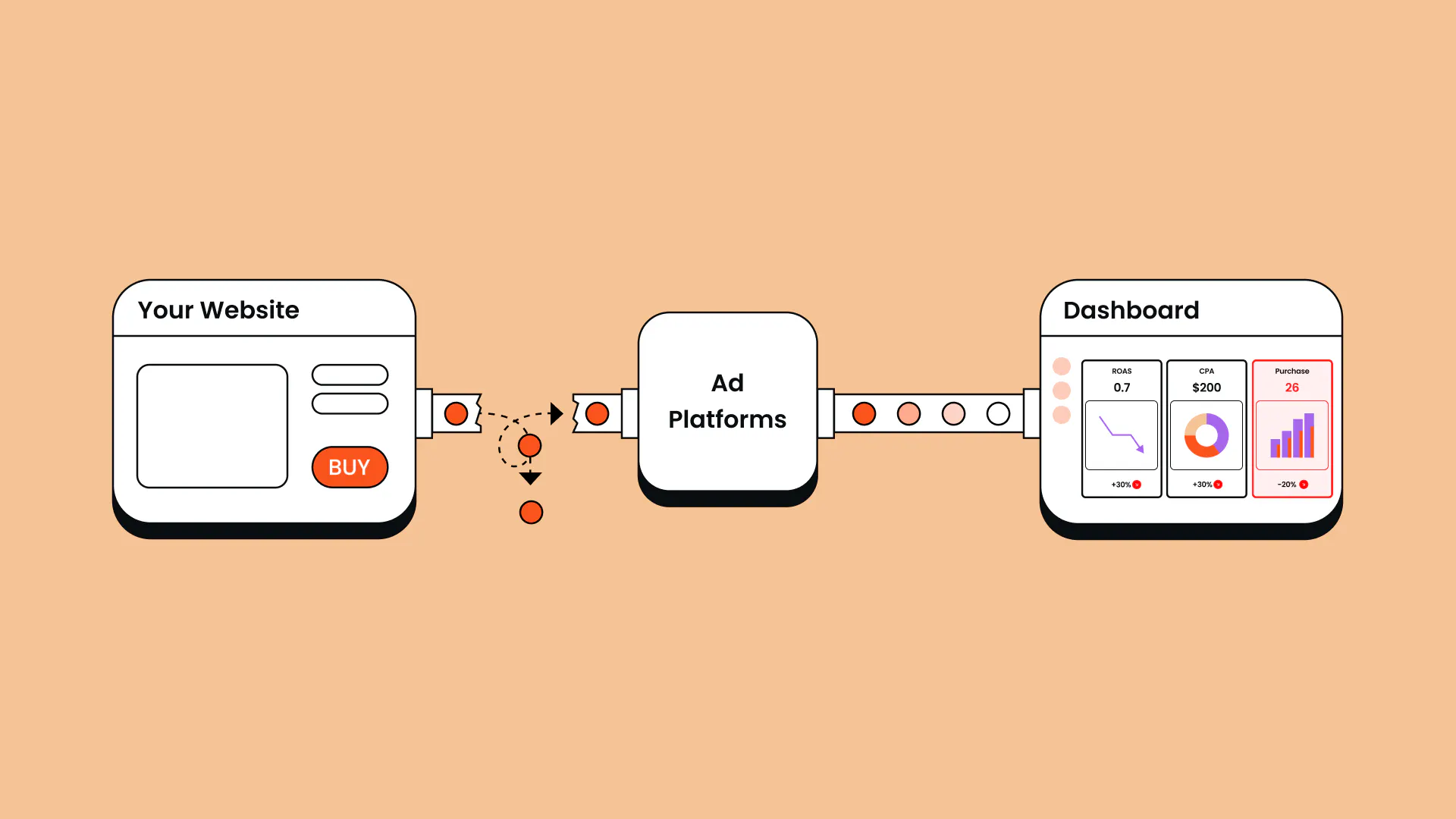
Something’s off with your numbers, but you can’t quite put a finger on it. Your dashboards show a worse return on ad spend (ROAS) than you know is actually happening. Conversions that clearly took place aren’t showing up in your ad account.
If any of this sounds familiar, your browser-based tracking setup is probably missing events due to ad blockers, iOS restrictions, and cookie consent. These gaps in your data mean you end up wasting your ad spend on incomplete signals and the wrong audiences. And with shrinking marketing budgets, that’s just not sustainable. So what’s the fix?
In this guide, we’re diving into what server-side tagging is, why it matters for your ad performance, and when you might need something more.
What is server-side tagging?
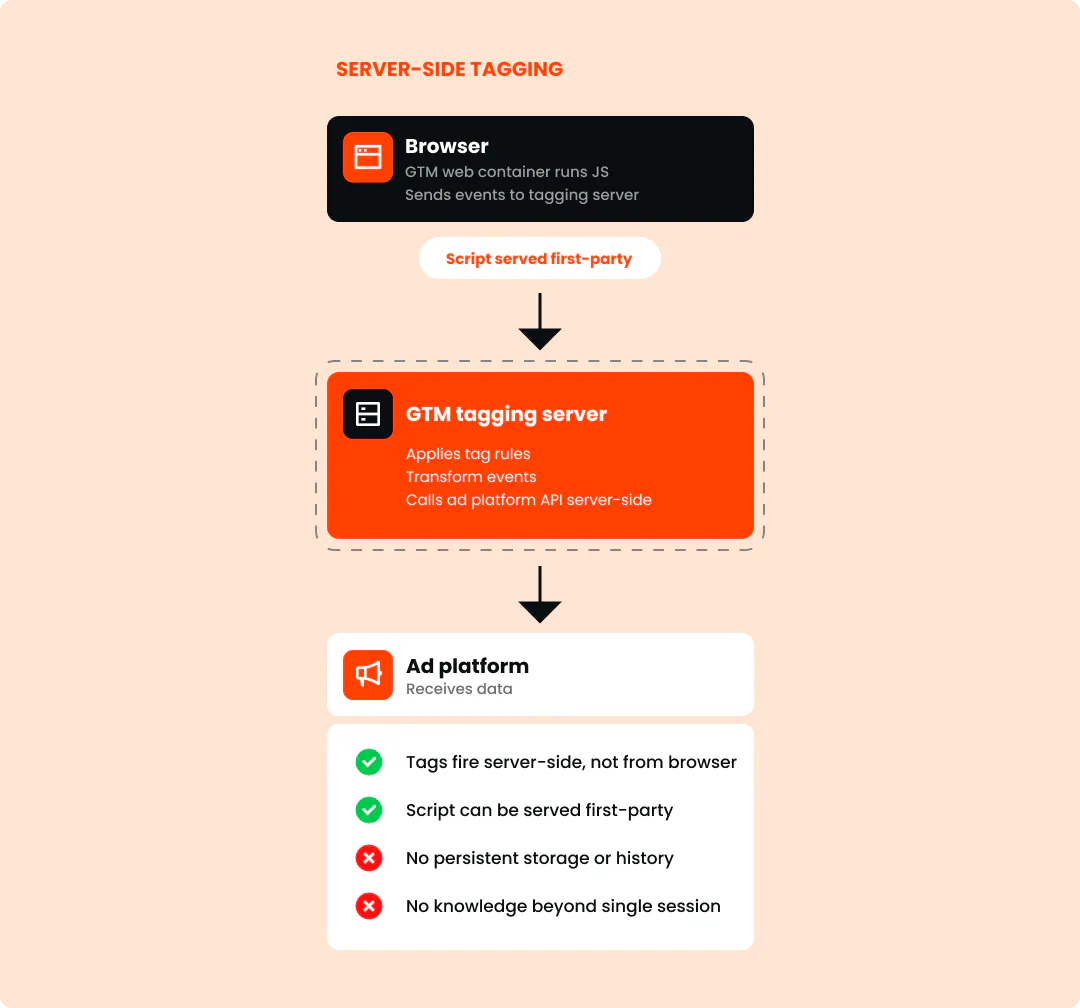
Server-side tagging is a method for improving the amount and quality of data that can be sent to advertising platforms compared to relying purely on client-side tracking in the browser. Instead of every tag sending data straight to those platforms, the event data flows through your server first. The browser still detects the event and collects the data, but your server interprets it and communicates with external platforms.
It can also give you more control over how that data is handled, which is especially important in regulated industries or in the EU where GDPR compliance needs to be considered.
“Ultimately, the business outcome is quite simple: better data helps you use your advertising budget more efficiently, lower customer acquisition costs, and get more customers at a lower price.” - Anni Salo, CEO at Tracklution
Why client-side tagging is losing ground
Client-side tagging has been the default for years. It's free and easy to set up, but it's simply not reliable anymore. Third-party cookies are being phased out by browsers like Chrome and Safari. Ad blockers now affect nearly 30% of internet users globally, blocking tracking scripts before they ever fire. Privacy features like Apple's Intelligent Tracking Prevention and the App Tracking Transparency (ATT) framework make data collection more complicated.
Plus, customer journeys now span websites, apps, physical stores, LLMs, and CRM systems, which is far more than a single browser script was ever built to follow.
And the digital marketing analytics landscape is only getting more complicated from here. Anni Salo, CEO at Tracklution, explains: “Regulation is getting tighter, consumers are becoming more tech-savvy and aware of ad blockers, and customer journeys are getting messier. People are switching between devices, doing part of their research with AI tools, and in some cases an agent is doing part or all of the journey for them. Having a proper way to track all of it is even more important in the future than it is today.”
How server-side tagging improves your data
Server-side tagging isn’t just about improving tracking for reporting purposes. In reality, thanks to AI-driven ad platform algorithms, it actively improves advertising performance. But most marketers don’t see it that way. When performance results dip, it’s easier to blame the usual suspects like creatives, audiences, or budgets, than to check whether the underlying data is actually the problem.
Let’s dig into the practical benefits of getting started with server-side tagging (and the wider benefits of server-side tracking):
More complete conversion data
Server-side tagging bypasses the limitations of client-side tagging that we touched on earlier. In a nutshell, they give your ad platforms the healthy fuel they need to give you the best results (remember: garbage in, garbage out). This matters more and more each year, since digital advertising is increasingly driven by algorithms: Meta, Google, and other platforms are reducing the manual controls marketers used to rely on.
“If you're feeding algorithms bad data, messy data, or no data at all, how can you expect good results?” says Anni. “The better data we are able to deliver to those algorithms, the better they can optimize advertising and the better performance we can get from our budget.”
Longer cookie life
Safari's Intelligent Tracking Prevention caps JavaScript-set cookies at 7 days. So if someone visits your site via an ad, then comes back to buy two weeks later, Safari's already erased the connection. As far as the algorithm’s concerned, that visitor is brand new, which doesn’t help your remarketing pool one bit. But when you route that same cookie through a server you control instead of a browser script, you extend that cap and keep users in your audience for longer.
It’s worth clarifying here that while the cookie’s lifetime is extended, there’s no built-in cross-session history with server-side tagging. Only a full server-side tracking pipeline lets your server remember context across sessions. But more on that later.
Better attribution
When conversion tracking gaps cause you to miss events, your attribution reports become unreliable, leaving you guessing at which campaigns actually drove results. And algorithms end up optimizing on incomplete information, making it harder to scale your marketing efforts. If you’re not accurately telling platforms like Google Ads whether Creative A or B is leading to the outcomes you care about, the algorithm can’t make good optimization decisions.
Server-side tagging helps close that gap by sending accurate conversion data straight to your ad platforms. So even in a post-cookie era, your campaigns can optimize on real outcomes and you can trust the numbers you’re seeing.
Faster pages
Every client-side tag is one more piece of JavaScript that your user’s browser has to load and run. Over time, this can really slow your page down and cost you conversions. Google's own research found that most mobile visits get abandoned once a page passes three seconds to load.
How does server-side tagging solve this? Simply put: it uses fewer scripts, which saves bandwidth and translates to faster load times and a much smoother user experience.
What server-side tagging doesn't solve on its own
Server-side tagging by itself is basically about moving tags from the browser to a server. It changes the pipeline through which the data is sent, but it doesn’t give you an intelligent tracking engine on its own.
Server-side tagging is stateless, meaning the server only knows what the browser sends in single requests, and nothing more. It processes one event at a time, with no memory of the visitor's last session, and no way to enrich that event with anything from outside. There’s also no deduplication, which prevents double-counting events.
To get more intelligence around the data itself, you need server-side tracking. Our server-side tracking vs server-side tagging vs platform gateways article breaks down the differences. But in a nutshell: it’s the full data pipeline that gives you a data processing engine on your server, not just the tooling layer.
Anni sums it up: “The objective of server-side tracking is not simply to send data from a server, but to make sure the data sent to advertising algorithms is as accurate and complete as possible and contains the data points that actually matter, so you get the best possible performance for your paid ads.”
Keep in mind that moving a poor tracking set-up server-side won’t fix everything, either. If the underlying tracking foundation is bad, simply sending the same data from a server doesn’t make the data good. But it does make these problems more visible: you’ll see what data is being received and sent, which makes broken signals far easier to spot and fix (but you still have to make those fixes).
Get up to 100% accurate data with server side tracking
Tracklution enriches, deduplicates, and connects your conversion data across sessions, sources, and platforms, all without you managing the infrastructure.
How to set up server-side tagging
There are three main paths to choose from:
sGTM self-hosted
The most common route is server-side Google Tag Manager (sGTM): a dedicated server container for your tags that you run yourself, usually on Google Cloud Platform or AWS. You get full control and full ownership on trigger setup, tag configuration, variable lookups, and deduplication logic.

“My biggest learning is don’t overcomplicate it. If I had my time again, I would have stopped that first process much more quickly and just said, whoa, this is way too complicated for what we need. Goodbye.”
Read the full success storyJohn Cove,
Marketing Manager at ScotlandShop
But with that control comes great responsibility: sGTM isn’t a “set it and forget it” solution. You’ll need developer expertise to manage hosting, implementation, maintenance, API updates, debugging, and ongoing configuration.
Anni explains, “People think you just press a button and everything works. That's not the case. Even with a self-hosted GTM approach, it's days, weeks, or months, depending on setup complexity and your technical skills.”
Managed hosting providers
Tools like Stape and TAGGRS offer an easy way to host sGTM containers without having to set up your own infrastructure. By combining prebuilt templates, automated server creation, and an API, they help marketers and small agencies dip their toes into server-side tagging.
But these sGTM hosting tools don’t take everything off your plate. Your team will need technical expertise and working knowledge of GTM, and you might still end up needing to hire a developer or consultant.
"Where most of the frustration lies is in the complexity and maintenance overhead of running a server-side GTM setup, managing tags for multiple platforms, formatting, and deduplication. Most people don't like the debugging and upkeep of all that.” - Lucas Nilsson, Product Specialist at Tracklution
Full server-side tracking platforms
With server-side tracking platforms like Tracklution, you get the full tracking engine without needing to build and maintain anything itself. You can combine data from different sources and systems, fetch the original click ID when a customer journey is split across multiple sessions, handle deduplication, and make sure the data is formatted and sent correctly.
Lucas Nilsson shares the mindset shift that many marketers experience: “The more you know about server-side tracking with GTM, the more you appreciate a managed platform. Realizing you use one format for all your platforms, or that you don't have to deal with deduplication yourself, that's usually the big moment.”
By the way, we rounded up the best server-side tracking tools for accurate conversion data in another article.
Case study
How Framery closed their lead attribution gap
42%
more conversions attributed within two weeks
<30 min
min setup time, despite expecting a long, costly build
48 hours
turnaround on custom feature requests
Framery, a global manufacturer of workplace solutions, ran a solid marketing data stack (BigQuery, Supermetrics, Looker Studio) feeding into Salesforce, but most of their leads showed no clear source at all. Marketing Data Lead Pierre-Antoine Colonna had heard of server-side tracking, but assumed it would involve a long, expensive build, until Tracklution proved otherwise. After being able to attribute leads that otherwise would remain unknown, Colonna says he now trusts Tracklution's attribution more than Google Analytics.
"It's happened at least twice that I asked for a feature and 48 hours later it was live, and that's really great."

Pierre-Antoine Colonna
Marketing Data Lead at Framery
Is server-side tagging worth it?
The answer depends on how important paid advertising is to your business and how complex the customer journey is.
If…
- You already use Google Tag Manager
- You have a very small advertising budget
- The entire conversion or purchasing journey only happens online
- You have developers available to build and maintain the server infrastructure
- You need full control over your configuration, and you don't mind owning the ongoing maintenance
then server-side tagging by itself might be worth it.
But if…
- Digital advertising is strategically important to your business
- You advertise across multiple channels
- The customer journey and data are spread across multiple sessions or systems
- You don't have dedicated technical resources (nor want to invest in them)
- You need tracking to stay reliable without having to watch over it 24/7
then tagging alone might not be enough, and you might be better off with a more complete server-side tracking solution. Once you need to connect data across different sources, preserve identifiers across customer journeys, deduplicate events, and make sure advertising platforms receive accurate business outcomes rather than just basic website events, you’re moving beyond server-side tagging alone and need the full tracking pipeline.
As a rough guide, Anni recommends: “I would start looking at server-side tracking quite seriously when paid advertising spend reaches around €5,000 a month, but the tipping point can already be around €2,000 a month, particularly if the objective is to scale.”

"Before Tracklution, we basically judged success by whether the calendar was full. Now we know exactly which campaigns drive real appointments — and we’ve cut acquisition costs by more than 30% while keeping bookings steady.”
Read the full case studyJesse Bartels,
Chief Smile Officer at Orthoclear
The bottom line
Good tracking isn’t just about seeing numbers in a dashboard: it has a direct connection to advertising efficiency, customer acquisition cost, and your ability to compete and scale.
Client-side tagging is losing ground for good reason. Ad blockers, shrinking cookie life, and privacy rules are stripping conversions before they ever reach your ad platforms. While server-side tagging gives you more control over your data, it still doesn’t give you the full tracking pipeline.
The good news is that with a server-side tracking tool like Tracklution, it’s much simpler than you’d expect to get a proper set-up.
Full server-side tracking without the heavy lifting
Tracklution gives you the full data pipeline live in 16 minutes, no developer resources needed. Start your free trial and see what your ad platforms have been missing.
Full server-side tracking without the heavy lifting
Tracklution gives you the full data pipeline live in 16 minutes, no developer resources needed. Start your free trial and see what your ad platforms have been missing.
Related posts
Server-Side Tracking
Server-side tracking and GDPR: what you need to know
Server-side tracking won't make you GDPR compliant on its own, but it gives you the control to get there. Here's a setup your legal team can sign off on
Server-Side Tracking
Server-side tracking and GDPR: what you need to know
Server-side tracking won't make you GDPR compliant on its own, but it gives you the control to get there. Here's a setup your legal team can sign off on
Server-Side Tracking
Server-side tracking vs server-side tagging vs platform gateways: What they are and which to choose
Server-side tracking, tagging, and gateways are not the same thing. Learn what each approach does, how they compare, and which is right for your setup.
Server-Side Tracking
Server-side tracking vs server-side tagging vs platform gateways: What they are and which to choose
Server-side tracking, tagging, and gateways are not the same thing. Learn what each approach does, how they compare, and which is right for your setup.

Server-Side Tracking
Google Ads server-side tracking explained: Setup & best practices for marketers
Google Ads server-side tracking gives you cleaner data, stronger attribution, and smarter bidding. Learn how to set it up and why managed tracking saves time.
Server-Side Tracking
Google Ads server-side tracking explained: Setup & best practices for marketers
Google Ads server-side tracking gives you cleaner data, stronger attribution, and smarter bidding. Learn how to set it up and why managed tracking saves time.
Questions and answers
1. Does server-side tagging replace my tracking pixel?
Not exactly. The browser still captures the event and sends it to your server container. What changes is what happens next: instead of a pixel firing straight to Meta or Google, the tags fire from your server container and take over delivery from there.
2. Is server-side tagging the same as server-side tracking?
No, though the terms do sometimes get used interchangeably. Server-side tagging is the tooling layer that moves tag execution to a server. Server-side tracking is the broader discipline, including storage, deduplication, enrichment, and forwarding to multiple platforms.
3. How much does server-side tagging cost?
sGTM itself is free, but the infrastructure around it isn't. Hosting typically starts around $20/ month on lower-volume tiers and scales with event volume. The real cost is developer time: a proper self-hosted setup commonly runs into the low tens of thousands once you account for configuration, testing, and the weeks or months it takes to get right, plus ongoing maintenance every time a platform changes its API.
4. Does server-side tagging make me GDPR compliant?
No, not on its own. It gives you more control over what data gets sent and when, which supports compliance, but you still need a lawful basis for processing personal data and a working consent mechanism.
Can server-side tagging fix my attribution problems?
It can help, but it can’t magically fix everything. Server-side tagging can validate and format events, but it can't add deduplication, cross-session memory, or offline conversion matching. Even the full server-side tracking setup is not a silver bullet: it can amplify good tracking, but it doesn’t replace a good tracking foundation. The good news is that server-side tracking makes these problems easier to spot because you can see exactly what data is being received and sent.

Have further questions?
Already convinced? Get 100% accurate data with server side tracking
Already convinced? Get 100% accurate data with server side tracking




