Up to 100% accurate
Google Ads
Set up and running in 16 minutes.
14-day trial • No credit card required • SOC2 & ISO20771 compliant
Recover +34.2% conversions (avg. uplift) that ad blockers and cookie restrictions hide from Google Ads
Fine-tune Smart Bidding with complete data from GCLID matching + Enhanced Conversions
16-minute no-code setup with the Google Ads connector. No credit card needed.








Advertisers using Tracklution track 34.2% more conversions on Google Ads
Ad blockers, iOS restrictions, and cookie deprecation cut Google tag accuracy to as low as 40%. Tracklution sends complete, deduplicated conversion data to Google Ads through their API, with GCLID (Google Click Identifier) matching and Enhanced Conversions built in.
Tracklution server-side tracking
Up to 100% data accuracy
Sends conversions via Google Ads API with GCLID matching
First-party data collection bypasses ad blockers, iOS and cookie restrictions
Enhanced Conversions built in. Hashes and sends ContactInfo automatically
Full Consent Mode v2 support, no additional setup
Faster site. Tracking handled server-side, not in the browser
Real conversion data, no modeled estimates
GDPR compliant (EU-built, SOC2, ISO 27001)
Google tag (browser-side)
As low as 40% data accuracy
Relies on browser-side Google tag and cookies
Blocked by iOS restrictions, ad blockers, and third-party cookie deprecation
Enhanced Conversions require manual tag configuration and data layer setup
Consent Mode v2 requires additional implementation
Client-side scripts slow page load and hurt UX
Conversion modeling fills gaps with estimated data
GDPR compliance depends on implementation
Fill your conversion gap in 16 minutes
Connect Tracklution to Google Ads, recover the conversions you're missing, and give Smart Bidding the complete data it needs to learn and bring you higher-quality conversions.
Fill your conversion gap in 16 minutes
Connect Tracklution to Google Ads, recover the conversions you're missing, and give Smart Bidding the complete data it needs to learn and bring you higher-quality conversions.
Google Ads Integrations
Tracklution seamlessly connects the platforms in your tech stack, making it easy to collect, process, and activate your event data across every integration.












Didn't find the platform you were looking for?
Send events from CRMs, booking systems, and other tools to Tracklution using webhooks.
Tracklution supports a wide variety of integrations, including custom connectors. Explore the full range of integrations below to find a solution that works for you.
Still unsure if this works for you?
Capture and send accurate Google Ads conversion data in minutes
Works across any website. No code. No maintenance.
Works with any CMS and ecommerce platform
Track every single purchase, lead, and offline conversion from CRMs or booking systems. Tracklution sends all events to the Google Ads API without custom dev work.
Pre-built Google Ads connector
Connect your Google Ads account in a few clicks. Tracklution creates two conversion lists (GCLID-based and Enhanced Conversions), handles deduplication, and keeps the API integration current automatically.
First-party data collection via your own domain
Add a DNS record and Tracklution loads under your domain. Bypass ad blockers, iOS restrictions, and cookie limits. Feed Smart Bidding accurate, first-party conversion signals.
Fully managed, no server to run
See events land in real time and what was sent where. And when Google updates their Ads API, we update the integration. No infrastructure, code changes or downtime to worry about.
How to implement accurate conversion tracking for Google Ads in 16 minutes
Three steps. No code. No developer needed. Your Google Ads campaigns will be optimizing on complete data before your coffee gets cold.
Step 01
Enable first-party data
Add a DNS record so Tracklution loads under your own domain. This switches tracking to first-party, bypassing iOS restrictions, ad blockers, and cookie limitations. Most Tracklution users observe reporting accuracy jump from 40-70% to up to 100%.
Step 02
Install your Tracklution pixel
Add the pixel to your website, just as you would any other tracking pixel. Use the Shopify app, WooCommerce plugin, or Google Tag Manager template. Standard events (Purchase, Lead, Add to Cart, etc.) are tracked automatically with Shopify and WooCommerce. With GTM, you add each event as a tag. You can also send conversions from CRMs, booking systems, or other platforms via webhook.
Step 03
Connect your Google Ads account
Click "Add" on the Google Ads Connector card in your Tracklution dashboard. Enter your Customer ID, grant access, and create your conversion lists. Google activates the lists within 6 hours, then events flow automatically. No server setup, no code.
Step 04
And you're all set
Your Google Ads campaigns now optimize on complete, GCLID-matched conversion data. No more guesswork. No more gaps in your reports.
All done!
Your Meta campaigns now optimize on complete, deduplicated conversion data.
Under the hood:
How Tracklution makes Google Ads server-side tracking possible
Complete conversion data means your Smart Bidding algorithms learn faster and, therefore, spend your ad budget more efficiently. Tracklution captures every conversion event server-side and delivers it to Google Ads through their API, matched against the GCLID for click attribution. If a GCLID isn't available, Enhanced Conversions sends hashed customer data (email, phone) so Google can still attribute the action.
This server-to-server approach means your conversion tracking isn't affected by ad blockers, iOS restrictions, or third-party cookie deprecation. Tracklution automatically supports Consent Mode v2 and detects whether each converter is a new or returning customer, sending that signal to Google Ads for smarter bidding optimization.
Tracklution creates two conversion lists in your Google Ads account: one for GCLID-based conversions (~90-95% of volume) and one for Enhanced Conversions where the click ID isn't available (~5-10%). Both should be set as Primary. Deduplication, data hashing, and API version updates are all handled automatically. You can link multiple Google Ads accounts to a single Tracklution container if you manage several accounts for the same website.
Check out our full Google Ads server-side tracking guide for more info.
Using Tracklution vs. Doing it yourself
See how Tracklution compares to doing it yourself with the Meta Pixel alone or building a full server-side GTM setup on Google Cloud.
 Primary setup | Google tag Browser-side | Server-side GTM Google Cloud | |
|---|---|---|---|
Accuracy | Up to 100% | 40 – 70% | Up to 100% |
Installation time | 16 minutes | 5–30 minutes | Hundreds of hours |
Bypassing Tracking Limitations | |||
Automatic API updates | |||
Server-side tracking without managing your own server | |||
Data Layer Setup | Automatic | ||
Shopify App | |||
Cost | Free plan available (5k events/mo). Grow plan from €39/mo. | - | Starts at €120/m + working hours |
Primary setup | Google tag Browser-side | Server-side GTM Google Cloud | |
|---|---|---|---|
Accuracy | Up to 100% | 40 – 70% | Up to 100% |
Installation time | 16 minutes | 5–30 minutes | Hundreds of hours |
Bypassing Tracking Limitations | |||
Automatic API updates | |||
Server-side tracking without managing your own server | |||
Data Layer Setup | Automatic | ||
Shopify App | |||
Cost | Free plan available (5k events/mo). Grow plan from €39/mo. | - | Starts at €120/m + working hours |
Still unsure? See what's broken in your tracking setup
Run a free audit and scan your current setup to see exactly where you're losing conversion data, and receive recommendations to fix it immediately.
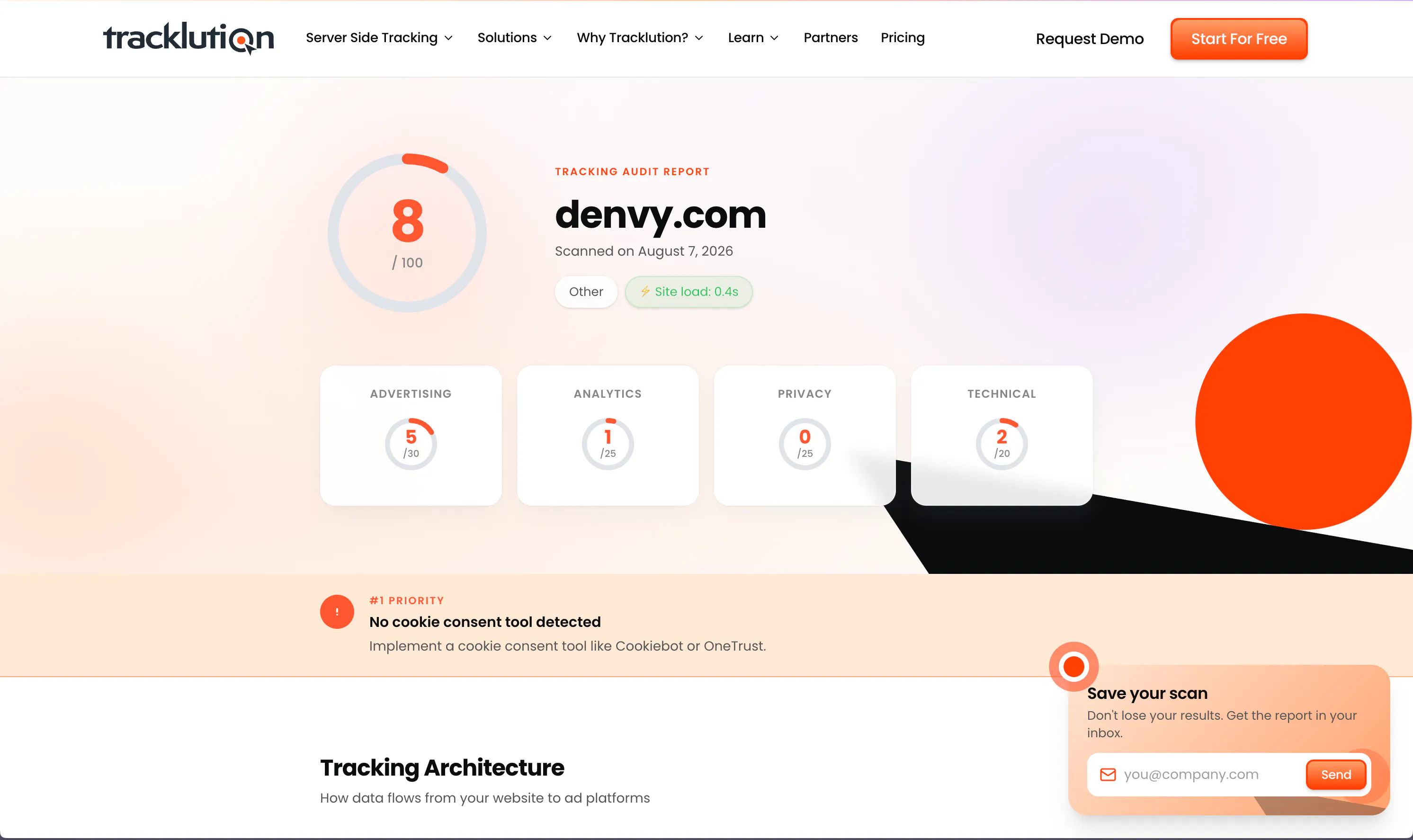
Still unsure? See what's broken in your tracking setup
Run a free audit and scan your current setup to see exactly where you're losing conversion data, and receive recommendations to fix it immediately.
What you can track through Tracklution for Google Ads
Tracklution sends your conversion data to Google Ads through their API with automatic GCLID matching. Standard events are tracked automatically with Shopify and WooCommerce. Every event includes hashed customer parameters for Enhanced Conversions.
Purchases
Transactions with value, currency, and product data. Matched to the GCLID for click attribution. Automatically tracked with Shopify and WooCommerce.
Leads
Form submissions, demo requests, and contact completions. Captured server-side for reliable attribution in your Google Ads campaigns.
Add to Cart / Checkout
Full-funnel shopping behavior from Add to Cart through Initiate Checkout and Add Payment Info. Gives Smart Bidding more signals to optimize on.
Registrations / Subscriptions
Sign-ups, trial starts, and subscription events. Track the full onboarding journey and feed it back to Google Ads.
View Content
Page and product views for building remarketing audiences. Tracked on every pageview.
Custom events
Any conversion action specific to your business. Name it, track it, send it to Google Ads through their API.
Offline conversions
CRM, booking system, or POS data sent via webhook. Connect offline sales to your Google Ads campaigns.
Enhanced Conversions
Email, phone, name, and other identifiers hashed and sent with every event. Enables attribution even when GCLID isn't available.
Trusted by Google Ads advertisers worldwide
See how teams like yours recover lost conversions, lower CAC, and get their Google Ads campaigns optimizing on complete data.


We made Tracklution a standard part of our service agreement and technology stack for clients. It’s like a quality guarantee for conversion data. And setting it up doesn’t take more than a few minutes.
Sampo Soininen, Digital Strategist @ Aava & Bang


Now we know exactly which campaigns drive real appointments – and we’ve cut acquisition costs by more than 30% while keeping bookings steady.
Jesse Bartels, Chief Smile Officer @ Orthoclear


Almost every client we have onboarded to Tracklution has seen a growth in conversions. For reference, the media spend for these companies starts at just €500 a month.
Mikael Lahtinen, Head of Advertising @ Tagomo


The system runs so smoothly that contact with Tracklution is minimal. Support response time is excellent. Overall very positive experience with minimal issues.
Jacob Blæsbjerg, Founder @ The Morning Show


While others are still debating whether to modernise, we’ve already built the foundation for the next decade of advertising
Shaan Raja, Teamlead SEO & Integration Analyst @ The Platform Group
Why use server-side tracking for Google Ads?

Smart Bidding needs complete data
Without complete data, Smart Bidding algorithms spend your ad budget making guesses. Tracklution sends every conversion to Google Ads server-to-server with GCLID matching, so your bidding algorithms learn from real and valuable conversions.

Optimize every dollar you spend
Complete conversion data means faster learning, better ROAS, and lower CAC. Tracklution users see a 34.2% average uplift in tracked conversions vs. browser-side tracking alone.

Enhanced Conversions without the setup overhead
Manual Enhanced Conversions means configuring data layers, hashing scripts, and maintaining tags. Tracklution captures first-party identifiers (email, phone) and hashes them automatically with every event, giving Google the match data it needs.
Privacy and security you can rely on
Tracklution is fully GDPR-compliant and certified under both ISO27001 and SOC2. Your data remains 100% yours — we never claim any rights to it. You have full control over what is tracked and what is sent to ad platforms. We’re simply your secure, privacy-first system provider.

SOC2, TYPE 2
Secure SSL Transactions

ISO 27001

GDPR Compliant
Questions and answers
How does Tracklution work with Google Ads Enhanced Conversions?
Tracklution captures first-party data (email, phone, name) through its ContactInfo tag, hashes it automatically, and sends it with every conversion to Google Ads. This enables Enhanced Conversions for attributing view-through and engagement-based actions even when a GCLID isn't available. You still need to enable Enhanced Conversions in your Google Ads settings. Tracklution handles everything else.
What are the two conversion lists Tracklution creates in Google Ads?
Tracklution creates two lists per conversion action: "Tracklution Conversions" for click-based events with a valid GCLID (~90-95% of volume), and "Tracklution Conversion Booster" for Enhanced Conversions when no GCLID is available (~5-10%). Both should be set as Primary. There's no double-counting. A conversion only goes to the Booster list if the GCLID-based delivery fails.
Do I still need the Google tag?
You can run both. Tracklution sends conversion data through the Google Ads API while the Google tag covers browser-side events. If you see "Tag is missing user provided data" or "Tag is not firing" warnings in Google Ads, that's expected. Conversions are being delivered server-side through Tracklution, so the browser tag doesn't fire for those events.
Does Tracklution support Consent Mode v2?
Yes, fully. Tracklution automatically adapts to each user's cookie consent status. This meets the EEA requirement for Consent Mode v2 without additional implementation on your end.
How does Tracklution handle GCLID matching?
When a conversion happens, Tracklution matches the event to the GCLID captured during the original click. If a GCLID isn't available (e.g., the user cleared cookies), the conversion is sent with hashed customer data through Enhanced Conversions instead. No conversions slip through the cracks.
How does Tracklution differ from other conversion tracking methods?
Tracklution collects accurate conversion data server-side and sends it to multiple ad platforms through their APIs. Unlike browser-side tracking, it isn't affected by iOS restrictions, ad blockers, or cookie limitations. Users typically see conversion reporting go from 40-70% coverage to up to 100%. It connects to Google Ads, Meta, TikTok, LinkedIn, GA4, and more without writing code.
What is the uplift in conversion tracking?
Based on data from Tracklution users, server-side tracking improves conversion visibility by 11-48% compared to pixel-only, cookie-based tracking. The average uplift is 34.2%. Results vary depending on how much traffic your website gets from iOS devices, how prevalent ad blockers are in your audience, and your current setup.
How much does this cost?
Enjoy the first 14 days on us, no credit card required, and you can cancel anytime. After the trial period, you can explore our pricing options here.
Are you GDPR compliant?
Yes. Tracklution is designed and built in the EU, thus GDPR compliance is in our very DNA. Data and servers are located in the EU area.
I'm sold! Is there a free trial to get started?
Absolutely! You can try out Tracklution for 14 days, no strings attached. No credit card is required to get started, and you can cancel any time.

Have further questions?
Get even more from your Google Ads campaigns
Track your real conversions with first-party data. Give Smart Bidding the complete picture.
Get even more from your Google Ads campaigns
Track your real conversions with first-party data. Give Smart Bidding the complete picture.




