Google Ads server-side tracking explained: Setup & best practices for marketers
Google Ads server-side tracking gives you cleaner data, stronger attribution, and smarter bidding. Learn how to set it up and why managed tracking saves time.

Table of contents
Better data.
Set up server-side tracking in minutes with Tracklution. Send better conversion data to your ad platforms so their algorithms can optimise for better results from your budget.
Start your free trialGoogle Ads performance comes down to creative, bidding strategies, and data. The first two usually get all the attention, but it’s the data that decides whether your campaigns perform. And right now, that data is compromised.
Browser restrictions, privacy frameworks, and tracking prevention strip out conversions before Google (and you) ever see them. Your ads could be the best you've ever run, but if the tracking underneath is producing poor-quality data, the results won't show up.
As Lucas Nilsson, Product Specialist at Tracklution, puts it: "Maximising conversion signals doesn't just mean more conversions on a report. More than anything, it means accuracy. If a conversion is accurately reported, accurately attributed to the campaign responsible, and tied to real business value — that's what drives successful advertising."
Whether you manage Google Ads campaigns in-house or across multiple brands, this guide shows how server-side tracking works, how to set it up, and which path fits your team best.
In this guide, you’ll learn:
- Why server-side tracking matters
- How it works
- Setup options (DIY sGTM vs. managed service)
- Best practices and things to avoid
- Which approach is best for you?
- FAQ
Why server-side tracking matters for Google Ads
Smart Bidding now handles the majority of bid decisions across Google Ads accounts. The better the conversion data you feed it, the better it performs.
Client-side tracking used to be enough. Today, by the time your conversion data reaches Google, browser restrictions, consent frameworks, and ad blockers have each taken their cut. GWI data puts global ad blocker usage alone at 1.77 billion people, and that's before accounting for consent dropoff and cookie restrictions on top of it.
Privacy concerns are also a driving factor. 42.4% of ad blocker users say they use one to protect their privacy. And as those concerns grow, so does regulatory pressure to match them.
"It's not usually just one thing — but the consent decline rate combined with ad blocker usage, plus some tracking tags that are misconfigured, plus tags that don't always load because there are so many that the page is slow. You lose a small percentage here and there, and all of a sudden you're losing half your data."
Server-side tracking fixes that by routing conversion data through a server environment — your own infrastructure or a managed solution like Tracklution— before it reaches Google Ads. Benchmarks from Tracklution users show conversion recovery rates of around 34% on average.
Tonefest Guitar Gallery, one of Northern Europe's largest vintage guitar retailers, was consistently below the data threshold Smart Bidding needed to learn effectively, until he set up server-side tracking with Tracklution.
'It's the only way to act bigger than you are,' says founder Petri Matero. 'Giants throw money at ads — we have to be smarter.'
Switching to server-side tracking pushed them past that threshold. ROAS doubled in two months, online sales grew 36%, and 45% more conversions were recovered and fed back to ad platforms.
How Google Ads server-side tracking works
Instead of firing conversion tags in the user's browser, events are sent to a server endpoint you control. Often this happens through a server-side Google Tag Manager (sGTM) container — though with managed solutions like Tracklution, the infrastructure is handled for you entirely. Either way, the data is cleaned, validated, and forwarded to Google Ads before anything reaches the platform.
Client-side vs Server-side
Client-side tracking relies on the browser to deliver the conversion signal — which is precisely where ad blockers, cookie restrictions, and consent dropoff do their damage. Server-side tracking adds a controlled layer between the browser and Google Ads, where data can be cleaned and validated before it reaches the platform.
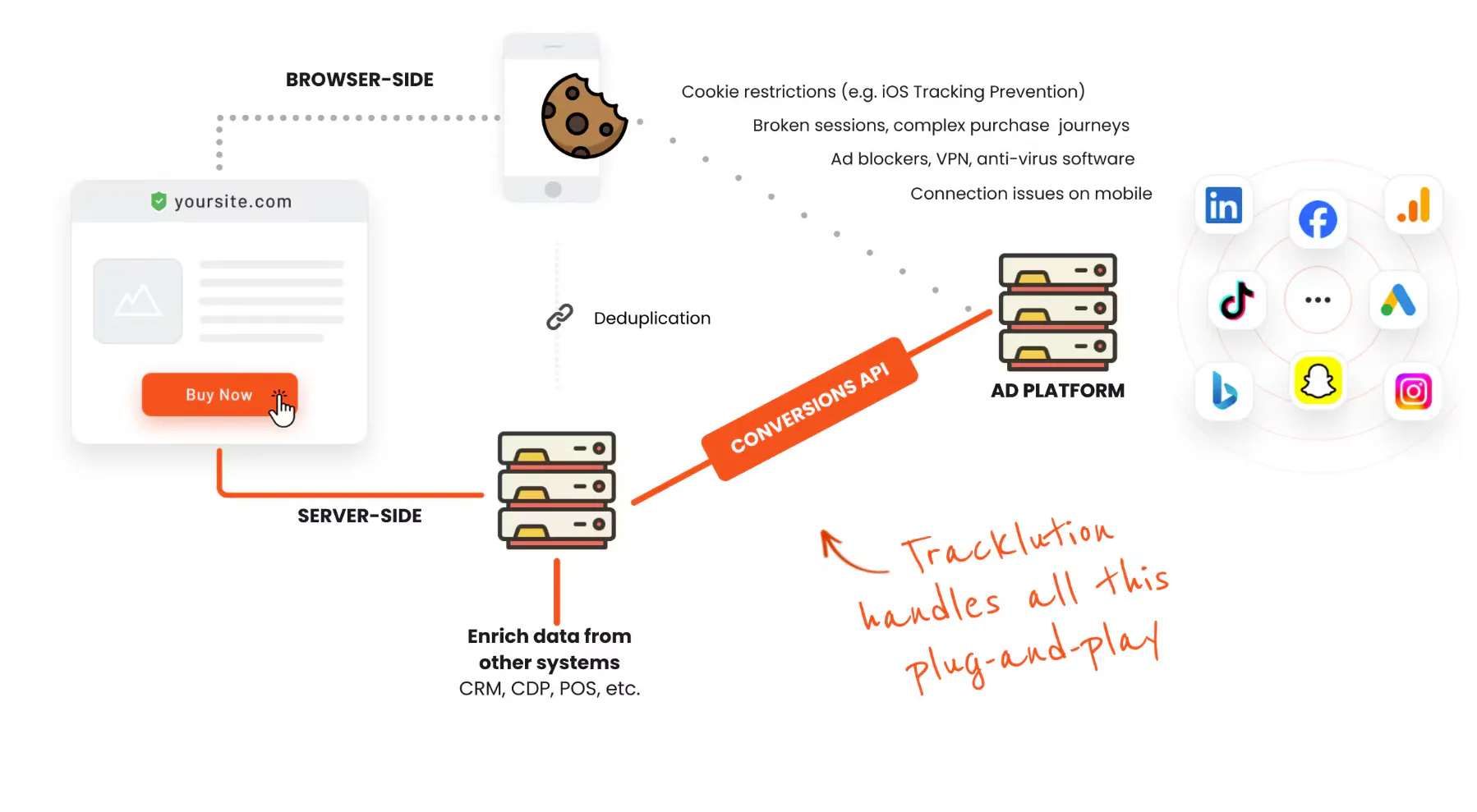
"Server-side tracking isn't a magic replacement. You still collect most events from a browser, and you still use pixels. Server-side is a powerful tool that enriches and supports your conversion tracking."
— Lucas Nilsson, Product Specialist at Tracklution
Key components in a server-side setup
A Google Ads server-side setup typically has four components, though the exact infrastructure depends on which approach you choose:
- Server environment: Where your data is processed — either a self-managed sGTM container (hosted on Google Cloud, Cloudflare, or AWS) or a managed solution like Tracklution
- First-party data collection: A tag or pixel on your site that sends events to your server environment instead of directly to ad platforms
- Ad platform connections: Server-to-server integrations that forward validated conversion data to Google Ads (and optionally Enhanced Conversions for improved match rates)
- Consent layer: Ensures data is only collected and sent when the user has given permission
How to set up Google Ads server-side tracking
There are two main ways to implement Google Ads server-side tracking:
- Manual setup with sGTM
- Managed solution like Tracklution
Both deliver the same outcome: clean, complete, privacy-compliant conversion data flowing to Google Ads. The difference is how long it takes and what it costs to get there.
A third option, building your own infrastructure from scratch, exists but is beyond the scope of this guide, as it's a significant engineering project that rarely makes sense outside of large enterprise data teams.
Manual setup with server-side Google Tag Manager (sGTM)
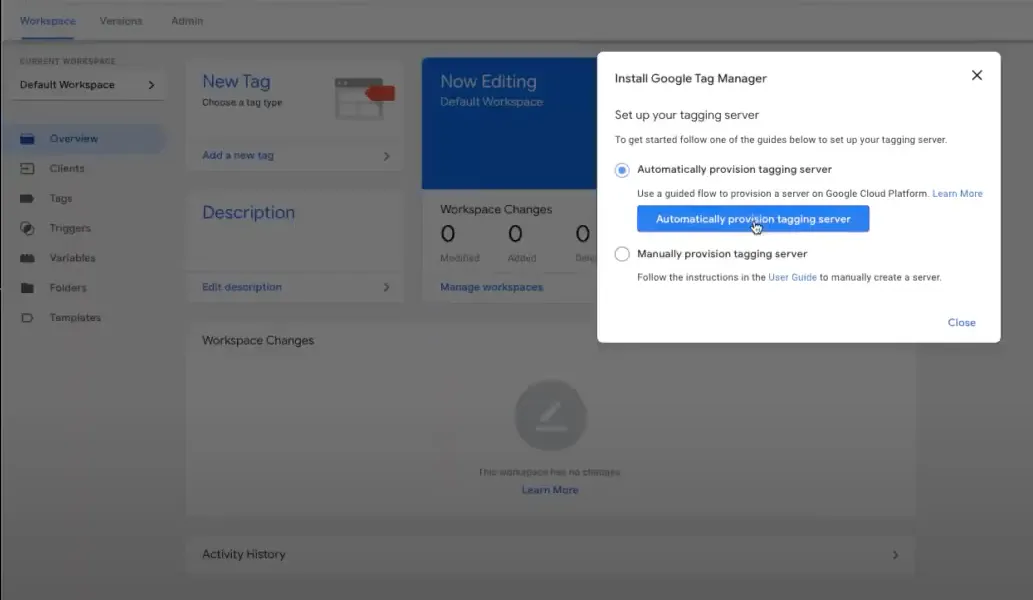
Ease of setup 2/5 (setup takes days to weeks, maintenance is ongoing)
How it works
With this setup, you deploy your own server container in Google Tag Manager. Your website or app sends conversion events to that container instead of firing Google Ads tags directly in the browser. Then, your server-side container cleans, enriches, and forwards the data to Google Ads through APIs or Enhanced Conversions.
Setup steps
- Create an sGTM container in Google Tag Manager
- Deploy the container on a server (typically Google Cloud, Cloudflare, or AWS)
- Configure your web container to send events to your new server endpoint
- Add Google Ads tags inside the server container to process conversions
- Enable Enhanced Conversions for additional match accuracy
- Test and validate with Tag Assistant or real-time reports
"Enhanced conversions in a server setup involve collecting user data and sharing it with Google Ads in a hashed format. This allows Google Ads to connect ads with users it can recognize, even without an ad click identifier. Where the server setup becomes really powerful is when the user journey spans more than one browser session. The user data in your server is connected to a visitor ID, meaning once collected it can be used across multiple sessions — giving Google Ads's attribution engine more chances to recognize and apply attribution accurately."
— Lucas Nilsson, Product Specialist at Tracklution
Pros
- Full ownership and control of your data flow
- Works across multiple platforms and data sources
- No dependency on third-party vendors
Cons
- Requires a developer for setup, configuration, and ongoing maintenance
- Hosting on Google Cloud, Cloudflare, or AWS typically runs $15–$150/month, on top of developer time
- Debugging attribution issues can take significant time without specialist knowledge
"The common misconception about server-side GTM is that people think it's something you just press a button and everything works. That's not the case. Depending on setup complexity and your technical skills, it's days, weeks, or months — and it still requires ongoing maintenance. It's not something you set and forget."
— Anni Salo, CEO at Tracklution
New to sGTM? Google's server-side tagging documentation covers the full setup process.
Managed server-side solution: Tracklution for Google Ads
Ease of setup: 5/5 (simple setup, no maintenance)
How it works
Tracklution works by installing a lightweight first-party pixel on your site, the same way you'd install any tracking pixel. That pixel sends conversion data to Tracklution's managed server environment, which cleans, validates,and forwards it to Google Ads via server-to-server API. The same setup extends to other platforms too, including Meta, GA4, and more.
Setup steps
- Connect your website or tag source, Tracklution supports common setups out of the box
- Authorize your Google Ads account to enable server-side conversion syncing
- Map your key conversion events (purchases, leads, signups, etc.)
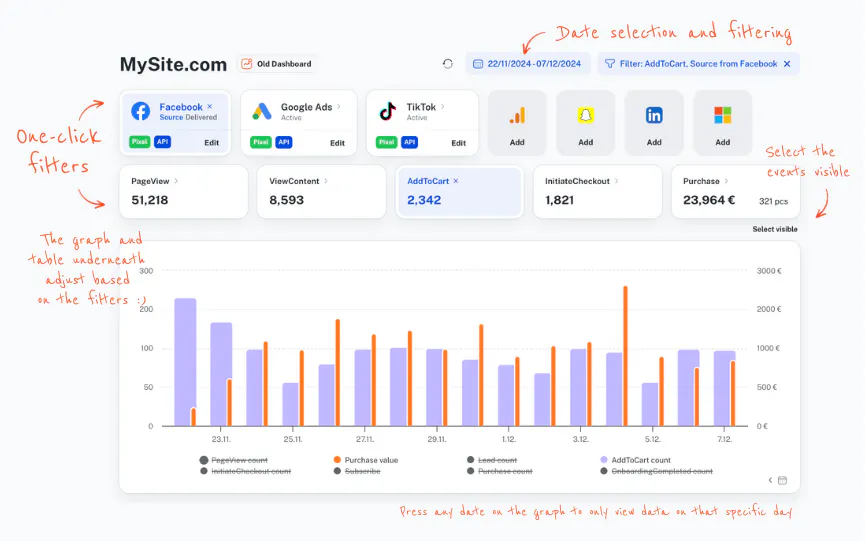
- Validate data flow with Tracklution’s real-time monitoring
Pros
- No servers, maintenance, or manual configuration needed
- Automatically compliant with consent and privacy frameworks
- Consistent, high-quality data across Google Ads
- Real-time event validation and performance insights
- Affordable and predictable subscription fee
Cons
- Slightly less granular customization (most users don’t need it)
Building and maintaining sGTM yourself means developer time, hosting costs, and ongoing debugging. Tracklution handles all of that for a subscription starting at around €39/month, with a 14-day free trial to see the results before you commit.
Get Started with Google Ads Server-side Tracking
Sign up for a free 14 day trial with Tracklution and start tracking more conversions today.
Pro tips to make your Google Ads server-side tracking work
Getting it right starts with the right setup and server-side tracking tools. If you're using Tracklution, most of what's listed below is handled automatically, but it's worth understanding why each point matters regardless of your setup.
Best practices
- Keep your consent logic consistent: Make sure user consent settings are mirrored between your website and your server environment. Mismatched consent signals can cause data loss or compliance issues.
- Validate every event before going live: Use test conversions and real-time debugging tools (like Tag Assistant) to confirm that each conversion fires exactly once.
- Use Enhanced Conversions with server-side data: This improves match rates and Smart Bidding accuracy by securely sending hashed user data.
- Monitor data flow continuously: Even small tag or template changes can affect tracking. Building monitoring into your routine catches issues before they affect campaign data — or use Tracklution's automated validation, which handles this for you.
- Think beyond Google Ads: Once your server-side setup is stable, extend the same data accuracy to Meta, LinkedIn, TikTok, Snapchat, GA4, Adform, or other platforms for unified measurement.
- Understand what each report is telling you: Google Ads reports campaign performance (click-date attribution), GA4 reports user behaviour and journeys (browser-based, consent-dependent), and Tracklution reports tracking performance (conversion-date, source-based). Cross-reporting can be configured to align more closely, but each platform is designed to answer a different question. Know which one you're asking.
Common mistakes to avoid
- Double-counting conversions: Don’t send the same conversion event from both the web container and the server container. Make server-side tracking your one source of truth.
- Skipping consent handling: Sending data without verified consent can cause compliance risks and inaccurate measurement under privacy laws.
- Outdated configurations: If you're managing tracking manually with sGTM, regular reviews are essential. Browser rules and ad APIs change frequently, and falling behind means compliance gaps and data loss. Tracklution users don't need to worry about this; the platform keeps everything up to date automatically.
- Expecting numbers to match across platforms: GA4, Google Ads, and your tracking tool each use different attribution models and report different things. GA4 uses browser-based attribution tied to its own session and user IDs. Google Ads reports based on when the ad was clicked. Tracklution reports conversions as they're delivered, using first or last click attribution. Comparing them at face value without accounting for these differences leads to confusion — not a tracking problem.
Tracking the wrong conversion point is one of the most common and costly mistakes, and one of the easiest to miss.
OrthoClear, a dental clinic group using Google Ads as their primary acquisition channel, was tracking clicks to their booking system instead of actual bookings — which taught the algorithm to optimize for the wrong thing. After fixing that with server-side tracking, they cut CAC by 30%, reduced ad spend by 20%, and tracked 100% of appointments from click to booking.
“Before Tracklution, we basically judged success by whether the calendar was full. Now we know exactly which campaigns drive real appointments — and we've cut acquisition costs by more than 30% while keeping bookings steady." - Jesse Bartels, Chief Smile Officer, OrthoClear
Decision framework: Which approach fits your need?
All three approaches — a managed solution like Tracklution, sGTM, and custom infrastructure — deliver cleaner, more accurate conversion data for Google Ads. The right choice depends on your team's resources, customization needs, skills, scale, and how quickly you want reliable data.
Most marketing teams don't need anything beyond Tracklution, including those running complex multi-brand or multi-channel setups. sGTM and custom infrastructure are for a smaller slice of teams than you might expect.
We’ve mapped the alternative tracking approaches to different levels of technical capability and customization requirements to guide your decision making.
Low technical capability | Medium technical capability | High technical capability | |
|---|---|---|---|
Low need for customization | ✅ Tracklution: Allows you to focus on marketing, not setup. | ✅ Tracklution: Scales as complexity grows without new infrastructure. | ✅ Tracklution: Handles high-volume, multi-platform data flows and privacy compliance without custom dev work. |
Medium need for customization | ✅ Tracklution: Save time and development effort; extend easily. | ✅ Tracklution: Best balance between control and simplicity. | ✅🟨 Tracklution or hybrid approach: Use managed infrastructure, extend with selective custom integrations if needed. |
High need for customization | ✅ Tracklution: handles complex multi-brand and multi-channel setups without custom infrastructure. | ✅ Tracklution: handles most high-customization needs without custom infrastructure. | 🟦⬛ Manual sGTM / DIY infrastructure: For enterprise-scale data teams with dedicated maintenance. |
Yummy, one of Northern Europe's leading meal kit companies, ran into exactly this problem. With six-digit monthly ad budgets, their pixel tracking was missing conversions that showed up in their backend but not their ad platforms.
"The less data you give the algorithms, the worse the campaigns perform," says Heiman Safeen, Group Growth Officer at Yummy. "That's what triggered us to look deeper into this."
After switching to server-side tracking with Tracklution, Yummy tracked 30% more purchases, saw 42% year-over-year growth in new customers, and reduced CAC by 15%, without changing their campaigns.
When to use manual sGTM?
If your team isn’t afraid of hands-on setup, has development bandwidth, and needs deep customization, the manual sGTM route might make sense.
- You have an in-house data engineering or analytics team comfortable with handling the technical setup and maintenance
- Your ad spend is high, and you want complete control over how data flows and is processed.
- You have highly specific custom data pipeline requirements that go beyond standard multi-platform tracking
- You want to optimize every part of the pipeline, even if it means higher maintenance overhead
- You’re fine with ongoing debugging, scaling, and compliance reviews.
When to use a managed server-side tool?
For most marketing teams, Tracklution is the faster path to accurate, privacy-compliant tracking. Setup takes minutes, there's no infrastructure to manage, and the platform handles compliance and updates automatically.
You want the benefits of server-side tracking without the technical burden of setup and maintenance
- Your team’s focus is on marketing performance and growth, not infrastructure
- You need accurate, privacy-compliant data across multiple ad platforms (Google Ads, Meta, GA4, Adform, LinkedIn, and others)
- You value speed and reliability and prefer to go live in minutes instead of weeks
- You prefer predictable subscription costs over variable hosting and maintenance expenses
Frequently asked questions
1. What is Google Ads server-side tracking? Instead of firing conversion tags directly in the user's browser, server-side tracking routes conversion data through an intermediary server before it reaches Google Ads. The browser still fires a pixel, but instead of sending data directly to ad platforms, that data is processed server-side first and forwarded via secure API. The result is more complete conversion data and a Smart Bidding algorithm that knows what it's working with.
2. Do I need a server-side Google Tag Manager (sGTM) container for this?
No. sGTM is one way to do it, but not the only way. Tracklution runs the server-side environment for you, so you don’t need cloud deployments, server management or ongoing maintenance. If you want to build and own the infrastructure yourself, sGTM is an option. If you want the same result without the technical overhead, Tracklution gets you there faster.
3. Is server-side tracking allowed by Google Ads?
Yes. Google officially supports server-side tagging through Google Tag Manager and Enhanced Conversions. Managed tools like Tracklution work within the same framework, handling the infrastructure so you don't have to.
4. How does server-side tracking improve Google Ads performance?
Client-side tracking misses a growing share of conversions. Ad blockers, browser restrictions, and consent dropoff all chip away at your conversion data. Server-side tracking recovers that missing data and sends it to Google Ads. More complete data means Smart Bidding is trained on reality rather than a partial picture, which shows up in lower CAC and stronger ROAS over time.
5. Does it require developer resources?
For sGTM, yes — setup, maintenance, and debugging all require technical expertise. Tracklution is built for marketing teams without a developer on call. If you can follow instructions and copy-paste a tag, you can get it running.
6. How long does it take to see results?
Most users see an increase in attributed conversions within days of going live. The bigger gains take longer, as Smart Bidding learns from the improved data. Depending on conversion volume, that learning period runs anywhere from a few weeks to a few months, after which cost per conversion should be lower than before.
7. Does server-side tracking work for lead generation, not just e-commerce?
Yes. Tracklution works on any website, whether it’s lead gen, B2B, SaaS, e-commerce. Several competing tools are built specifically for e-commerce and don't handle other business models well.
8. What's the difference between sGTM and Tracklution in practice?
Both send conversion data through a server rather than the browser. The difference is who builds and maintains that server. With sGTM, your team deploys the container on Google Cloud, Cloudflare, or AWS, and keeps it running as browser rules and ad APIs change. That means developer time, ongoing maintenance, and debugging when things break. With Tracklution, the infrastructure is fully managed. You connect your data sources, map your conversion events, and go live in minutes. Same outcome, significantly different investment of time and resources to get there.
Future-proofing your Google Ads attribution
Ad platforms are moving further from manual control every year. Smart Bidding, automated audiences — the algorithm is handling more of the work, which means the data you feed it matters more than it ever has.
Server-side tracking addresses that at the source. Clean, consent-compliant conversion data reaching Google Ads gives the platform what it needs to optimize effectively, and keeps your measurement intact as browser restrictions and privacy regulations continue to tighten.
As Anni Salo puts it: "Ad platforms are getting more and more automated. At the same time, regulation is getting tighter and customer journeys are getting messier. Having a proper way to track all of it is even more important in the future than it is today."
The irony of modern advertising is that the platforms have never been more capable, and the data feeding them has never been less reliable. Server-side tracking is how you close that gap.
Recover lost Google Ads conversions with server-side tracking
Set up Tracklution in minutes to capture conversions browsers and ad blockers would otherwise miss. Send cleaner, more complete data to Google Ads and improve campaign performance.
Recover lost Google Ads conversions with server-side tracking
Set up Tracklution in minutes to capture conversions browsers and ad blockers miss. Send cleaner, more complete data to Google Ads and improve campaign performance.
Related posts

Server-Side Tracking
Server-side tagging: What it is and why it matters for your ad performance
Get clear on what server-side tagging is, why it matters for your ad performance, and whether it’s worth it for your marketing team.
Server-Side Tracking
Server-side tagging: What it is and why it matters for your ad performance
Get clear on what server-side tagging is, why it matters for your ad performance, and whether it’s worth it for your marketing team.

Server-Side Tracking
Server-side tracking and GDPR: what you need to know
Server-side tracking won't make you GDPR compliant on its own, but it gives you the control to get there. Here's a setup your legal team can sign off on
Server-Side Tracking
Server-side tracking and GDPR: what you need to know
Server-side tracking won't make you GDPR compliant on its own, but it gives you the control to get there. Here's a setup your legal team can sign off on
Server-Side Tracking
Server-side tracking vs server-side tagging vs platform gateways: What they are and which to choose
Server-side tracking, tagging, and gateways are not the same thing. Learn what each approach does, how they compare, and which is right for your setup.
Server-Side Tracking
Server-side tracking vs server-side tagging vs platform gateways: What they are and which to choose
Server-side tracking, tagging, and gateways are not the same thing. Learn what each approach does, how they compare, and which is right for your setup.
Questions and answers
What does Tracklution actually do?
Tracklution sends conversion data directly to ad platforms (Meta, Google Ads, TikTok, etc.) through server-side APIs. Instead of relying on browser pixels that get blocked by ad blockers, iOS privacy changes, and cookie restrictions, your data goes server-to-server. The result: ad platforms see more of your real conversions, their algorithms optimize better, and you get better ROAS.
What is server-side tracking?
Server-side tracking gathers first-party data directly on your website and sends tracking events to ad platforms via Conversion APIs. This approach bypasses restrictions from iOS devices, ad blockers, and privacy-focused browsers, providing more accurate data and making your paid advertising more efficient.
Is it just one setup that feeds data into all my ad platforms?
Yes. You install Tracklution once, connect your ad accounts, and it sends conversion data to all platforms simultaneously through their respective APIs (Meta CAPI, Google Ads API, TikTok Events API, etc.). No need to manage separate server-side setups for each platform.
How much more conversion data will my ad platforms actually see?
On average, clients report 34.2% more conversions compared to traditional browser-based pixels. This means the ad algorithms have significantly more signal to work with, which translates to 15-35% lower customer acquisition costs for most clients.
Do I need developers to set this up?
No. Setup takes 5-15 minutes depending on your platform. For Shopify, WooCommerce, and other supported platforms, it is plug-and-play. You do not need custom coding or engineering resources. For GTM users, you can keep your existing setup and add Tracklution alongside it.
Do I need to remove my existing tracking tags?
Not necessarily. Tracklution works alongside your current setup. You can run both in parallel initially to compare data, then decide whether to simplify.
What about the DNS / CNAME setup?
Tracklution uses a first-party CNAME record on your domain for data collection. This takes a couple of minutes to configure and up to 48 hours to propagate. It is what makes the tracking resistant to ad blockers and browser restrictions.
Can I verify that the data is actually more accurate?
Yes. Run Tracklution alongside your existing tracking and compare. The dashboard also shows "recovered events" so you can see exactly how many conversions would have been missed without server-side tracking.
Can I distinguish between organic and paid traffic?
Yes. Tracklution preserves traffic source attribution. The conversion data sent to each ad platform includes the proper attribution parameters.
What about offline conversions (phone calls, in-store, CRM events)?
Tracklution supports offline conversion tracking through webhooks and CRM integrations. If someone clicks an ad, then converts offline, you can feed that back to the ad platforms. Clients using this see up to 35% reduction in acquisition costs because the algorithms learn from the full conversion picture.
How does this work with cookie consent and CMP tools?
Tracklution supports both Basic and Advanced Consent Mode. It reads your CMP data layer automatically and respects user consent choices. In Advanced Consent Mode, it can still collect anonymized, cookieless data when users decline cookies, which helps ad platform modeling without violating privacy rules. Fully GDPR-compliant.
How is this different from Stape or building your own sGTM setup?
Stape provides server-side GTM hosting, which means you still need to build and maintain the tags, triggers, and configuration yourself. Tracklution is a complete solution: plug-and-play setup, automatic event detection, built-in consent management, a real-time analytics dashboard, and ongoing maintenance of all API connections. When ad platforms change their APIs (which happens often), we handle the updates.
How does the agency partner model work?
Single dashboard to manage all client accounts. Each client has their own tracking container. The platform handles all technical maintenance, so you are not stuck troubleshooting API changes or broken tracking.

Have further questions?




