Server-Side Tracking Guide: What It Is & Everything You Need to Know
Server-side tracking routes data through a server layer, so ad blockers and cookie limits don't get in the way. Here's why it matters and how it works.

Table of contents
Better data.
Set up server-side tracking in minutes with Tracklution. Send better conversion data to your ad platforms so their algorithms can optimise for better results from your budget.
Start your free trialIn this guide, we'll cover nearly everything you need to know about server-side tracking: what it is, how it works, why businesses are adopting it, and how to get started.
If your ad performance has slipped in the past couple of years, the culprit is probably not your creative, targeting, or bids. It's your data. Most marketers don’t realize how much they’re missing and what it’s costing them.
Traditional browser-based tracking is breaking down. Ad blockers, stricter privacy laws, and the deprecation of third-party cookies have eroded the conversion data most marketers rely on. According to the IAB's 2026 State of Data report, between 60% and 75% of marketers say their measurement approaches fall short on basic requirements like coverage, consistency, and trust.
The result? Your Google Analytics and ad platform numbers don't add up, and budget goes to campaigns that look like they're performing while your actual top performers get overlooked.
“In 2026, marketers have less manual control over how they optimize and target campaigns. More decisions are made by algorithms and automation, and those systems simply cannot work if the data you feed them isn’t good.” - Anni Salo, CEO at Tracklution
Server-side tracking is the fix. This guide covers what it is, why it's now essential, and what kind of results to expect.
What is server-side tracking?
Server-side tracking is a method of collecting and processing website visitor data on a server you control. It gathers first-party data directly and sends tracking events to ad platforms through conversion APIs. This approach bypasses restrictions from iOS devices, ad blockers, and privacy-focused browsers, providing more accurate data and making your paid advertising more efficient.
In a nutshell, it’s a big improvement in how we gather, track, and use advertising data.
How is it different from client-side tracking?
With client-side tracking, a script runs directly in the user's browser. When someone visits your site, their browser collects data on actions like page views, product views, and purchases, and sends it back to your ad platforms in real time.
With server-side tracking, your server handles data collection instead of the browser. Interactions are captured server-side, then processed and sent to ad platforms via secure API connections.
For a full breakdown, see our client-side vs server-side tracking comparison article.
Why is server-side tracking necessary?
The reason is simple: without reliable tracking, you’re unlikely to have access to accurate data. And that shows up directly in your reporting, costs, and results.
And browser-based tracking has become less reliable:
- Third-party cookies are being phased out by browsers like Chrome and Safari
- Ad blockers now affect nearly 30% of internet users globally, blocking tracking scripts entirely
- Privacy laws like GDPR and CCPA, and privacy features like Apple's Intelligent Tracking Prevention make data collection more complicated
- Customer journeys now span websites, apps, physical stores, and CRM systems
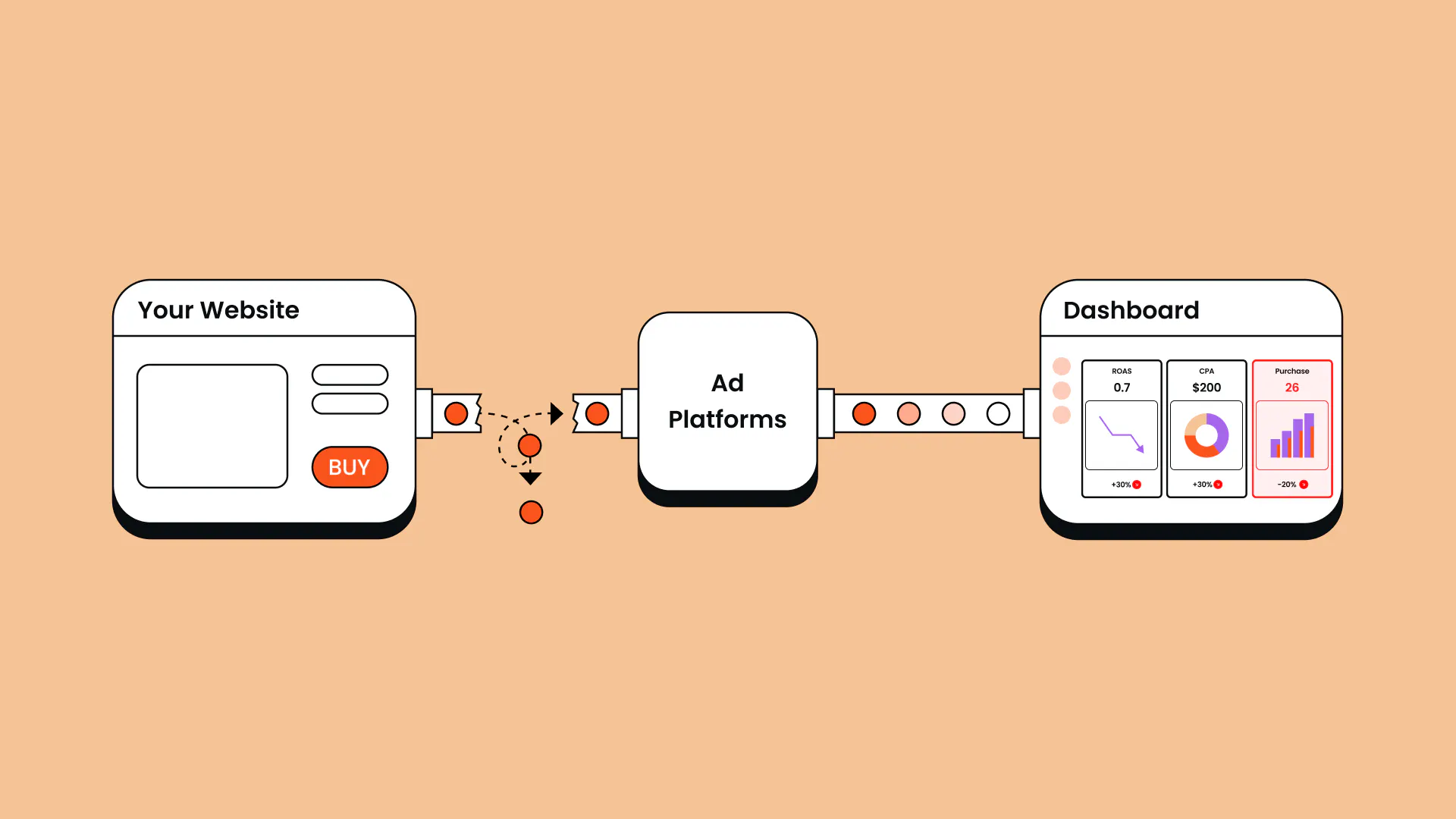
The data loss rarely comes down to just one thing. As Anni Salo, CEO at Tracklution, puts it: “In reality, it’s usually a bunch of small things that collectively make tracking worse. You lose a small percentage here and there, and all of a sudden you're losing half your data.”
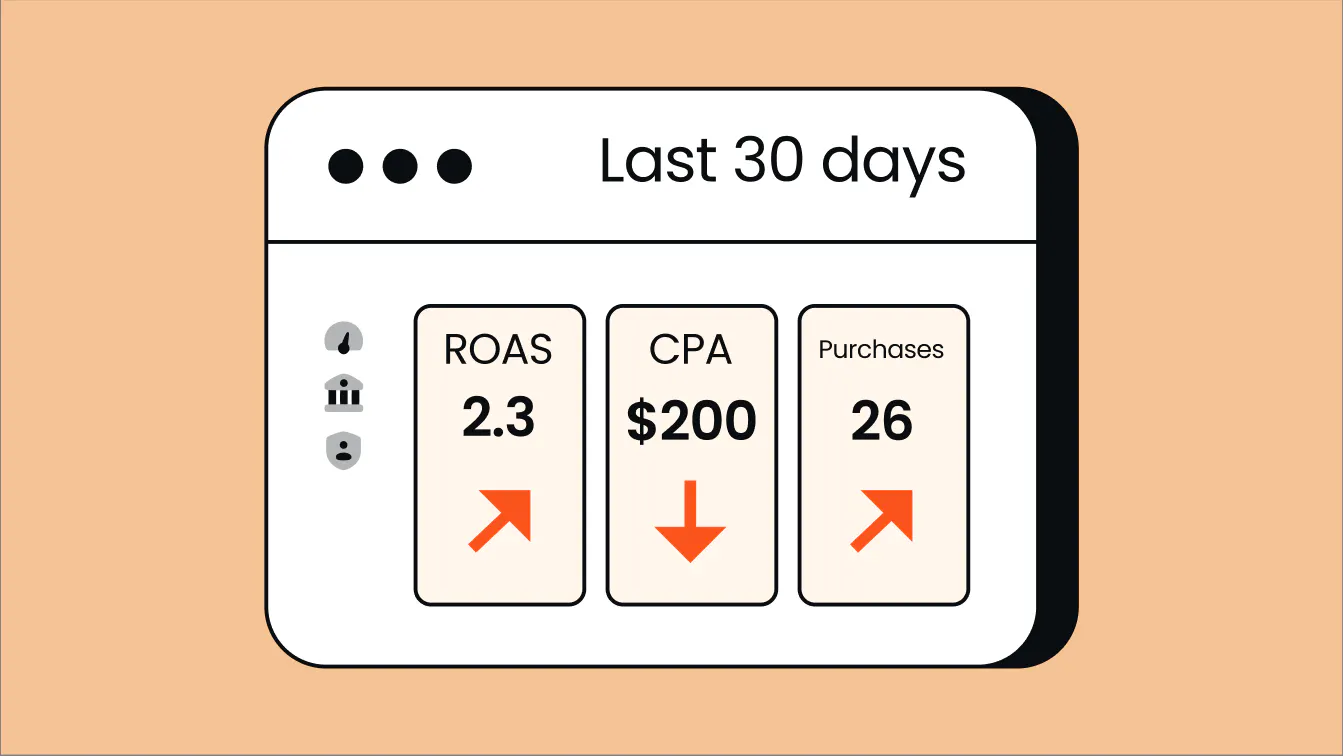
For example, if your ad platforms are missing 34% of your conversions, your reported ROAS, CPA, and other metrics look worse than they actually are. That makes it harder to justify budgets, demonstrate value to clients, or make confident decisions about where to invest.
But the impact goes beyond reporting. Salo explains: “Ads are driven by algorithms, and algorithms are directly affected by the data they receive. People think tracking is just for reports, but it has a direct impact on how the marketing algorithms perform.”
That connection matters now more than ever. Ad platforms are handing more and more control to automated systems: Smart Bidding, Advantage+, and similar tools are making decisions that used to be made manually. Every one of those decisions is based on the conversion data you send them.
“If the data is incomplete—like it always is in client-side setups—inconsistent, or simply faulty, the algorithm learns the wrong patterns,” adds Salo.
By sending more high-quality data to ad platforms, you can optimize your ad campaigns and get more out of your marketing budgets, leading to a lower customer acquisition cost (CAC) and a better growth for your business.
Finally, while GDPR and CCPA have changed how companies are allowed to collect and store data, properly set up server-side tracking lets you stay compliant while still tracking user behavior.
What problems does server-side tracking actually solve?
Many marketers are surprised by just how many persistent issues vanish almost immediately after making the switch from client-side to server-side tracking.
What it fixes:
- Missing conversions: Recovers conversions that ad blockers, iOS restrictions, and browser settings would normally block.
- Attribution gaps: Reduces the difference between clicks in Meta ads or Google ads and your actual conversion numbers.
- Data inconsistencies: Resolves mismatches between Google Analytics 4 and your ad platforms by using a single data source.
- Privacy compliance: Helps you follow privacy regulations while still collecting the data you need.
- Online-offline connection: Links online behavior with offline sales (i.e. conversions that happen in your CRM, or anywhere else) through proper integrations.
What it can't fix:
While server-side tracking solves many critical issues, we can't promise it's a silver bullet. Some problems require more fundamental fixes before server-side tracking can work its magic. Here are the limitations to keep in mind:
- Poor setup: If your pixels are incorrectly installed or your events are inconsistently named, server-side tracking won't automatically fix that.
- Attribution models: It can't determine on its own that someone visited your store because of a Facebook ad unless you have a system to track that connection.
- Bad CRM data: If your customer data is a mess, server-side tracking won't clean it up for you.
How does server-side tracking work?
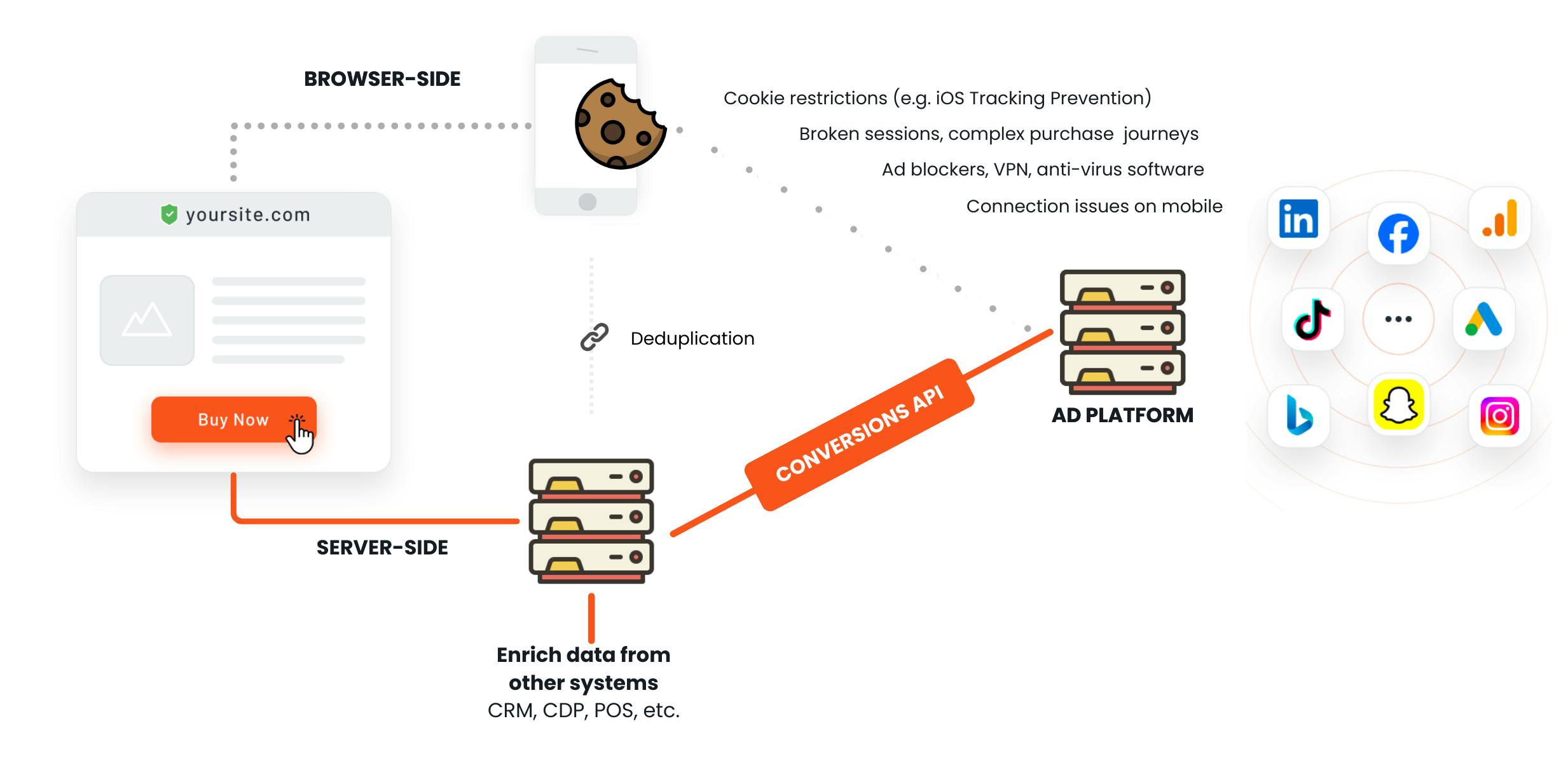
Server-side tracking works by shifting part of the data handling process from the user’s browser to your own server. Instead of sending tracking data directly from the browser to third-party platforms (like Meta Ads or Google Analytics), the data first flows through your server. This gives you more control, better accuracy, and improved privacy.
Here’s what happens behind the scenes when server-side tracking is in play.
1. User action triggers an event
When a user interacts with your website (clicks a button, views a product, sends a form, and so on) the action triggers a data event (e.g., Purchase, AddToCart, PageView).
These events are recognized by client-side scripts embedded on the page. Think of this as the moment the data signal is born. Modern tag managers or custom tracking libraries (e.g., via window.dataLayer) are often used to streamline and standardize this process.
One common misconception is that server-side tracking replaces browser-based event detection. It doesn't. The browser is still the eyes and ears. The server just becomes the central brain that interprets and communicates with external platforms.
Example: A Shopify merchant notices a 25% drop in reported conversions in Meta Ads. The culprit? Safari’s Intelligent Tracking Prevention (ITP) is blocking the Meta Pixel. With server-side tracking in place, that same purchase is recorded accurately and sent to Meta via the Conversions API, bypassing browser restrictions entirely.
2. Data sent to your server
Once the browser detects the event, it packages it into a request that is sent to your tracking server. The destination is usually a subdomain like https://track.yourdomain.com/event.
This request contains structured data (often JSON) about what occurred, who the user is (or was), and any contextual metadata (e.g. timestamp, page URL, UTM parameters, session ID).
The key here is that this transfer contains first-party data. Since it happens from your website to your own domain, it's not subject to the same tracking prevention mechanisms (ITP, ETP, ad blockers) that disrupt third-party pixel requests.
Advanced tip: Many server-side architectures use request queues (e.g., AWS SQS, Pub/Sub) to handle high traffic while maintaining responsiveness and reliability.
3. Server validates, processes, and enriches the data
Now your server gets to work. Why? Because raw tracking data is rarely perfect. This layer is where the transformation happens:
- Validation: Is the data complete? Are required fields present? Is the event type allowed?
- Enrichment: Can we add session or user context? Inject data from your CRM, backend, or CDP?
- Normalization: Unify formats, timestamps, and naming conventions.
- Filtering: Exclude internal traffic, bots, or low-quality signals.
- Deduplication: Prevent double-counting due to reloads, retries, or redundant firing logic.
This step separates amateur setups from professional-grade tracking architectures. This layer is also the home to your compliance logic: here, you enforce data privacy rules, such as removing personally identifiable information. For example, you can block data from being forwarded based on consent states, or strip PII to remain GDPR aligned.
Example: A B2B SaaS company wants to track signups across multiple landing pages, but their CRM data includes sensitive fields (e.g., job title, phone number). With server-side logic, they can anonymize personal data and only send hashed email + signup events to ad platforms, maintaining privacy without losing attribution.
4. Server sends data to third-party platforms via APIs
With clean, enriched data in hand, your server now forwards it to destination platforms via secure APIs, such as:
- Facebook Conversions API (see our guide on Facebook server-side tracking)
- Google Analytics 4 Measurement Protocol
- TikTok Events API
- Custom endpoints (e.g. affiliate platforms, CRMs, or BI tools)
This typically requires API authentication. Note that each platform has its own structure, rate limits, and data requirements, which your server must honor.
Best practice: Use structured logging and response tracking to ensure event delivery and diagnose any platform-side errors.
What server-side tracking does for your ads
Here’s a high-level overview of what server-side tracking brings to ecommerce businesses and agencies. For a deeper look, read our full guide on the benefits of server-side tracking.
- Recover the conversions you’re losing: Server-side tracking recovers conversions that would otherwise be lost to ad blockers and browser restrictions.
- Give your ad algorithms better signals: Ad platforms like Meta and Google optimize based on the conversion signals they receive. Server-side tracking restores the signal, ultimately improving the efficiency of your campaigns.
- Get a single view across all your channels: Phone sales, in-store purchases, CRM deals, and any conversion that happens outside your website are invisible to browser-based pixels.
- Enable profit-based bidding: Server-side tracking makes it possible to pass actual margin data, like cost of goods, fulfillment, and returns, through to ad platforms as conversion value, so algorithms can optimize for profit. Read more in our guide to profit on ad spend.
- Stay in control of your data and compliance: Server-side tracking puts you in control of what data gets collected, filtered, and shared. You can strip personal data before it leaves your server and respect consent preferences with precision.
Case Study
How Tonefest Guitar Gallery doubled ROAS and grew sales 36% with server-side tracking
2x
ROAS in 2 months
45%
more conversions recovered
+36%
increase in online sales
Tonefest Guitar Gallery is a specialty retailer competing against companies with far larger budgets. Before using server-side tracking, they didn't have enough conversion data for the algorithm to learn from. Once they recovered their missing conversions, the algorithm finally had enough to optimize properly.
If you are running a shop and serve every other customer with your eyes closed, that's how marketing felt before. Tracklution lets me serve every customer with my eyes open.

Petri Matero
Founder, Tonefest Guitar Gallery
What kind of results can I get with Tracklution's server-side tracking?
Every business is different, and results depend on how much data you were losing to begin with. But here are a few of the results our customers have seen after implementing server-side tracking with Tracklution.
“You'll see more attributed conversions almost immediately—but that's just the start. The algorithm then begins learning from the better data, and depending on volume, that takes a few weeks to a few months. After that, your cost per conversion should be meaningfully lower.” - Anni Salo, CEO at Tracklution
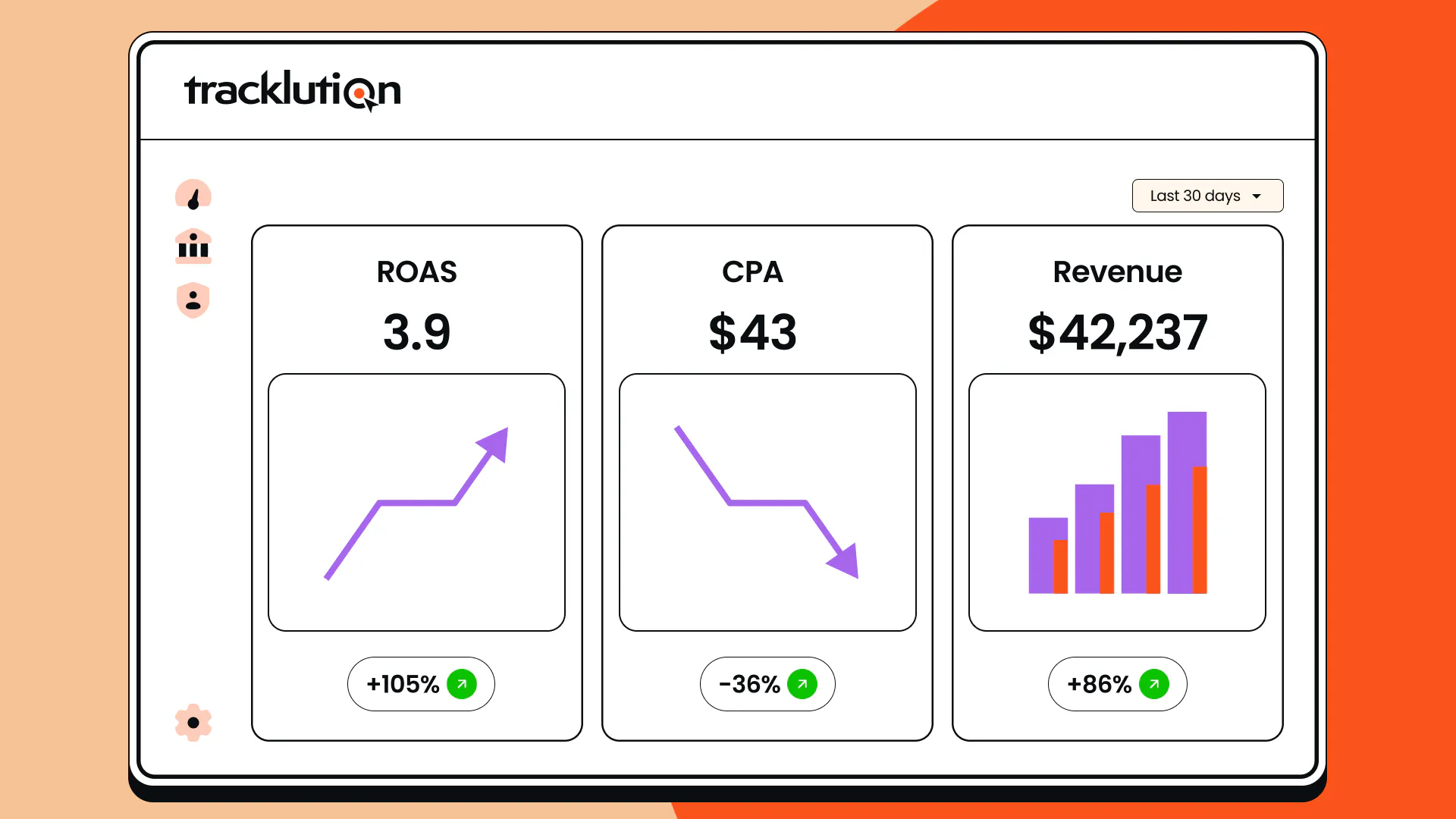
The headline result is an improvement in efficiency, which translates to real financial upside for your business.
Meaningful reduction in customer acquisition cost (CAC) and improvement in ROAS are both common among our customers - they typically see CAC reductions of 5% to 20%, with some experiencing improvements of up to 50%. In practice, a modest 20% reduction in CAC could save you €20,000 on every €100,000 of ad spend, while retaining your current rate of customer acquisition.
Alternatively, it could translate into seeing 20% more customers and revenue without increasing your current spend.
Salo explains common feedback from our customers:
“Before, all the data around them was fuzzy and they didn't really know what to trust. But having full visibility changes how you do your job— it's not only the algorithms getting more efficient, it's also empowering the people running the campaigns. And with that confidence, you're more willing to try different things and experiment.”
Case Study
When your ad data goes missing: Yummy’s journey to better tracking
+42%
new customers year over year
-15%
CAC
+30%
more purchases tracked than pixel-only
Yummy is one of Northern Europe's leading meal kit companies. With pixel tracking missing a big share of their conversions, their algorithms were optimizing blind.
Getting this kind of growth in these market conditions doesn't come easy. Now that the algorithms have the right data in the right format, they just work better—the numbers speak for themselves.

Heiman Safeen
Group Growth Officer at Yummy
Choosing your server-side tracking setup
There are a few different ways to implement server-side tracking, and the right one depends on your team's technical resources, timeline, and how much ongoing maintenance you're willing to take on.
Watch this video for a quick walkthrough of a set up option with Tracklution.
In practice, most teams end up choosing between a self-hosted GTM setup or a managed solution like Tracklution. Here's how all methods compare.
- Full DIY - Building your own server-side setup from scratch - Implementation takes months, requires a team of engineers, and demands ongoing maintenance.
- Server-side GTM - self / shared hosting - Google Tag Manager's server-side container and hosting providers like Stape are the most common alternative to a SaaS solution. sGTM is a proven tool used by sophisticated tracking professionals. But setup is more demanding than many people expect.
Salo explains: “Some people think server-side GTM is something you just press a button and everything works. That's not the case. Depending on setup complexity and your technical skills, it's days, weeks, or months. I've spoken with organizations who spent a full year setting it up and only finished part of the project.” - SaaS solution - Plug-and-play managed solutions handle the technical complexity for you. Setup takes 16 minutes on average, API updates and platform integrations are managed by the provider, and no developer resource is required.
“If you know how to copy-paste, follow instructions, or implement a normal client-side tracking tag to your website, you know how to install Tracklution. We handle all the difficult things—APIs, server management, updates, hashing, data processing—from our end. Even the CEO can do it.” - Anni Salo, CEO at Tracklution
Comparing vendors? See our full guide to server-side tracking tools.
For a full, step-by-step guide to implementation, check out our guide on how to set up server-side tracking, which breaks down the full process for different methods.
Or, take the easy route and give Tracklution a go.
Find out what tracking data you’re missing
Tracklution's free tracking audit scans your current setup in minutes and shows you exactly where you're losing conversion data, and what to fix first.
Related posts

Server-Side Tracking
Server-side tagging: What it is and why it matters for your ad performance
Get clear on what server-side tagging is, why it matters for your ad performance, and whether it’s worth it for your marketing team.
Server-Side Tracking
Server-side tagging: What it is and why it matters for your ad performance
Get clear on what server-side tagging is, why it matters for your ad performance, and whether it’s worth it for your marketing team.
Server-Side Tracking
Server-side tracking and GDPR: what you need to know
Server-side tracking won't make you GDPR compliant on its own, but it gives you the control to get there. Here's a setup your legal team can sign off on
Server-Side Tracking
Server-side tracking and GDPR: what you need to know
Server-side tracking won't make you GDPR compliant on its own, but it gives you the control to get there. Here's a setup your legal team can sign off on
Server-Side Tracking
Server-side tracking vs server-side tagging vs platform gateways: What they are and which to choose
Server-side tracking, tagging, and gateways are not the same thing. Learn what each approach does, how they compare, and which is right for your setup.
Server-Side Tracking
Server-side tracking vs server-side tagging vs platform gateways: What they are and which to choose
Server-side tracking, tagging, and gateways are not the same thing. Learn what each approach does, how they compare, and which is right for your setup.
Questions and answers
1. Do I need server-side tracking?
For any business running paid advertising at scale, the answer is yes. Otherwise, you’re losing money. It can already pay off on small budgets. As Anni puts it: “I would start looking at server-side tracking quite seriously when paid advertising spend reaches around €5,000 a month, but the tipping point can already be around €2,000 a month, particularly if the objective is to scale.”
2. What is the difference between client-side and server-side tracking?
Client-side tracking happens in your browser. When you visit a website, your browser runs tracking scripts that collect data and send it directly to platforms like Google Analytics or Meta. With server-side tracking, the user’s browser sends the event data directly to a server you control, which then processes and forwards it to your ad platforms via secure API connections.
3. How does server-side tracking improve data accuracy?
Server-side tracking bypasses the browser-based obstacles like ad blockers and cookie restrictions that degrade client-side tracking. Events are captured at the server level and sent directly to ad platforms via secure APIs, giving platforms more complete and consistent conversion signals to work with.
4. Is server-side tracking GDPR compliant?
It can be, and it makes compliance easier because you control the data collection and processing. That said, compliance isn’t automatic: you still need proper consent management mechanisms and a Data Processing Agreement with your provider. Tracklution is fully GDPR compliant and provides a DPA as standard.
5. When should I use server-side tracking?
If you're running paid advertising and relying on conversion data to optimize campaigns, server-side tracking should be part of your setup. It’s essential when you want to improve your data quality and ad performance, especially if you're relying on algorithmic bidding. You can also link up your online campaigns with offline purchases where relevant, and see how your efforts translate to real business outcomes.
6. Does server-side tracking require a developer?
It depends on the approach. DIY and self-hosted GTM setups require significant technical expertise and ongoing engineering resources. Managed solutions like Tracklution are designed for non-technical users and typically take 16 minutes on average.
7. What is server-side tracking?
Server-side tracking moves data collection from the user's browser to your server, making it far less affected by ad blockers and privacy restrictions while giving you more control over your data. Instead of each ad platform's pixel collecting data in the browser, your server receives the events and forwards them to the platforms you choose.
8. How does server-side tracking work?
Server-side tracking works by shifting part of the data handling process from the user’s browser to your own server. Instead of sending tracking data directly from the browser to third-party platforms (like Meta Ads or Google Analytics), the data first flows through your server. This gives you more control, better accuracy, and improved privacy.
9. What's an example of server-side tracking?
A Shopify merchant notices a 25% drop in reported conversions in Meta Ads. The culprit? Safari’s Intelligent Tracking Prevention (ITP) is blocking the Meta Pixel. With server-side tracking in place, that same purchase is recorded accurately and sent to Meta via the Conversions API, bypassing browser restrictions entirely.
10. Is server-side tracking the same as server-to-server tracking?
They overlap. Server-to-server tracking usually means one server sending conversion data straight to another, like an affiliate postback or a Conversions API call. Server-side tracking uses those same connections, and adds the collection on your website and the processing in between.

Have further questions?
Start tracking accurately in 16 minutes on average
Tracklution handles the technical complexity so you don't have to. Recover your missing conversions and see the difference clean data makes.
Start tracking accurately in 16 minutes on average
Tracklution handles the technical complexity so you don't have to. Recover your missing conversions and see the difference clean data makes.




