
GA4 Server-Side Tracking: What It Is, Why It Matters & How to Set It Up
Understand GA4 server-side tracking, its benefits over client-side, and how to implement it for more accurate analytics and better data quality.

Table of contents
Better data.
Set up server-side tracking in minutes with Tracklution. Send better conversion data to your ad platforms so their algorithms can optimise for better results from your budget.
Start your free trialIf blind spots in your data are catching you out and clouding your insight into customer behavior, GA4 server-side tracking (SST) could be just what you need. Unlike traditional client-side tracking which can be vulnerable to ad blockers, privacy limitations and browser restrictions, GA4 server-side tracking bypasses these challenges and puts you in control of what you send to Google Analytics.
The result? Richer, more complete data that can help you join the dots between marketing strategy, consumer habits and business outcomes for better decision making and improved campaigns.
Here, we explain how server-side tracking works with GA4, when it’s worth implementing, and what your options are when it comes to set up. We’ve also rounded up some of the most frequently asked questions to save you time searching for answers.
What is GA4 Server-Side Tracking?
GA4 server-side tracking is a method for capturing events and channeling them through a server container which processes and enhances the data before sending it to GA4.
GA4 server-side tracking typically uses Google Tag Manager (GTM) server containers or Google’s API, (the GA4 Measurement Protocol) to route your event data through to Google Analytics. The alternative is client-side tracking which sends data directly from the user's browser to GA4. See our breakdown of client-side vs server-side tracking for a full comparison.

Why GA4 Server-Side Tracking Matters
Server-side tracking ultimately provides marketing teams with accurate, reliable first-party data to support digital marketing analytics, inform marketing strategies, and optimize ad spend. An added bonus is that SST can also help you comply and adapt to shifting privacy regulations. The specific benefits of server-side tracking include:
More complete analytics
Server-side tracking avoids hurdles such as ad blockers, browser limitations and privacy tools like Safari’s Intelligent Tracking Prevention. The result is fewer lost conversions and significantly improved event tracking accuracy. This greater accuracy helps build a more complete view of consumer behavior, improving attribution and enabling better decision making for stronger commercial performance.
Increased data and privacy control
Once you've configured your DNS settings, data is routed through your own domain, making your business the first-party data collection point (in compliance terms). This centralized processing puts you in control of the information you send to Google Analytics 4 (and other platforms). As the data controller, you can remove or anonymize identifying information, like email addresses, helping you comply with GDPR regulations. Reducing the amount of sensitive information you share can also help boost customer trust and cut the risk of a data breach.
Enhanced data
Capturing event data within a server container gives you the chance to enhance the information before sending it to Google via the GA4 Measurement Protocol. Valuable enhancements include connecting your CRM database for greater depth and context into your pipeline, as well as consumer behaviors and demographic profiles. You can also enable commercial data lookups such as revenue, margin, and stock levels to influence marketing decisions, maximize the impact of advertising budgets, and indirectly improve customer experiences (for instance, by not promoting out of stock items).
Extended cookie lifespan and improved session continuity
Traditional client-side tracking uses JavaScript-set cookies, which have a shorter lifespan compared to cookies created by your server (they are also at the mercy of ad blockers and privacy restrictions). Shifting cookies server-side increases their lifespan from around one week to up to 400 days, letting you monitor specific consumer behavior over time and across different visits. This improved session continuity provides greater insight, allowing for more accurate attribution and increased ad-targeting precision.
Improved website performance
Browser-based tracking can be overloaded with JavaScript tags serving different platforms (like Meta Pixel, Google ads, TikTok or LinkedIn Insight). When the tags are triggered each one fires an HTTP request, sending a message to their respective platforms and slowing down page loading times. Server-side tracking avoids this as tags are consolidated and managed by a single tag management system hosted on a dedicated server. Because fewer HTTP requests need to be made, this frees up processing power, enabling faster page loading which can also bolster your search rankings.
What are the drawbacks of GA4 server-side tracking?
Even great solutions have some limitations, and for server-side tracking, those disadvantages include:
- Technical complexity — set up, maintenance and debugging generally requires technical expertise, which also comes with the associated costs.
- Cost — implementing and maintaining a GTM server container (which requires hosting fees) as well as dedicated developer resources - the cost of these can quickly add up.
- Set up time — as well as being technically complex, you’ll need marketers and developers to collaborate so that specific events can be chosen, then mapped and captured; in large organizations, this coordination can extend lead times and cause frustration.
The good news is that managed solutions like Tracklution are ready-from-the-get-go. There’s no need for a developer or technical expertise, and there are no pricey set up and maintenance costs. As a marketer, that means almost immediate access to reliable, accurate data for one affordable subscription.
How to Set Up GA4 Server-Side Tracking
There are three main ways to set up server-side tracking, but the right method for you will depend on your technical know-how, budget and needs:
- DIY by building your own custom infrastructure.
- Tracklution’s managed solution.
- Self-setup using sGTM (server-side Google Tag Manager).
Below, we’ll cover how to get started with Tracklution and give you a high-level view of sGTM self-setup. Although a custom tracking setup might give you a truly bespoke infrastructure, it’s technically complex and costs can be prohibitive (making it beyond what we can usefully cover here).
Step-by-Step Setup with Tracklution
- Sign up and log in to the Tracklution dashboard.
- Add your website as a new container in your dashboard — you’ll need to include your website’s URL, and Tracklution will guide you through the setup.
- Install the Tracklution main tracking script on your site — simply copy and paste the snippet into every page of your website (typically in the header).
- Add your base event scripts to key pages — pageview events on each page; purchase events on your checkout page; lead events from form submissions, and any other conversion events you want to capture.
- Configure your DNS settings so that you become the first-party endpoint for data collection — this is the bit that bypasses third-party cookies and browser restrictions.
- Connect your dashboard to your GA4 property using Tracklution’s built-in GA4 connector — you’ll need your GA4 Measurement ID and API Secret Value for this. Note: first-party mode (DNS) must be configured before activating the GA4 connector.
- Important: If you already have a GA4 tag firing via GTM or directly on your site, remove or deactivate it. Tracklution's GA4 connector handles both pixel and API delivery and deduplicates automatically, running both will cause double-counted events.
- Map the events you want to track such as purchases, sign-ups, form submissions — this ensures that the events you want captured are sent to GA4.
- Test the setup to confirm events are reaching GA4 — validating your connection confirms your data flows through the tracking system as it should.
- Monitor events in both Tracklution and GA4 to verify everything is working — you can double check by visiting your website and triggering events like page views and add to carts.
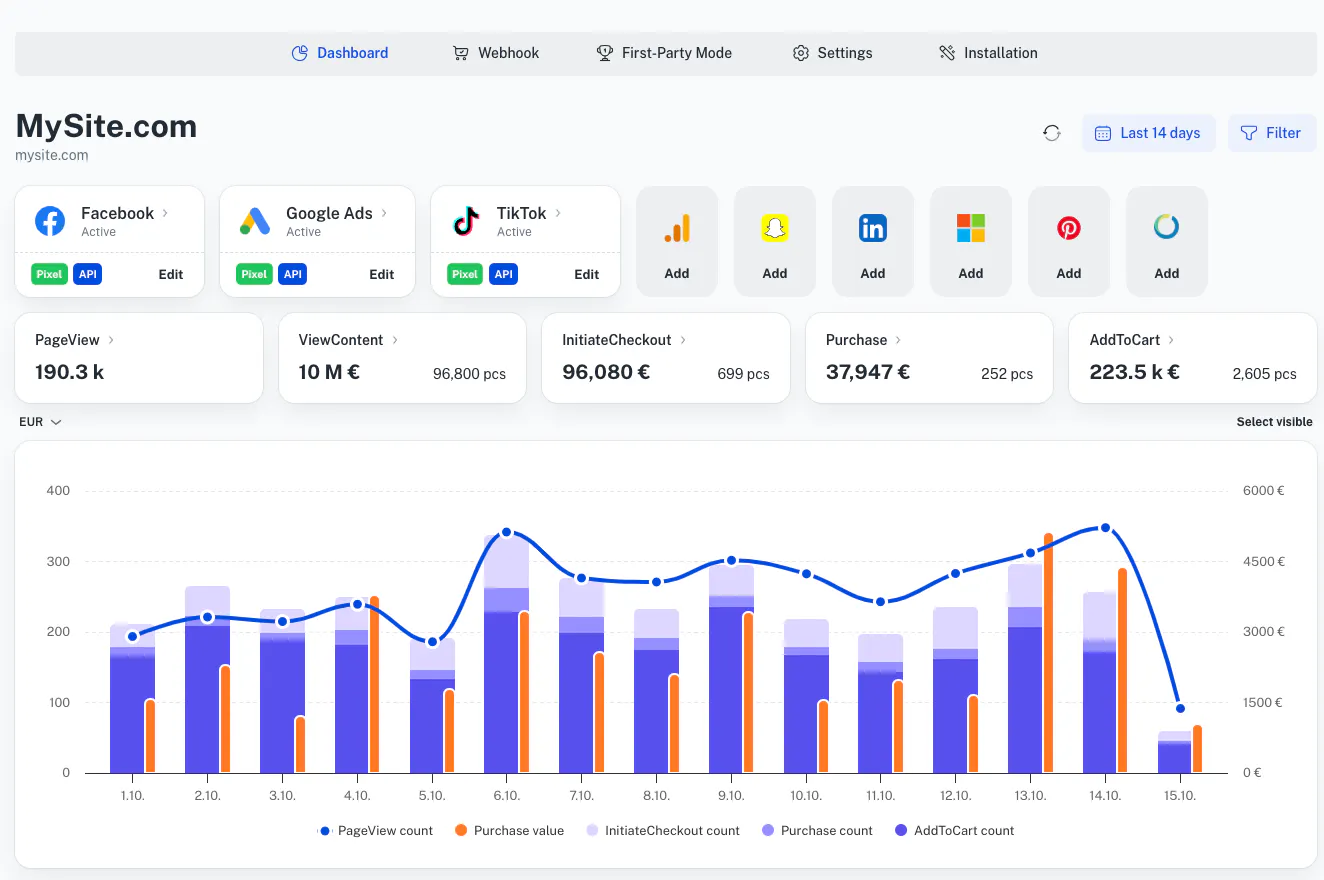
Self-Setup Route
- Create a GTM server-side container (sGTM) in Google Tag Manager — this is what houses your tracking infrastructure.
- Provision hosting for your server-side container — typically via Google Cloud Run which you can find in the Google Cloud Platform (remember that this also comes with an ongoing cost).
- Configure the GA4 client and tags within the server container to receive and process events like ecommerce parameters — getting this step right is crucial, if not, it can lead to data loss, misattributions and inaccuracies.
- Update your GTM web container's GA4 tag configuration to route data through the server container — add the server_container_url parameter pointing to your server container's subdomain.
- Use the GA4 Measurement Protocol to send backend or offline events to the server container — this ensures your data is as complete as possible, enabling you to track user interactions across all marketing touchpoints.
- Manage hosting infrastructure — self setup means you’re responsible for monitoring the custom domain you’ve created within the Google Cloud Platform; this includes keeping an eye on uptime and being responsible for security.
- Ongoing maintenance and troubleshooting — you’ll need to stay on top of any changes to GA4 (such as API updates) which could affect your GA4 tags or tracking code. You’ll also have to be aware of any amendments to privacy regulation, which could impact your tracking setup.
As you can see, even the self-setup route is relatively complex with enough technicalities to frustrate even the most enthusiastic DIY-ers. In contrast, opting for a server-side tracking tool like Tracklution, means you can have server-side GA4 up and running in about the same length of time it takes to make a cup of tea.
Skip the Server Setup — Track GA4 Events in Minutes
Tracklution handles the infrastructure so you don't have to. Connect your GA4 property, start capturing conversions, and get accurate data without provisioning a single server.
When To Choose Server-Side for GA4
Server-side tracking is a highly effective way to collect data for GA4, but it’s not a one-size-fits-all solution. Whether implementation is right for your business will really depend on what your needs are and what you want to achieve with the data you collect. For smaller businesses with tight budgets and limited resources, traditional client-side tracking can still be a solid and efficient option.
On the other hand, implementing server-side tracking does make sense if:
Accuracy and data quality are crucial
If you’re capturing events at scale, it's very likely that your analytics have been hindered by ad blockers and beaten by browser restrictions. Server-side tracking recovers up to 34.2% lost conversions, giving you more complete and accurate data. Adding supplemental information from offline events and marketing databases also gives you a more precise understanding of customer profiles and can help you to make more informed and valuable decisions.
Privacy and security is a concern or high priority
As you’re the first-party data endpoint, you’re in full control over what data is sent to GA4, so you can remove any personal or sensitive information — vital if you’re working within regulated services like health or finance.
Customer journeys are protracted and complex
Increased cookie lifespan and improved session continuity helps you capture individual customer behavior over a longer period of time, providing deeper insight into high value or complex sales decisions (such as buying a car, life insurance or mortgages and property).
Your customers convert offline
Server-side tracking enables you to track offline conversions. This includes in-store purchases or phone sales, as well as any other events that happen outside the scope of your tracking pixel, like Stripe payments, Calendly bookings, CRM deals, and more. Without offline conversion tracking, your most valuable conversion events may be invisible in your analytics data (not to mention to your ad platforms).
You’re spending budget on paid ads
If you’re relying on bidding algorithms to optimize sales performance, it’s essential to feed them the most complete picture. Better data can directly support improved paid ads performance, such as increased ROAS and lower CAC.
You want to improve your website’s loading speed
Server-side tagging reduces the need for bulky third-party cookies which would otherwise slow your website down. Faster page loading helps boost your website’s visibility through organic search, improves user experience and lowers bounce rates.
Frequently Asked Questions
Why should I switch to server-side tracking?
Server-side tracking provides a significant improvement in tracking accuracy, giving you more complete, accurate customer behavior data for optimized ad campaigns and marketing spend. You’ll also have a faster loading website which is good for SEO and UX.
Does server-side tracking help with ad blockers?
Yes! Shifting to server-side tracking means you can side-step ad blockers and browser restrictions as the data is directed to a server you control. This also puts you in charge of the data sent to GA4, helping you stay compliant.
How much does it cost to set up and run server-side tracking?
With Tracklution, you get your first 14 days for free. After that, you can choose from one of our affordable pricing packages.
Does server-side tracking affect GDPR and privacy regulations?
Yes — but in a good way. As you’re the first-party endpoint, you have complete visibility and control over the data received, so you can remove sensitive personal information before it’s sent to GA4. And because data is processed within a server you control, it’s more secure. With Tracklution, you get added reassurance as our deletion tools make it easy to comply with GDPR user request guidelines; we also process and store data within the EU.
Does server-side tracking affect web performance?
Server-side tracking helps speed up page loading as tags are managed from your server. In contrast, client-side tracking overloads the browser by making simultaneous HTTP requests, as multiple tags fire events to multiple platforms.
Future-proof Your GA4 Data
Server-side tracking provides greater data accuracy, capturing more conversions to give you deeper insight into customer behavior over a longer period of time. You can also enhance your data by integrating your own CRM database, offline conversions, or commercial metrics like revenue, margin, and stock levels.
Plus, processing data within your own server also keeps it secure, helping your business meet GDPR and other privacy regulations.
So, if you’ve been left confused by your conversion data, maybe it’s time to commit to change and try server-side tracking with Tracklution. Our built-in GA4 connector delivers your event data directly to GA4, helping you capture conversions that client-side tracking misses — putting you back in control.
Get Complete GA4 Data Without the Guesswork
Ad blockers, browser restrictions, and cookie limitations silently erode your conversion data. Tracklution's server-side tracking recovers what's lost — set up in minutes, connect GA4, and see the full picture. No developers required.
Related posts

Server-Side Tracking
Server-side tagging: What it is and why it matters for your ad performance
Get clear on what server-side tagging is, why it matters for your ad performance, and whether it’s worth it for your marketing team.
Server-Side Tracking
Server-side tagging: What it is and why it matters for your ad performance
Get clear on what server-side tagging is, why it matters for your ad performance, and whether it’s worth it for your marketing team.
Server-Side Tracking
Server-side tracking and GDPR: what you need to know
Server-side tracking won't make you GDPR compliant on its own, but it gives you the control to get there. Here's a setup your legal team can sign off on
Server-Side Tracking
Server-side tracking and GDPR: what you need to know
Server-side tracking won't make you GDPR compliant on its own, but it gives you the control to get there. Here's a setup your legal team can sign off on

Server-Side Tracking
Server-side tracking vs server-side tagging vs platform gateways: What they are and which to choose
Server-side tracking, tagging, and gateways are not the same thing. Learn what each approach does, how they compare, and which is right for your setup.
Server-Side Tracking
Server-side tracking vs server-side tagging vs platform gateways: What they are and which to choose
Server-side tracking, tagging, and gateways are not the same thing. Learn what each approach does, how they compare, and which is right for your setup.
Questions and answers
What does Tracklution actually do?
Tracklution sends conversion data directly to ad platforms (Meta, Google Ads, TikTok, etc.) through server-side APIs. Instead of relying on browser pixels that get blocked by ad blockers, iOS privacy changes, and cookie restrictions, your data goes server-to-server. The result: ad platforms see more of your real conversions, their algorithms optimize better, and you get better ROAS.
What is server-side tracking?
Server-side tracking gathers first-party data directly on your website and sends tracking events to ad platforms via Conversion APIs. This approach bypasses restrictions from iOS devices, ad blockers, and privacy-focused browsers, providing more accurate data and making your paid advertising more efficient.
Is it just one setup that feeds data into all my ad platforms?
Yes. You install Tracklution once, connect your ad accounts, and it sends conversion data to all platforms simultaneously through their respective APIs (Meta CAPI, Google Ads API, TikTok Events API, etc.). No need to manage separate server-side setups for each platform.
How much more conversion data will my ad platforms actually see?
On average, clients report 34.2% more conversions compared to traditional browser-based pixels. This means the ad algorithms have significantly more signal to work with, which translates to 15-35% lower customer acquisition costs for most clients.
Do I need developers to set this up?
No. Setup takes 5-15 minutes depending on your platform. For Shopify, WooCommerce, and other supported platforms, it is plug-and-play. You do not need custom coding or engineering resources. For GTM users, you can keep your existing setup and add Tracklution alongside it.
Do I need to remove my existing tracking tags?
Not necessarily. Tracklution works alongside your current setup. You can run both in parallel initially to compare data, then decide whether to simplify.
What about the DNS / CNAME setup?
Tracklution uses a first-party CNAME record on your domain for data collection. This takes a couple of minutes to configure and up to 48 hours to propagate. It is what makes the tracking resistant to ad blockers and browser restrictions.
Can I verify that the data is actually more accurate?
Yes. Run Tracklution alongside your existing tracking and compare. The dashboard also shows "recovered events" so you can see exactly how many conversions would have been missed without server-side tracking.
Can I distinguish between organic and paid traffic?
Yes. Tracklution preserves traffic source attribution. The conversion data sent to each ad platform includes the proper attribution parameters.
What about offline conversions (phone calls, in-store, CRM events)?
Tracklution supports offline conversion tracking through webhooks and CRM integrations. If someone clicks an ad, then converts offline, you can feed that back to the ad platforms. Clients using this see up to 35% reduction in acquisition costs because the algorithms learn from the full conversion picture.
How does this work with cookie consent and CMP tools?
Tracklution supports both Basic and Advanced Consent Mode. It reads your CMP data layer automatically and respects user consent choices. In Advanced Consent Mode, it can still collect anonymized, cookieless data when users decline cookies, which helps ad platform modeling without violating privacy rules. Fully GDPR-compliant.
How is this different from Stape or building your own sGTM setup?
Stape provides server-side GTM hosting, which means you still need to build and maintain the tags, triggers, and configuration yourself. Tracklution is a complete solution: plug-and-play setup, automatic event detection, built-in consent management, a real-time analytics dashboard, and ongoing maintenance of all API connections. When ad platforms change their APIs (which happens often), we handle the updates.
How does the agency partner model work?
Single dashboard to manage all client accounts. Each client has their own tracking container. The platform handles all technical maintenance, so you are not stuck troubleshooting API changes or broken tracking.

Have further questions?




