
Digital marketing analytics: What it is, what to track, and how to make it reliable
Digital marketing analytics tells you what's working—but only if the data feeding it is accurate. Here’s how to build an analytics setup you can trust.

Table of contents
Better data.
Set up server-side tracking in minutes with Tracklution. Send better conversion data to your ad platforms so their algorithms can optimise for better results from your budget.
Start your free trialHere’s what digital marketing analytics covers today, which metrics and tools matter, and how to build a reliable setup with data you can trust.
Most marketers don’t lack information about their data. If anything, there’s too much of it. It’s relatively straightforward to build dashboards and pull reports, but turning data analytics into decisions that improve performance is where things get harder. And when the data itself is incomplete or unreliable, even a solid marketing strategy starts to slip.
This guide covers the full picture: what digital marketing is, why it matters, the metrics worth tracking, and how to make the most of your marketing data with the tools that belong in your stack. We also look at why marketing analytics is only as good as the data feeding it. Because poor data doesn’t just affect reporting, it shapes all the marketing decisions you make.
What is digital marketing analytics?
Digital marketing analytics is the process of collecting, measuring, and interpreting data across all of your digital marketing channels—from your website and search engines to email and ad campaigns.
The terms analytics and reporting are often used interchangeably, but they serve different purposes. Reporting shows you what happened, like click-through rates or conversions over a given period. But digital marketing analytics goes deeper, answering “so what?” It tells the story behind the numbers, what it means for your strategy, and what to try next.
Done well, it connects the full customer journey, from awareness to retention, so you can see how your marketing efforts translate into real business outcomes.
Why does digital marketing analytics matter?
Without it, you’re making decisions based on gut feel. There’s a place for trusting your instincts in marketing, but relying on guesswork can quickly get expensive.
Digital marketing analytics gives you evidence of what is and isn’t working so you can make better decisions. It shows you which channels, campaigns, and audiences are driving results so you know where to put your budget.
With real-time data, you can catch problems in live campaigns before they do too much damage. Historical performance data helps you spot trends and patterns that you can plan around. For example, if previous campaigns show that Google Ads consistently outperforms Meta on profit on ad spend, doubling down there next time just makes sense.
Types of digital marketing analytics
Different types of analytics measure different parts of your marketing activities. Most setups combine all of these to get a full view:
- Web and behavioral analytics: How people interact with your site or app, including traffic sources, page views, session durations, and bounce rates. It’s the foundation for understanding user behavior and flagging friction points.
- Paid campaign analytics: How your paid advertising performs across platforms like Google Ads, Meta, and LinkedIn. It tells you what’s converting and where to optimize PPC spend.
- Search engine optimization (SEO) analytics: How your site performs in search engine results pages (SERPs), which queries drive the most relevant website traffic, and what’s affecting visibility.
- Email marketing analytics: How your email campaigns perform (open rates, click-through rates, bounce rates, etc.) and whether engagement is turning into conversions.
- Social media analytics: How your social content performs across channels like LinkedIn, Facebook, Instagram, Reddit, and YouTube so you can see the overall impact on your business.
- Conversion tracking and attribution analytics: Conversion tracking connects marketing activities to real outcomes like sign-ups, downloads, and purchases. Marketing attribution assigns credit across channels like ads, social media, or SEO.
Key digital marketing metrics and KPIs
Not all metrics are worth your attention. Keep these key performance indicators (KPIs) on your radar, but remember the most relevant ones will depend on your business goals.
Revenue and efficiency metrics
These sit closest to business outcomes and should be your main focus. They're also the most affected by data quality, which we’ll get into later.
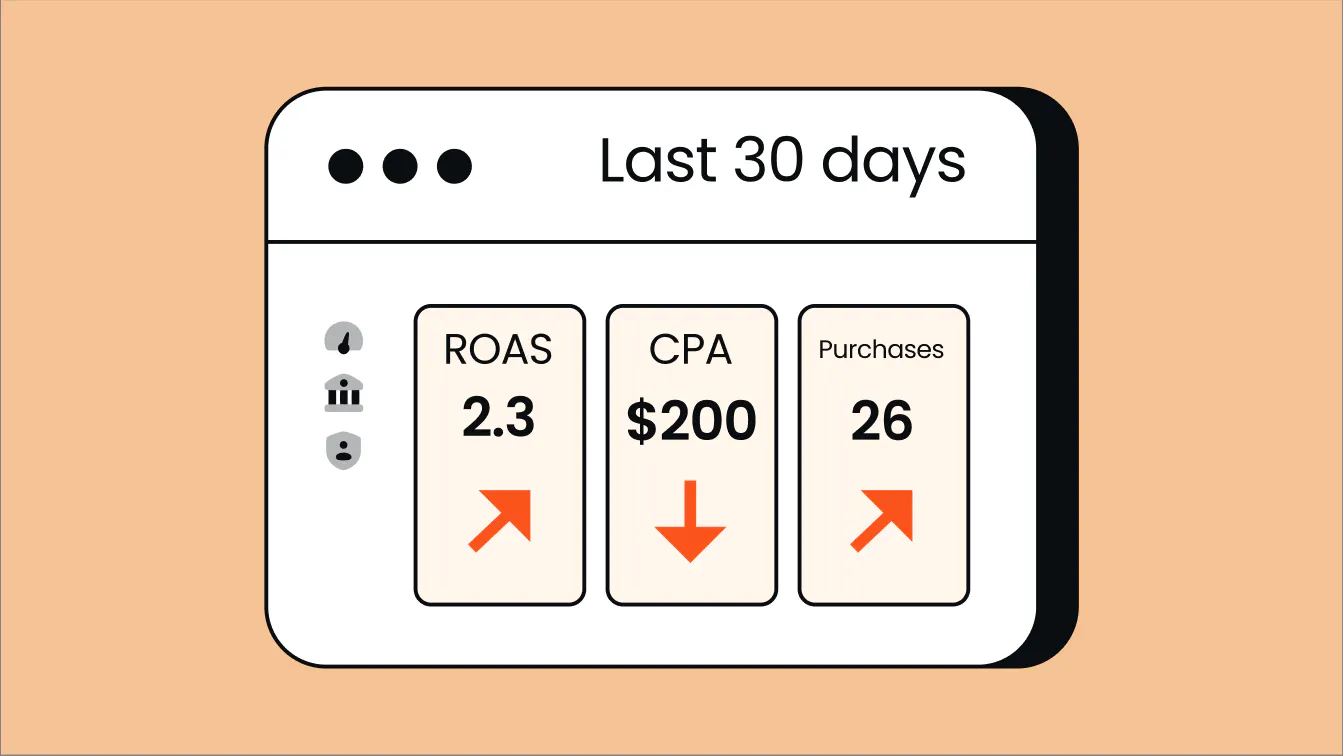
Return on ad spend (ROAS): Revenue generated per dollar of ad spend. It’s a straightforward indicator of ad efficiency, but it doesn’t take into account the cost of goods, fulfillment, or refunds behind the sale.
Profit on ad spend: Gross profit generated per dollar of ad spend, after subtracting the cost of goods sold (COGS), fulfilment, transaction fees, and returns. This can be more useful than ROAS as it tells you whether campaigns are profitable, not just generating revenue.
Customer acquisition cost (CAC): What it costs to acquire a new customer. When tracked against customer lifetime value, it tells you whether your marketing efforts are paying off.
Marketing-attributed revenue: The revenue you can directly trace back to specific marketing campaigns, channels, or touchpoints so you know what’s driving conversions and where to put your resources. How much you can attribute, and to what, depends on your attribution model.
Funnel diagnostics
These tell you where things are breaking down in your funnel, and why.
Conversion rate: The percentage of users who take a specific desired action. Track this across the funnel to see exactly where you're losing people so you can make improvements.
Cost per lead (CPL) vs cost per acquisition (CPA): This gap gives you a quick view on lead quality and funnel efficiency. If your CPL is low but CPA is high, you’re generating leads cheaply but they’re not converting.
Drop-off points: Where users abandon a process before completing a desired action. In paid campaigns, this might be the landing page. In eCommerce, it's often the checkout. Finding these friction points is the first step to figuring out the problem and testing solutions.
Context metrics
These give you useful info about brand awareness and demand, but they're not necessarily what you should be optimizing toward.
Traffic: Where visitors come from and how many arrive. Use it to spot channel trends, but don't chase big numbers here for the sake of it, especially if the traffic is irrelevant.
Impressions: How many times your content or ads were shown. Impressions alone don’t tell you much—you want to know what happens next. Like did anyone click? Or convert?
Engagement: Through likes, shares, comments, and time on page, engagement shows how people interact with your content. But engagement without conversion won’t move the needle on your business goals.
The trap with vanity metrics is that they look good in reports without translating into revenue. High follower counts, post likes, and page views can feel like progress but they're false positives that distract you from what matters. Treat them as context, but don’t build your strategy around them.
Actionable metrics, on the other hand, like Profit on Ad Spend, CAC, and conversion rates are more closely tied to real business impact and what you should work towards.
The main digital marketing analytics tools
Here are the tools most performance marketers have in their stack and what each one is for.
Google Analytics 4 (GA4)
The default web analytics platform for most companies. It tracks customer behavior, measures conversions, and pulls attribution data across channels using an event-based model. Unlike the old Universal Analytics (which ended in 2023 and focused on sessions), this model gives you a clearer picture of customer engagement across both your online and offline touchpoints.
Check out out guide on GA4 server-side tracking for more information.
Google Ads and Meta Ads Manager
The built-in dashboards for managing paid campaigns. They give you actionable insights on impressions, clicks, conversions, demographics, and spend efficiency. Keep in mind these platforms have built-in incentives to claim as much credit for your conversions as possible. Collecting first-party data through server-side tracking gives you a more reliable foundation for measuring performance across channels.
Google Search Console
Google’s free tool to monitor organic search performance. It shows which queries drive impressions and clicks, where your pages rank, and flags technical SEO issues affecting your visibility. For deeper keyword research and competitive analysis, many marketing teams also use tools like Semrush or Ahrefs.
Customer relationship management (CRM) platforms
While web analytics tell you what people did on your site, CRM platforms like HubSpot and Salesforce tell you what happened after. It’s where all your customer data lives across the entire customer lifecycle, including contact history, purchase behavior, lead status, and communication logs. Use this to understand what’s happening deeper in the funnel, improve the user experience, run more personalized campaigns, and target specific customer segments.
Business intelligence (BI) and data visualization platforms
Tools like Looker Studio (formerly Google Data Studio) and Tableau handle data integration, pulling information from multiple sources into unified dashboards. Instead of jumping through multiple platforms, you get a single view of performance for informed decision making.
How to build a reliable analytics setup
Tools are a must for your digital marketing analytics setup, but they’re just that: tools. What matters more is how you configure and manage them.
Keep these five principles in mind to build an analytics setup you can trust:
- Define goals before configuring tools. First, get clear on what you're trying to achieve with your marketing. That determines your key metrics and everything you configure your tools to measure.
- Consolidate your reporting. Fragmented dashboards across a gazillion different tools makes it almost impossible to get a clear marketing performance picture. A cross-channel marketing dashboard gives you a single source of truth and lets you see key metrics at a glance.
- Keep tagging consistent. Event names, UTM parameters, and conversion definitions need to stay consistent across every campaign, channel, and time period. Inconsistent naming conventions mess up your performance analytics over time, skew attribution, and make it harder to trust what your data is telling you.
- Run regular tracking audits. Tracking breaks more often than marketers realize. A site update wipes a pixel, a tag fires twice, or a consent configuration changes. Build a regular cadence to check that your tracking is working as intended.
- Make your tracking infrastructure reliable. Your analytics setup is only as trustworthy as the data flowing into it. If you’re losing conversions to ad blockers, browser restrictions, or off-site activity your pixel can’t see, everything built on top becomes compromised. (More on this below.)
Psst! Tracklution’s free AI tracking audit checks your pixels, consent setup, and server-side infrastructure in minutes and flags what’s broken.
Start optimizing on data you can trust
Tracklution's server-side tracking recovers what your pixel loses and sends accurate, complete data to your ad platforms in minutes—no developers needed.
Why your analytics data might not be telling the full story
Even a well-configured analytics setup might be working from incomplete or inaccurate data. That means you and your ad algorithms could be optimizing on the wrong signals, burning your budget on campaigns that only look successful.
Here are the common issues:
Ad blockers and browser restrictions
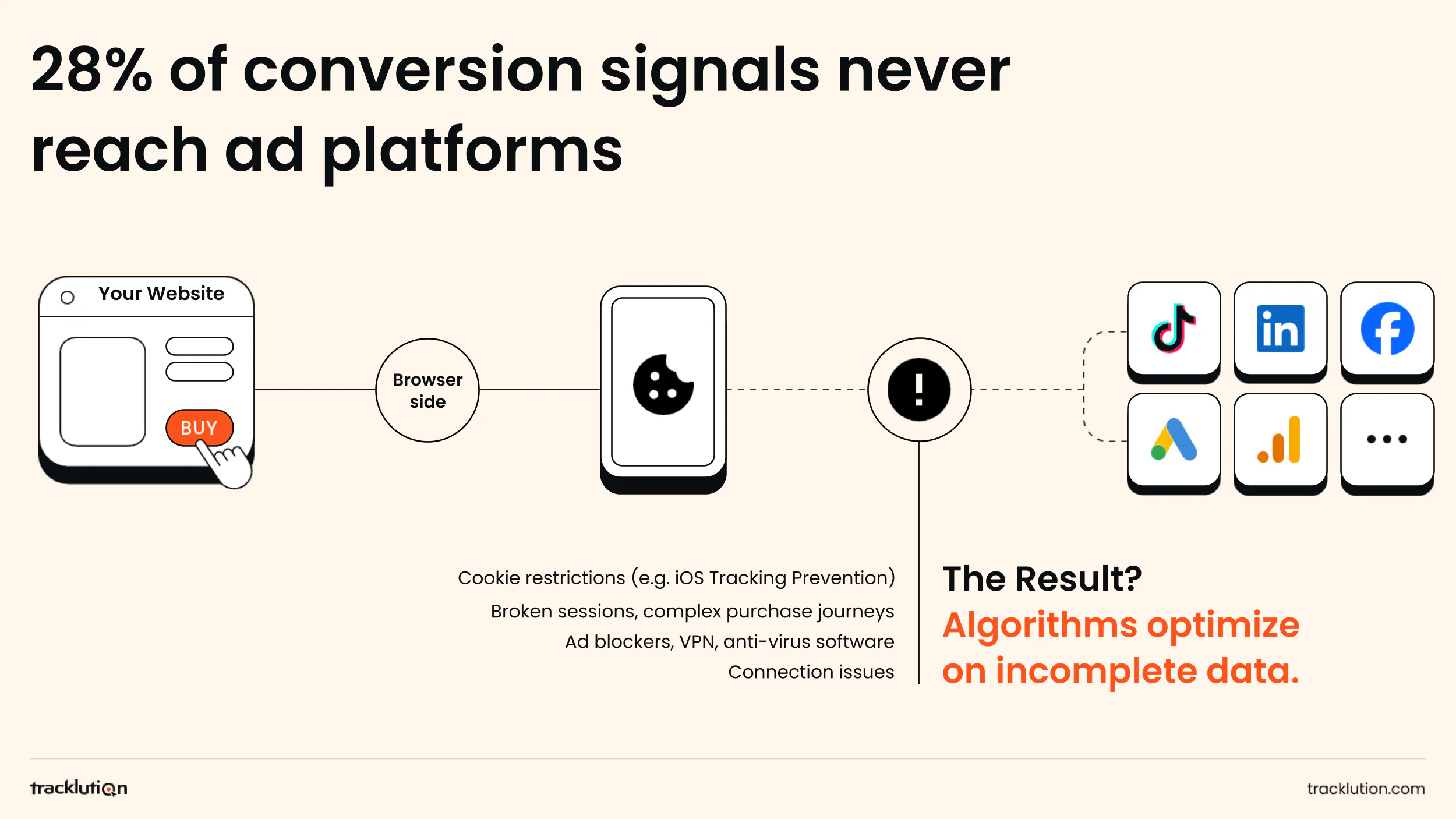
With traditional browser-based tracking, someone clicks your ad, lands on your site, and takes an action (like filling out a form or making a purchase). A tracking script, like the Meta Pixel, fires in their browser, stores data in third-party cookies, and sends it back to the ad platform.
The problem is this process often breaks down. Around 1.77 billion internet users worldwide use ad blocking across desktop and mobile, blocking those scripts entirely. Browser-level privacy features like Apple's Intelligent Tracking Prevention limit cookie lifetimes and what third-party scripts can see. So even when the data does go through, it’s incomplete.
Off-site conversions your pixel never sees
Browser pixels only track what happens in the browser. Phone calls, in-store purchases, and payment platforms that don't redirect back to your site are invisible to browser-side tracking unless you build connections to capture them.
For many businesses (especially B2B, high-consideration eCommerce, and those with offline sales), a big chunk of conversions happen in those scenarios. Optimizing campaigns without that data means you’re making decisions based on an incomplete picture of what’s actually working.
Cookie and consent degradation
Privacy regulations like GDPR and CCPA made user consent a legal requirement for tracking in most markets. As more users opt out, the population your analytics can see shrinks. The users who opt out tend to be more privacy-conscious, which introduces selection bias into your data.
In our privacy-first world, the shift away from third-party cookies forces companies to rethink how to collect, process, and attribute data.
How server-side tracking closes the gap
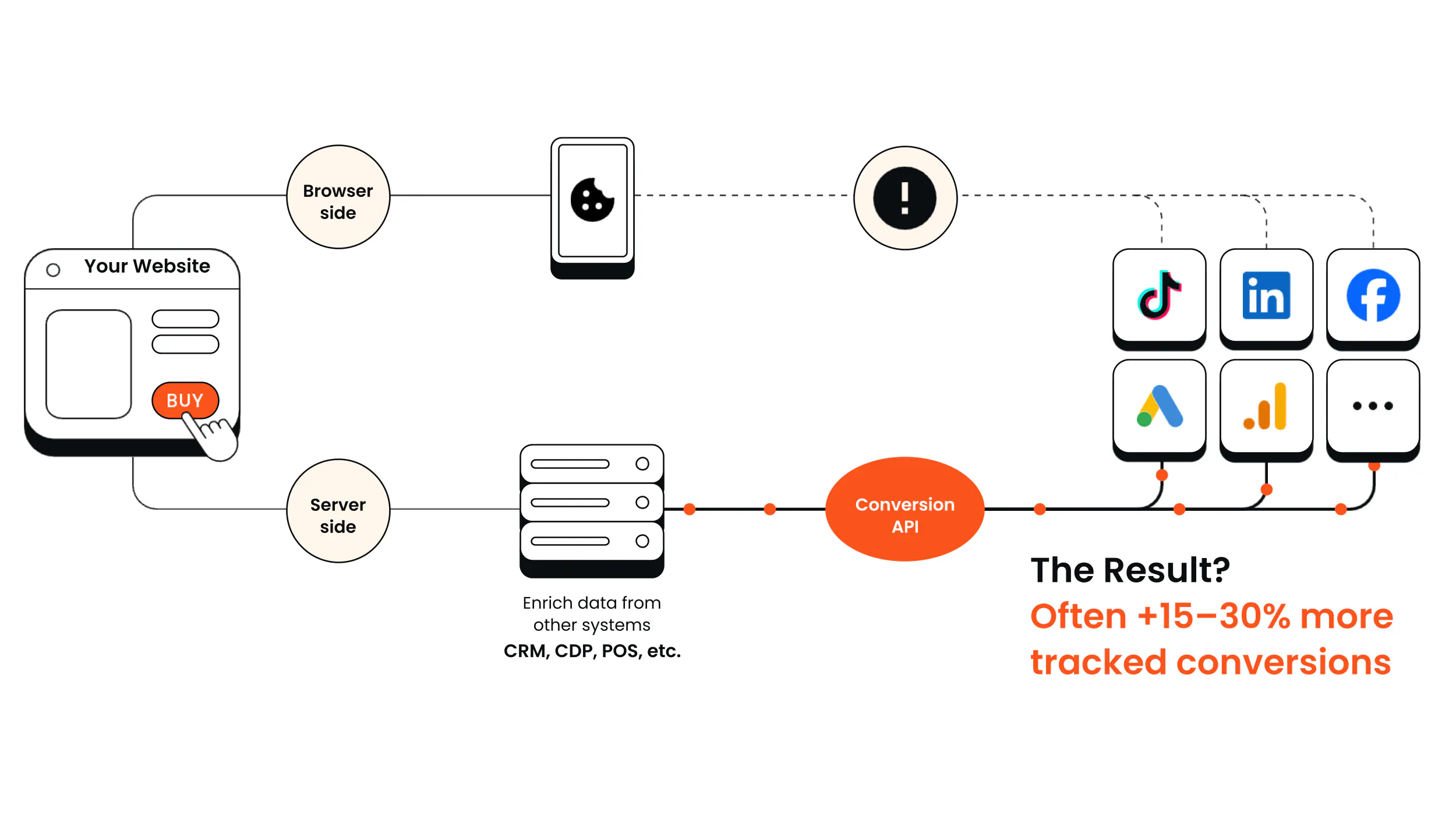
The fix for most of these problems? Move event collection off the browser and onto a server you control. With server-side tracking, interactions are captured at the server level and sent directly to your ad platforms via secure APIs, bypassing ad blockers, browser restrictions, and cookie limitations.
More complete data means better targeting, more efficient spend, and lower CAC over time. Server-side tracking software like Tracklution makes server-side tracking easy, handling everything from accurate first-party data capture to offline conversion tracking. Customers see on average 34.2% more conversions recovered and meaningful CAC reductions.
Still have questions?
What's the difference between digital marketing analytics and web analytics?
Web analytics is a subset of digital marketing analytics, covering what happens on your website specifically. Digital marketing analytics is a broader discipline, including paid campaign performance, SEO, email, social media engagement, attribution across channels, and how it all connects to business outcomes.
Why does my analytics data not match my ad platform data?
Usually it comes down to differences in attribution models and browser-side tracking limitations. The bigger issue is often what’s not measured: browser restrictions and ad blockers mean pixel-based tracking misses conversions that platforms capture through server-to-server connections.
How do I know if my tracking data is accurate?
Ask yourself: Do reported conversions match your actual revenue? Do your analytics numbers match your CRM or payment platform? Are there big discrepancies between your analytics and ad platform data? Are your retargeting audiences smaller than you'd expect given your traffic?
If you answered yes to any of these questions, you might have a data quality issue worth investigating. Try Tracklution's free AI tracking audit to see what’s broken in minutes.
How do I get started with digital marketing analytics?
Start by defining what you want to achieve with digital marketing, then build your setup around that rather than tracking everything under the sun and trying to make sense of it later. Start simple with basic tools and keep experimenting and refining your methods over time.
What is first-party data and why does it matter?
First-party data is information you collect directly from your users and customers through your website, app, and CRM. Unlike third-party data, you control it and it, and it isn't subject to the cookie restrictions degrading most other tracking methods. In a world where third-party cookies are disappearing, first-party data helps you build a more reliable foundation.
Wrapping up
Digital marketing analytics is all about getting valuable insights to make better, data-driven decisions, faster. The right metrics, tools, and setup help you move from reactive reporting to a proactive digital marketing strategy. But analytics is only as good as the data feeding it. Most setups are quietly missing conversions, and optimizing on incomplete data only makes the problem worse.
That’s where Tracklution comes in: the tracking stack does all the heavy lifting for you through automation so you can capture and send accurate data to ad platforms in minutes.
Fix your data quality and scale your campaigns with confidence
Get started with Tracklution in minutes and restore your conversion data. Feed your algorithms better data and get better results.
Related posts

Performance Marketing
Marketing Spend Optimization: How to Get More From Shrinking Budgets
Learn the biggest sources of wasted marketing spend and a solid framework for optimizing your budget, improving ROAS, and preventing spend on underperforming activities.
Performance Marketing
Marketing Spend Optimization: How to Get More From Shrinking Budgets
Learn the biggest sources of wasted marketing spend and a solid framework for optimizing your budget, improving ROAS, and preventing spend on underperforming activities.

Performance Marketing
Profit on Ad Spend Explained: Meaning, Formula, and How to Improve It
Are your ads actually profitable? Learn what Profit on Ad Spend is, how you calculate it, and the strategies to improve your margins, ad efficiency, and the data behind it all.
Performance Marketing
Profit on Ad Spend Explained: Meaning, Formula, and How to Improve It
Are your ads actually profitable? Learn what Profit on Ad Spend is, how you calculate it, and the strategies to improve your margins, ad efficiency, and the data behind it all.
Performance Marketing
PPC Optimization: How to Improve PPC Performance in 2026
Stop wasting ad spend. Discover the core PPC optimization levers and why better conversion data is the foundation of high-performing, scalable campaigns.
Performance Marketing
PPC Optimization: How to Improve PPC Performance in 2026
Stop wasting ad spend. Discover the core PPC optimization levers and why better conversion data is the foundation of high-performing, scalable campaigns.
Questions and answers
What does Tracklution actually do?
Tracklution sends conversion data directly to ad platforms (Meta, Google Ads, TikTok, etc.) through server-side APIs. Instead of relying on browser pixels that get blocked by ad blockers, iOS privacy changes, and cookie restrictions, your data goes server-to-server. The result: ad platforms see more of your real conversions, their algorithms optimize better, and you get better ROAS.
What is server-side tracking?
Server-side tracking gathers first-party data directly on your website and sends tracking events to ad platforms via Conversion APIs. This approach bypasses restrictions from iOS devices, ad blockers, and privacy-focused browsers, providing more accurate data and making your paid advertising more efficient.
Is it just one setup that feeds data into all my ad platforms?
Yes. You install Tracklution once, connect your ad accounts, and it sends conversion data to all platforms simultaneously through their respective APIs (Meta CAPI, Google Ads API, TikTok Events API, etc.). No need to manage separate server-side setups for each platform.
How much more conversion data will my ad platforms actually see?
On average, clients report 34.2% more conversions compared to traditional browser-based pixels. This means the ad algorithms have significantly more signal to work with, which translates to 15-35% lower customer acquisition costs for most clients.
Do I need developers to set this up?
No. Setup takes 5-15 minutes depending on your platform. For Shopify, WooCommerce, and other supported platforms, it is plug-and-play. You do not need custom coding or engineering resources. For GTM users, you can keep your existing setup and add Tracklution alongside it.
Do I need to remove my existing tracking tags?
Not necessarily. Tracklution works alongside your current setup. You can run both in parallel initially to compare data, then decide whether to simplify.
What about the DNS / CNAME setup?
Tracklution uses a first-party CNAME record on your domain for data collection. This takes a couple of minutes to configure and up to 48 hours to propagate. It is what makes the tracking resistant to ad blockers and browser restrictions.
Can I verify that the data is actually more accurate?
Yes. Run Tracklution alongside your existing tracking and compare. The dashboard also shows "recovered events" so you can see exactly how many conversions would have been missed without server-side tracking.
Can I distinguish between organic and paid traffic?
Yes. Tracklution preserves traffic source attribution. The conversion data sent to each ad platform includes the proper attribution parameters.
What about offline conversions (phone calls, in-store, CRM events)?
Tracklution supports offline conversion tracking through webhooks and CRM integrations. If someone clicks an ad, then converts offline, you can feed that back to the ad platforms. Clients using this see up to 35% reduction in acquisition costs because the algorithms learn from the full conversion picture.
How does this work with cookie consent and CMP tools?
Tracklution supports both Basic and Advanced Consent Mode. It reads your CMP data layer automatically and respects user consent choices. In Advanced Consent Mode, it can still collect anonymized, cookieless data when users decline cookies, which helps ad platform modeling without violating privacy rules. Fully GDPR-compliant.
How is this different from Stape or building your own sGTM setup?
Stape provides server-side GTM hosting, which means you still need to build and maintain the tags, triggers, and configuration yourself. Tracklution is a complete solution: plug-and-play setup, automatic event detection, built-in consent management, a real-time analytics dashboard, and ongoing maintenance of all API connections. When ad platforms change their APIs (which happens often), we handle the updates.
How does the agency partner model work?
Single dashboard to manage all client accounts. Each client has their own tracking container. The platform handles all technical maintenance, so you are not stuck troubleshooting API changes or broken tracking.

Have further questions?




