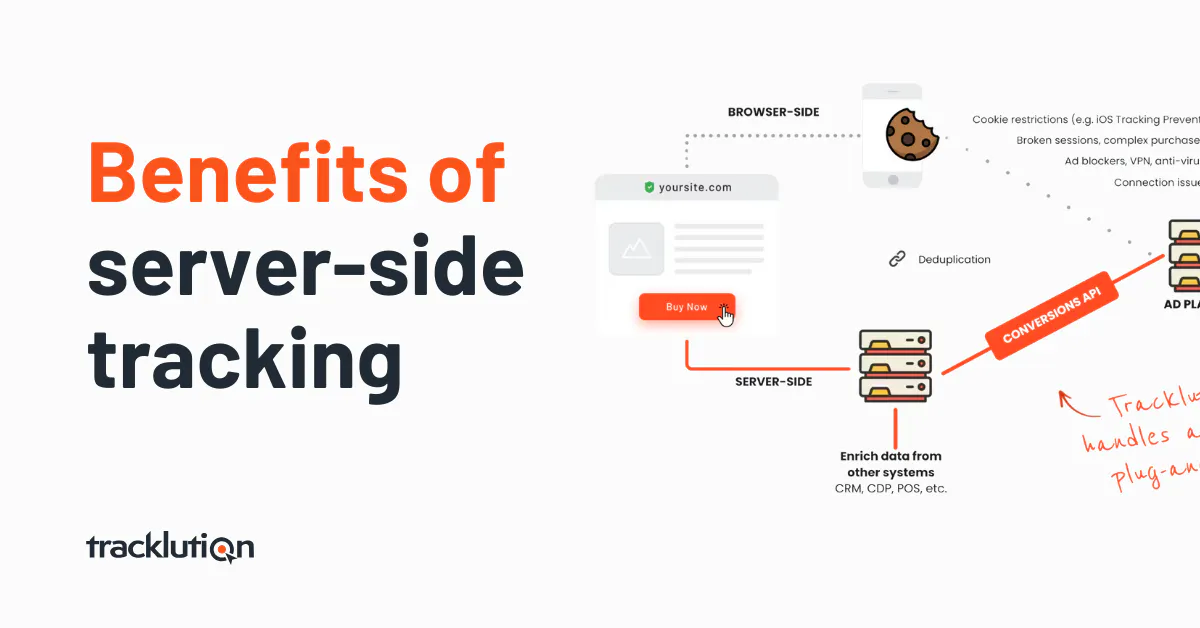
9 Benefits of server-side tracking for marketers: Better data, better bottom line
Explore the benefits of server-side tracking, from data accuracy to smarter optimization, and see how Tracklution delivers them without complexity.

Table of contents
Better data.
Set up server-side tracking in minutes with Tracklution. Send better conversion data to your ad platforms so their algorithms can optimise for better results from your budget.
Start your free trialIf you’ve run paid campaigns in the past few years, you’ve likely felt it: platform performance slipping, conversion numbers not lining up, and retargeting audiences shrinking. Don’t panic, it’s not your ads. It’s your tracking. And you can do something about it.
Between browser restrictions, ad blockers, and stricter privacy laws, traditional client-side tracking is quietly gutting your data. With it, down goes your ability to effectively optimize ad performance, and down goes your ROAS.
Server-side tracking offers a number of benefits over traditional tracking setups by closing the gap caused by lost conversions. It offers a modern, more reliable way to handle data processing and delivery, and runs deeper than simple reporting fixes. It is a necessary tool for gathering the fuel that ad algorithms run on, and plugs the slow-drip leak of data loss and its compounding impact.
This leaves you with better, more complete data, allowing ad platforms to spend more efficiently, and for you to get a healthier bottom line.
Unpacking the benefits of server-side tracking
The following 9 benefits of server-side tracking will show you how and why investing in a server-side tracking setup can drive real, meaningful ROI for your business:
- Tracking accuracy & conversion reliability
- Smarter PPC optimization through better algorithm training
- Enhanced data control & compliance
- Improved attribution & retargeting performance
- First-party cookies & cross-domain support
- Unified data pipeline for enrichment
- Improved website performance & UX
- Stronger security with hidden API keys & spam protection
- Future-proof tracking stack for a cookieless web
1. Tracking accuracy & conversion reliability
Why this matters
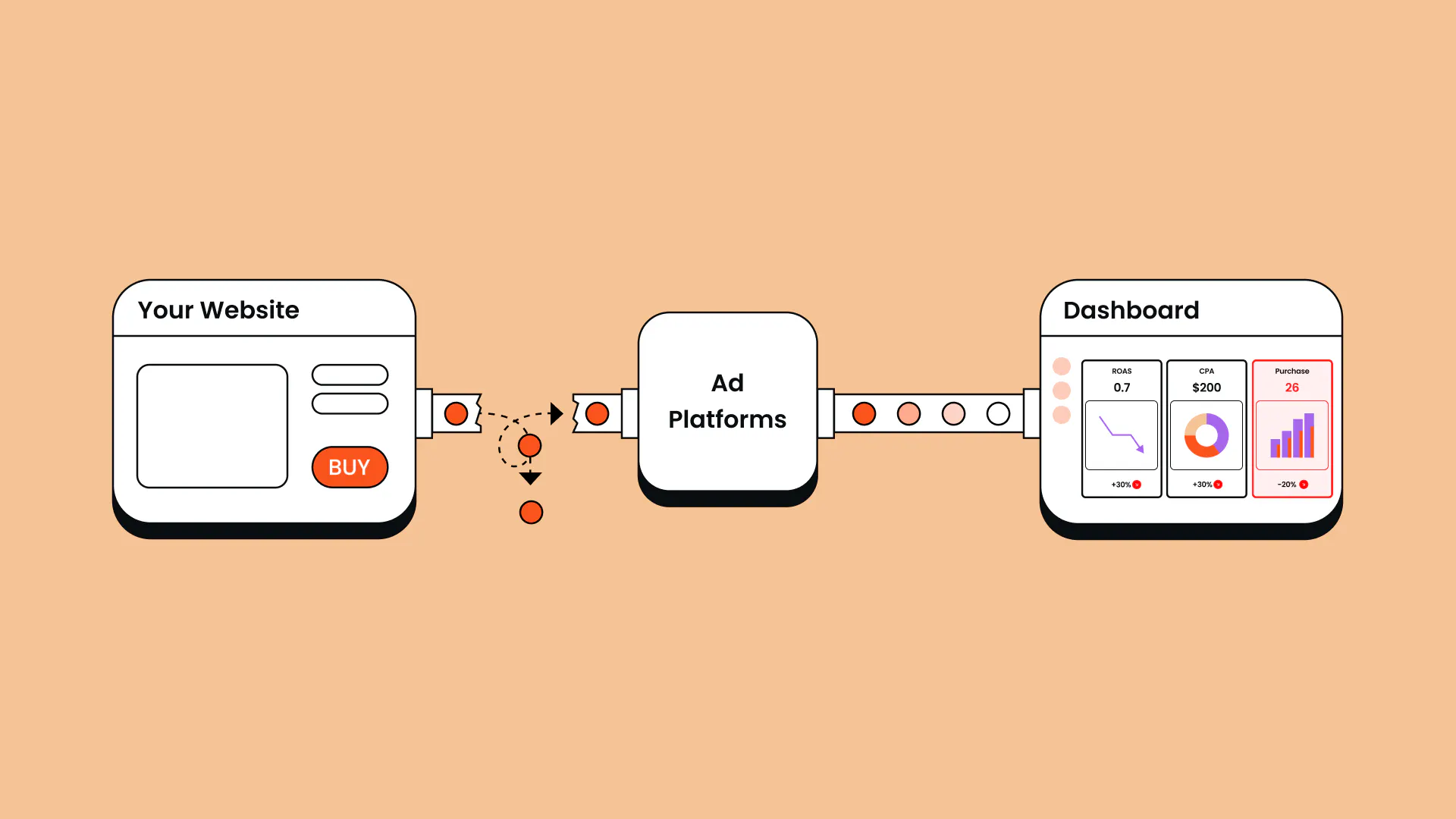
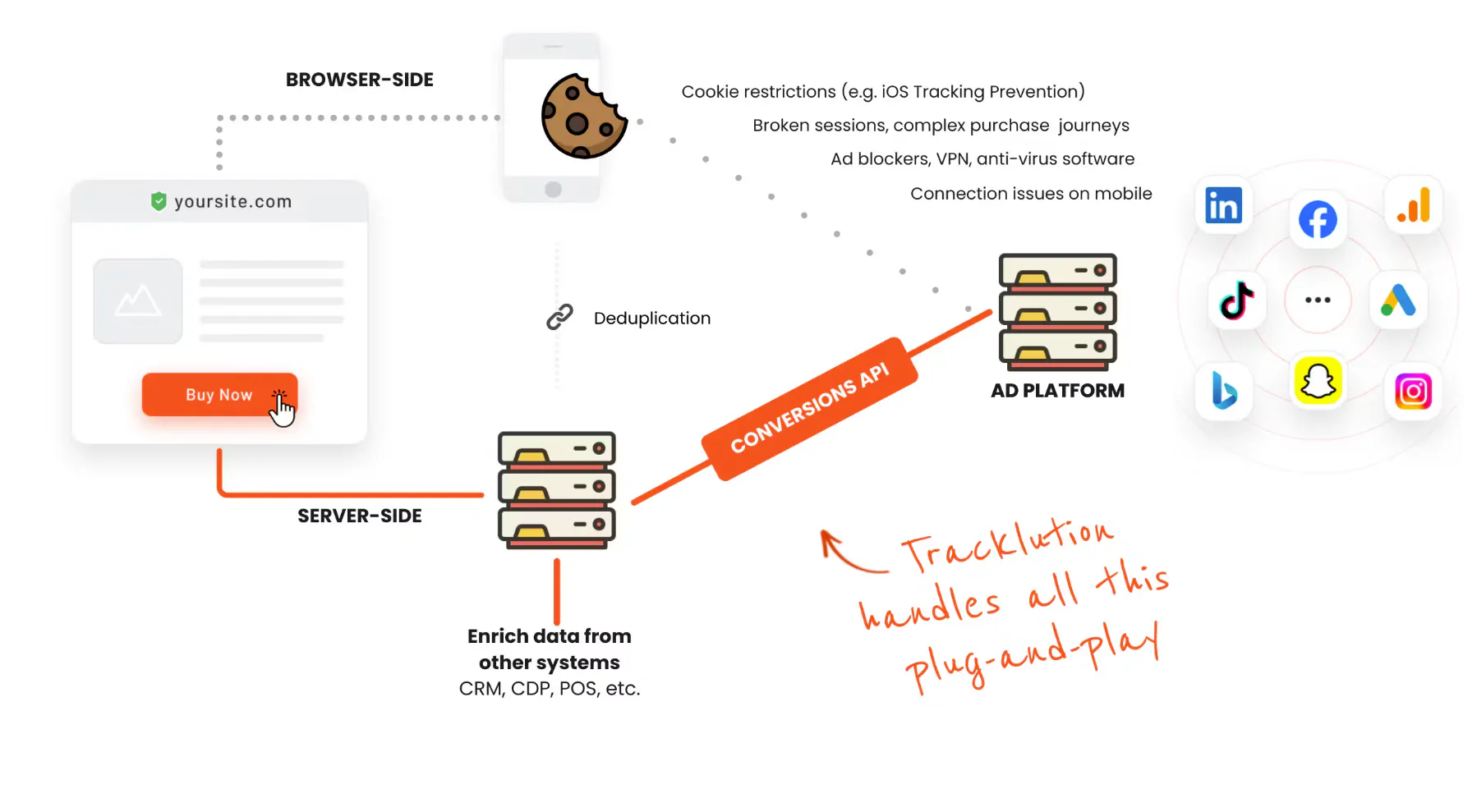
Over 30% of internet users employ ad blockers that block your pixels. Some visitors bounce before the user’s browser loads your tags. Safari, the second most-used browser, Intelligent Tracking Prevention (ITP) caps cookie lifetimes and blocks third-party cookies, meaning the data your business relies on is incomplete. And if you're tracking across domains? Good luck stitching that journey together. All of this leads to lost conversions and hidden events.
Sure, the low numbers make for sad reporting. But the real damage is the unreliable data foundation on which all of your marketing decisions depend.
How server-side tracking solves this
Server-side tracking shifts event collection from fragile browser scripts to your backend server. That means:
- Events aren’t lost due to browser blocking or script failure
- Conversions are recorded even if the user closes the tab quickly
- Tracking works across domains with first-party cookie continuity
- Ad blockers become irrelevant because no third-party scripts fire
The result? You recover lost conversions and gain a clear, accurate view of what’s actually working.
Take Tonefest Guitar Gallery, a used and vintage guitar retailer competing against companies with tens of millions in ad budget. As a smaller advertiser with incomplete tracking, they were often below the data volume the algorithm needs to learn. After moving to server-side tracking, they recovered 45% of conversions, doubled ROAS in two months, and grew online sales 36%.
"It's the only way to act bigger than you are. Giants throw money at ads, we have to be smarter." – Petri Matero, founder at Tonefest Guitar Gallery
2. Smarter ad optimization through better algorithm training
Why this matters
Most marketers underestimate how much data quality affects the efficiency and performance of paid ads on platforms like Meta, Google Ads and TikTok. They all rely on clean and complete conversion data to understand which users are converting and how to optimize your spend.
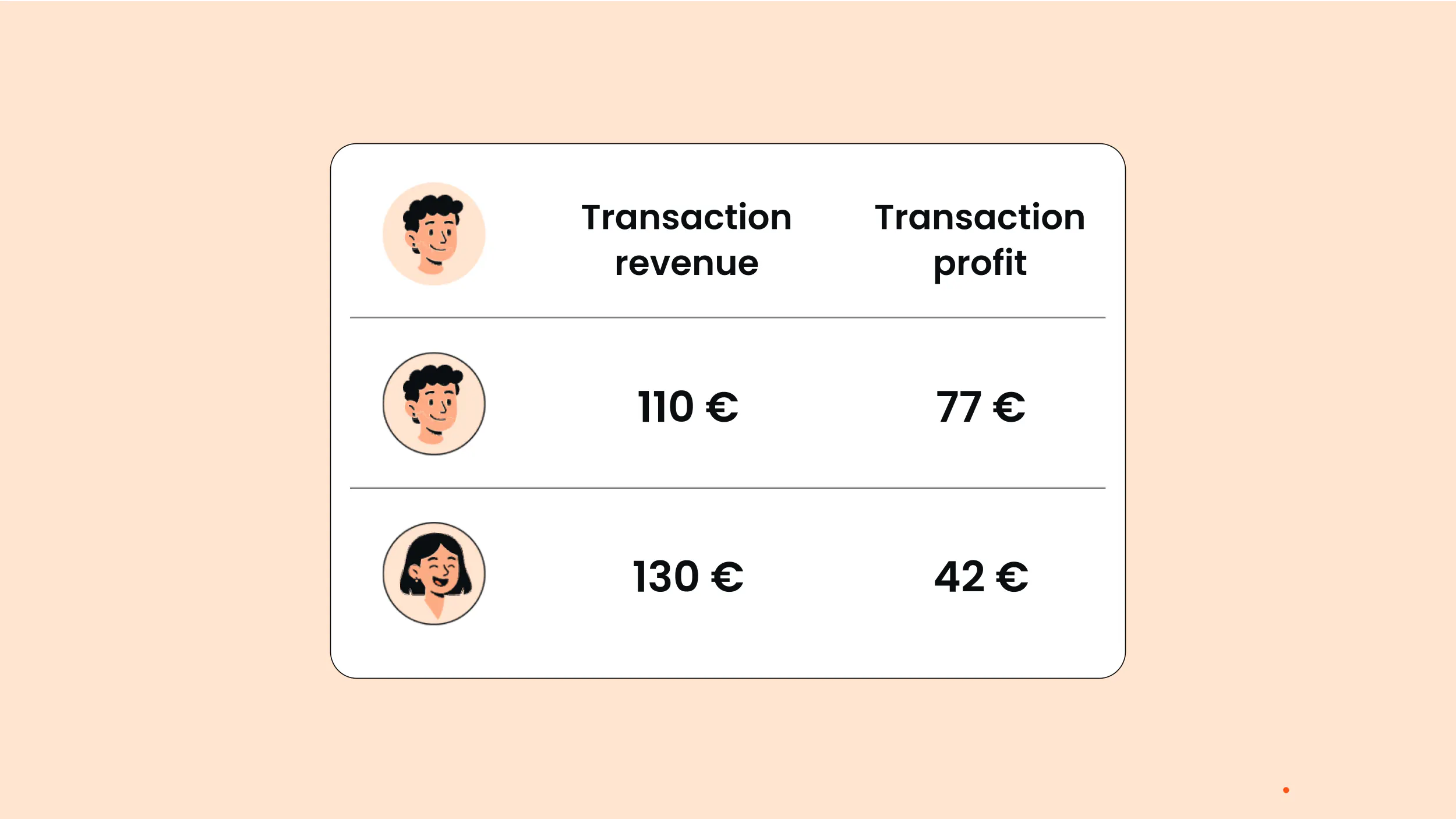
Proper targeting relies on complete tracking data that shows us the whole picture: the actions users took, the ads they saw, and the value of their purchases.
According to Meta’s Conversions API documentation, only events matched to a real account can be used for attribution and delivery optimization, so an incomplete customer record gets excluded from the process altogether. When there are data gaps, algorithm optimization is disrupted and it ends up spending your budget chasing the wrong signals.
All this to say that high data quality means algorithms learn faster and spend more efficiently, which directly impacts your bottom line.
How server-side tracking solves this
Recovered conversions directly affect the efficiency of your ad campaigns, and even modest ad efficiency gains can have a significant financial impact.
For example, a 20% improvement (often seen among our customers) on a $20,000 monthly ad budget can result in a monthly saving of $4,000, while maintaining or improving new revenue. And you can imagine how this effect scales as your ad budget and revenue do.
"The major thing is that people who say they're fine with client-side tracking usually don't understand that ads are driven by algorithms, and algorithms are directly affected by the data they receive. They think tracking is there just for fun, or just for watching reports — but that's not the case." — Anni Salo, CEO at Tracklution
3. Enhanced data control & compliance
Why this matters
Regulators are watching. Users are watching. And increasingly, ad platforms are watching too. As laid out in the IAB Europe Transparency & Consent Framework, the cost of not complying can extend beyond fines to damaged ad performance and lost trust.
Poor consent handling or loose data sharing practices can lead to:
- Legal risk
- Broken trust with users
- Account restrictions or pixel disablement
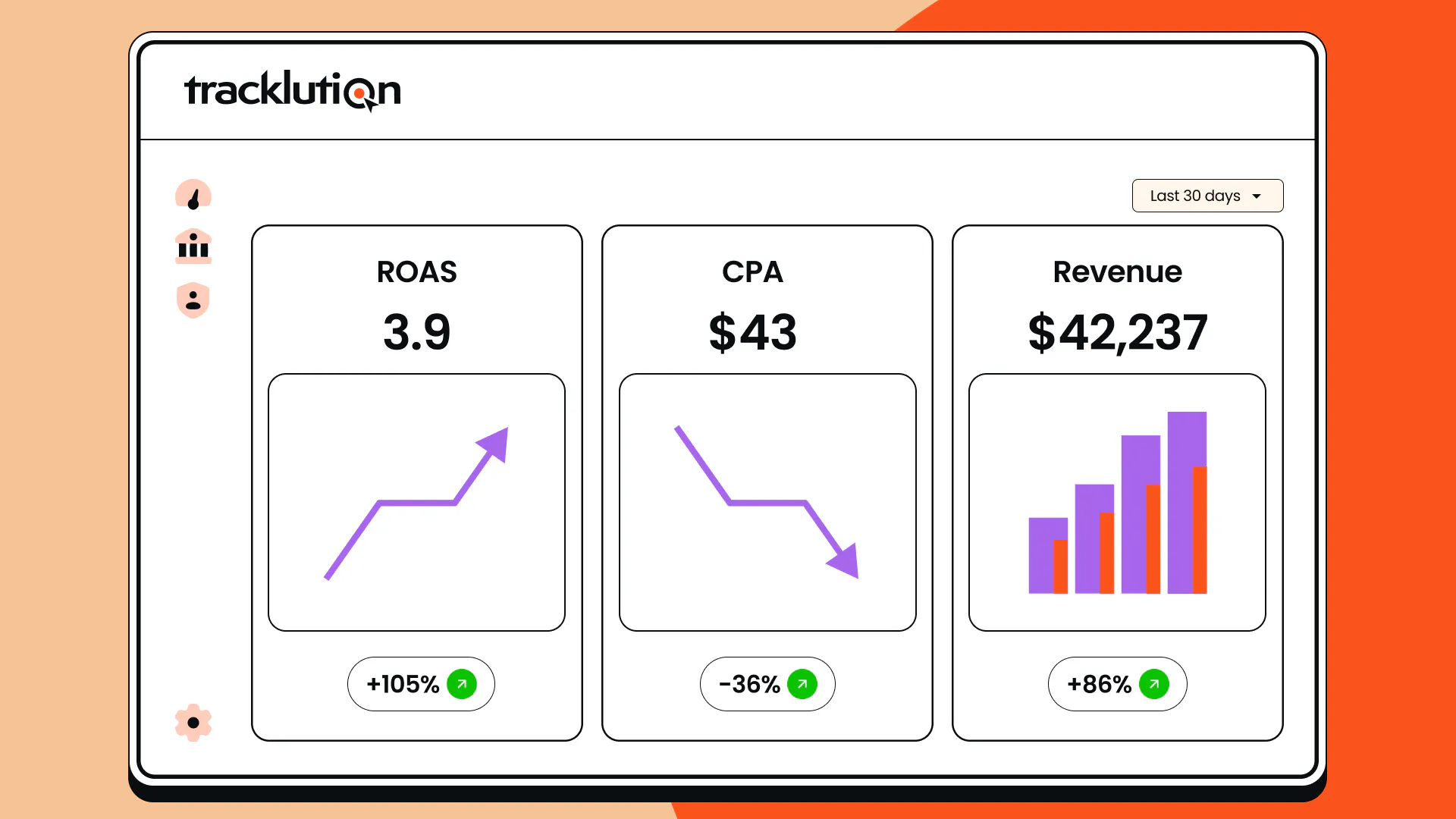
Handling data comes with the responsibility of protecting privacy and managing information sharing with third-party vendors. This means you need control over the data that you capture and distribute.
How server-side tracking solves this
Let’s be clear that it is a common server-side tracking myth that moving data collection to your own server automatically makes you GDPR-compliant.
However, while server-side tracking doesn’t guarantee compliance, it does afford you control over what user data gets captured, shared, with whom, and when.
While a browser pixel hands over raw data directly to the third-party vendor, an appropriate server-side tracking setup allows you to filter, anonymize, or restrict data. The ability to control data with this buffer between your users and third-party vendors is a fundamental privacy improvement that supports GDPR and other regulatory compliance.
4. Improved attribution & retargeting performance
Why this matters
When conversion tracking gaps cause you to miss events, your retargeting audiences shrink, and your attribution reports become unreliable.
This happens because accurate attribution and retargeting depend on recognizing the same user across visits, and the 7-day client-side cookie cap leads to returning visitors looking like brand new visitors. This shrinks your remarketing pools and distorts the overall picture.
How server-side tracking solves this
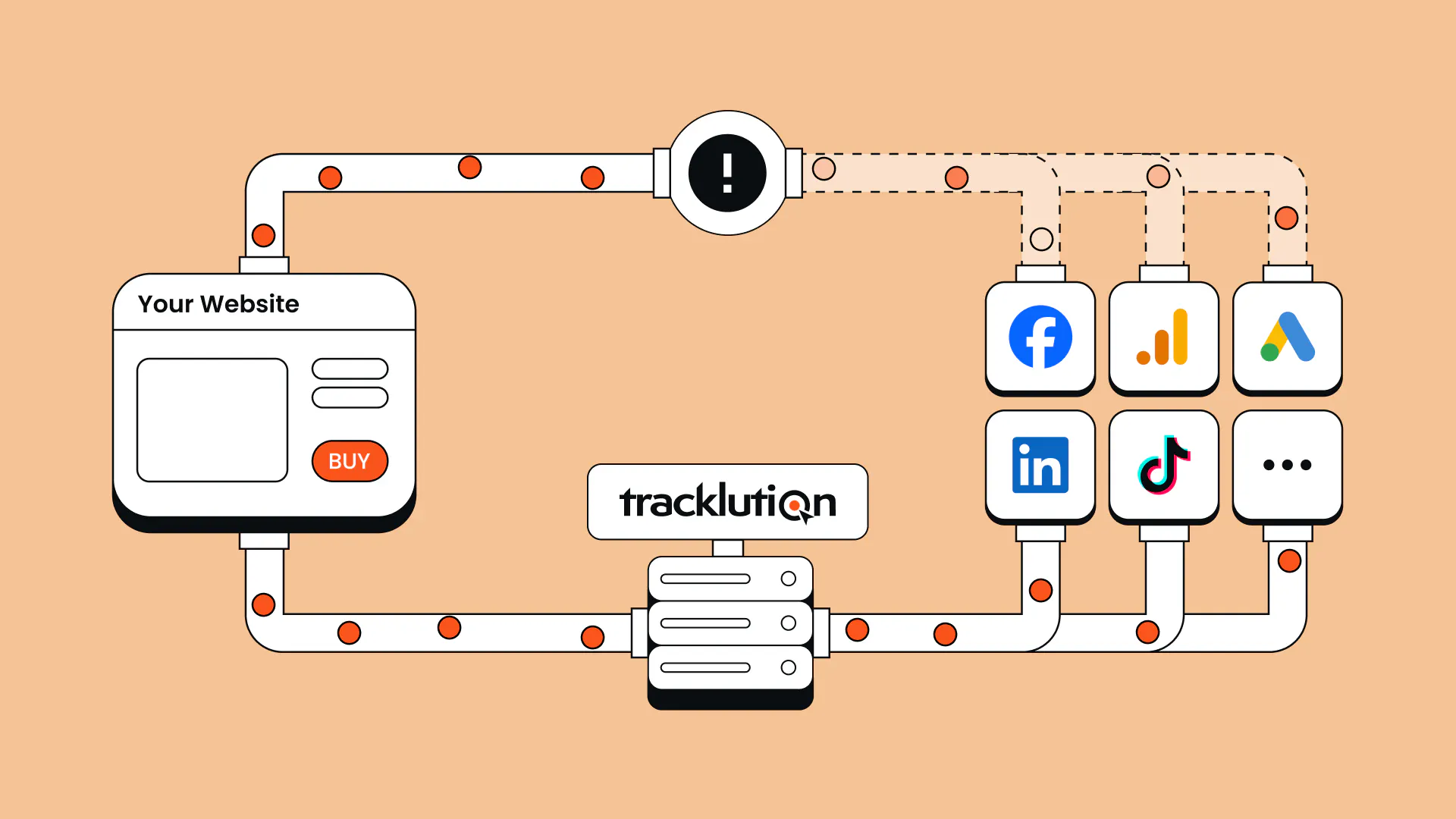
Server-side tracking restores those signals, recovering lost conversions by setting cookies in a first-party, server-side context with an extended cap. This keeps users in your audience beyond the seven day cutoff. It also improves match quality by sending richer, better-structured event data, which lets platforms connect more events to real people.
Server-side tracking tools like Tracklution ensure that every eligible event reaches your ad platforms, complete with the context they need to drive stronger results.
5. First-party cookies & cross-domain support
Why this matters
First-party cookies are essential for accurate tracking. But these days your ability to track returning users and attribute conversions breaks down fast. Apple’s Intelligent Tracking Prevention caps the lifespan of cookies set via JavaScript and browsers like Safari and Firefox restrict or block third-party cookies outright.
How server-side tracking solves this
Server-side tracking enables the use of first-party cookies via your own custom domain, sidestepping the storage limits and increasing the lifespan. This results in recognizable returning visitors and enables tracking across domains.
The real payoff of this sidestep is cross-domain tracking. Client-side cookies typically don’t travel across domains, so one visitor on multiple properties ends up looking like multiple visitors. A properly configured server-side setup maintains one first-party identity across all of your domains, giving you the full user journey as one picture instead of fragmented sections.
This technical layer is complex and It’s important to get the setup right for it to work properly. This is where a managed solution like Tracklution really shines, letting you maintain attribution and session continuity without requiring in-house complex engineering know-how.
6. Unified data pipeline and enrichment
Server-side tracking allows for all of your events to flow through your server; creating a unified pipeline instead of a mess of browser tags and conflicting data streams. The goal is for a consistent stream of data to flow in, so that the same high-quality, processed, and complete data can be distributed to your advertising platforms and analytics setups.
With server-side tracking you can enrich data in real time at the event level, merge events with CRM data or other offline conversions, and hash personal fields before they flow out to each vendor.
You can enrich and filter data both ways: enrich the incoming stream and trim the outgoing data so that each vendor receives data on your terms.
This gives you a unified view of each customer and opens the door for more personalized campaigns, higher LTV targeting, and digital marketing analytics.
The value of offline conversion tracking can’t be overstated. For a lot of businesses it’s where the real money hides. A lot of conversions, sometimes the majority, don’t happen on your site. Your pixel doesn’t pick up conversions on third-party booking systems, a payment on Stripe or a Calendly meeting schedule, for example.
Ad platforms only optimize on what they can see, and without closing the loop on offline conversions you risk attention shifting to the wrong campaigns while the ones driving leads and real revenue are ignored. Server-side tracking closes that loop.
Orthoclear, a clear-aligner company that runs mostly on Google Ads, experienced this directly. Their booking tool tracked clicks toward appointments, rather than the appointments themselves, so Google started chasing cheap clicks instead of real bookings.
After they implemented server-side tracking and connected that booking data into a unified server-side pipeline, they could track confirmed appointments from ad click through to booking. This change cut customer acquisition cost by more than 30% while holding the same appointment volume, and reduced ad spend by 20%.
"Before Tracklution, we basically judged success by whether the calendar was full. Now we know exactly which campaigns drive real appointments — and we've cut acquisition costs by more than 30% while keeping bookings steady." — Jesse Bartels, Chief Smile Officer at Orthoclear
7. Improved website performance & UX
Why this matters
Client-side tracking relies on a swarm of third-party scripts. Each one adds weight, slows down your pages, and risks clashing with other tools.
Analytics, pixels, chat widgets, and marketing scripts compete for the main thread, and asynchronous scripts can add latency even when they don’t block the initial render.
Slow pages make for low quality UX, higher bounce rates and sad Core Web Vitals that ultimately affect your conversions and** your organic rankings.
How server-side tracking solves this
Server-side tracking can be implemented with fewer scripts, saving bandwidth and improving load times.
Think your user won’t notice that few seconds difference? A Google Study on mobile page speed found that the likelihood of a user bouncing increases by 32% when page load time goes from 1s to 3s. And if the load time moves to 5s, bounce increases to 90%!
If you’re running performance-driven landing pages or ecommerce funnels, lagging load times can directly affect your revenue as users bounce before converting.
Stop leaving conversions on the table
Recover 20%-40% of your conversions with server-side tracking that installs in minutes
8. Stronger security with hidden API keys & spam protection
Why this matters
Client-side pixels often expose public-facing endpoints and raw event data (can also be personal data!) that attackers can spoof or scrape.
How server-side tracking solves this
Server-side tracking kills two birds with one stone. Not only does it hide credentials, but it also keeps junk traffic from spoiling your data.
When an API key or token is used in the browser, anyone who opens developer tools can read it. When you send those pings through your server instead, the keys never touch the device. The platform simply sees a request from your server, and your credentials stay where they belong…hidden.
Keeping your sensitive credentials behind the curtain reduces the risk of spam, fake conversions, or malicious usage of your tracking setup.
9. Future-proof tracking stack for a cookieless web
Why this matters
The outdated argument for server-side tracking was that third-party cookies are dying. Remember the panic over Chrome’s cookie deprecation? Thankfully, Google reversed this course and didn’t kill third-party cookies.
But there’s still a lesson to learn here: The tracking landscape is not immune to change and will likely keep getting more complex.
You should be future-proofing your tracking not because of the policies of a single browser, but because of the landscape’s direction of travel.
Anni Salo, sums it up nicely:
"Ad platforms are getting more automated, regulation is getting tighter, and customer journeys are getting messier. People switch between devices, do part of their research with AI tools, and in some cases an agent does part of the journey for them. Having a proper way to track all of it is even more important in the future than it is today.”
How server-side tracking solves this
Server-side tracking future-proofs your setup by giving you control over how you collect and share first-party data, flexibility to adapt as APIs and platforms evolve, and a stable foundation for privacy-safe growth.
Challenges and trade-offs of server-side tracking
So, what’s not to love about server-side tracking? Well, it’s certainly no magic cure or fix-all, and alongside the obvious benefits are some clear challenges you need to navigate.
- Complexity: You’ve probably had one or two head scratches just reading through all of this information. The technical layer of server-side tracking comes with a steep learning curve and/or some serious engineering know-how on your team. It only pays off if you get it right.
- Maintenance: Server-side tracking isn’t a once-off job that you can get an external technical specialist to set up and then let it run itself. APIs change, platform requirements evolve, and integrations and infrastructure need ongoing maintenance. To reap the benefits of server-side tracking you need to configure and maintain it properly to remain relevant and accurate.
- Cost: This depends on the route that you take: self-hosted, a shared or managed hosting service, or a fully managed solution.
At first glance, self-hosted or managed hosting options may seem pretty affordable, but total costs add up quickly: the primary cost typically comes from the need for technical expertise to set up and maintain. If you don’t have in-house tech experts, total costs can easily run into the thousands.
Tracklution exists to tackle these challenges, bypassing the need for costly setup and maintenance that you’d otherwise be paying for separately so that you can get the benefits without running the infrastructure.
Wondering whether server-side is right for you? Read our guide to client-side vs server-side tracking or check out the table below.
Dimension | Client-side | Server-side |
|---|---|---|
Data recovery | Loses data to ad blockers, browser restrictions, cookie caps | Recovers roughly 20% to 40%, but not a silver bullet |
Cost | Free script in the page | Self-hosted from $120/month, plus setup and maintenance (can run into the thousands); from $39/month with a fully managed solution like Tracklution |
Setup effort | Around 1 to 2 hours per platform, marketer-friendly | Days to weeks self-hosted, minutes with a managed tool like Tracklution |
Maintenance | Low | Ongoing; APIs change, containers don't auto-update |
Data control | Vendors get raw browser access | Filter, hash, or drop data before it leaves |
Page speed | Heavier, more browser scripts | Lighter, only if you don't also run the full pixel |
Compliance | Auditable in the browser | More control, but not automatic compliance |
Debugging | Real-time browser tools | Harder, multiple layers |
Whether your tracking struggle links to data accuracy, privacy concerns, or plain lack of results, Tracklution is built to adapt with you, so you’re never stuck chasing the next workaround.
“Nearly all the agencies I talked with said either that they're not doing server-side tracking because they're not technical enough, or that they tried doing it themselves and it was too complicated and not scalable. The easy answer to both is: with us, you don't have to worry about it. If you know how to copy-paste, follow instructions, or implement a normal client-side tracking tag to your website, you know how to install Tracklution” — Anni Salo, CEO at Tracklution
Is server-side tracking worth it?
Whether server-side tracking is worth it is not a straightforward yes or no answer.
Generally speaking, If you don’t run paid ads or if you have a very limited budget, then server-side tracking likely isn’t the solution for you because the return probably won’t outweigh the cost and resources required to set it up and run it.
But if you’re a high-traffic, data-driven business that allocates a meaningful budget towards paid ads, then a server-side setup is the smart, worthwhile choice.
This is the big picture: Your tracking data teaches algorithms what to chase and informs important marketing decisions. If you’re only using client-side tracking, you’re leaving money on the table. Server-side tracking fills those gaps, gives you control over your data and recovers lost conversions so that your campaigns perform at their best, and your ad spend works efficiently.
But it’s not a silver bullet and a sloppy setup just leaves you bleeding money and data. Scale the cost and complexity hurdles with Tracklution. It installs in as little as 16-minutes on average, recovers over 30% of lost conversions, and handles the servers, updates and data processing for you.
FAQs
Is server-side tracking worth it for a small business?
The value of server-side tracking isn’t dependent on the size of your business but on your ad spend and how much data you’re losing. If you’re spending less than a few hundred dollars a month on paid media, the juice is likely not worth the squeeze. But anything more than that and you’re likely to see a real return from investing in a proper tracking setup.
Why do you need server-side tracking?
Because the browser environment that client-side tracking relies on is no longer dependable. Ad blockers affect over 30% of users, Safari caps cookie lifetimes to 7 days, and third-party scripts are increasingly restricted. This means a meaningful chunk of your conversion data never reaches your ad platforms, and they end up optimizing on incomplete information. Server-side tracking moves event collection to your server, where it isn't subject to those browser-level restrictions.
What is the impact of server-side tracking on ad performance?
The biggest impact is on the data that feeds your ad algorithms. When you recover conversions that client-side tracking misses, platforms like Meta and Google receive more complete signals, which means they optimize bidding and targeting more accurately. This typically translates to improved ROAS and lower acquisition costs, with the effect scaling alongside your ad spend. Beyond ads, server-side tracking also reduces page load times and gives you more control over data sharing for privacy compliance.
Does server-side tracking actually bypass ad blockers?
While server-side tracking is less-likely to be blocked than a browser-based pixel, it’s not impossible. Some ad blockers can still identify and block server-side setups, especially if they;re not configured as a proper first-party setup.
Do I still need cookie consent with server-side tracking?
Yes. Server-side tracking does not equal compliance and it doesn’t remove your obligation to compliance, but it does provide you with more control over the data.
Server-side or client-side tracking: which should I use?
It’s not an either-or decision and for most businesses, a hybrid model works best. Most strong setups run both with deduplication for the sake of redundancy. Our server-side vs. client-side tracking guide covers where each one wins.
How many conversions will I actually recover?
This is largely dependent on your audience type but usually lands in the 20% - 40% range.
Related posts

Server-Side Tracking
Server-side tagging: What it is and why it matters for your ad performance
Get clear on what server-side tagging is, why it matters for your ad performance, and whether it’s worth it for your marketing team.
Server-Side Tracking
Server-side tagging: What it is and why it matters for your ad performance
Get clear on what server-side tagging is, why it matters for your ad performance, and whether it’s worth it for your marketing team.

Server-Side Tracking
Server-side tracking and GDPR: what you need to know
Server-side tracking won't make you GDPR compliant on its own, but it gives you the control to get there. Here's a setup your legal team can sign off on
Server-Side Tracking
Server-side tracking and GDPR: what you need to know
Server-side tracking won't make you GDPR compliant on its own, but it gives you the control to get there. Here's a setup your legal team can sign off on
Server-Side Tracking
Server-side tracking vs server-side tagging vs platform gateways: What they are and which to choose
Server-side tracking, tagging, and gateways are not the same thing. Learn what each approach does, how they compare, and which is right for your setup.
Server-Side Tracking
Server-side tracking vs server-side tagging vs platform gateways: What they are and which to choose
Server-side tracking, tagging, and gateways are not the same thing. Learn what each approach does, how they compare, and which is right for your setup.
Questions and answers
What does Tracklution actually do?
Tracklution sends conversion data directly to ad platforms (Meta, Google Ads, TikTok, etc.) through server-side APIs. Instead of relying on browser pixels that get blocked by ad blockers, iOS privacy changes, and cookie restrictions, your data goes server-to-server. The result: ad platforms see more of your real conversions, their algorithms optimize better, and you get better ROAS.
What is server-side tracking?
Server-side tracking gathers first-party data directly on your website and sends tracking events to ad platforms via Conversion APIs. This approach bypasses restrictions from iOS devices, ad blockers, and privacy-focused browsers, providing more accurate data and making your paid advertising more efficient.
Is it just one setup that feeds data into all my ad platforms?
Yes. You install Tracklution once, connect your ad accounts, and it sends conversion data to all platforms simultaneously through their respective APIs (Meta CAPI, Google Ads API, TikTok Events API, etc.). No need to manage separate server-side setups for each platform.
How much more conversion data will my ad platforms actually see?
On average, clients report 34.2% more conversions compared to traditional browser-based pixels. This means the ad algorithms have significantly more signal to work with, which translates to 15-35% lower customer acquisition costs for most clients.
Do I need developers to set this up?
No. Setup takes 5-15 minutes depending on your platform. For Shopify, WooCommerce, and other supported platforms, it is plug-and-play. You do not need custom coding or engineering resources. For GTM users, you can keep your existing setup and add Tracklution alongside it.
Do I need to remove my existing tracking tags?
Not necessarily. Tracklution works alongside your current setup. You can run both in parallel initially to compare data, then decide whether to simplify.
What about the DNS / CNAME setup?
Tracklution uses a first-party CNAME record on your domain for data collection. This takes a couple of minutes to configure and up to 48 hours to propagate. It is what makes the tracking resistant to ad blockers and browser restrictions.
Can I verify that the data is actually more accurate?
Yes. Run Tracklution alongside your existing tracking and compare. The dashboard also shows "recovered events" so you can see exactly how many conversions would have been missed without server-side tracking.
Can I distinguish between organic and paid traffic?
Yes. Tracklution preserves traffic source attribution. The conversion data sent to each ad platform includes the proper attribution parameters.
What about offline conversions (phone calls, in-store, CRM events)?
Tracklution supports offline conversion tracking through webhooks and CRM integrations. If someone clicks an ad, then converts offline, you can feed that back to the ad platforms. Clients using this see up to 35% reduction in acquisition costs because the algorithms learn from the full conversion picture.
How does this work with cookie consent and CMP tools?
Tracklution supports both Basic and Advanced Consent Mode. It reads your CMP data layer automatically and respects user consent choices. In Advanced Consent Mode, it can still collect anonymized, cookieless data when users decline cookies, which helps ad platform modeling without violating privacy rules. Fully GDPR-compliant.
How is this different from Stape or building your own sGTM setup?
Stape provides server-side GTM hosting, which means you still need to build and maintain the tags, triggers, and configuration yourself. Tracklution is a complete solution: plug-and-play setup, automatic event detection, built-in consent management, a real-time analytics dashboard, and ongoing maintenance of all API connections. When ad platforms change their APIs (which happens often), we handle the updates.
How does the agency partner model work?
Single dashboard to manage all client accounts. Each client has their own tracking container. The platform handles all technical maintenance, so you are not stuck troubleshooting API changes or broken tracking.

Have further questions?




