Offline Conversion Tracking: What It Is, How It Works, and How to Set It Up
If your customers convert off your website - by phone, in-store, via Calendly, Stripe, or your CRM - your ad platforms may be flying blind. Here's how to fix it with offline conversion tracking.

Table of contents
Better data.
Set up server-side tracking in minutes with Tracklution. Send better conversion data to your ad platforms so their algorithms can optimise for better results from your budget.
Start your free trialIf you have customers who convert offline (calls, in-store, Calendly, Stripe, etc.) and you haven’t set up offline conversion tracking, you and your ad platforms are essentially flying blind.
Imagine a customer who clicks your ad, visits your landing page, reads it, and then books a call via Calendly. Three days later, the customer pays for the product or service. Although the original touchpoint worked perfectly, your ad platforms and your reporting are completely oblivious to it.
This problem affects more businesses than the name “offline” conversion tracking suggests. The challenge is to close the gap between a customer’s early interactions with your site or campaigns and the offline conversion events that actually drive business impact.
What is offline conversion tracking?
At its core, offline conversion tracking is the process of connecting real-world business outcomes to the digital interactions that preceded them.
The name is a bit of a misnomer. While it often brings to mind in-store purchases or phone calls, it actually encompasses any conversion that happens outside the scope of your tracking pixel.
It is the practice of syncing this offline data back to your marketing and reporting systems.
This includes:
- In-store purchases and over-the-phone sales
- Third-party booking tools like Calendly, Acuity, etc.
- Separate payment processors like Stripe, Shopify checkout, etc.
- CRM conversion tracking, like a lead converting weeks after being generated on your site, but the sale actually closing in HubSpot or Salesforce.
- SaaS trial to conversion tracking, like a free trial signup occurring on your site, but the conversion to a paying customer occurring in a separate system like Recurly, etc.
- Subscription renewals where the first payment is tracked, but subsequent renewals remain invisible
While the concept of offline conversion tracking can also be used more broadly for digital marketing analytics and revenue attribution, this guide focuses on the most immediate use case: feeding high-quality conversion data back to your ad platforms to improve algorithmic optimization and campaign ROAS..
Why does offline conversion tracking matter?
Ad platforms only optimize based on what they can see. Offline conversions are, by definition, invisible. No pixel magic or wizardry will help you track a deal that closes in your CRM or a payment that processes in Stripe. To your ad platforms, they simply don't exist unless you send that data back to them.
For businesses where a part of your conversion cycle occurs offline, this has specific and problematic implications.
Without accurate offline conversion tracking, a campaign generating qualified leads that then convert in your CRM is considered a failure. And a campaign that generates a huge number of leads that don't convert looks like a winner.
Your budget will shift to campaigns that have more conversions occurring online, and the campaigns that are actually generating revenue for your business will be starved of budget. Your bidding will optimize for form fills and free signups instead of revenue and deals. And your CPA and ROAS will be calculated on inaccurate numbers, leaving you and your ad platforms unable to make effective campaign decisions.
All of this also directly impacts the perceived value of your ad campaigns in the eyes of relevant stakeholders, as some of the most important results are never attributed.
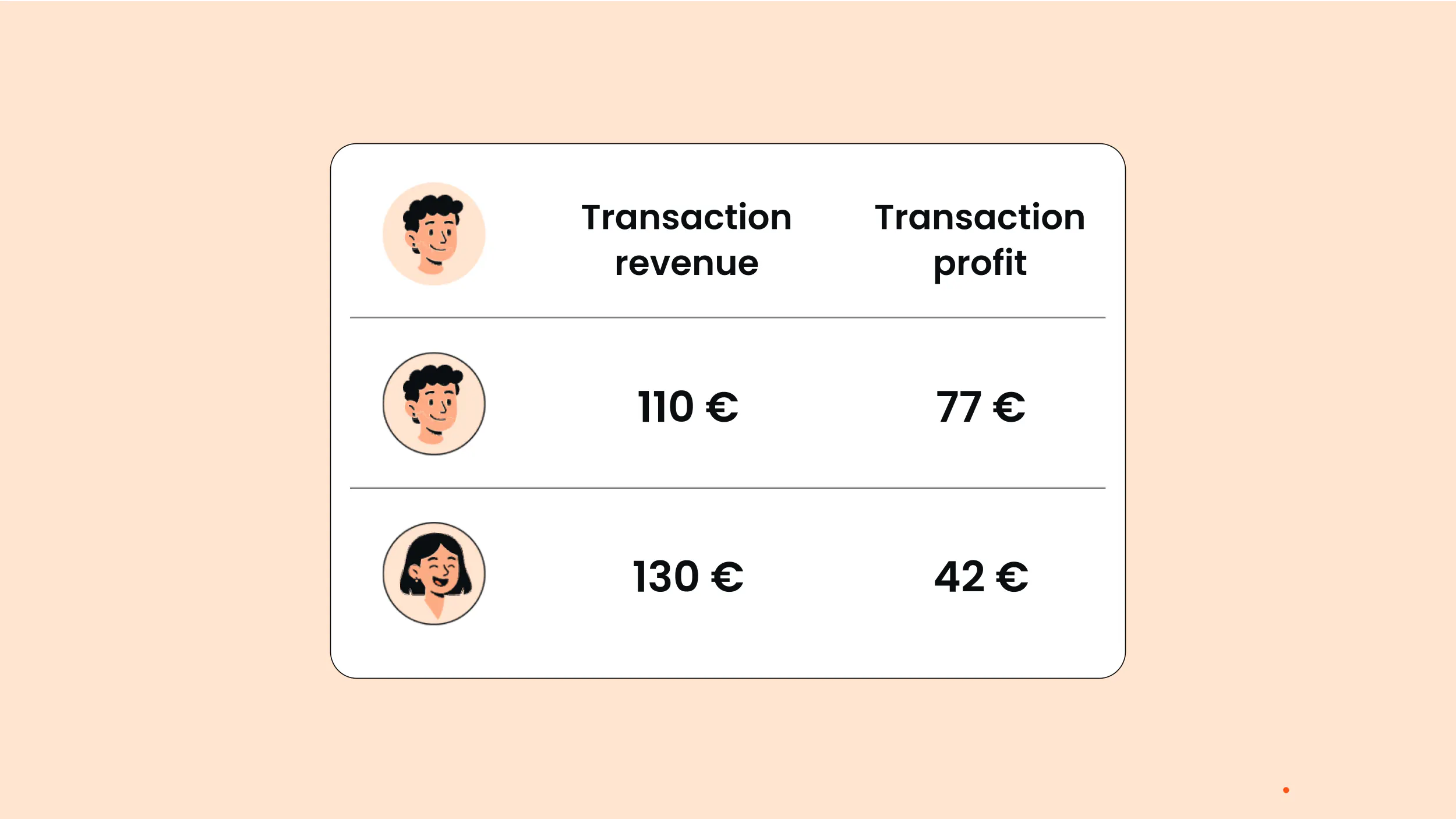
When your ad platform finally sees what happened after the click: the payment, the closed deal, the activated subscription - it stops optimising for the wrong thing. The algorithm learns from people who actually became customers, which sharpens bidding, improves audience targeting, and tends to reduce CAC over time.
IAB's State of Data 2024 reporting found that 73% of ad and data decision-makers expect their ability to attribute campaign performance to degrade due to signal loss - offline tracking gaps are a significant part of that picture.
How Does Offline Conversion Tracking Work?
The mechanism generally hinges on the Click ID. This is a unique ID that your ad platform appends to every URL when a user clicks on your ad.
For instance, Google uses GCLID, Facebook uses FBCLID, and Microsoft uses MSCLKID. Each of them is slightly different, but the principle is the same. Your website captures this ID and stores it, along with any other information you collect from the user throughout their journey.
With offline conversion tracking,the final event (the payment, the closed deal, the subscription activation) is sent to the ad platform with the Click ID, which it then matches to the original ad click and attributes the conversion to the correct campaign, ad set, and audience..
In case no click ID is present, it is possible to match based on hashed data. Google's enhanced conversions for leads and Meta's Conversions API support this with hashed email and phone number data.
There are two things to be aware of for successful implementation:
- Deduplication
When conversions are tracked through multiple sources - such as a browser pixel and a server-side or offline event - the same conversion can sometimes be reported more than once. Advanced server-side tracking solutions such as Tracklution help prevent this by passing identifiers such as transaction IDs, event IDs, or click IDs. These are used by advertising platforms to recognize duplicate signals and only count the conversion event once.
- Consent Signals
Offline conversion events should carry the consent signal from the original web session. If a user has declined to be tracked on your site, this should also be honored in how you send this data back to the platform.
Who needs offline conversion tracking?
Any business where the conversion event you actually care takes place outside of your own site. This includes:
- Brick and mortar and phone sales: This is the original offline conversion problem. Every offline conversion event is taking place in a physical location or over the phone.
- SaaS and subscription-based businesses: In these cases, trial to paid conversion is taking place in Stripe or your own billing system, not on your marketing site, which is where SaaS server-side tracking comes in.
- B2B businesses: B2B conversions often take place in your CRM.
- eCommerce with third-party checkout, where the pixel fires on your product pages but the transaction completes elsewhere
- Appointment-based service businesses where booking happens in Calendly or similar, and payment takes place separately.
Case Study: Orthoclear

Orthoclear, an Amsterdam-based clear aligner provider, was running Google Ads but had no visibility into either their Calendly bookings or their Shopify purchases.
After connecting both to Google Ads via Tracklution, they cut CAC by 30% and reduced ad spend by 20% while maintaining appointment volume.
"Before Tracklution, we basically judged success by whether the calendar was full. Now we know exactly which campaigns drive real appointments — and we've cut acquisition costs by more than 30% while keeping bookings steady." — Jesse Bartels, Orthoclear
Read the full case study here →
How to set up offline conversion tracking
There are four main approaches, differing substantially in reliability, maintenance overhead, and real-time delivery.
The best place to start is determined by where your conversion data lives.
For example, if your conversion data lives in a CRM that has native connectivity to your ad platform, that is likely your best place to start.
If it’s stored in a payment processor such as Stripe or Recurly, or in booking tools without native ad platform integration, you may need to use webhook-based delivery.
1. Manual CSV upload
Google and Meta allow you to upload offline conversions in CSV format. Google's conversion window is 90 days from the click date (63 days for Enhanced Conversions for Leads). This is a delayed signal and you'll need to do it once for each platform. There’s no deduplication logic and no error notifications, so it’s probably not something you'd want to do at scale.
2. Native CRM integrations
Salesforce and HubSpot have Google Ads integrations that automatically send closed deals back to the platform without the need to manually upload them. The cons are that most of these integrations support Google Ads only, the level of granularity is restricted to what the integration provides, and they will also stop working if your CRM configuration changes.
3. Middleware (Zapier, Make)
Automation tools like Zapier or Make can connect your CRM, Calendly, or Stripe to ad platform APIs, with no developer needed. It works fine when volume is low. But they start to become less convenient at scale; you'll hit rate limits that delay delivery and will need a separate workflow for every platform you're sending to. You also won't get any help with deduplication or consent management, so you'd have to handle those yourself.
4. Server-side tracking
Server-side tracking can send conversion data from your source systems (CRM, booking platform, payment processor, or point of sale) to a single server endpoint via webhooks. The server handles click ID matching, deduplication, consent signal propagation, and delivery to all ad platforms at once.
This is the most reliable method for offline conversion tracking at scale. One integration, many platforms, and the ability to include conversion value in addition to conversion actions (such as profit margin, LTV, subscription value) so platforms can optimize for Profit on Ad Spend rather than raw revenue.
The traditional server-side setup requires significant engineering effort both to implement and to maintain. But server-side tracking tools like Tracklution can match events to the original click ID or user identifier automatically, and deliver to Google, Meta, and other platforms in real time without manual uploads, developer, or GTM container.
A second benefit of server-side tracking tools is signal recovery. Ad blockers, iOS restrictions, and cookie deprecation cause conversion data loss. This loss can be equally as damaging to campaign optimization as loss due to offline tracking limitations. On average, Tracklution’s customers receive 34.2% more conversion data sent to ad platforms compared to client-side tracking alone, resulting in an 18% reduction in customer acquisition cost.
Close the loop between your ad spend and actual revenue
Tracklution automatically sends offline conversions from your CRM, Stripe, Calendly, or POS to Google and Meta in real time. No CSV uploads, no developer, no per-platform setup.
Platform notes: Google, Meta, Microsoft
Google Ads offline conversion tracking
Click identifier:
GCLID (Google Click ID). Auto-tagging is required.
Upload options and windows:
- CSV/scheduled upload: Up to 90 days from click; 63 days for enhanced conversions for leads
- Direct API or server-side: Real time, no upload constraint
Key recommendation:
Enhanced conversions for leads is Google's recommended approach for offline conversion tracking. It combines GCLID with hashed email or phone, improving match rates and attribution. This is particularly useful in cases where click ID is not present due to cookie blocking or cross-device activity.
One thing worth knowing: A dedicated conversion action is required for each type of event (e.g. "lead qualified," "deal closed"). Where possible, send both GCLID and hashed email or phone together. This improves match rates, particularly for cross-device journeys or sessions where the GCLID alone may not resolve.
For any account with an ongoing conversion flow, Google Ads server-side tracking is your best option. It delivers events in real time, eliminating upload windows and manual maintenance entirely.
Meta Ads offline conversion tracking
Click identifier:
FBCLID, stored as 'fbc'.
One thing worth knowing: 'fbp' is also used as a fallback identifier in the user’s browser in case 'fbclid' is not set.
Upload options and windows:
- Manual upload (Events Manager): Within 62 days of the conversion.
Note: The 28-day window refers to how far back Meta will attempt to match a conversion to a click, while the 62-day limit applies to how long you have to upload the event. They are separate, but both affect attribution.
- Conversions API: Real time, no upload constraint
Key recommendation:
Meta Conversions API (server-side tracking) is the way to go. Server-to-server bypasses browser constraints, and hashed first-party data makes up for the lack of FBCLID.
CAPI developer documentation recommends passing multiple identifiers (email, phone, name, location) to achieve optimal Event Match Quality (EMQ), which is used in optimization and delivery.
Note: Meta's legacy Offline Conversions API was deprecated in mid-2025.. All offline events should be sent via CAPI.
Microsoft Ads offline conversion tracking
Click identifier:
MSCLKID. Auto-tagging is required.
Upload options and windows:
- CSV/API upload: Up to 90 days from click (configurable when creating the conversion goal)
- Server-side: Real time, no delivery constraint
Key recommendation: Microsoft’s hashed email and phone number matching (similar to Google’s enhanced conversions for leads) is beneficial in making up for missing MSCLKID.
For any account other than occasional use, server-side tracking via webhook is the way to go. Real time, no upload window constraints. If Bing is driving real B2B traffic for your business, it is worth setting up.
How to set up offline conversion tracking
"Offline" conversion tracking is the wrong way to think about the problem. We're not talking about edge cases; we're talking about the Calendly booking, Stripe payment, or CRM deal that your business actually runs on.
The idea is straightforward: get the click ID, process it through your system, and send it back out when the deal closes. But the execution is the hard part, where each solution has its own failure case: CSV at scale, CRM integration when your config changes, middleware when rate limits are hit.
You could implement your own custom server-side solution, but there's real work involved up front and ongoing maintenance to consider. Tracklution takes the complexity out of it: the infrastructure is taken care of so that you don't need to manage different solutions per platform or babysit the integrations as your system evolves.
Feed your ad algorithms what they're actually missing
Tracklution connects your CRM, Stripe, Calendly, or POS to your ad platforms in real time, automatically closing the loop between your ad spend and actual business impact. 14-day free trial, no coding required.
Related posts
Conversion Tracking
Google Ads conversion tracking in 2026: A complete guide
Learn how Google Ads conversion tracking works, compare client-side and server-side setups, see where Enhanced Conversions fits, and choose the right approach.
Conversion Tracking
Google Ads conversion tracking in 2026: A complete guide
Learn how Google Ads conversion tracking works, compare client-side and server-side setups, see where Enhanced Conversions fits, and choose the right approach.

Conversion Tracking
Shopify Google Ads Conversion Tracking Setup Guide
Set up Shopify Google Ads conversion tracking, find out why Google Ads reports fewer conversions than Shopify, and learn how to recover the missing sales.
Conversion Tracking
Shopify Google Ads Conversion Tracking Setup Guide
Set up Shopify Google Ads conversion tracking, find out why Google Ads reports fewer conversions than Shopify, and learn how to recover the missing sales.
Conversion Tracking
Conversion tracking software: A practical buyer’s guide
Conversion tracking software covers many different tools solving different problems under one label. Find the category you need, with options for each.
Conversion Tracking
Conversion tracking software: A practical buyer’s guide
Conversion tracking software covers many different tools solving different problems under one label. Find the category you need, with options for each.
Questions and answers
1. What is an "offline" conversion?
Any conversion that occurs beyond the reach of your tracking pixel. This includes in-person sales, phone sales, third-party bookings, CRM deals, payments on another platform, or any other form of revenue generation. If your pixel cannot observe your conversions, then they are offline conversions.
2. How do ad platforms match offline conversion events to an ad click?
Primarily through click IDs (GCLID, FBCLID, MSCLKID), which were stored during the original ad click. If click IDs are not present, then platforms may utilize hashed first-party data, email, or phone number data using Google's enhanced conversions or Meta's CAPI advanced matching.
3. What if I don't have a click ID for every offline conversion?
Passing hashed email and phone number data will recover a significant percentage of what your click ID chain is missing. A second thing to verify is whether your CRM is actually passing GCLID at lead capture. That is where most advertisers go wrong.
4. How long do I have to import an offline conversion?
It depends on the platform and method. For Google, it's 90 days from the click date (63 days for enhanced conversions for leads). For Meta, it's 62 days from conversion. For Microsoft, it's 90 days from the click date. None of these limits apply to server-side tracking in practice, as it sends conversions in real time.
5. What's the difference between offline conversion tracking and server-side tracking?
Offline conversion tracking is the feature, server-side tracking is the technology that enables it. While you can have offline conversion tracking without server-side tracking, server-side is the most reliable way to automate it at scale with minimal ongoing effort.
6. Does this work with GA4?
To get offline events into GA4, you'd need a separate implementation: either custom-built or via a server-side tracking tool like Tracklution that can send events to multiple destinations simultaneously. That way, the same CRM or payment event reaches GA4 and your ad platforms without building a separate integration for each one.
7. Can I automate offline conversion tracking?
Yes, every approach mentioned here, except for CSV upload, is automated. CRM integration, middleware, and server-side tracking are all automated processes. Server-side is the most complete method for automation, especially at scale and across multiple platforms. While custom server-side setups require complex setup and maintenance, tools like Tracklution support multiple platforms out of the box, with minimal setup and no development resources required.

Have further questions?




