Tracklution product update: July 2026
Discover Tracklution's July updates: improved GA4 tracking, Meta attribution insights, stronger first-party tracking, and enhanced reporting.

Table of contents
Better data.
Set up server-side tracking in minutes with Tracklution. Send better conversion data to your ad platforms so their algorithms can optimise for better results from your budget.
Start your free trialWe've released several updates focused on improving Google Analytics tracking, providing deeper attribution insights, strengthening first-party tracking, and expanding dashboard visibility:
📊 GA4 v2 becomes the default Google Analytics connector 📈 Meta Additional Conversions Insights now available 🛡️ Same-Origin Proxy for WooCommerce tracking 📋 New dashboard insights and reporting improvements
📊 GA4 v2: Better Google Analytics Tracking
GA4 v2 is now the default Google Analytics connector for all new installations.
Unlike the v1 implementation, GA4 v2 runs Google's own tag directly on your website, allowing Google Analytics to behave exactly like a standard GA4 installation. This means you get normal session handling, attribution, and all of GA4's built-in Enhanced Measurement features such as scroll tracking, outbound clicks, file downloads, site search, and more.
At the same time, Tracklution continues recovering events that browsers would otherwise miss by sending them server-side. Purchases and other conversion events blocked by ad blockers or browser restrictions are still delivered to Google Analytics, helping maintain more complete reporting.
The previous GA4 connector remains available as GA4 v1. You can switch from GA4 v1 to GA4 v2 on the GA4 connector page.
You can find the documentation here.
📈 Meta Additional Conversions Insights
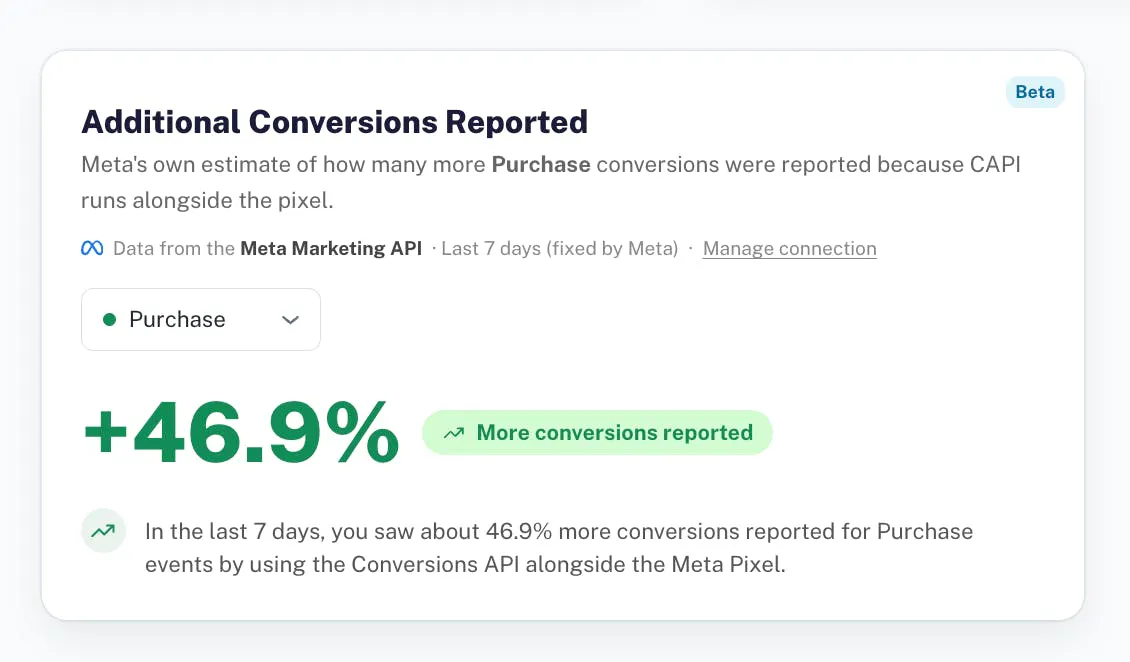
Tracklution now displays Meta's Additional Conversions Reported metric directly from the Meta Marketing API.
This metric represents Meta's own estimate of how many additional conversions were attributed because the Meta Conversions API was running alongside the browser Pixel.
The new insight gives advertisers an easy way to see the measurable impact of combining server-side tracking with traditional browser tracking, directly inside Tracklution.
🛡️ Same-Origin Proxy for WooCommerce
WooCommerce installations now support Same-Origin Proxy delivery through the Tracklution WordPress plugin.
Instead of loading tracking requests from a Tracklution subdomain, requests can now be served directly through the store's own domain (for example, myshop.com/trl).
Running tracking through the same origin makes requests significantly harder for browsers and ad blockers to identify and block, improving data collection reliability.
For maximum stability, if the proxy cannot be reached, Tracklution automatically falls back to the previous delivery method without interrupting tracking.
The updated WooCommerce plugin is now available from the WooCommerce installation guide.
📋 Dashboard & Reporting Improvements
We've added several new reporting and analysis improvements across the Tracklution dashboard:
Show Secondary Traffic Sources in Event Cards
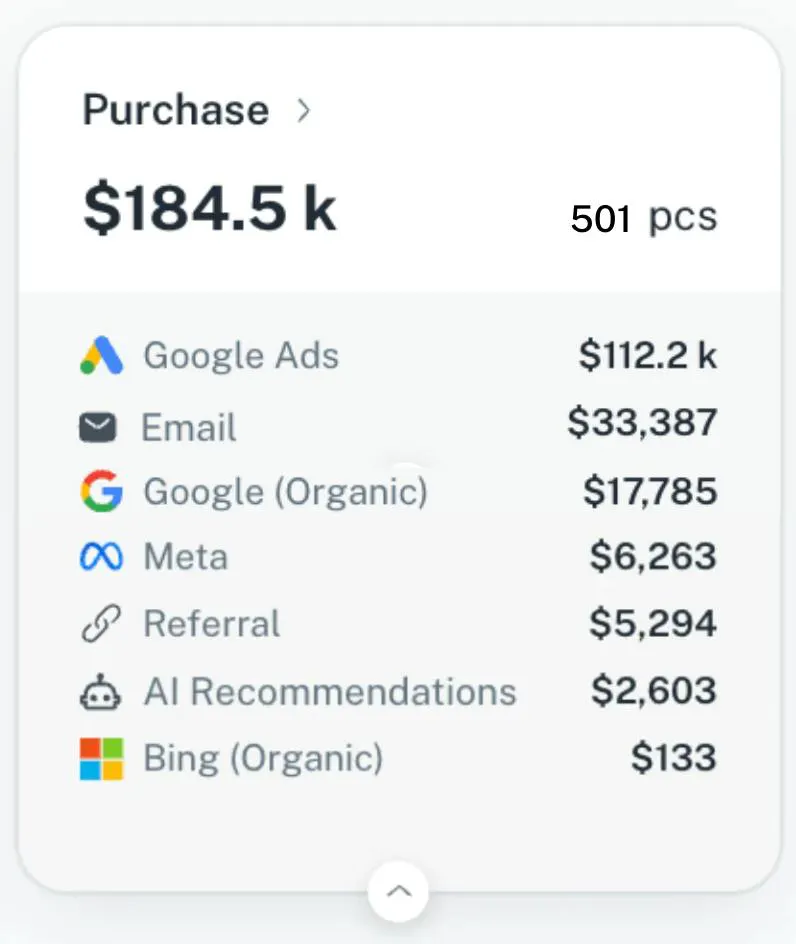
Event cards now display secondary traffic sources such as Google Organic, Referral, AI, and other channels alongside paid sources. This gives you a clearer view of how each conversion was influenced across different acquisition channels.
Bot Score Visibility Developer Mode now displays visitor bot scores directly in session rows. You can also filter the session table using bot score thresholds, making it easier to identify and analyze automated traffic.
Recovered Events by Event Type
Recovered Event statistics are now available for individual event types instead of only Purchases, providing a more detailed view of Tracklution's recovery performance across your funnel.
Flexible Graph Intervals Dashboard charts can now be viewed by Hour, Day, or Week, making it easier to analyze both short-term changes and longer-term trends. You can also decide which day is the first day of the week.
Feature reminder 👇🏻
Tracklution's Audit Tool automatically checks your tracking setup for common issues across your website and connected platforms. It helps you identify missing events, configuration problems, and tracking gaps before they impact your reporting, so you can spend less time troubleshooting and more time optimizing.
Wrap Up
This month's updates focus on improving analytics quality, strengthening first-party tracking, and providing deeper reporting insights:
- GA4 v2 is now the default Google Analytics connector
- Meta Additional Conversions insights available in the dashboard
- Same-Origin Proxy support for WooCommerce
- Secondary Traffic Sources in Event Cards
- Bot score visibility and filtering
- Recovered Event statistics for all event types
- Dashboard charts with Hour, Day, and Week views
All updates are now available in Tracklution.
Whether you're using Google Analytics, Meta, or WooCommerce, you'll now have a clearer picture of what's driving your results.
As always, happy tracking. 👋🏻
Related posts
Product updates
Analytics engine, Insights and Monitoring: October 2026 update
A dedicated analytics engine, new tabs, multiple Meta datasets, Nextdoor and Adtraction connectors.
Product updates
Analytics engine, Insights and Monitoring: October 2026 update
A dedicated analytics engine, new tabs, multiple Meta datasets, Nextdoor and Adtraction connectors.

Product updates
PII redaction, more connectors, improved UI: September 2026 update
PII redaction, 7 new ad connectors, and Microsoft Ads Conversions API for everyone.
Product updates
PII redaction, more connectors, improved UI: September 2026 update
PII redaction, 7 new ad connectors, and Microsoft Ads Conversions API for everyone.
Product updates
Your tracking data, more accurate than ever: August product update
Sharper consent visibility, more accurate GA4 data, a smarter WooCommerce plugin, and lockable webhooks. Everything new this August.
Product updates
Your tracking data, more accurate than ever: August product update
Sharper consent visibility, more accurate GA4 data, a smarter WooCommerce plugin, and lockable webhooks. Everything new this August.
Questions and answers
What does Tracklution actually do?
Tracklution sends conversion data directly to ad platforms (Meta, Google Ads, TikTok, etc.) through server-side APIs. Instead of relying on browser pixels that get blocked by ad blockers, iOS privacy changes, and cookie restrictions, your data goes server-to-server. The result: ad platforms see more of your real conversions, their algorithms optimize better, and you get better ROAS.
What is server-side tracking?
Server-side tracking gathers first-party data directly on your website and sends tracking events to ad platforms via Conversion APIs. This approach bypasses restrictions from iOS devices, ad blockers, and privacy-focused browsers, providing more accurate data and making your paid advertising more efficient.
Is it just one setup that feeds data into all my ad platforms?
Yes. You install Tracklution once, connect your ad accounts, and it sends conversion data to all platforms simultaneously through their respective APIs (Meta CAPI, Google Ads API, TikTok Events API, etc.). No need to manage separate server-side setups for each platform.
How much more conversion data will my ad platforms actually see?
On average, clients report 34.2% more conversions compared to traditional browser-based pixels. This means the ad algorithms have significantly more signal to work with, which translates to 15-35% lower customer acquisition costs for most clients.
Do I need developers to set this up?
No. Setup takes 5-15 minutes depending on your platform. For Shopify, WooCommerce, and other supported platforms, it is plug-and-play. You do not need custom coding or engineering resources. For GTM users, you can keep your existing setup and add Tracklution alongside it.
Do I need to remove my existing tracking tags?
Not necessarily. Tracklution works alongside your current setup. You can run both in parallel initially to compare data, then decide whether to simplify.
What about the DNS / CNAME setup?
Tracklution uses a first-party CNAME record on your domain for data collection. This takes a couple of minutes to configure and up to 48 hours to propagate. It is what makes the tracking resistant to ad blockers and browser restrictions.
Can I verify that the data is actually more accurate?
Yes. Run Tracklution alongside your existing tracking and compare. The dashboard also shows "recovered events" so you can see exactly how many conversions would have been missed without server-side tracking.
Can I distinguish between organic and paid traffic?
Yes. Tracklution preserves traffic source attribution. The conversion data sent to each ad platform includes the proper attribution parameters.
What about offline conversions (phone calls, in-store, CRM events)?
Tracklution supports offline conversion tracking through webhooks and CRM integrations. If someone clicks an ad, then converts offline, you can feed that back to the ad platforms. Clients using this see up to 35% reduction in acquisition costs because the algorithms learn from the full conversion picture.
How does this work with cookie consent and CMP tools?
Tracklution supports both Basic and Advanced Consent Mode. It reads your CMP data layer automatically and respects user consent choices. In Advanced Consent Mode, it can still collect anonymized, cookieless data when users decline cookies, which helps ad platform modeling without violating privacy rules. Fully GDPR-compliant.
How is this different from Stape or building your own sGTM setup?
Stape provides server-side GTM hosting, which means you still need to build and maintain the tags, triggers, and configuration yourself. Tracklution is a complete solution: plug-and-play setup, automatic event detection, built-in consent management, a real-time analytics dashboard, and ongoing maintenance of all API connections. When ad platforms change their APIs (which happens often), we handle the updates.
How does the agency partner model work?
Single dashboard to manage all client accounts. Each client has their own tracking container. The platform handles all technical maintenance, so you are not stuck troubleshooting API changes or broken tracking.

Have further questions?
Already convinced? Get 100% accurate data with server side tracking
Already convinced? Get 100% accurate data with server side tracking




