Analytics engine, Insights and Monitoring: October 2026 update
A dedicated analytics engine, new tabs, multiple Meta datasets, Nextdoor and Adtraction connectors.

October was (yet again) a very busy month for our development and product teams, and here are the highlights you need to know about:
- A dedicated analytics engine: faster reports and decks, heatmaps and live screens you can generate from a single prompt.
- New Insights and Monitoring tabs: two new tabs that show the impact of Tracklution on your tracking, and custom alerts when something breaks.
- Add multiple Meta datasets per container: one of our most requested features is live for everyone.
- New connectors: Nextdoor and Adtraction are now live.
- PII delivery controls: choose which personal data each connector gets to see.
- … and what didn't make it to the headlines: improvements for agencies, API and MCP users, and more.
Make your data talk: meet the dedicated analytics engine
Your tracking data just got a dedicated analytics engine.
A new engine under every server
Every Tracklution server now runs a dedicated analytics engine: it’s much faster, and it handles far more complex queries, so you can analyze all the data that lives in Tracklution in ways that weren’t practical before.
What the Reporting API gives you
The Reporting API runs on it too, so it's faster and now covers about six months of history (that keeps growing). Your existing integrations keep working exactly as before.
Here's what you get:
- Universal Analytics style reports: channels, campaigns, countries, landing pages, ecommerce and goals, with a comparison mode ("this period vs. the previous one").
- Session and event search across all the history it covers, with complex filtering that wasn't practical before.
- A realtime view of the last 30 minutes.
Ask your AI assistant for personalized reports, in seconds
The Tracklution MCP also gets 8 new tools, all powered by the new engine.
In practice, you describe the deliverable in plain language and your assistant builds it from your own data: a deck, a heatmap, a live screen, a spreadsheet, you name it.
Here are example dashboards created with one prompt, in a couple of seconds.
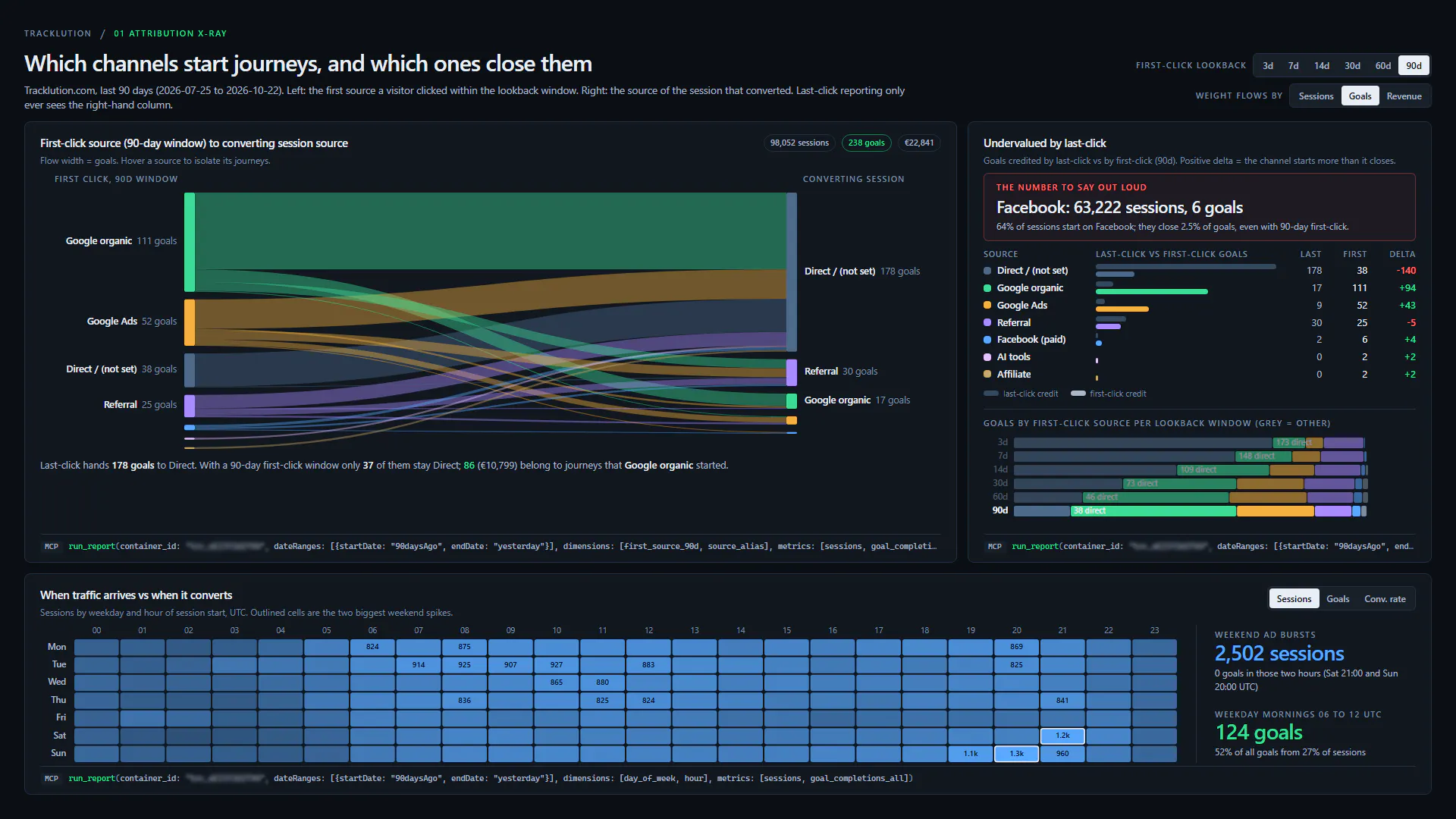
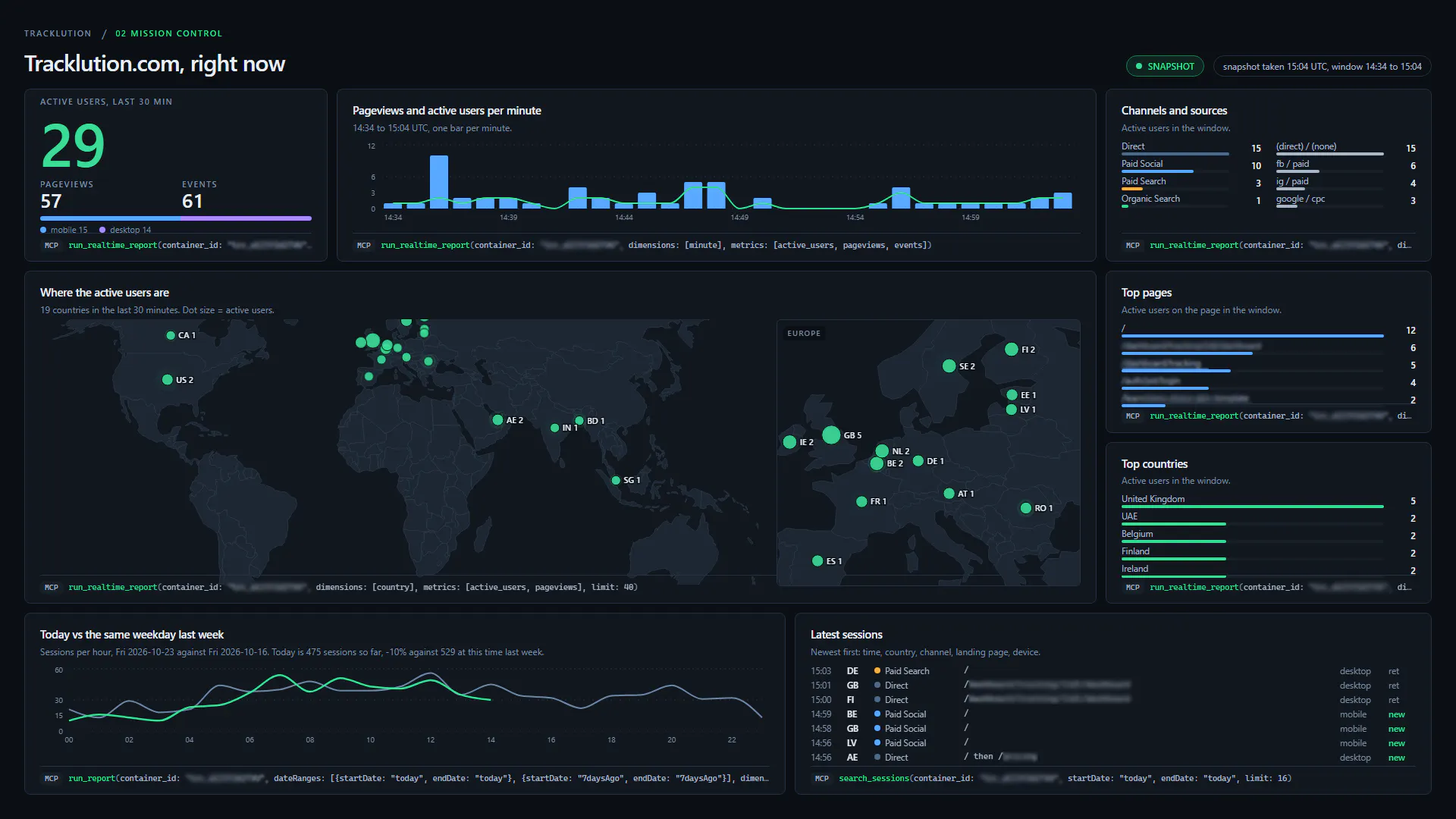
And here's the kind of thing you could ask for.
- "Build an interactive heatmap of when people visit and when they buy, by weekday and hour, with a toggle between sessions, orders and conversion rate. Give me the 3 best time windows for ads and emails, and the dead hours where we could cut spend."
- "We ran Black Friday from 24 Nov to 1 Dec. Show how many of our orders started with a click on a different channel than the one that closed the sale, as a flow from first-click channel to last-click channel. Which channels are we undervaluing if we only look at last click?"
- "Build a live screen for our office TV: active users in the last 30 minutes, a per-minute pageviews chart, top pages and where visitors are coming from."
If you already use the Tracklution MCP, you may need to disconnect and reconnect it to see the new tools.
Two new tabs in every container: Insights and Monitoring
Every container has two new tabs this month, one to show you what your tracking is doing and one to tell you when something breaks.
Meet the new Insights tab: what Tracklution adds to your tracking

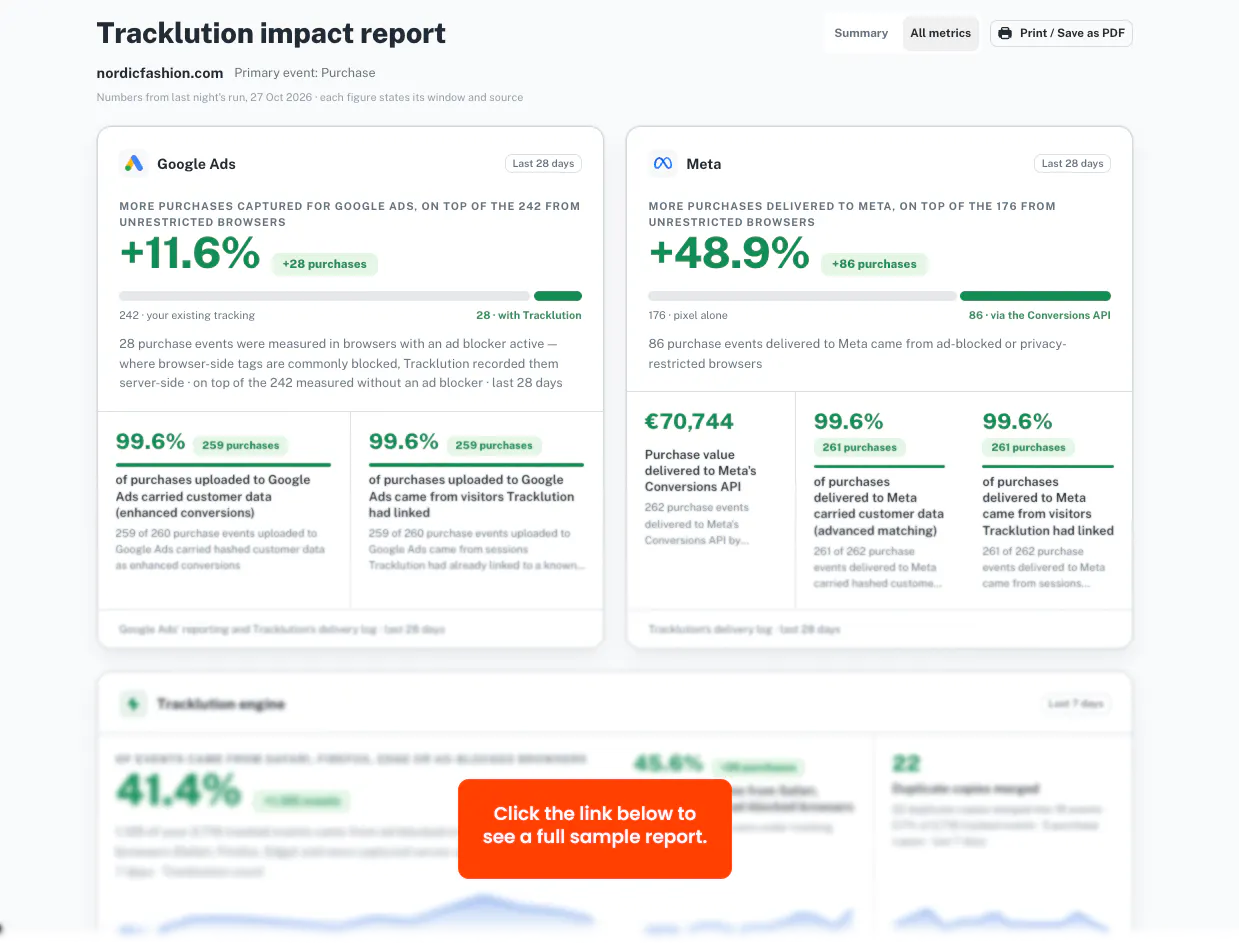
Containers now have an Insights tab, built to answer the questions you'd otherwise have to dig for:
- How many conversions did Tracklution capture that browser-only tracking would have missed?
- How many extra events is Meta getting through the Conversions API, and how well do they match?
- What share of your traffic comes from Safari, Firefox, Edge or ad blockers, and roughly how much conversion value comes with it?
- Is your data healthy, from consent rates to how much of your traffic you can recognize as returning customers?
- How much of your traffic is bots, and which kinds: search engines, SEO tools or AI tools?
- Where do your visitors come from, and what is each session worth?
Trackie AI knows these numbers too, so you can ask it what they mean for your setup.
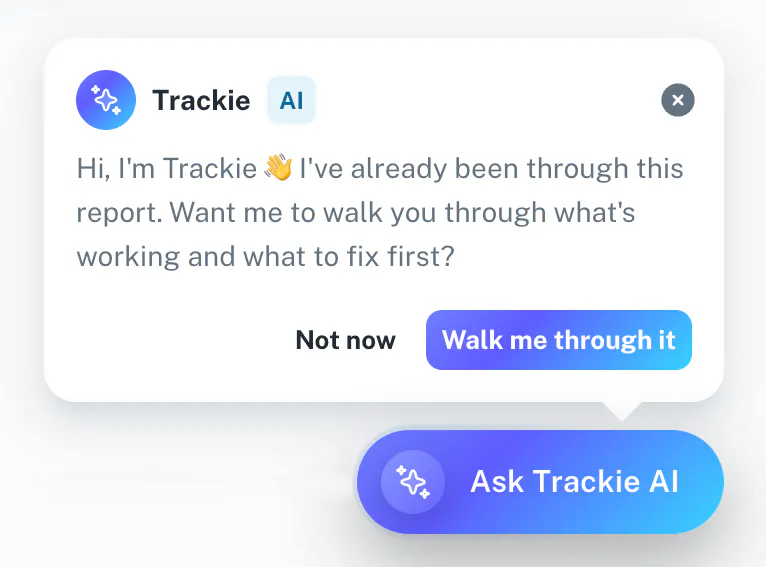
Go and look at yours.
Monitoring tab: be alerted if and when tracking breaks

Every container now has a Monitoring tab.
It's where you set up email alerts and where Tracklution checks your consent setup for you.
The built-in alerts cover missing or zero purchase values, no tracking data for an hour, and no purchases in 24 hours.
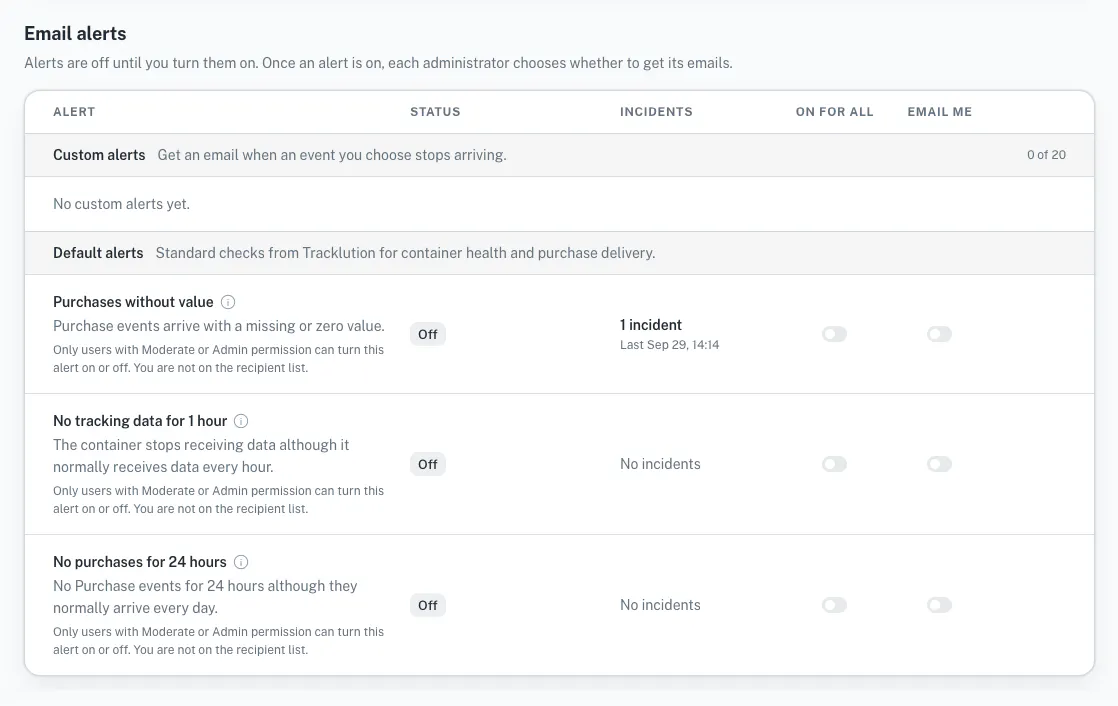
- pick any event that matters to you, like Purchase or Lead,
- decide how long it can go missing, anywhere from 5 minutes to 4 weeks
If the event stops coming in for that long, container administrators get an email, so a broken checkout or form gets caught quickly.
Note that alerts are off until you turn them on, and you can set them up once the container setup is finished.
The tab also has a new Checks section, which starts with one check: sessions without a consent choice.
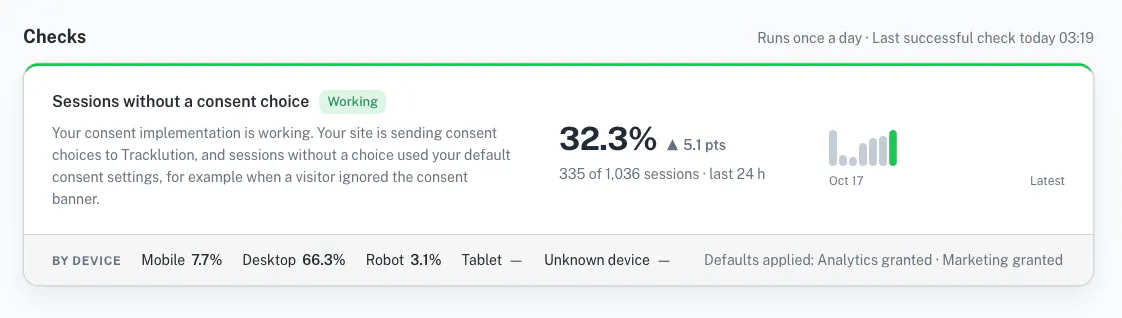
Every day, Tracklution looks at the past 24 hours and shows how many sessions arrived without a consent choice. If your consent banner may have stopped sending choices to Tracklution, you'll see a warning.
Add multiple Meta datasets to one container
This was one of our most requested features, and it's live for everyone: one container can now send events to several Meta datasets (pixels).
You can now duplicate the Meta Connector from the Connector page with the New button, and connect multiple different datasets to one container using a different pixel ID, access token and delivery domain.
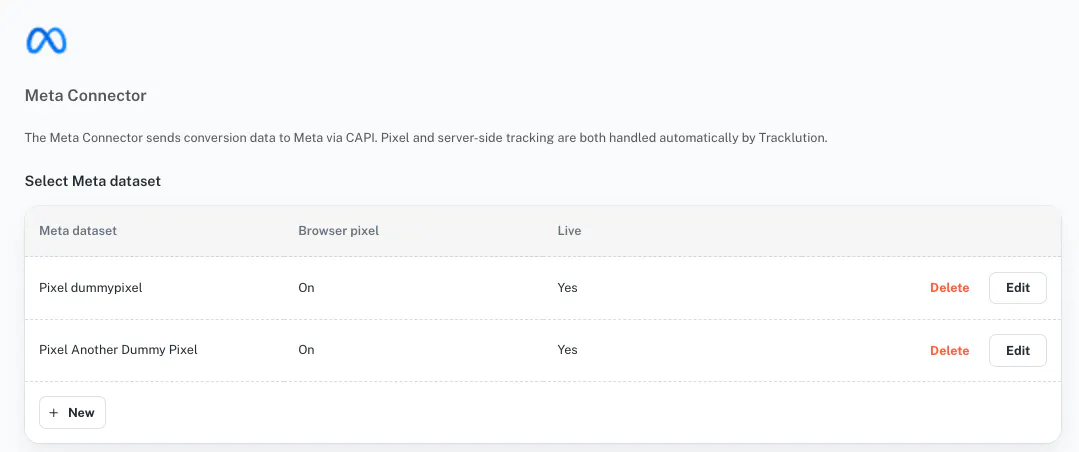
That means you can use a new dataset off without creating multiple containers. A list shows all your datasets at a glance, with their status and an Edit and Delete button next to each.
Connector cards show how many datasets are connected, and the Meta uplift graphs have a pixel picker, so you can check each dataset on its own.
Also, event name mapping, consent and the other container settings apply to every dataset, so you only set them up once.
Two new ready connectors!
This month, we added 2 new ready connectors, Nextdoor and Adtraction
This means Tracklution now features 22 (and counting) ready connectors!
Adtraction connector (beta)
Adtraction is an affiliate network, big in the Nordics and with a solid presence in the Netherlands, Germany and Spain. The connector is server-to-server only, using Adtraction callback URLs.
Paste the callback URL from the brand's Adtraction guide, one per commission type (some brands have one affiliate campaign for sales, another for leads), then pick the events for each URL.

Two optional settings: deliver the order value without VAT, and use your own order ID for the callback (the default is the Tracklution event ID).
The event log shows the exact callback URL for every conversion, so you can check any of them.
Nextdoor connector
Nextdoor is a neighborhood ad platform, popular with local businesses and home services, mostly in the US.
The new connector sends your conversions to Nextdoor from your server, and it works alongside the Nextdoor pixel without double counting.
Setup takes two pastes: add your Pixel ID and API token from Nextdoor Ads Manager.

Common events like purchases and leads are already set up for you. Customer details are protected automatically, and when a visitor's consent is restricted, the connector follows Nextdoor's US privacy rules for you.
If you don't see the Ads API option in your Nextdoor Business Settings, ask Nextdoor for access.
PII delivery controls, per connector
Last month, we enabled PII redaction, and we just improved the feature.
For each container, you can now choose which types of personal data get delivered to each connector. It already works for Meta, Google Ads, Microsoft Ads, OpenAI ads and Nextdoor.
- Pick a connector type,
- pick a PII type,
- and set it to deliver or not deliver.
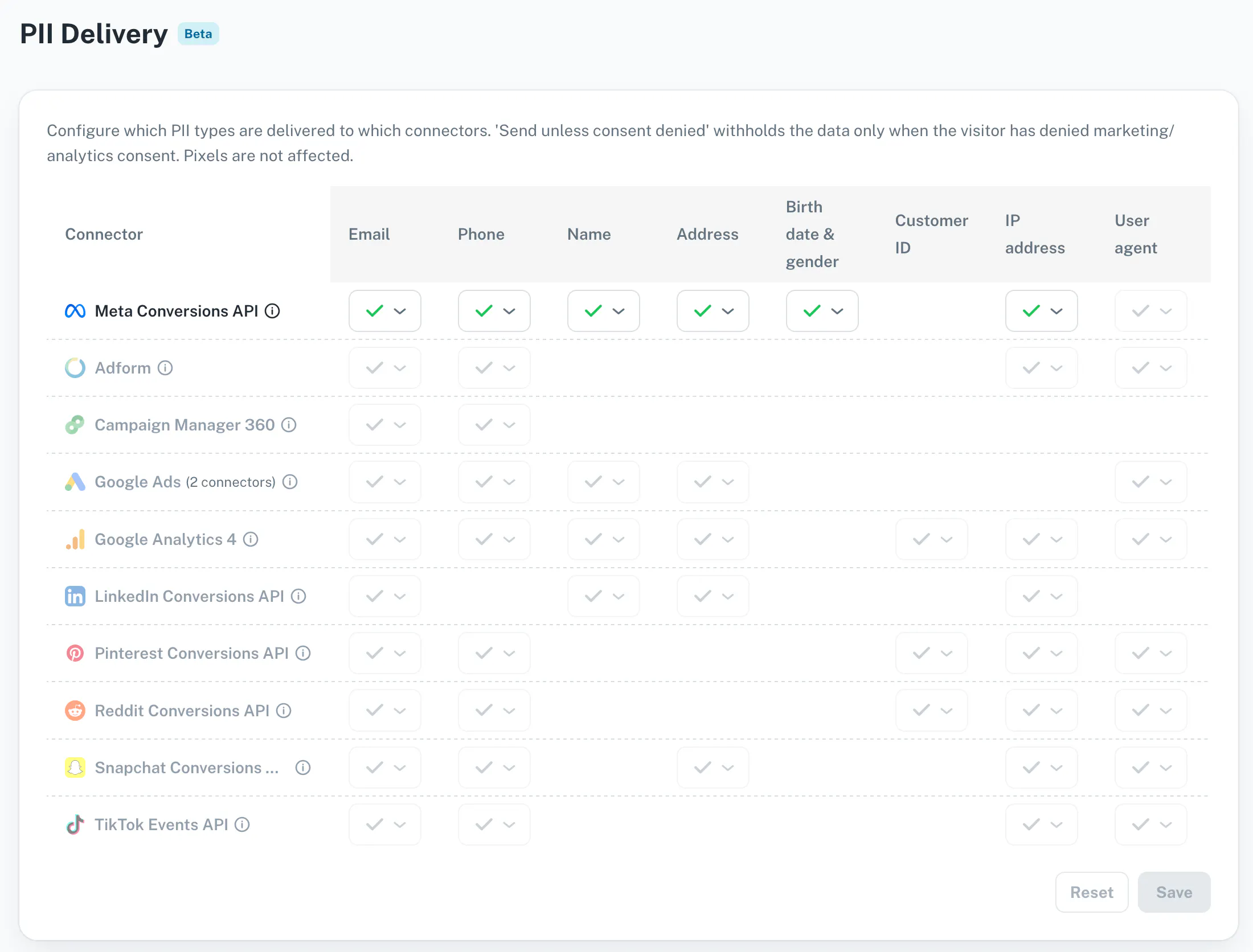
When a piece of PII is set to "do not deliver," Tracklution leaves it out of every request to that connector. If not enough data remains for a successful delivery, the delivery is skipped and the skip reason is recorded, so you can see exactly what happened.
What didn't make the headlines
Updates for agency partners
The Tracking Containers page has a searchable company picker that shows how many containers each company has, plus a search field to find any container by name, website or company.
Containers with several connectors of the same type, like multiple Google Ads accounts, show as one icon with a count badge, and you can re-invite a team member whose invitation expired without getting an error. Invoices also show your company name, so you can tell several subscriptions apart.
Updates for API and MCP users
The Reporting API's event list now filters by product ID, transaction ID, value, currency and event attributes. Email addresses are masked in answers, MCP traffic gets its own per-key limit, and page-level reports are capped at 90 days.
And that's October
Questions about any of this? Reply to the update email and we'll get back to you.
Happy tracking!
Related posts

Product updates
PII redaction, more connectors, improved UI: September 2026 update
PII redaction, 7 new ad connectors, and Microsoft Ads Conversions API for everyone.
Product updates
PII redaction, more connectors, improved UI: September 2026 update
PII redaction, 7 new ad connectors, and Microsoft Ads Conversions API for everyone.
Product updates
Your tracking data, more accurate than ever: August product update
Sharper consent visibility, more accurate GA4 data, a smarter WooCommerce plugin, and lockable webhooks. Everything new this August.
Product updates
Your tracking data, more accurate than ever: August product update
Sharper consent visibility, more accurate GA4 data, a smarter WooCommerce plugin, and lockable webhooks. Everything new this August.
Product updates
Tracklution product update: July 2026
Discover Tracklution's July updates: improved GA4 tracking, Meta attribution insights, stronger first-party tracking, and enhanced reporting.
Product updates
Tracklution product update: July 2026
Discover Tracklution's July updates: improved GA4 tracking, Meta attribution insights, stronger first-party tracking, and enhanced reporting.
Questions and answers
What does Tracklution actually do?
Tracklution sends conversion data directly to ad platforms (Meta, Google Ads, TikTok, etc.) through server-side APIs. Instead of relying on browser pixels that get blocked by ad blockers, iOS privacy changes, and cookie restrictions, your data goes server-to-server. The result: ad platforms see more of your real conversions, their algorithms optimize better, and you get better ROAS.
What is server-side tracking?
Server-side tracking gathers first-party data directly on your website and sends tracking events to ad platforms via Conversion APIs. This approach bypasses restrictions from iOS devices, ad blockers, and privacy-focused browsers, providing more accurate data and making your paid advertising more efficient.
Is it just one setup that feeds data into all my ad platforms?
Yes. You install Tracklution once, connect your ad accounts, and it sends conversion data to all platforms simultaneously through their respective APIs (Meta CAPI, Google Ads API, TikTok Events API, etc.). No need to manage separate server-side setups for each platform.
How much more conversion data will my ad platforms actually see?
On average, clients report 34.2% more conversions compared to traditional browser-based pixels. This means the ad algorithms have significantly more signal to work with, which translates to 15-35% lower customer acquisition costs for most clients.
Do I need developers to set this up?
No. Setup takes 5-15 minutes depending on your platform. For Shopify, WooCommerce, and other supported platforms, it is plug-and-play. You do not need custom coding or engineering resources. For GTM users, you can keep your existing setup and add Tracklution alongside it.
Do I need to remove my existing tracking tags?
Not necessarily. Tracklution works alongside your current setup. You can run both in parallel initially to compare data, then decide whether to simplify.
What about the DNS / CNAME setup?
Tracklution uses a first-party CNAME record on your domain for data collection. This takes a couple of minutes to configure and up to 48 hours to propagate. It is what makes the tracking resistant to ad blockers and browser restrictions.
Can I verify that the data is actually more accurate?
Yes. Run Tracklution alongside your existing tracking and compare. The dashboard also shows "recovered events" so you can see exactly how many conversions would have been missed without server-side tracking.
Can I distinguish between organic and paid traffic?
Yes. Tracklution preserves traffic source attribution. The conversion data sent to each ad platform includes the proper attribution parameters.
What about offline conversions (phone calls, in-store, CRM events)?
Tracklution supports offline conversion tracking through webhooks and CRM integrations. If someone clicks an ad, then converts offline, you can feed that back to the ad platforms. Clients using this see up to 35% reduction in acquisition costs because the algorithms learn from the full conversion picture.
How does this work with cookie consent and CMP tools?
Tracklution supports both Basic and Advanced Consent Mode. It reads your CMP data layer automatically and respects user consent choices. In Advanced Consent Mode, it can still collect anonymized, cookieless data when users decline cookies, which helps ad platform modeling without violating privacy rules. Fully GDPR-compliant.
How is this different from Stape or building your own sGTM setup?
Stape provides server-side GTM hosting, which means you still need to build and maintain the tags, triggers, and configuration yourself. Tracklution is a complete solution: plug-and-play setup, automatic event detection, built-in consent management, a real-time analytics dashboard, and ongoing maintenance of all API connections. When ad platforms change their APIs (which happens often), we handle the updates.
How does the agency partner model work?
Single dashboard to manage all client accounts. Each client has their own tracking container. The platform handles all technical maintenance, so you are not stuck troubleshooting API changes or broken tracking.

Have further questions?
Already convinced? Get 100% accurate data with server side tracking
Already convinced? Get 100% accurate data with server side tracking




