Your tracking data, more accurate than ever: August product update
Sharper consent visibility, more accurate GA4 data, a smarter WooCommerce plugin, and lockable webhooks. Everything new this August.

Table of contents
Better data.
Set up server-side tracking in minutes with Tracklution. Send better conversion data to your ad platforms so their algorithms can optimise for better results from your budget.
Start your free trialSome of the trickiest parts of ecommerce tracking come from how cookie banners, checkout redirects, and GA4's own payload limits work. A visitor declining cookies, a checkout that skips straight to the cart, a big order with a complex GA4 payload ... common events that all tracking setups need to be able to handle.
Well, this month, Tracklution got better at handling all three, and we added a lock on your webhooks while we were at it (as well as a bunch of other really cool stuff).
In short, in this product update:
- Spot consent issues before they cost you data
- WooCommerce plugin 1.3.0, with AJAX AddToCart tracking
- More complete GA4 ecommerce data
- Protect your webhook endpoints with a token
- The remaining update log for August
See consent issues before they cost you data
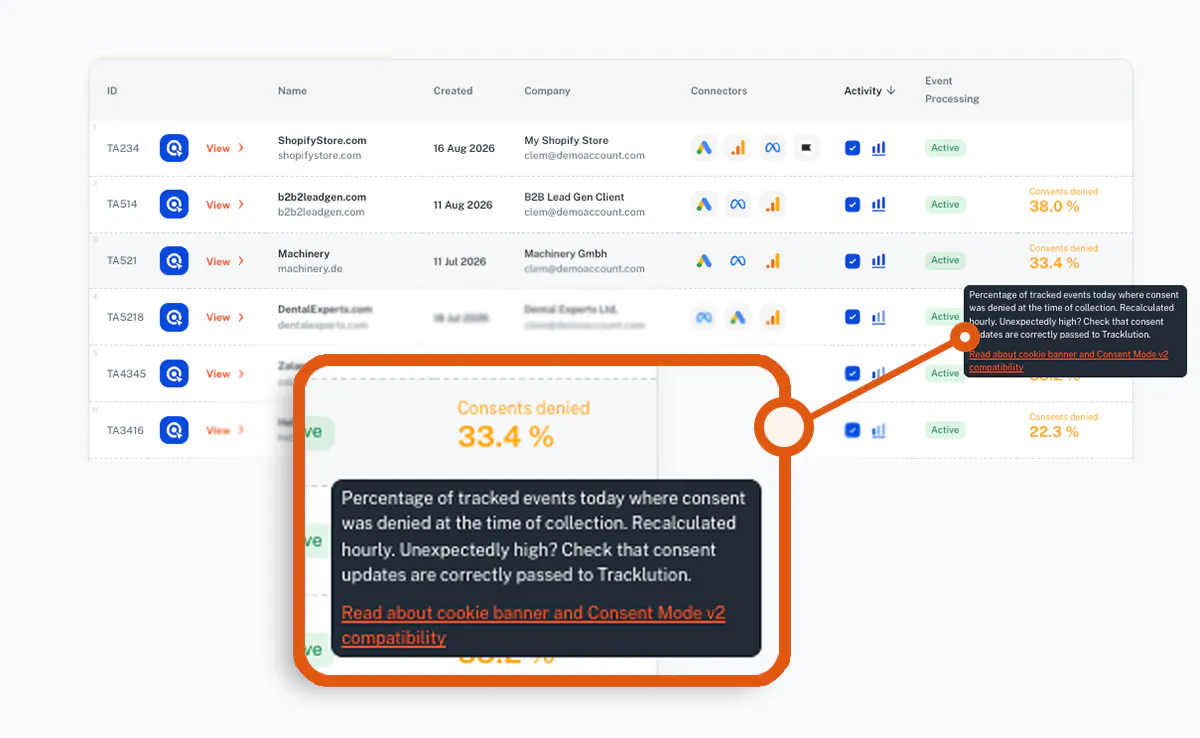
Your container list now shows the share of visitors who denied tracking consent, with a clear warning when the number climbs unusually high.
You'll now be able to see it the moment you log in.
Consent handling got smarter under the hood too.
When a cookie banner takes a moment to load, tracking now waits for the visitor's decision before sending the first events to GA4, so you don't lose those early hits while waiting for the visitor to respond.
And when a visitor does deny consent, GA4 can still count the sale anonymously through Advanced Consent Mode, using Google's cookieless consent-mode ping, so your reporting doesn't go blind.
WooCommerce plugin 1.3.0
AddToCart tracking now works on AJAX add-to-cart buttons (on shop pages, category pages, and filtered product grids) and slide-out carts, the places modern stores actually put them.
1 - Update the plugin from your Tracklution installation page.
2 - Turn on "Track AJAX add-to-cart" under Advanced Settings. It's off by default, so you'll need to switch it on.
AddToCart events also no longer disappear when your store sends shoppers straight to the cart after adding a product.
One thing to check before you update: if you added your own AddToCart tracking code to your theme or in Google Tag Manager as a workaround, remove it. Otherwise, AddToCarts might get counted twice.
GA4 ecommerce reports are now even more accurate
Purchase events with large item lists or complex data used to lose details, or drop entirely, on the way to Google Analytics. That's improved: transaction IDs, item lists, tax, and shipping now flow through intact, so your GA4 data matches what actually happened at checkout.
Webhooks are getting an upgrade
You can now protect webhook endpoints with a token derived from your container key and secret.
It's a new "Protect webhook URL" section in the webhook onboarding card, with a shield icon and token-aware examples so you know exactly what to send.
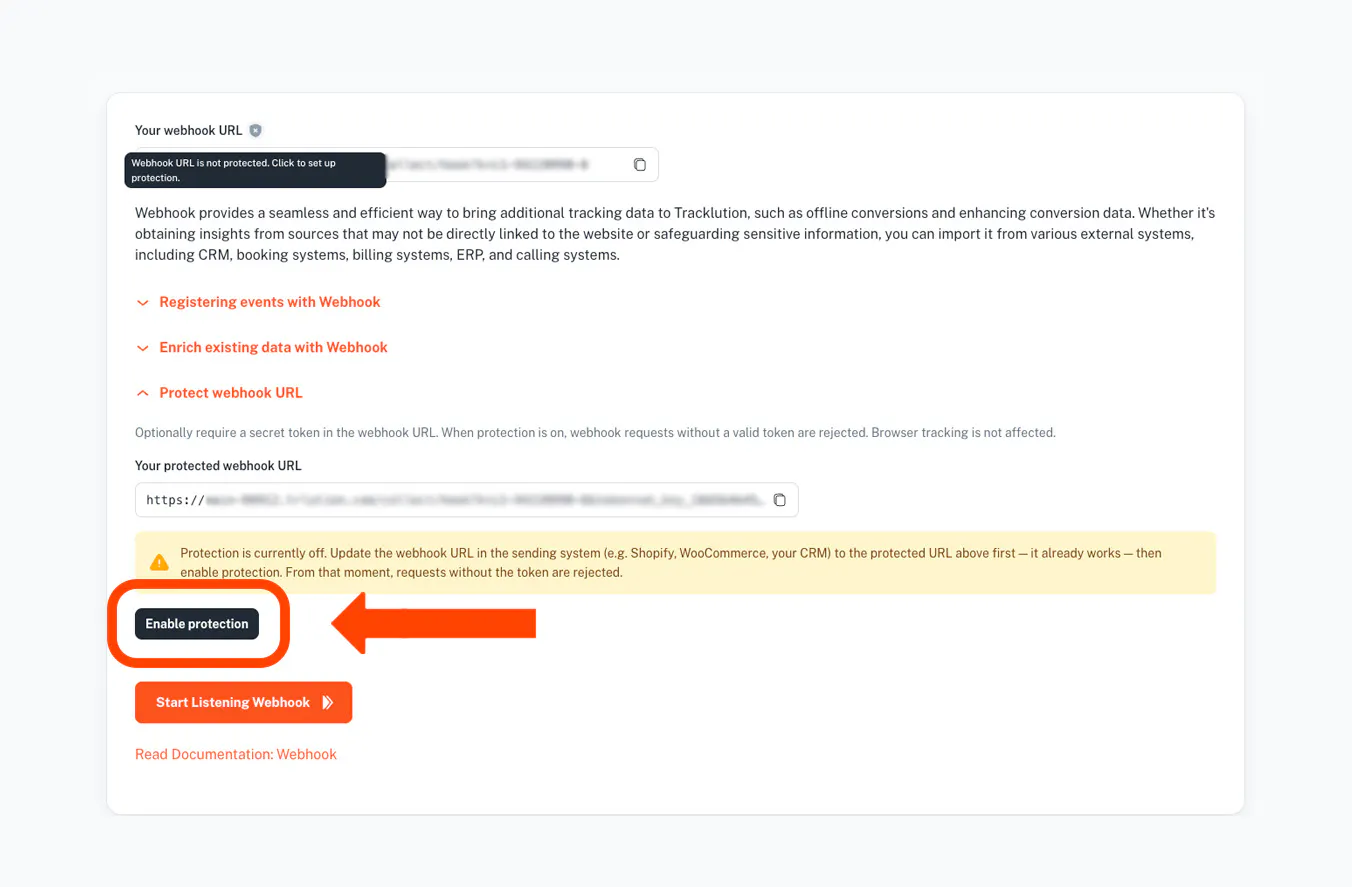
Note that this isn't turned on automatically. You need to manually enable protection.
Also shipped in August
There's more!
Simpler subscription management
(agency partner feature) Cancel a company's subscription straight from the dashboard, restart cleanly afterward, and remove companies from account-wide plans. Multi-company accounts can now activate a Freemium plan per company without getting bounced back to plan selection.
Billing, made easier
(agency partner feature) Enter a discount code when starting a subscription and it's applied before you reach payment. You'll also see a clearer price preview before confirming a plan change.
New block rule
Exclude events whose URL does not contain a given string, plus a straightforward always-block option.
Tidier rule editor
The rule type selector in event rules is now organized into clear sections, like Event data, Visitor & device, Identity, and Traffic source, instead of one long list. Finding the right rule is much quicker.
Reporting API
Filter event stats by page location, so you can pull numbers for one page or funnel step directly from the API.
See what your data sources actually mean
Hover over any Referral, AI, or connector icon in Explore to see exactly what it is and where that data came from.
Faster dashboards
Dashboard statistics now load significantly faster, especially on busy containers and longer date ranges.
Better Shopify identification
Shopify installations now capture contact details as soon as the checkout contact form is filled in, so conversions can be matched to the right visitor even before payment completes.
TikTok click IDs preserved
Long TikTok click IDs are now stored in full, improving attribution accuracy for TikTok campaigns.
GA4 user_id control
A new toggle on the GA4 connector page lets you decide whether user_id values are forwarded to Google Analytics.
Smarter purchase deduplication
If you track multiple domains in the same container, purchases with the same transaction ID on different domains are now correctly kept separate.
And that's August for us.
Happy tracking!
Related posts

Product updates
PII redaction, more connectors, improved UI: September 2026 update
PII redaction, 7 new ad connectors, and Microsoft Ads Conversions API for everyone.
Product updates
PII redaction, more connectors, improved UI: September 2026 update
PII redaction, 7 new ad connectors, and Microsoft Ads Conversions API for everyone.
Product updates
Tracklution product update: July 2026
Discover Tracklution's July updates: improved GA4 tracking, Meta attribution insights, stronger first-party tracking, and enhanced reporting.
Product updates
Tracklution product update: July 2026
Discover Tracklution's July updates: improved GA4 tracking, Meta attribution insights, stronger first-party tracking, and enhanced reporting.
Product updates
Tracklution product update: June 2026
Tracklution's June update introduces an OpenAI Ads Connector for direct server-side conversion tracking, a more powerful Audit Tool, automatic critical notifications, and attribution improvements for LinkedIn Ads and Adform.
Product updates
Tracklution product update: June 2026
Tracklution's June update introduces an OpenAI Ads Connector for direct server-side conversion tracking, a more powerful Audit Tool, automatic critical notifications, and attribution improvements for LinkedIn Ads and Adform.
Questions and answers
What does Tracklution actually do?
Tracklution sends conversion data directly to ad platforms (Meta, Google Ads, TikTok, etc.) through server-side APIs. Instead of relying on browser pixels that get blocked by ad blockers, iOS privacy changes, and cookie restrictions, your data goes server-to-server. The result: ad platforms see more of your real conversions, their algorithms optimize better, and you get better ROAS.
What is server-side tracking?
Server-side tracking gathers first-party data directly on your website and sends tracking events to ad platforms via Conversion APIs. This approach bypasses restrictions from iOS devices, ad blockers, and privacy-focused browsers, providing more accurate data and making your paid advertising more efficient.
Is it just one setup that feeds data into all my ad platforms?
Yes. You install Tracklution once, connect your ad accounts, and it sends conversion data to all platforms simultaneously through their respective APIs (Meta CAPI, Google Ads API, TikTok Events API, etc.). No need to manage separate server-side setups for each platform.
How much more conversion data will my ad platforms actually see?
On average, clients report 34.2% more conversions compared to traditional browser-based pixels. This means the ad algorithms have significantly more signal to work with, which translates to 15-35% lower customer acquisition costs for most clients.
Do I need developers to set this up?
No. Setup takes 5-15 minutes depending on your platform. For Shopify, WooCommerce, and other supported platforms, it is plug-and-play. You do not need custom coding or engineering resources. For GTM users, you can keep your existing setup and add Tracklution alongside it.
Do I need to remove my existing tracking tags?
Not necessarily. Tracklution works alongside your current setup. You can run both in parallel initially to compare data, then decide whether to simplify.
What about the DNS / CNAME setup?
Tracklution uses a first-party CNAME record on your domain for data collection. This takes a couple of minutes to configure and up to 48 hours to propagate. It is what makes the tracking resistant to ad blockers and browser restrictions.
Can I verify that the data is actually more accurate?
Yes. Run Tracklution alongside your existing tracking and compare. The dashboard also shows "recovered events" so you can see exactly how many conversions would have been missed without server-side tracking.
Can I distinguish between organic and paid traffic?
Yes. Tracklution preserves traffic source attribution. The conversion data sent to each ad platform includes the proper attribution parameters.
What about offline conversions (phone calls, in-store, CRM events)?
Tracklution supports offline conversion tracking through webhooks and CRM integrations. If someone clicks an ad, then converts offline, you can feed that back to the ad platforms. Clients using this see up to 35% reduction in acquisition costs because the algorithms learn from the full conversion picture.
How does this work with cookie consent and CMP tools?
Tracklution supports both Basic and Advanced Consent Mode. It reads your CMP data layer automatically and respects user consent choices. In Advanced Consent Mode, it can still collect anonymized, cookieless data when users decline cookies, which helps ad platform modeling without violating privacy rules. Fully GDPR-compliant.
How is this different from Stape or building your own sGTM setup?
Stape provides server-side GTM hosting, which means you still need to build and maintain the tags, triggers, and configuration yourself. Tracklution is a complete solution: plug-and-play setup, automatic event detection, built-in consent management, a real-time analytics dashboard, and ongoing maintenance of all API connections. When ad platforms change their APIs (which happens often), we handle the updates.
How does the agency partner model work?
Single dashboard to manage all client accounts. Each client has their own tracking container. The platform handles all technical maintenance, so you are not stuck troubleshooting API changes or broken tracking.

Have further questions?
Already convinced? Get 100% accurate data with server side tracking
Already convinced? Get 100% accurate data with server side tracking




