
PII redaction, more connectors, improved UI: September 2026 update
PII redaction, 7 new ad connectors, and Microsoft Ads Conversions API for everyone.

Table of contents
Better data.
Set up server-side tracking in minutes with Tracklution. Send better conversion data to your ad platforms so their algorithms can optimise for better results from your budget.
Start your free trialWe shipped a LOT in September (about 170 improvements, give or take), and here’s what actually changes for you:
- Security update: We have enabled PII redaction, which means you can now decide who on your team gets to see visitor personal data.
- 7 new connectors for better tracking: X, Outbrain, Taboola Realize, Amplitude, Mixpanel, Awin, PropellerAds, and Microsoft Ads CAPI now open to everyone.
- Life quality and UI improvement
- Account management made simpler for agencies
Let’s dive in.
Security update: PII redaction is now enabled
You've been asking for it, we dealt with it.
You can now decide who on your team gets to see visitor personal data, per organization, right from User Management.
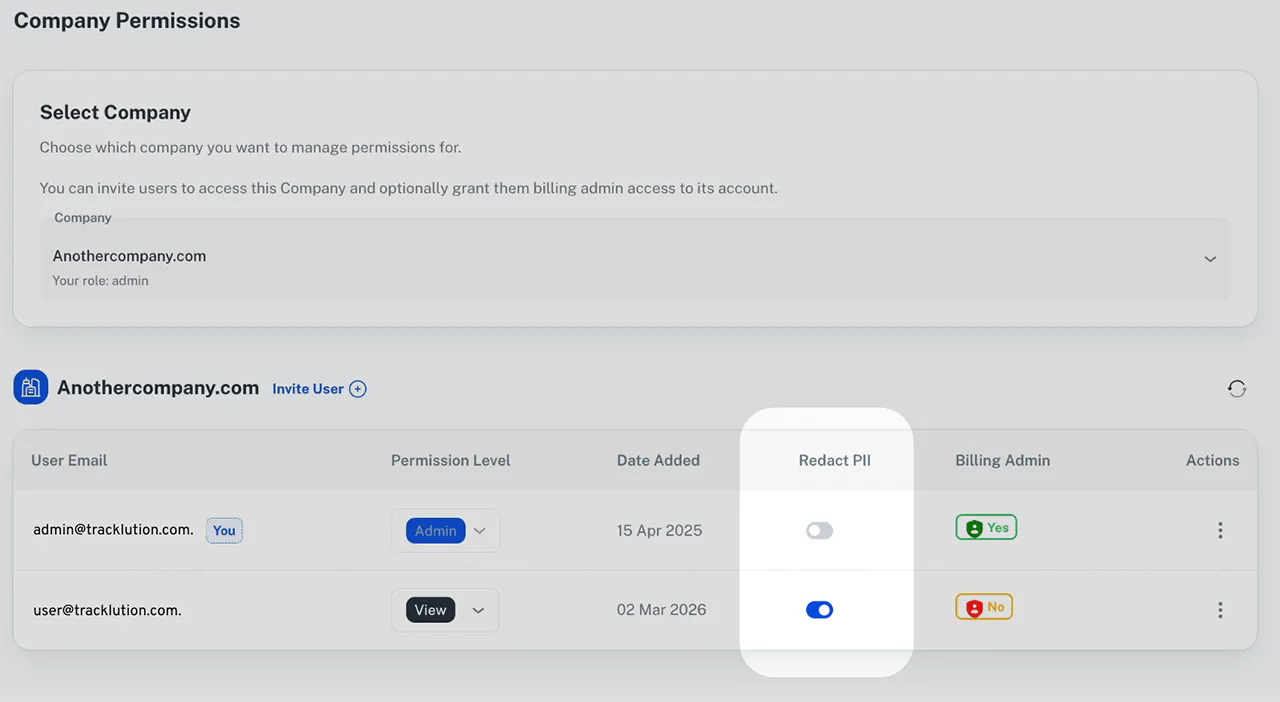
Turn on PII access with one click for a team member, and they'll see masked emails, phone numbers, and names everywhere (dashboard, Explore, exports, even their own Reporting API keys).
And you can revoke access the exact same way, with one simple click.
More information here
New connectors for better tracking
7 brand new connectors for better tracking

X, Outbrain, Taboola Realize, Awin, Amplitude, Mixpanel and PropellerAds are now clicks away from your dashboard.
Now, each connector has their own specificities.
X Ads connector
Pixel and server-side (their Conversion API), same connector, no juggling two setups.
The setup is the usual 3 clicks:
- connect the X user managing your ad account (Ad manager or Account admin only),
- pick the account,
- map your events.
Here's the one thing to know before you turn it on. X has no consent API. So both routes, pixel and server-side, need marketing consent to fire. No workaround for that one.
Note: want to skip the pixel and go server-side only? There's a toggle for that.
Outbrain and Taboola Realize are live, server-to-server, no pixel involved.
Simply turn the connector on, map your events, and you're done.
No more duct-taping with a custom connector.
Awin connector (beta)
The Awin connector is live, with a choice between any-click (the default) and last-click attribution, on a customizable window (30 days by default).
It’s important to note that, by default, the connector sends events to Awin regardless of visitor consent, and that's a deliberate choice, not an oversight: affiliate payouts are a commercial obligation between you and your affiliate partners, not a marketing decision, and a conversion that goes unreported because someone declined a cookie banner means an unpaid partner and a real dispute on your hands, not just a gap in a report.
Also note that you can also switch on a “respect visitor consent” toggle to have Awin follow the same rules as your other connectors.
Amplitude (beta) and Mixpanel (beta) connectors
Amplitude and Mixpanel’s SDKs only see what happens in a browser.
And so things like:
- An order placed over the phone,
- a webhook-triggered purchase,
- Or anything that happens after the visitor's already gone,
… would reach Amplitude or Mixpanel on its own. Well, now it does.
Now, each also comes with their own specifics:
- Amplitude lets you pick which user and device identity gets sent, so you don't end up with the same person split across two profiles.
- Mixpanel runs in the US, EU, or India (your call on data residency), and skips PageView events by default on new connections, flip that back on if you actually want it.
PropellerAds connector (beta)
- Paste your postback URL,
- tell us your click ID parameter,
- map your events.
And that's it!
Microsoft Ads Conversions API: now open to everyone
Connect the new Conversions API on your Microsoft Ads connector, and every mapped event reaches Microsoft Ads through both your UET* tag and this new server-side connection. No waitlist. No beta list.
*Universal Event Tracking
Note that right after you connect it, events can briefly show as "Delivery deferred (warming up)." That's normal, not broken, they retry on their own, nothing for you to do.
Product IDs and page types now ride along on product, search, cart, and purchase events, across both the UET tag and the new CAPI. So you can finally build dynamic remarketing lists off what people actually viewed, added to cart, or bought.
Life quality and UI improvement
We also shipped a couple of life quality improvement tickets you can directly see in the tool.
Drag-and-drop event cards
You can drag and drop your most-checked events the way you see fit. No more digging through a long list to find the ones you look at every morning.

Heads up: this is saved per browser, per container. Switch devices or browsers, and you'll need to set it up there too.
Connector display update
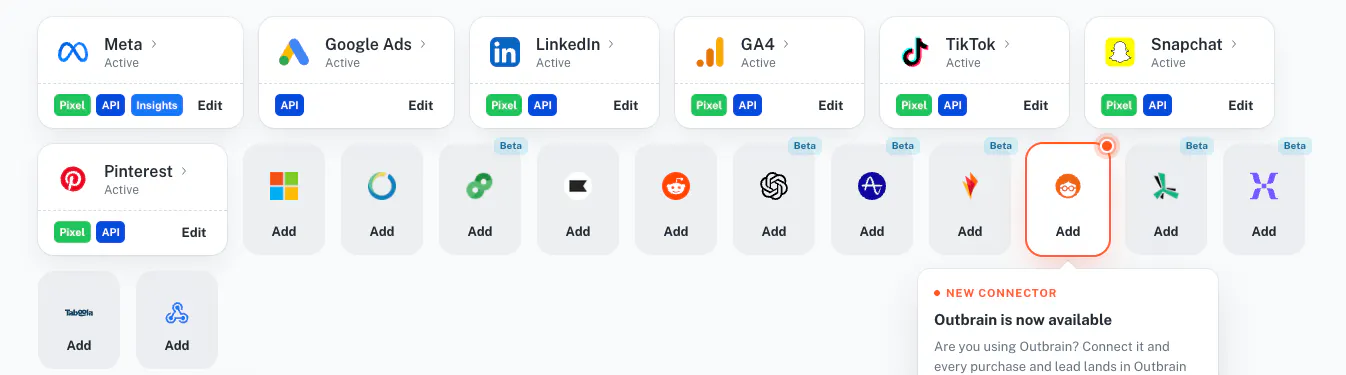
Tracklution now embarks a LOT of ready-to-use connectors. As a result, the interface, your interface, was getting a little crowded.
And so, in September, we decided to do something about it and when from:
To:

From now on, the connectors you already use are displayed on one row, and you can either click a specific platform icon to add a connector, or click “Add connector” to open the following popup:
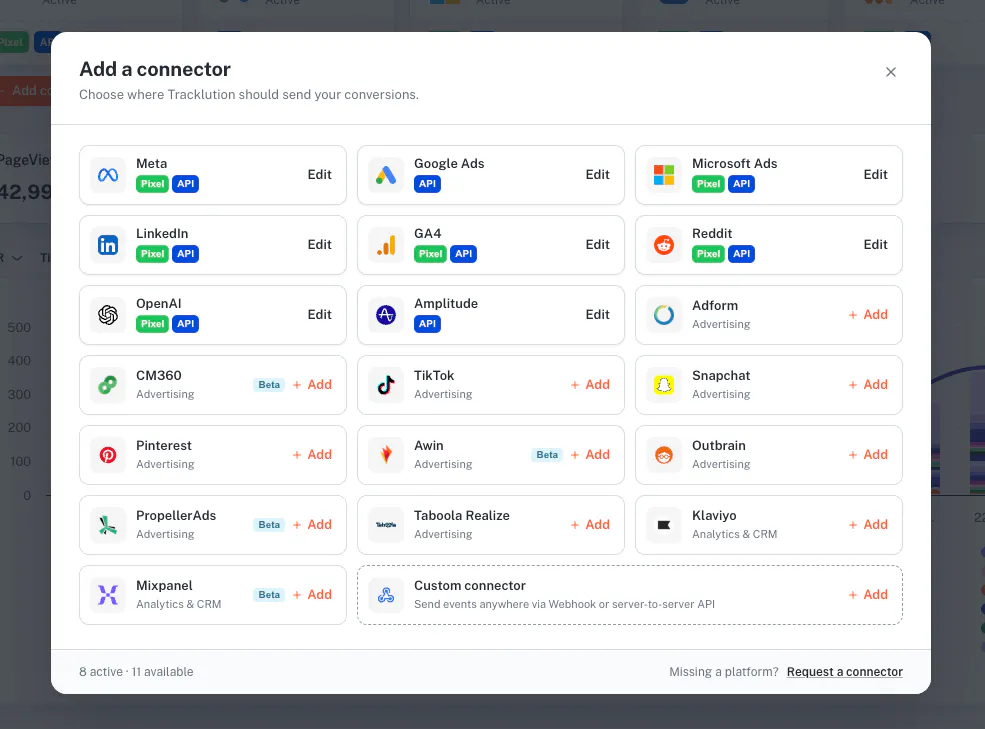
The result is a cleaner and clearer interface for you.
Account management made simpler
One reporting API key per agency
Agency MCP connections now cover every client account with one key, and follow your client list automatically as clients are added or removed, instead of a key frozen to whichever clients you had when you first connected.
Clearer invoices
Your invoice list now matches your books: refunds show as refunded, credits as credited, drafts and voided invoices are gone, and totals match the PDF. Some general polish landed on billing too.
Some platform specific updates
LinkedIn: optimize for lead quality, not just volume
Three new conversion types: Qualified Lead, Marketing Qualified Lead, and Sales Qualified Lead.
OpenAI Ads: fewer blocked events, richer data
Matching data got richer, on both the pixel and the API. And when a click ID gets stripped (ad blockers, aggressive privacy settings, you know the drill), there's now a fallback parameter instead of losing the attribution entirely.
Just make sure your landing pages actually carry that parameter, or the fallback has nothing to catch.
> More about fallback parameters here.
Shopify: GA4 revenue that matches what people paid
AddToCart events now capture quantity. Purchases from the custom pixel carry real discount details too, so GA4 item revenue finally reflects what people actually paid, not the sticker price. On the custom pixel? Re-paste the snippet to pick up both fixes.
And that's September.
We're back from summer break, and we're not planning on slowing down. Making Tracklution the best server-side tracking platform out there is a full-time job, and we like it that way.
Happy tracking!
Related posts
Product updates
Your tracking data, more accurate than ever: August product update
Sharper consent visibility, more accurate GA4 data, a smarter WooCommerce plugin, and lockable webhooks. Everything new this August.
Product updates
Your tracking data, more accurate than ever: August product update
Sharper consent visibility, more accurate GA4 data, a smarter WooCommerce plugin, and lockable webhooks. Everything new this August.
Product updates
Tracklution product update: July 2026
Discover Tracklution's July updates: improved GA4 tracking, Meta attribution insights, stronger first-party tracking, and enhanced reporting.
Product updates
Tracklution product update: July 2026
Discover Tracklution's July updates: improved GA4 tracking, Meta attribution insights, stronger first-party tracking, and enhanced reporting.
Product updates
Tracklution product update: June 2026
Tracklution's June update introduces an OpenAI Ads Connector for direct server-side conversion tracking, a more powerful Audit Tool, automatic critical notifications, and attribution improvements for LinkedIn Ads and Adform.
Product updates
Tracklution product update: June 2026
Tracklution's June update introduces an OpenAI Ads Connector for direct server-side conversion tracking, a more powerful Audit Tool, automatic critical notifications, and attribution improvements for LinkedIn Ads and Adform.
Questions and answers
What does Tracklution actually do?
Tracklution sends conversion data directly to ad platforms (Meta, Google Ads, TikTok, etc.) through server-side APIs. Instead of relying on browser pixels that get blocked by ad blockers, iOS privacy changes, and cookie restrictions, your data goes server-to-server. The result: ad platforms see more of your real conversions, their algorithms optimize better, and you get better ROAS.
What is server-side tracking?
Server-side tracking gathers first-party data directly on your website and sends tracking events to ad platforms via Conversion APIs. This approach bypasses restrictions from iOS devices, ad blockers, and privacy-focused browsers, providing more accurate data and making your paid advertising more efficient.
Is it just one setup that feeds data into all my ad platforms?
Yes. You install Tracklution once, connect your ad accounts, and it sends conversion data to all platforms simultaneously through their respective APIs (Meta CAPI, Google Ads API, TikTok Events API, etc.). No need to manage separate server-side setups for each platform.
How much more conversion data will my ad platforms actually see?
On average, clients report 34.2% more conversions compared to traditional browser-based pixels. This means the ad algorithms have significantly more signal to work with, which translates to 15-35% lower customer acquisition costs for most clients.
Do I need developers to set this up?
No. Setup takes 5-15 minutes depending on your platform. For Shopify, WooCommerce, and other supported platforms, it is plug-and-play. You do not need custom coding or engineering resources. For GTM users, you can keep your existing setup and add Tracklution alongside it.
Do I need to remove my existing tracking tags?
Not necessarily. Tracklution works alongside your current setup. You can run both in parallel initially to compare data, then decide whether to simplify.
What about the DNS / CNAME setup?
Tracklution uses a first-party CNAME record on your domain for data collection. This takes a couple of minutes to configure and up to 48 hours to propagate. It is what makes the tracking resistant to ad blockers and browser restrictions.
Can I verify that the data is actually more accurate?
Yes. Run Tracklution alongside your existing tracking and compare. The dashboard also shows "recovered events" so you can see exactly how many conversions would have been missed without server-side tracking.
Can I distinguish between organic and paid traffic?
Yes. Tracklution preserves traffic source attribution. The conversion data sent to each ad platform includes the proper attribution parameters.
What about offline conversions (phone calls, in-store, CRM events)?
Tracklution supports offline conversion tracking through webhooks and CRM integrations. If someone clicks an ad, then converts offline, you can feed that back to the ad platforms. Clients using this see up to 35% reduction in acquisition costs because the algorithms learn from the full conversion picture.
How does this work with cookie consent and CMP tools?
Tracklution supports both Basic and Advanced Consent Mode. It reads your CMP data layer automatically and respects user consent choices. In Advanced Consent Mode, it can still collect anonymized, cookieless data when users decline cookies, which helps ad platform modeling without violating privacy rules. Fully GDPR-compliant.
How is this different from Stape or building your own sGTM setup?
Stape provides server-side GTM hosting, which means you still need to build and maintain the tags, triggers, and configuration yourself. Tracklution is a complete solution: plug-and-play setup, automatic event detection, built-in consent management, a real-time analytics dashboard, and ongoing maintenance of all API connections. When ad platforms change their APIs (which happens often), we handle the updates.
How does the agency partner model work?
Single dashboard to manage all client accounts. Each client has their own tracking container. The platform handles all technical maintenance, so you are not stuck troubleshooting API changes or broken tracking.

Have further questions?




