
The Best Google Tag Manager Alternatives and How to Choose One in 2026
Frustrated with GTM's data loss or complexity? Compare the best alternatives for 2026, from managed server-side tracking to traditional tag managers.

Table of contents
Better data.
Set up server-side tracking in minutes with Tracklution. Send better conversion data to your ad platforms so their algorithms can optimise for better results from your budget.
Start your free trialGoogle Tag Manager (GTM) may be the most widely used tag management system (TMS), but that doesn’t mean it’s faultless.
With browser-based tracking missing up to 40% of conversions, traditional tracking infrastructure is increasingly at the mercy of privacy controls that mean third party scripts and pixels are blocked, leaving you with incomplete analytics and a trail of wasted ad spend.
So if you can’t face the complexity or cost of implementing and managing your own server-side GTM (sGTM) set-up, you can end up feeling stuck between a rock and a hard place.
The good news is there are options, whether that's complementing your existing GTM setup with server-side tracking or switching to a different platform entirely. Here are the best alternatives to consider based on your priorities and the frustrations you want to resolve.
Why People Look for GTM Alternatives
Client-side Google Tag Manager has long been the default choice for many businesses. It’s free, fairly easy to use and on the whole, has worked relatively well. But the limitations of browser-based tracking are becoming increasingly apparent, and these traditional setups are losing their edge.
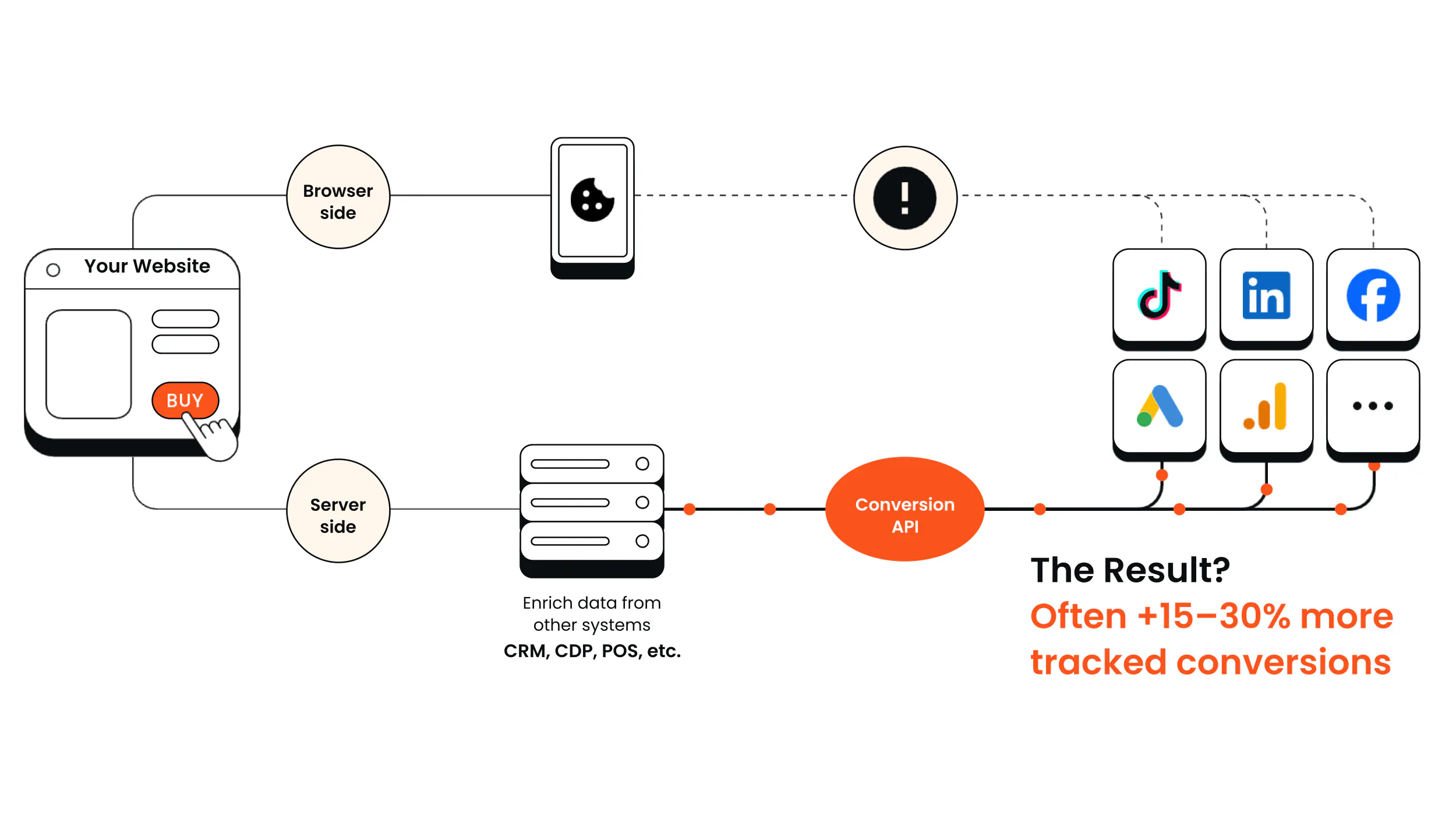
While server-side GTM is a natural choice for managing the limitations of its browser-based predecessor, the cost and complexity of setting up and maintaining an sGTM set-up is a real concern for many. These factors, when combined, can make the thought of using an alternative TMS outside of the Google ecosystem a serious consideration.
Lucas Nilsson, Product Specialist at Tracklution recognizes this predicament: “GTM is a great tool and I love working with it, but not everyone does.”
I think that people looking for alternatives to GTM are really asking 'what server-side tracking solutions exist that aren't dependent on server-side GTM?' because most of the frustration is simply about the complexity and maintenance of running an sGTM setup.
Whether you’re looking for a simplified solution or to improve the data gaps that you’re seeing, you’re likely trying to find answers to particular problems you’re facing with GTM. Being able to pinpoint what those problems actually are can help you identify the most effective solution.
So, here are the most common problems that GTM users see:
1. Data loss
Privacy-driven data loss is one of the biggest and most obvious drawbacks of any browser-based tag management system. Research reveals that one in three consumers worldwide already use an ad-blocker. What’s more, Apple’s Intelligent Tracking Prevention (ITP), browser privacy restrictions, and users rejecting cookie consent, mean that up to 40% of valuable conversion data never even reaches the intended ad platform.
This broken event tracking obscures consumer behavior, skews performance metrics, and prevents ad algorithms from fully optimizing. Commercially, that means lower ROAS, higher CAC, and stunted business growth that leaves marketing teams scratching their heads for what went wrong.
2. sGTM complexity and developer dependency
A self-managed sGTM setup is complex and requires developer expertise to build the infrastructure, validate, and configure forwarding logic that determines where and how that data is sent to third parties. Managing security, debugging and deduplication (so that events aren’t registered twice) are all ongoing tasks which rely on specialist support.
Practically, this means dedicating meaningful developer resources to tracking for both set up and ongoing maintenance. It also means that marketers are unable to affect change without the help of a developer, which can create a dependency bottleneck and slow things down meaningfully.
3. Cost
Developer time and expertise also costs money. Implementing sGTM can set you back €10,000 or more, plus you’ll need to factor in ongoing hosting and specialist support fees. For enterprise-level organizations, annual upkeep can easily run into five or six figures.
“Running a server-side GTM setup comes with significant overheads. Managing tags for multiple platforms, processing, formatting, deduplication – and that’s even before you put a payload together. Most people just don't like the debugging or the upkeep of all that." – Lucas Nilsson, Product Specialist at Tracklution
4. Vendor lock-in and data sovereignty
If you’re in a highly regulated service or work with clients within healthcare, finance or government, moving to an alternative TMS altogether can help you overcome lack of data ownership and minimize reliance on Google’s ecosystem. Fundamentally, GTM gives you very little control over data once it leaves your site and is fed to individual platforms. You can’t process the information or enrich it and GDPR compliance becomes murky as it’s transferred to third parties (sometimes, outside of the EU).
The Best Google Tag Manager Alternatives
Each of the following alternatives is best equipped for overcoming different challenges – whether that’s achieving data sovereignty, bypassing the need for a developer or improving tracking accuracy and reliability.
Identifying the best alternative for your business is about identifying which problems you’re aiming to solve and matching it up with the tool that solves it best.
Below is a comprehensive breakdown of your options.
1. Server-Side GTM (DIY)
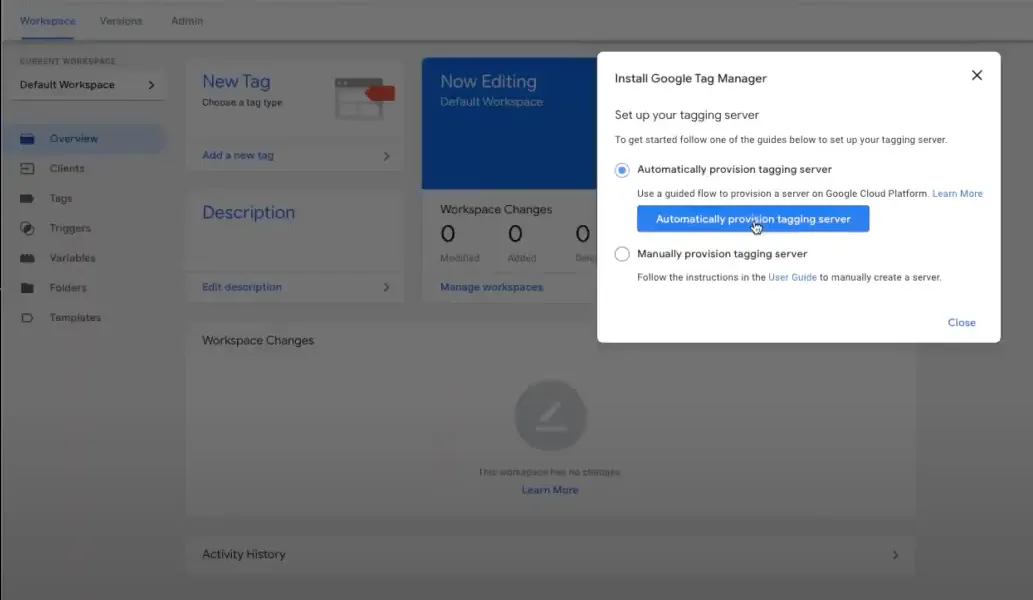
For those looking to overcome the limitations of client-side GTM, server-side GTM should be a real consideration. sGTM directly addresses the problem of unreliable client-side data by capturing and processing events server-side.
While it is typically complex and costly, setting up your own sGTM is broadly considered to be the most flexible option. Doing-it-yourself gives you a truly bespoke setup, putting you in control of security and privacy. There’s also an extensive online community providing templates, guides, tips and advice. A case in point being this excellent Simo Ahava guide which explains what server-side tagging is and how it works with Google Tag Manager.
Strengths
You have absolute control over the data you capture and the environment it’s stored and processed in, which makes it ideal if you work within regulated services, as the risk of accidental leaks is minimal. Unlimited customization also means you can tailor your TMS to collect specific data points and enrich it with data from your own CRM (for example); though managed solutions like Tracklution also support CRM enrichment and offline conversion tracking via webhooks, without the manual configuration.
Limitations
Configuring a bespoke sGTM is hugely time consuming and can take hundreds of hours to implement, as well as all the ongoing maintenance you’ll need. It’s also incredibly expensive to achieve and set-up costs can spiral upwards of €10,000, on top of hosting fees. All in all, this option means you need to have dedicated developer resources to manage it and a ready stack of cash for both set-up and maintenance..
Who it’s best for
sGTM is geared towards organizations with dedicated technical expertise and a meaningful budget. While it offers you absolute control and autonomy over data capture, storage and processing, the price to make this all possible can be prohibitive. Justifying the expense means you’ll need a clear business case that demonstrates how the enriched data you capture will support improved business outcomes from marketing.
Server-side is not some magic replacement, you still collect most events from a browser, and you still use pixels. It is, however, a powerful tool that enriches and supports your conversion tracking. — Lucas Nilsson, Product Specialist at Tracklution
2. Tracklution
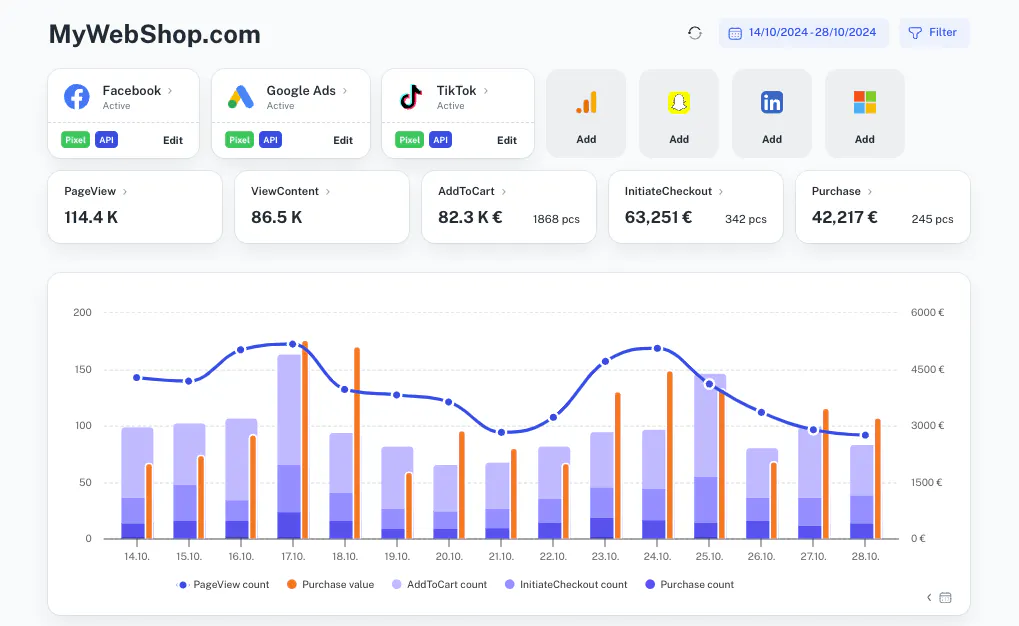
So, while sGTM is an excellent tool for solving the data loss problem, its cost and complexity are a barrier for many. This is where Tracklution comes in.
Full disclosure: Tracklution is our product, so take what follows with that in mind. That said, it's on this list because it's a strong option for addressing all of the problems above — data loss, sGTM complexity, developer dependency, cost, and compliance — in a single platform.
Tracklution is a server-side tracking tool that solves the limitations of client-side tracking without the cost or complexity of DIY setups. It can work as a standalone tracking tool or complement your existing GTM setup (check out our Simo Ahava template for straightforward installation).
It does all the heavy lifting, capturing, processing and sending data directly to ad platforms via their conversion APIs. This server-to-server connection bypasses key challenges like privacy restrictions, browser limitations and ad blockers that undermine the data quality of traditional GTM setups.
The result is more accurate attribution data and improved conversion reliability, which directly improves real business outcomes by empowering your ad algorithms with the real data they need to optimize effectively, and enables you to make better informed marketing decisions.
Installing Tracklution changes the whole conversation around the complexities of server-side tracking and how it works. Instead of investing in a costly and complicated DIY solution, you get one that’s ready-made and that works out of the box. Tracklution is also SOC2 and ISO27001 certified, stores all data within the EU, and fully supports Consent Mode V2 — so compliance is built in from day one.
With Tracklution, the work becomes more focused on what actions are important for the business, rather than 'how do I format hashed user data for Microsoft ads'. — Lucas Nilsson, Product Specialist at Tracklution
Strengths
Tracklution is code-free and quick to set-up (16 minutes is the average installation time across all platforms) for marketers and other non-developers, eliminating dependencies and dramatically cutting the required resources . Ready-made integrations for all major ad platforms — including Meta, Google Ads, TikTok, LinkedIn, Snapchat, Pinterest, Reddit, Microsoft/Bing, Klaviyo, and more — mean you could be live in as little as five minutes.
Shopify app and WooCommerce plugin auto-configure standard eCommerce events out of the box, and first-party mode is enabled with a single DNS change for improved match rates.
Tracklution also supports offline conversion tracking via webhooks, so CRM events, phone calls, in-store purchases, or any off-site conversions can be fed back into ad platforms automatically. It integrates with tools like HubSpot, Zoho, Stripe, and Calendly, and supports profit tracking with server-side margin data — meaning your ad algorithms optimize against actual profit, not just revenue.
As a fully managed solution, Tracklution handles conversion API updates, deduplication, consent management, and data hashing automatically — zero ongoing maintenance. It processes over 642 million events per day and scales alongside growing enterprises. Starting at €31 per month, it tends to be significantly more cost-effective than a DIY sGTM setup.
Limitations
It’s not for teams that need a fully self-hosted infrastructure or who want deep technical control for complicated custom event transformations.
Who it’s best for
Tracklution suits performance marketing agencies managing multiple client accounts, mid-market brands across sectors looking for enterprise-grade tracking without the technical overhead, and any team that wants accurate server-side data without the complexity of building it themselves.
Deploying Tracklution has been a game-changer for advertising agency Tagomo Digital, who recovered up to 70% more conversions for their mid-market B2B and B2C clients. Server-side tracking is now embedded as part of their service, strengthening their overall analytics offering without the need for extra technical resources or high ongoing maintenance costs.
If you want to get better results with your paid advertising, you should move to server-side tracking. And if you don't have the resources to build, code and maintain everything manually, you should check out Tracklution. — Mikael Lahtinen, Head of Advertising, Tagomo Digital
Stop Losing Conversions to Browser Restrictions
Tracklution's server-side tracking recovers the data that ad blockers, ITP and cookie limitations silently strip away — no sGTM setup or developer resources needed.
3. Tealium iQ Tag Management
If your frustration is vendor lock-in and you want a fully independent tag management ecosystem with enterprise-grade data governance, Tealium is built for that.
Tealium iQ is an enterprise-level tag management system that runs client-side. It’s part of the Tealium Customer Data Platform (CDP) and can be used as a standalone TMS or function alongside the wider CDP collection of products (such as Tealium EventStream, its server-side data collection and distribution pipeline).
Strengths
Tealium iQ offers one of the largest choices of integrations, so you can connect to new software tools without developer expertise. Combining iQ with EventStream also provides you with a comprehensive hybrid framework that still gives users consent control via the client-side, while server-side EventStream gives you the opportunity to capture more complete data and enrich it for improved consumer visibility.
Tealium also offers robust data privacy controls with its ‘privacy widget’ which gives website users opt-in and opt-out consent choices supporting GDPR and CCPA compliance. With that said, consent management is increasingly standard across the industry (Tracklution, for example, fully supports Consent Mode V2 and automatically forwards consent states to every connected platform).
Limitations
As an enterprise-level TMS, Tealium also requires enterprise budgets and man-hours to implement and manage effective workflows. Its complexity, vast selection of integrations and extensive privacy controls also make it overkill for any mid-market firms.
Who it’s best for
Tealium lends itself towards large organisations managing high-traffic websites with complex martech stacks who want independence from Google or Adobe ecosystems. Its data governance features also make it suitable for regulated sectors — though it's worth noting that enterprise-grade compliance certifications (SOC2, ISO27001) are available from managed solutions like Tracklution at a fraction of the cost.
4. Matomo Tag Manager
If full data ownership and privacy compliance are non-negotiable — and you want to self-host everything on your own servers — Matomo puts you in complete control.
Matomo is an open source, self-hosted TMS. Its point of difference is a privacy-focused approach — data isn't shared with Google Analytics (though you can import Google data into your Matomo Analytics dashboard for comparison).
Being open source means Matomo’s core software is free, visible and rigorously tested by a community of users. The option to self-host on your own cloud servers or on-premises also means you own 100% of the data you collect.
Strengths
Its key strength is that it provides you with full data ownership. It’s also designed with privacy compliance in mind and is GDPR and CCPA friendly. If you use Matomo Analytics already, you’ll find it fully integrates for ease of use.
Limitations
Matomo's tag manager provides fewer integration options and a smaller choice of tag templates. As a client-side-only tool, it also can't recover the conversion data lost to ad blockers, iOS restrictions, and browser privacy features. So if data loss is your primary frustration, Matomo won't solve it. Plus, despite its self-hosting option being a strength on the one hand, on the other, it does mean you need a fair level of technical expertise or support to get it up and running.
Who it’s best for
Matomo is aimed at privacy-conscious small businesses and organisations in regulated sectors where data sovereignty is non-negotiable. But if your goal is recovering lost conversion data and improving ad platform performance, its client-side-only architecture can't help. Larger, high-traffic sites are also likely to find its smaller ecosystem restrictive.
5. Piwik PRO Tag Manager
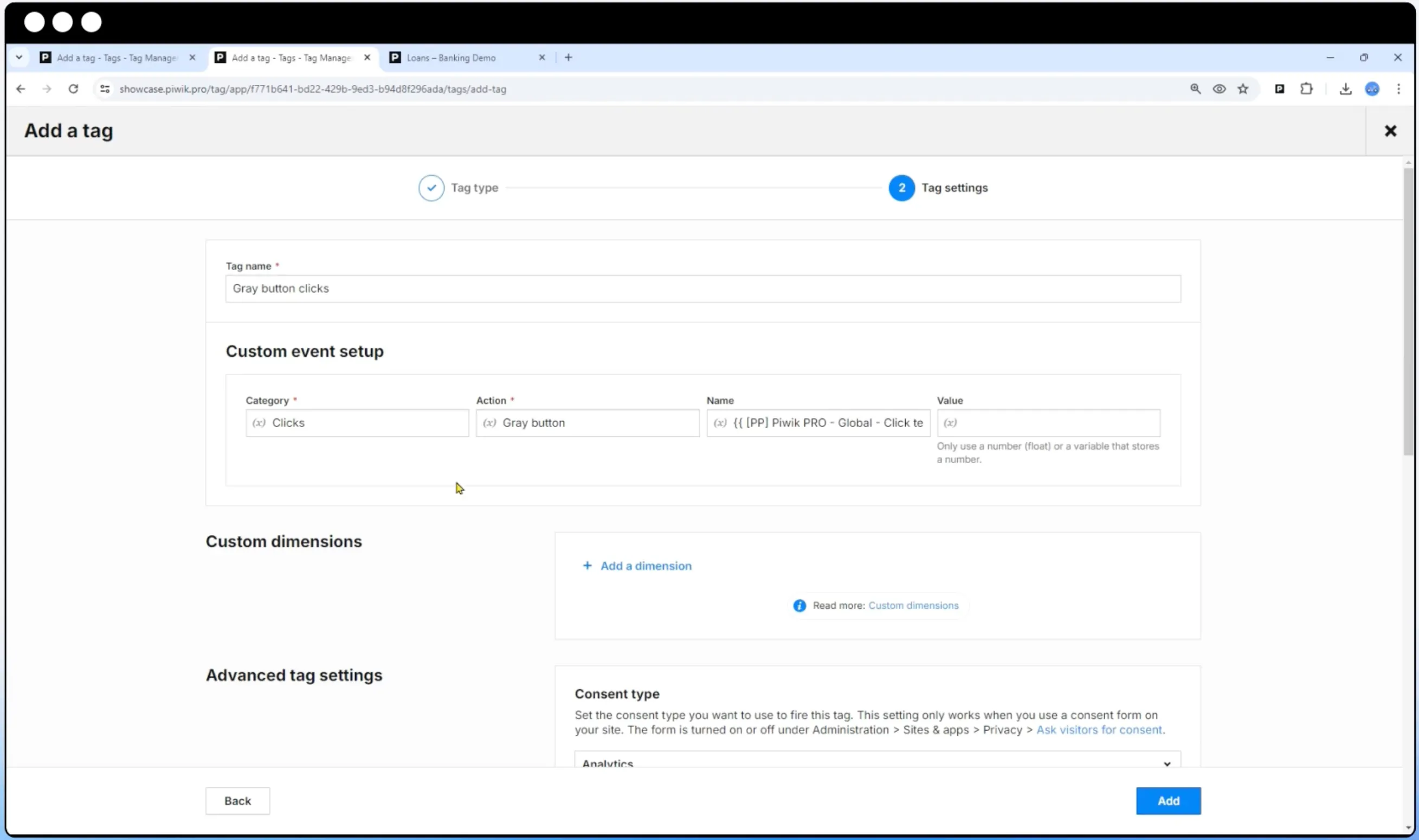
If regulatory compliance drives every decision and you need granular control over exactly where data is stored and how consent is handled, Piwik PRO is purpose-built for that.
Another privacy-first tag manager geared up for regulated sectors, Piwik PRO promises an end to the trade off between detailed customer insight and privacy compliance. Its flexible hosting options also make Piwik PRO a popular option for GDPR focused EU businesses.
Strengths
Piwik PRO uses an integrated consent manager so tags only fire when consent has been given. This next-level privacy extends to user amendments too — if a client changes their mind about their privacy settings, Piwik PRO automatically adjusts data collection rules to match.
The platform is compliant with multiple pieces of privacy legislation across the world, including:
- Europe — GDPR (General Data Privacy Regulation)
- California — CCPA (California Consumer Privacy Act)
- US — HIPAA (Health Insurance and Accountability Act)
- India — Personal Data Protection Bill
Flexible hosting also means you can choose to self-host data onsite or choose between private or public cloud hosting. If you decide on cloud-based storage, you can also pick from several locations (including the EU, US, Hong Kong) so you can be absolutely confident about where sensitive data is held.
Limitations
Piwik PRO’s focus is data sovereignty and compliance so while these features are top-notch, you’ll find it has a much smaller choice of templates. This means you’ll need some JavaScript skills or hire technical expertise to get the tools you need for it to be truly effective.
While Piwik PRO offers a free Core plan, its enterprise-grade packages (which include dedicated support and advanced features) come at a significant cost and are likely out of reach for smaller or cost-conscious businesses.
Who it’s best for
Best for organizations within healthcare, finance and government services who deal with highly sensitive data and prioritize security, compliance and data sovereignty above all else. The option to choose cloud hosting location also makes this a good option for European firms who want to keep data within Europe.
6. Adobe Experience Platform Tags
If Adobe is already foundational in your tech stack and you need tag management that plugs directly into your existing ecosystem, Adobe Tags is the natural extension.
Previously called Adobe Launch (and before that, Dynamic Tag Management), Adobe Tags is designed to function seamlessly within the Adobe ecosystem. Used with other native products (such as the Adobe Analytics platform), you benefit from comprehensive real-time insight into customer behavior without the need to create custom connections.
Strengths
If you already use Adobe and it’s an integral piece of software within your organization, it makes sense to use Tags to join up processes. Accessing Adobe’s Event Forwarding tool which sits server-side and routes data to other platforms, also gives you a hybrid infrastructure for more complete data capture.
Adobe takes a slightly different approach to tag integrations too, designed to simplify the process. Called ‘extensions’ their tags are pre-built packages (built by third-party platforms themselves) that can be chosen like plugins or apps. This makes it easy to upgrade your TMS without the need to write your own tracking code.
Adobe’s Libraries feature also provides different environments enabling version control. It means you can save each stage of work in a ‘library’ where you can test and tweak updates before finally launching.
Limitations
Adobe Tags is deeply embedded within the Adobe ecosystem, so if it’s not one you’re familiar with, it can be a steep and expensive learning curve.
Who it’s best for
Adobe Tags suits large organizations with complex workflows and who benefit from strict version controls. It also makes sense if you already have Adobe Experience Cloud as you’ll find Tags is already included within your subscription.
7. Stape
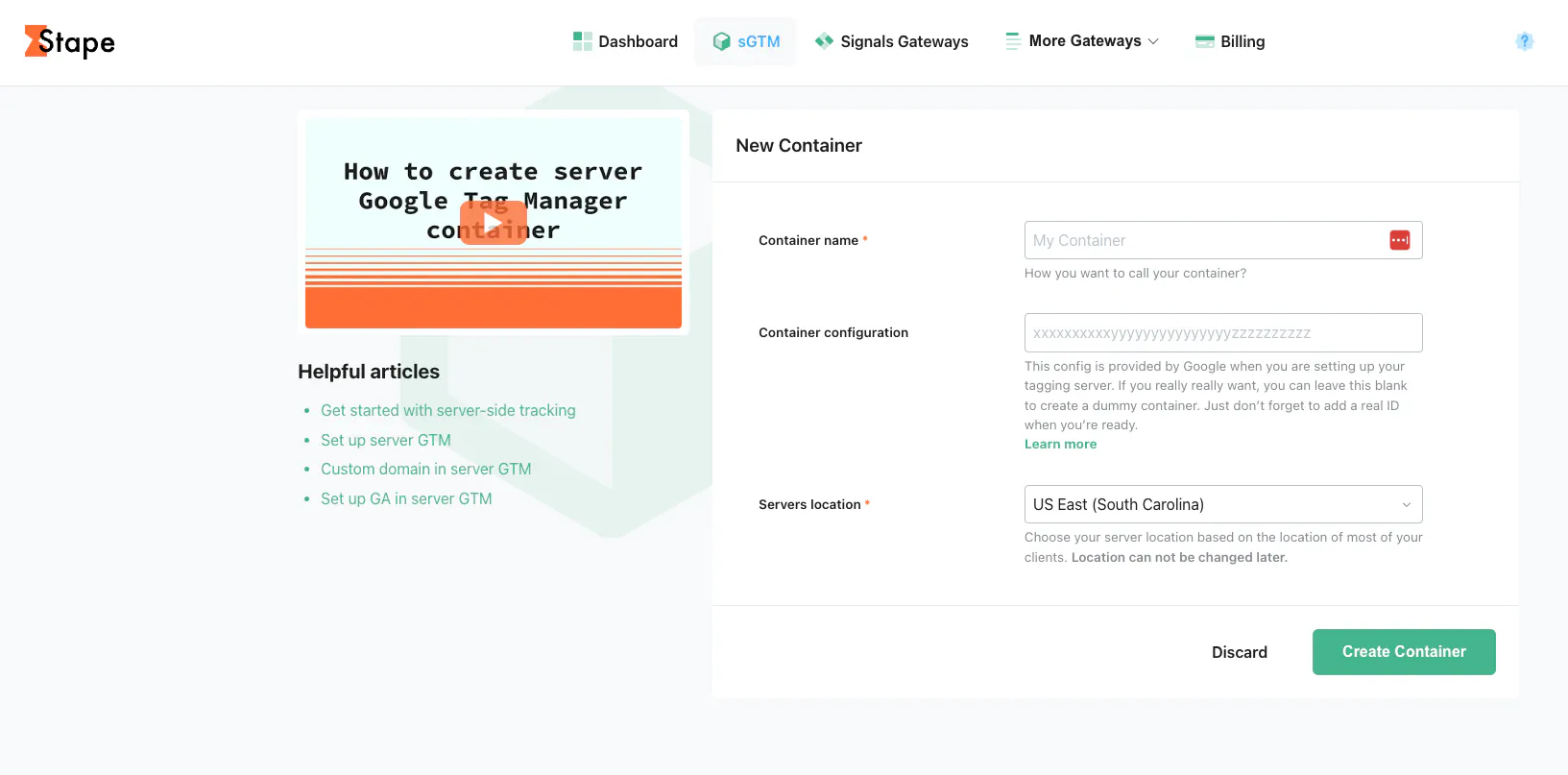
If you've committed to sGTM and want to simplify the hosting and infrastructure — but are comfortable configuring and maintaining your own tags — Stape takes the DevOps off your plate.
Stape started as sGTM hosting — simplifying the server infrastructure so you don't have to manage cloud servers yourself — and has since expanded with "Signals Gateway" products that connect data sources directly to ad platforms (Meta CAPI, TikTok Events API, Snapchat, Google) without requiring a full sGTM setup. For the core sGTM hosting product, however, you still need to configure and maintain your own tags, set up forwarding logic, and handle debugging — all of which requires technical expertise.
Strengths
Stape makes it easier for technically capable teams to implement server-side tracking by handling the hosting infrastructure. For sGTM, there's an extensive library of community-built tag templates for platforms including Meta CAPI, Google Ads, LinkedIn Conversions API and Snapchat CAPI. The newer Gateway products offer a simpler, no-code path to specific platforms. Pricing starts with a freemium plan, with paid sGTM hosting from around $20 per month.
Limitations
Don’t forget that Stape just provides the hosting and infrastructure, ultimately, you still need technical know-how to configure your tags so you’ll need to pay for developer support if you’re not technically minded. You’ll also need to cover costs for ongoing debugging and maintenance.
If you like the idea of server-side tracking but don't want the technical headache of configuring and maintaining tags yourself, Tracklution provides a fully managed solution that's ready to go in less time than it takes to read this article, with no sGTM knowledge required.
Who it’s best for
Stape works well for mid-sized teams with sound technical resources who want sGTM's flexibility without managing their own servers. The newer Gateway products also lower the bar for less technical teams who only need server-side tracking for one or two specific ad platforms. But if you need a complete, multi-platform solution without ongoing technical maintenance, Tracklution is the more hands-off alternative.
How Your Tracking Setup Affects Campaign Performance
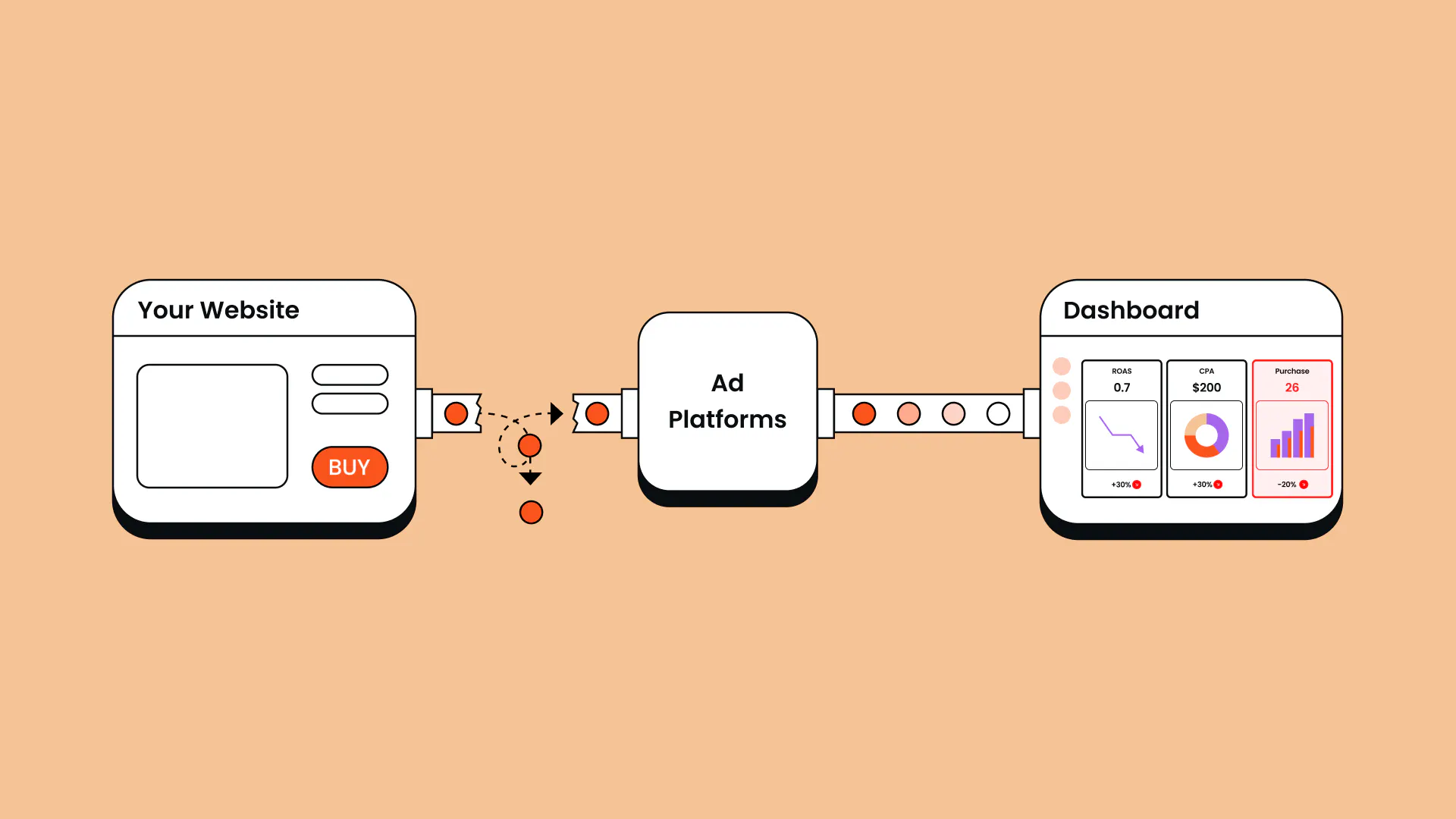
Accurate tracking is the backbone to your marketing. Regardless of the tracking tool you use, incomplete or inaccurate data means algorithm-based ad platforms can’t ever fully optimize based on the conversion data they receive.
Ultimately, says Lucas Nilsson, Product Specialist at Tracklution: “Conversions is the language AI bidding understands and it’s your only way to directly talk with AI bidding algorithms and to tell it what to do”.
For marketers and agencies, it’s important to remember that AI algorithms neither know nor care about brand identity, on-paper demographics or a campaign brief. Their only understanding is what drives conversions — feed in the wrong data and you’re optimizing algorithms for the wrong signals. The result? Poor ad performance, lower ROAS and higher CAC — in other words, wasted marketing spend and unrealized commercial goals.
In contrast, fluency in conversions can significantly improve outcomes as European meal kit maker Yummy can testify. Despite serving more than 300,000 happy customers across the Czech Republic, Slovakia, Finland and Estonia, the Yummy team noticed that something wasn’t quite adding up. Mismatched reporting and missing conversions meant campaigns just weren’t landing where they should, putting expansion in jeopardy.
The solution (after much searching) was Tracklution’s fully managed server-side tracking solution and the result has been profound; 42% customer growth, 15% lower CAC and 30% more purchases tracked for deeper data analysis — demonstrating that the proof really is in the pudding.
Getting this kind of growth in these market conditions doesn't come easy. Now that the algorithms have the right data in the right format, they just work better – the numbers speak for themselves. — Heiman Safeen, Group Growth Officer at Yummy
Which GTM Alternative Is Right for You?
To choose what’s right for you, consider what your priorities are — ecosystem, privacy, cost, customization. For instance, if privacy, data sovereignty and compliance are the priorities, Tealium, Matomo, and Piwik all share your focus. From here, consider practicalities and cost — for example, where Tealium might suit large organizations with technical and financial resources, Matomo sits at the other end of the scale, but with that comes trade offs. Similarly, if Adobe is a foundational software platform in your business, Adobe Tags is the logical (and free) option.
It’s worth looking at the broader picture too — to reiterate Lucas’ point — are you looking for alternatives because you want to avoid server-side GTM and the complexity around set up? Because if you already have GTM (and even if you don’t), adding server-side tracking software like Tracklution to your set of marketing tools is a quick, simple and cost effective solution to enhance what you already have.
I've seen it over and over. Brands or agencies struggling with just their browser-based GTM setup, when they realize that GTM (or whatever tool) plus Tracklution is actually easier than their current client-side setup, it's a real light-bulb moment. It's wild, but I see that reaction so many times. — Lucas Nilsson, Product Specialist at Tracklution
Tracklution’s agnostic approach to platforms also enables conversion tracking from multiple sources. It’s an advantage dental company Orthoclear discovered when they were on the look out for a way to seamlessly connect their Calendly appointments, Shopify purchases and Google Ads.
With Tracklution we know exactly which campaigns drive real appointments; we've also cut acquisition costs by more than 30% while keeping bookings steady. — Jesse Bartels, Chief Smile Officer at Orthoclear
Your data is only as good as your tracking, so if you’re ready to regain control and improve your marketing and commercial outcomes like Orthoclear and Yummy, take the leap with Tracklution.
Get Accurate Conversion Data in Under 16 Minutes
Join brands like Yummy and Orthoclear who recovered missing conversions, cut CAC and scaled campaigns — all without touching server-side GTM.
FAQs
What are the best Google Tag Manager alternatives in 2026?
The best Google Tag Manager alternative for your organization will depend on your specific use cases and priorities, for example, data compliance, privacy, customization or scalability. If certain software ecosystems are already heavily embedded in your business, this may also be a deciding factor. Also remember that GTM can be used alongside Tracklution’s server-side tracking, giving you a powerful hybrid approach without losing what you’ve achieved so far.
Can I use server-side tracking without Google Tag Manager?
Yes. Google Tag Manager is just one way to collect, manage and deploy your tags, but it’s not the only way. GTM can make it easier to integrate server-side tracking if it’s something you already use, but it’s not essential.
What is the difference between a tag management system and server-side tracking?
Tag management systems are a way to manage, launch and update marketing tags. Using a TMS means you can deploy your tags from one central hub without having to edit any website code. Tags can also be fired asynchronously to minimize lag on page loading times. Traditional tag management systems operate from the browser (client-side) so they can be hindered by ad blockers and privacy restrictions as data is sent from the browser directly to third parties.
Server-side tracking can use a tag management system but it’s not essential. Instead of data being sent directly from the browser to third parties, it’s sent to a server that you control where it’s processed; this also means it bypasses barriers such as ad blockers and privacy restrictions. You can also enrich the data by adding information from other databases (like a CRM) to help optimize ad algorithms.
How much does it cost to set up server-side GTM?
This ultimately depends on the solution you choose. Using a hosting service like Stape is an economical option (around €17 per month) but you’ll also need to pay developer costs and cover ongoing maintenance.
Enterprise grade solutions come with heavy price tags too (into the thousands) which can be prohibitive for many organizations.
Opting for a managed solution like Tracklution means you benefit from a complete ready-to-go package with no maintenance fees or hidden set-up costs.
Do I need a developer to switch from GTM to an alternative?
This depends on how complex your tracking is, or needs to be. Some platforms offer migration tools that do the job for you, but if you use a custom data layer with unique tags, you’ll probably need technical support to implement the switch.
What’s the best GTM alternative for agencies?
Agencies need to consider what’s going to provide the biggest win (while ensuring data security) for the least upheaval. You’ll also need to think about what client priorities you need to uphold — which may be sector specific (for example, if your clients are primarily within highly regulated sectors).
Other factors to consider include migration time, workflow processes, available integrations and whether white label reporting is an option.
Related posts
Questions and answers
What does Tracklution actually do?
Tracklution sends conversion data directly to ad platforms (Meta, Google Ads, TikTok, etc.) through server-side APIs. Instead of relying on browser pixels that get blocked by ad blockers, iOS privacy changes, and cookie restrictions, your data goes server-to-server. The result: ad platforms see more of your real conversions, their algorithms optimize better, and you get better ROAS.
What is server-side tracking?
Server-side tracking gathers first-party data directly on your website and sends tracking events to ad platforms via Conversion APIs. This approach bypasses restrictions from iOS devices, ad blockers, and privacy-focused browsers, providing more accurate data and making your paid advertising more efficient.
Is it just one setup that feeds data into all my ad platforms?
Yes. You install Tracklution once, connect your ad accounts, and it sends conversion data to all platforms simultaneously through their respective APIs (Meta CAPI, Google Ads API, TikTok Events API, etc.). No need to manage separate server-side setups for each platform.
How much more conversion data will my ad platforms actually see?
On average, clients report 34.2% more conversions compared to traditional browser-based pixels. This means the ad algorithms have significantly more signal to work with, which translates to 15-35% lower customer acquisition costs for most clients.
Do I need developers to set this up?
No. Setup takes 5-15 minutes depending on your platform. For Shopify, WooCommerce, and other supported platforms, it is plug-and-play. You do not need custom coding or engineering resources. For GTM users, you can keep your existing setup and add Tracklution alongside it.
Do I need to remove my existing tracking tags?
Not necessarily. Tracklution works alongside your current setup. You can run both in parallel initially to compare data, then decide whether to simplify.
What about the DNS / CNAME setup?
Tracklution uses a first-party CNAME record on your domain for data collection. This takes a couple of minutes to configure and up to 48 hours to propagate. It is what makes the tracking resistant to ad blockers and browser restrictions.
Can I verify that the data is actually more accurate?
Yes. Run Tracklution alongside your existing tracking and compare. The dashboard also shows "recovered events" so you can see exactly how many conversions would have been missed without server-side tracking.
Can I distinguish between organic and paid traffic?
Yes. Tracklution preserves traffic source attribution. The conversion data sent to each ad platform includes the proper attribution parameters.
What about offline conversions (phone calls, in-store, CRM events)?
Tracklution supports offline conversion tracking through webhooks and CRM integrations. If someone clicks an ad, then converts offline, you can feed that back to the ad platforms. Clients using this see up to 35% reduction in acquisition costs because the algorithms learn from the full conversion picture.
How does this work with cookie consent and CMP tools?
Tracklution supports both Basic and Advanced Consent Mode. It reads your CMP data layer automatically and respects user consent choices. In Advanced Consent Mode, it can still collect anonymized, cookieless data when users decline cookies, which helps ad platform modeling without violating privacy rules. Fully GDPR-compliant.
How is this different from Stape or building your own sGTM setup?
Stape provides server-side GTM hosting, which means you still need to build and maintain the tags, triggers, and configuration yourself. Tracklution is a complete solution: plug-and-play setup, automatic event detection, built-in consent management, a real-time analytics dashboard, and ongoing maintenance of all API connections. When ad platforms change their APIs (which happens often), we handle the updates.
How does the agency partner model work?
Single dashboard to manage all client accounts. Each client has their own tracking container. The platform handles all technical maintenance, so you are not stuck troubleshooting API changes or broken tracking.

Have further questions?




