Server-side tracking, server-side tagging, gateways: what's the difference?
Client-side, server-side, and gateways explained: what each one actually does, how they differ, and which is right for you.

Table of contents
Better data.
Set up server-side tracking in minutes with Tracklution. Send better conversion data to your ad platforms so their algorithms can optimise for better results from your budget.
Start your free trialWe often see server-side tracking, server-side tagging (especially those two) and gateways being used like they are and mean the same thing. They aren’t and they don’t.
In this quick read, I’ll explain what they are and how they differ when it comes to collecting, managing data and feeding data (or attempting to) to ad platforms.
The TL;DR version
Gateways
A gateway is just a middleman that your tracking data passes through on its way to the ad platform, and it doesn't make your tracking truly first-party. For instance, Meta's Conversion API (or CAPI) gateway is still tied to Meta's third-party pixel.
With gateways, you have no visibility or control over the data and, if the ad platform's pixel gets blocked, your gateway gets blocked with it.
Server-side tagging
Server-side tagging means running your tags on a server instead of the browser, in practice almost always Google Tag Manager's server-side container.
Data is still collected client-side first; the server just fires the tags based on what the browser sends.
That means it's only as good as what's available in the browser at the time: cookies, click IDs, session data.
There's no persistent storage or history on the server by default, so without additional build work, it has no deeper knowledge of the user beyond that single session.
Server-side tracking
Server-side tracking gives you a full data processing engine on your server.
A lightweight script collects events from the browser and sends them up, where they're stored, enriched, deduplicated, and transformed before being forwarded to ad platforms.
And because everything lives server-side, you're not reliant on what happens to be available in the browser at that moment: no cookie dependencies, no session limitations. You can pull in historical data, stitch sessions together, and build a richer signal than the browser could ever provide on its own.
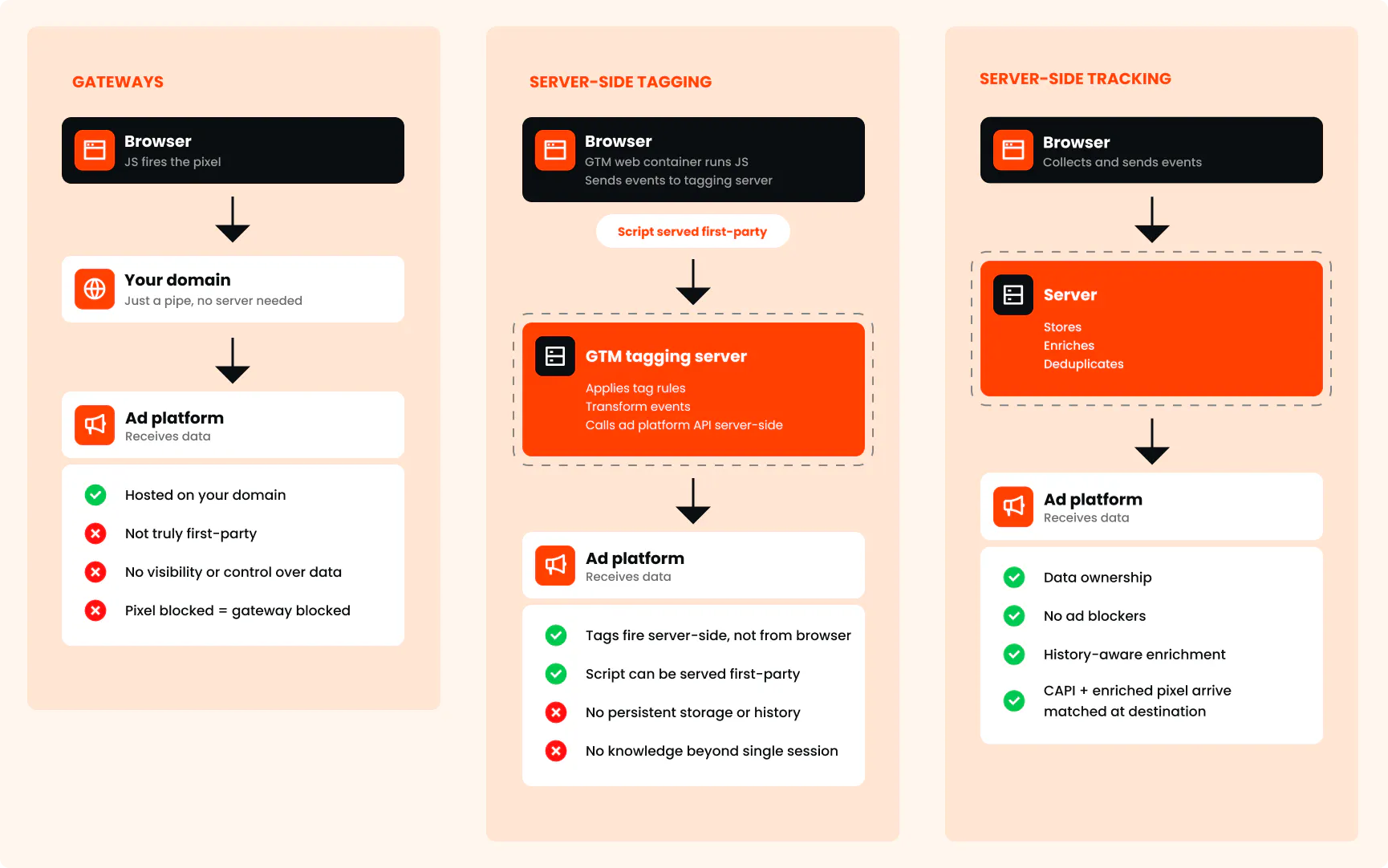
Client-side, server-side, and gateways explained
For the curious minds, let’s see what's happening in each approach, starting with the most basic tracking setup, for comparison: client-side tracking.
Client-side tracking
With client-side tracking, JavaScript runs in the browser and sends events (pageviews, add to cart, purchases, etc.) directly to vendor platforms (Meta, Google, TikTok, LinkedIn, etc.).
The browser does everything: collection, processing, sending.
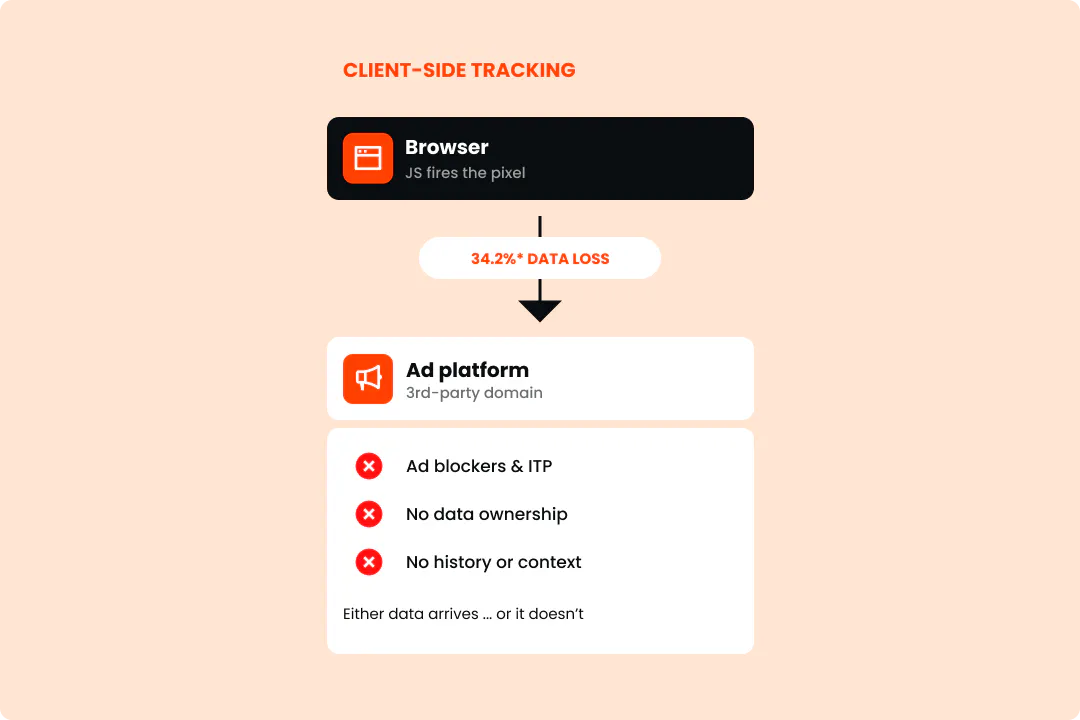
Or at least, it tries to.
In reality, you can’t trust browsers for transmitting your important marketing data.
- Ad blockers get in the way: more than 30% of internet users worldwide use ad blockers (at least occasionally).
- Cookie restrictions eat chunks of your data. iOS devices now have privacy protections (Intelligent Tracking Prevention, or ITP) that cap how long tracking cookies last (from 7 days to sometimes as little as 24 hours). Most ad platforms set their cookies through the browser, so they hit this limit hard. And this matters because iOS devices account for 32% of all mobile operating systems, and Safari alone (browser) accounts for roughly 18% of worldwide traffic.
- High dependence on internet speed: slow internet connection may drop events before they ever fire. That’s because the tracking code has to load in the browser, like any other file on the page. In short, slow connection = loads late or doesn’t load at all. And so, if the user closes a page before it finishes loading, the event is gone (and the more pixels you load, the worse it gets).
And because each event is sent and forgotten in real-time, there's no enrichment, no history, no context. It either arrives at the destination or it doesn't.
All in all, client-side alone is an obsolete way to collect and track data.
Gateways
A gateway sounds more sophisticated than it is: it's just an API endpoint that receives pixel data and passes it on. A middleman, of some sort.

Some implementations sit on a subdomain you own, which can reduce interference from domain-based blocklists (domain-based blocklists flag suspicious ad tracking domains and tell your browser to block them).
But owning the subdomain doesn't mean you own the data, or that the tracking becomes truly first-party.
Let’s take Meta's CAPI Gateway as an example. The request travels through a gateway, yes, but the pixel is still Meta's. None of what goes through, what gets stored or what happens to it is visible to you.
Additionally, with gateways, the browser is still doing most of the work. Every pixel still needs to download, parse, and execute before a single event gets sent. In other words, a gateway changes where the data goes, not how it gets collected.
There's also a practical headache: each gateway is tied to one ad platform's pixel:
- block that pixel, and the gateway goes with it.
- run three ad platforms, manage three gateways.
Technically, it's just a pipe. Event comes in, event goes out. No storage, no processing, no memory of what came before.
Server-side tagging
Server-side tagging means running your tags on a server instead of the browser. In practice, it almost always refers to a specific tool: Google Tag Manager's server-side container.
Here's how it works.
Instead of loading tag scripts directly in the browser, your website loads a lightweight collector script.
- The script runs client-side, captures the event, and sends it up to your server.
- And the server processes the event, applies your tag rules, and can forward signals to ad platforms.
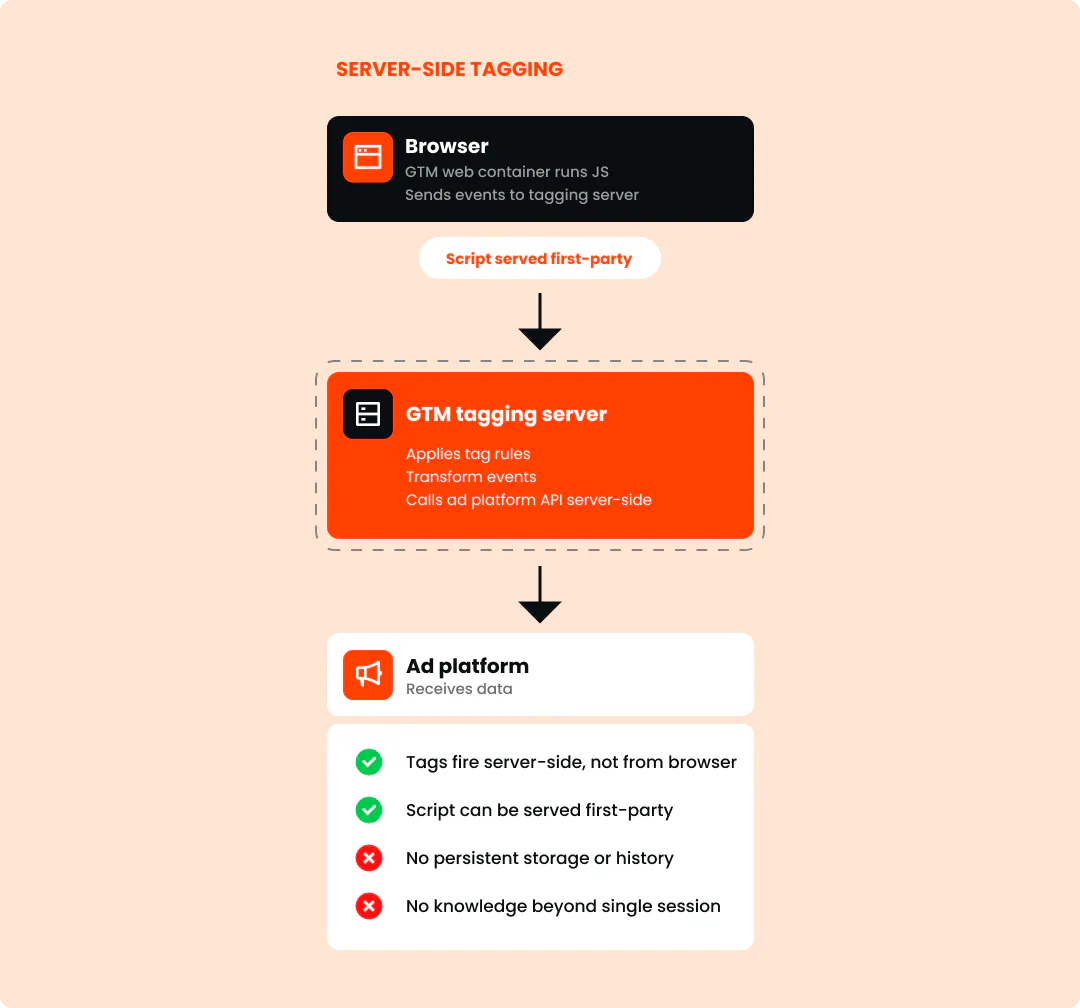
On the one hand, it gives you tags running away from the browser, events processed and transformed before they leave, and your script loading first-party.
On the other, it is still (in many cases) fully reliant on what is available in the browser at the time of the collector script running. There's no built-in storage, no cross-session history and no enrichment across visits, unless you build all those capabilities on top of your server-side tagging infrastructure.
Server-side tracking
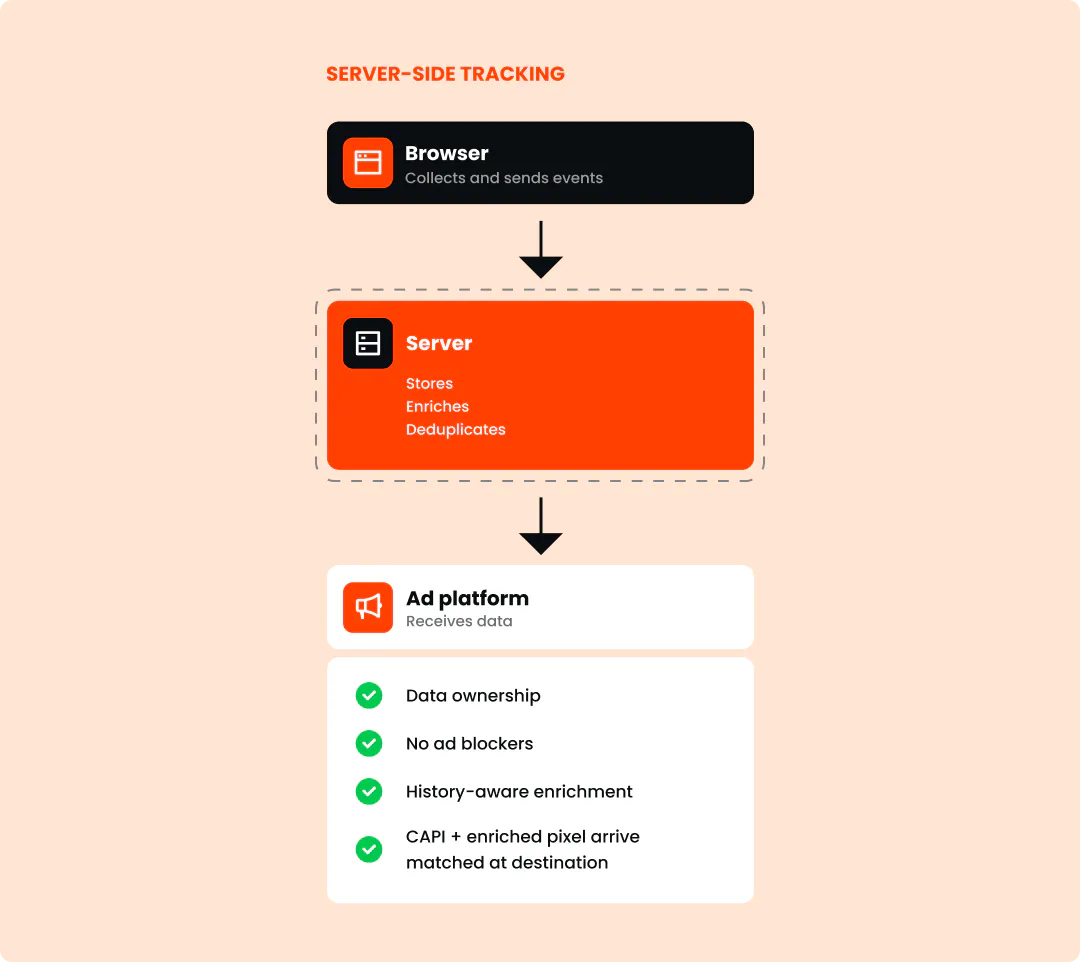
With server-side tracking, a lightweight collector browser script still runs, but instead of firing events directly to ad platforms, it sends data to your server.
That server ideally handles everything: storing, enriching, deduplicating, and the routing to ad platforms via their CAPIs.
This is typically how server-side tracking is represented.
Hybrid server-side setups for the win
In our experience, the most complete server-side setups are, in fact, hybrid server-side setups.
That's exactly what Tracklution allows.
And - hang in there - ‘hybrid’ means 2 important things here.
Hybrid data collection
First, Tracklution can collect data from 2 sources:
- Your website, where what we call a sandboxed pixel fires client-side in real-time. Ad platforms need this for session context, device data, and optimization signals that are difficult to get any other way. The pixel runs in a restricted environment, so ad platforms get what they need without being able to inspect your page structure, read form fields, or collect data beyond what you explicitly share. The server receives this too, enriches it, and sends it to ad platforms via their CAPIs.
- Your back-end systems and offline channels: That means things like CRM updates, phone orders, subscription renewals, etc. It’s anything that happens outside the browser, and can be fed into the server as offline conversions via webhooks.
Hybrid data delivery
Secondly, and as mentioned above, the website data specifically gets delivered to ad platforms 2 ways:
- via a sandboxed client-side pixel
- and a server-side CAPI call,
… both arriving matched at the destination (with proper deduplication IDs provisioned to avoid deduplication of events at the destination).
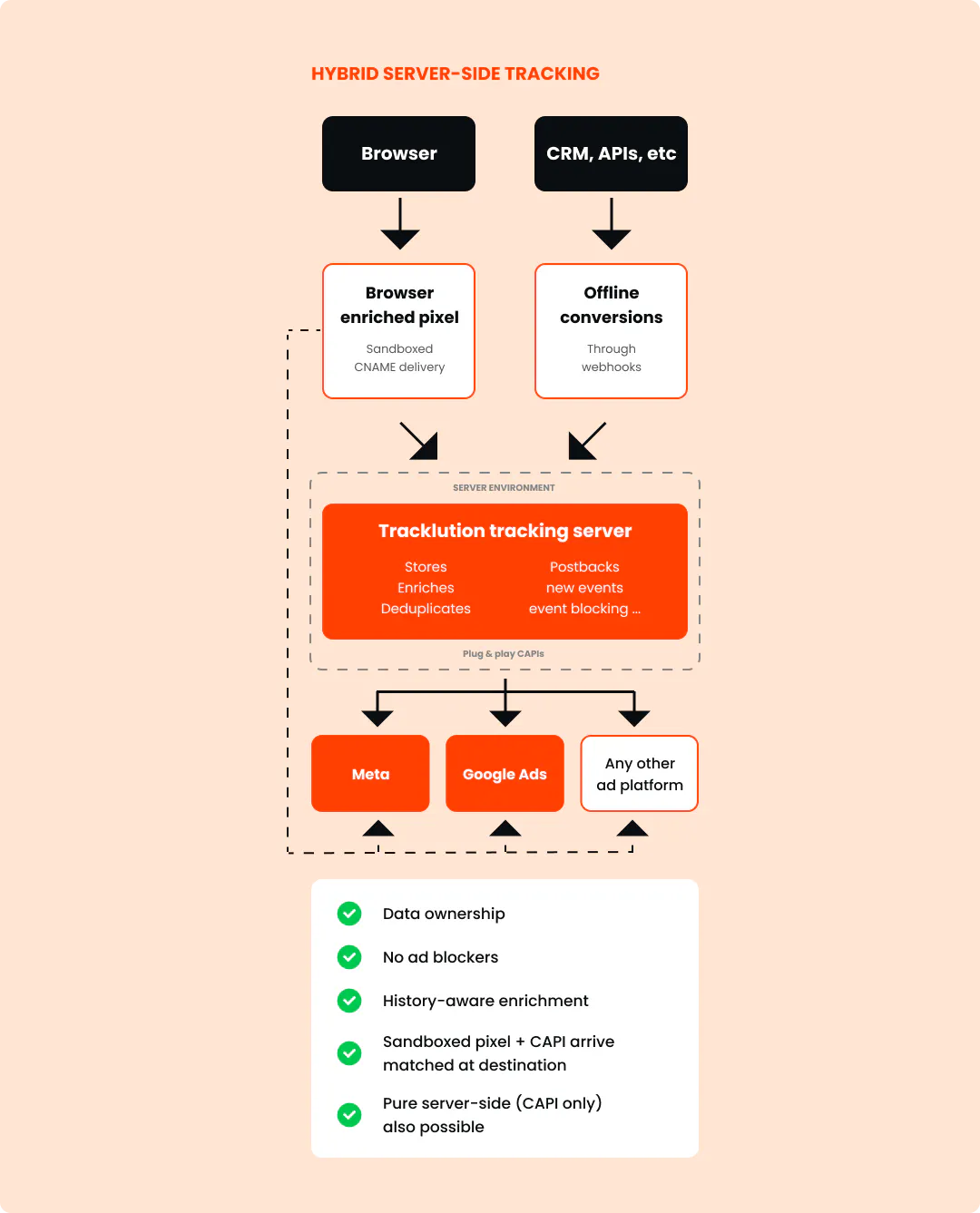
Together, this gives the platform the richest possible view of the conversion.
Related posts
Ask Tracklution
Is server-side tracking just better reporting?
Server-side tracking recovers conversions your pixel misses. Is that just better reporting, or does it actually change how your ads perform?
Ask Tracklution
Is server-side tracking just better reporting?
Server-side tracking recovers conversions your pixel misses. Is that just better reporting, or does it actually change how your ads perform?
Ask Tracklution
Do you need your own server to do server-side tracking?
No, you don't need your own server for server-side tracking. Here's what it actually takes and your three real options.
Ask Tracklution
Do you need your own server to do server-side tracking?
No, you don't need your own server for server-side tracking. Here's what it actually takes and your three real options.
Ask Tracklution
If Tracklution is server-side, why use a browser script?
Tracklution server-side tracking still uses a browser script, but not to process data. We tell you why it matters, and what happens on the server.
Ask Tracklution
If Tracklution is server-side, why use a browser script?
Tracklution server-side tracking still uses a browser script, but not to process data. We tell you why it matters, and what happens on the server.
Questions and answers
What does Tracklution actually do?
Tracklution sends conversion data directly to ad platforms (Meta, Google Ads, TikTok, etc.) through server-side APIs. Instead of relying on browser pixels that get blocked by ad blockers, iOS privacy changes, and cookie restrictions, your data goes server-to-server. The result: ad platforms see more of your real conversions, their algorithms optimize better, and you get better ROAS.
What is server-side tracking?
Server-side tracking gathers first-party data directly on your website and sends tracking events to ad platforms via Conversion APIs. This approach bypasses restrictions from iOS devices, ad blockers, and privacy-focused browsers, providing more accurate data and making your paid advertising more efficient.
Is it just one setup that feeds data into all my ad platforms?
Yes. You install Tracklution once, connect your ad accounts, and it sends conversion data to all platforms simultaneously through their respective APIs (Meta CAPI, Google Ads API, TikTok Events API, etc.). No need to manage separate server-side setups for each platform.
How much more conversion data will my ad platforms actually see?
On average, clients report 34.2% more conversions compared to traditional browser-based pixels. This means the ad algorithms have significantly more signal to work with, which translates to 15-35% lower customer acquisition costs for most clients.
Do I need developers to set this up?
No. Setup takes 5-15 minutes depending on your platform. For Shopify, WooCommerce, and other supported platforms, it is plug-and-play. You do not need custom coding or engineering resources. For GTM users, you can keep your existing setup and add Tracklution alongside it.
Do I need to remove my existing tracking tags?
Not necessarily. Tracklution works alongside your current setup. You can run both in parallel initially to compare data, then decide whether to simplify.
What about the DNS / CNAME setup?
Tracklution uses a first-party CNAME record on your domain for data collection. This takes a couple of minutes to configure and up to 48 hours to propagate. It is what makes the tracking resistant to ad blockers and browser restrictions.
Can I verify that the data is actually more accurate?
Yes. Run Tracklution alongside your existing tracking and compare. The dashboard also shows "recovered events" so you can see exactly how many conversions would have been missed without server-side tracking.
Can I distinguish between organic and paid traffic?
Yes. Tracklution preserves traffic source attribution. The conversion data sent to each ad platform includes the proper attribution parameters.
What about offline conversions (phone calls, in-store, CRM events)?
Tracklution supports offline conversion tracking through webhooks and CRM integrations. If someone clicks an ad, then converts offline, you can feed that back to the ad platforms. Clients using this see up to 35% reduction in acquisition costs because the algorithms learn from the full conversion picture.
How does this work with cookie consent and CMP tools?
Tracklution supports both Basic and Advanced Consent Mode. It reads your CMP data layer automatically and respects user consent choices. In Advanced Consent Mode, it can still collect anonymized, cookieless data when users decline cookies, which helps ad platform modeling without violating privacy rules. Fully GDPR-compliant.
How is this different from Stape or building your own sGTM setup?
Stape provides server-side GTM hosting, which means you still need to build and maintain the tags, triggers, and configuration yourself. Tracklution is a complete solution: plug-and-play setup, automatic event detection, built-in consent management, a real-time analytics dashboard, and ongoing maintenance of all API connections. When ad platforms change their APIs (which happens often), we handle the updates.
How does the agency partner model work?
Single dashboard to manage all client accounts. Each client has their own tracking container. The platform handles all technical maintenance, so you are not stuck troubleshooting API changes or broken tracking.

Have further questions?




