
What makes Tracklution different from other server-side tracking solutions?
See what actually sets Tracklution apart from other server-side tracking tools: all-in-one, managed, CAPIs built in, and setup agnostic.

Table of contents
Better data.
Set up server-side tracking in minutes with Tracklution. Send better conversion data to your ad platforms so their algorithms can optimise for better results from your budget.
Start your free trialWell, this is a question we (and I guess every other provider out there) get asked daily in sales calls.
The truth is, doing server-side tracking alone is not enough of a differentiator anymore.
That’s actually why we don’t shy away from mentioning Tracklution alternatives like Stape, Taggrs, Addingwell, JENTIS, or even a DIY sGTM container you’d host yourself. They too can help you send event data to platforms like Google, Meta, or TikTok through a server-side setup.
That problem is solved.
The real answer(s) for what sets Tracklution apart lies elsewhere.
The TL;DR version
- Tracklution is all-in-one and managed: data collection from any source (websites, backend systems, you name it), storage, session stitching, deduplication, preprocessing, data transformations and cleanups, and built in connectors for many ad platforms. You collect the events from your preferred sources and send them to Tracklution, and that's the whole job on your end: no infrastructure to piece together or maintain.
- Tracklution has the quickest setup for a stack-agnostic solution: our users need a median 16 minutes to get up and running, regardless of their stack and the platforms they advertise on. There’s no sGTM container to wire up, and you’re not limited to ecommerce. Leads, bookings, and CRM events go in the same way as purchases do. In short, nothing about your stack locks you in (or out).
- Tracklution is built for marketers, backed by support and AI: For users, Tracklution is settings, not code. This means you don’t need to be particularly tech savvy to use it. And if ever you need help or if something looks off, Trackie, our AI assistant, can read your container's data and tell you what's wrong. And of course, our (human) support team is always only one message away.
- Tracklution offers full visibility: Our dashboard shows every session and exactly what was sent where, which also means you can prove how you handle the data, if and when needed.
4 things that make Tracklution stand out (beyond core server-side tracking features)
1. Tracklution is all-in-one and fully managed
Most tools in this space hand you the pieces and leave you to build with them:
- an sGTM container to configure,
- a set of platform APIs to connect one by one,
- a separate tool to tell you when something breaks.
- …
You get the idea.
And so, you end up assembling your own infrastructure, then maintaining it every time a platform changes something.
Well Tracklution skips that part.
There's no server to configure: one managed solution, with everything between your events and your ad platforms built in. Also, if CAPIs are part of it, all-in-one & fully managed means much, much more than just CAPIs.
Here's what you get without setting any of it up:
- Event collection from any source: the first-party script for your website, GTM template, automatic dataLayer collection, plugins for Shopify and WooCommerce, and webhooks for backend and offline data (CRM leads, phone calls, in-store sales). Everything goes in the same format. And you decide how and where you want to collect your data.
- Storage and processing: events are stored and prepared for each destination before they leave.
- Session stitching: events from different sources, belonging to the same session, are tied to the same session, so you don't juggle different pixels or match IDs yourself. It’s all done for you.
- Deduplication: when the same event arrives twice or arrives from multiple places, it’s automatically flagged and gets counted once to ensure clean and accurate reporting.
- Connectors: currently over 20 (and counting), for ad platforms and analytics tools. And you turn each one on in a few clicks.
Offline conversions? Not a problem.
Getting offline conversions sent by webhook to line up with the rest of your tracking is notoriously hard to build yourself. With Tracklution, it’s already built in.
What makes that possible is one format for everything. You collect an event once and send it to Tracklution, and we reformat it for whichever connector needs it. You never touch a payload to fit a platform’s spec.
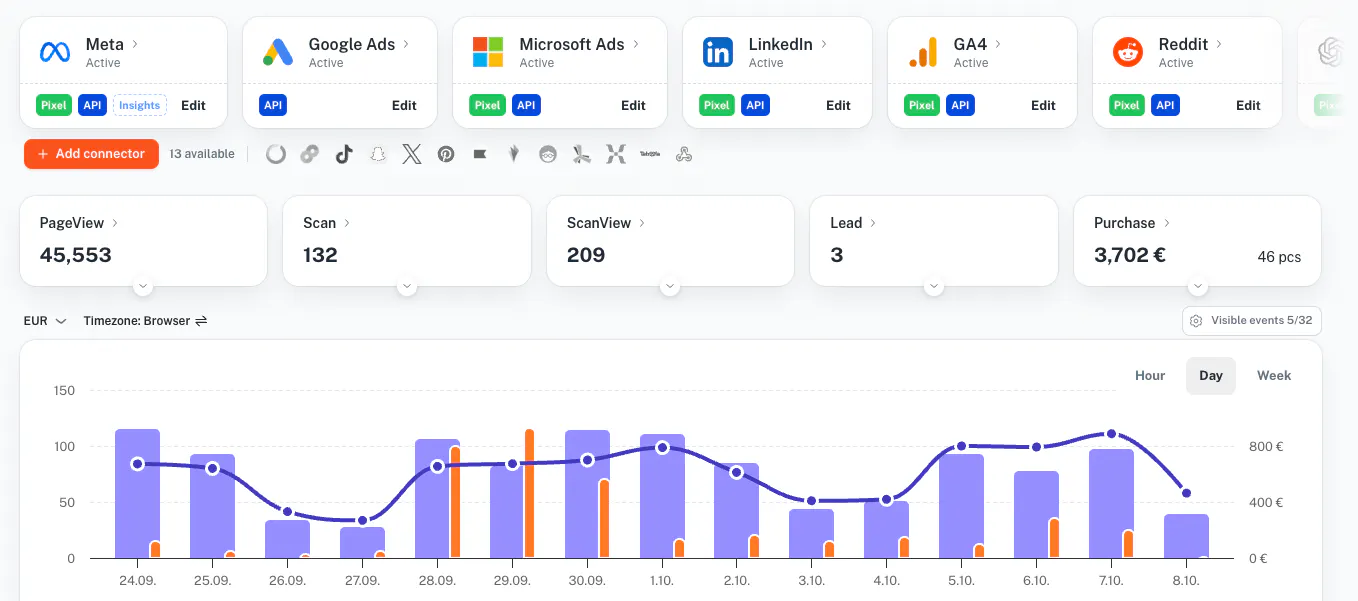
Coming from GTM? You can drop the pile of separate tags and send everything to your first-party domain, which passes it to your server, where everything else happens. And the more data you send, the better it works.
We make hybrid server-side tracking easy
One concrete example of this is our ability to offer our customers a full hybrid server-side tracking experience, combining online and offline conversions to send complete and accurate dataset to your ad platforms.
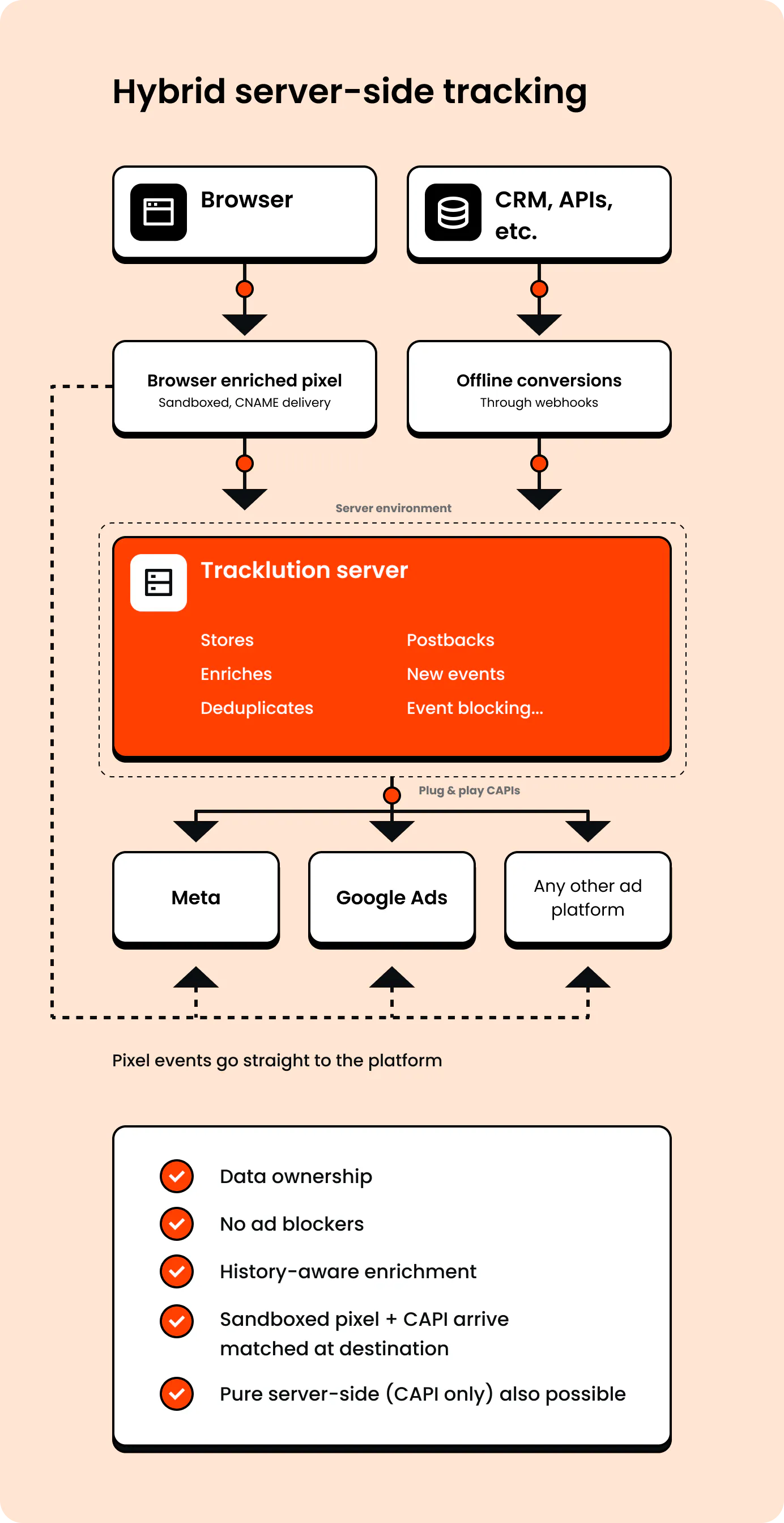

“You don't have to configure a server, host a server, or get a hosting service for one. You don't have to do the reconfigurations, and you don't have to do per-connector payload reformatting. It's settings, not code configuration. Not template configuration, not installs, not apps. All you have to do is collect the events. You send them to Tracklution, that's all you have to do."
Lucas Nilsson,
Product Specialist at Tracklution
In other words, we handle the infrastructure and the formatting so you don't have to build or maintain either. That's not a convenience feature, it's the setup itself.
It's also SOC2 Type 2, ISO 27001 certified, and GDPR and CCPA compliant by default, on servers around the world. What’s more, you can freely choose whether your server is located in the US, Oceania, or in the EU.

"We're a fairly independent team. We're the only team in the company, apart from IT and Data, that really has full ownership. We own our data and our stack, and we didn't want that to be outsourced, or to depend on other teams."
Read Framery's storyPierre-Antoine Colonna,
Marketing Data Lead at Framery
And because it's just one tool, you connect your website once and get tracking, delivery, and monitoring in the same place, regardless of your tech stack and where you use your advertising budget. No separate container, gateways, or monitoring tool to wire together.
2. The quickest implementation for a setup-agnostic solution
We observe a median setup time on Tracklution of 16 minutes, across all stacks.

"Within about 10 minutes he'd [my developer] come back to me and said, this is great, this is simple, this is straightforward,"
Read ScotlandShop storyJohn Cove,
Marketing Manager at ScotlandShop

“We made Tracklution a standard part of our service agreement and technology stack for clients. It’s like a quality guarantee for conversion data. And setting it up doesn’t take more than a few minutes.”
Read Aava & Bang's storySampo Soininen,
Digital Strategist @ Aava & Bang
Tracklution runs the same way on any CMS: Shopify, WooCommerce, Magento, or a custom stack, and still gets you there in a median of 16 minutes.
That's what makes it the fastest setup you'll find that isn't locked to one platform.
In comparison, a typical sGTM setup can take hours, if you know what you're doing (and depending on the complexity of what you’d like to set up).
And it can even take days or weeks (if not months) for the most technical setups requiring the intervention of agencies or a dev team.
“Hey Claude, install Tracklution”
Tracklution also has an MCP (Model Context Protocol) integration: type "install Tracklution" into AI tools like Cursor, Claude Code, or Lovable, and the agent installs the code and checks it works.
And once you're live, you can ask your AI assistant about performance in plain language, like "Compare Google Ads vs. Facebook purchases in May."
It's an optional extra for the way some teams work, and the standard setup stays just as quick.
Learn more about Tracklution MCP.
Setup agnostic means no GTM dependency
Tracklution isn't built as a layer on top of Google Tag Manager's server-side container.
You can send events to us however you collect them, GTM or not, and we're not waiting on Google's roadmap, GTM's template ecosystem, or anyone else's release schedule to ship what advertisers actually need.
3. Built for marketers, backed by support and AI
Tracklution is a tool we built so that marketers and advertisers can run server-side tracking autonomously, without having to involve developers to get it running or to maintain it.
It's settings, not code: you essentially click, select and drag and drop instead of writing template configurations or custom scripts.
Of course, developers can use it too to spare themselves the complexity of more typical server-side tracking setups.
Don’t get me wrong: in practice, most sGTM setups work fine on day one (provided an expert set it up) … until they break the next time a platform changes its API and someone has to notice, diagnose, and fix it.
That’s something that folks from LAZZAWEB fixed with implementing Tracklution.

“Tracking is such a dynamic field. If you don't have somebody keeping it up to date, you will fall behind. You will lose data at some point.”
Read LAZZAWEB's storyNikolaj Bæk,
Chief Commercial Officer & Partner at LAZZAWEB
Again, Tracklution is built so a marketer, and not a particularly technical one, can set it up, adjust it, and maintain it without help from IT.
Trackie, our context-aware debugging assistant
When something looks off, you don't have to dig through logs (you can, if you want to, but you don’t have to).
Meet Trackie, our AI assistant built into every container.
Trackie works from the actual data in your container, so it can diagnose installation issues in seconds, explain what each connector is doing, and point out anything missing or misconfigured.
And it’s worth mentioning that Trackie only sees statistical and technical data, never personal data.
And if you'd rather talk to a person, our real human support team is there too.
Built for marketers … by marketers
We’re hands-on performance marketers ourselves, so we know your pain. In fact, Tracklution started as the fix for our own tracking issues, after setting up conversion tracking by hand project after project, and it turned out to be in high demand.
That’s why we ship so many product updates constantly: no GTM dependency slowing down what we can build, and a roadmap shaped by the problems you actually run into. We see a need, we build for it.
You report challenges, we provide fixes.
4. A processed event table that shows you everything
Tracklution builds sessions for you, and the processed event table is where you see them.
Pick a session, see every event in it, then open an event to see what data came in, what went out to each platform (as pixels or API calls), and what the platform's API replied.
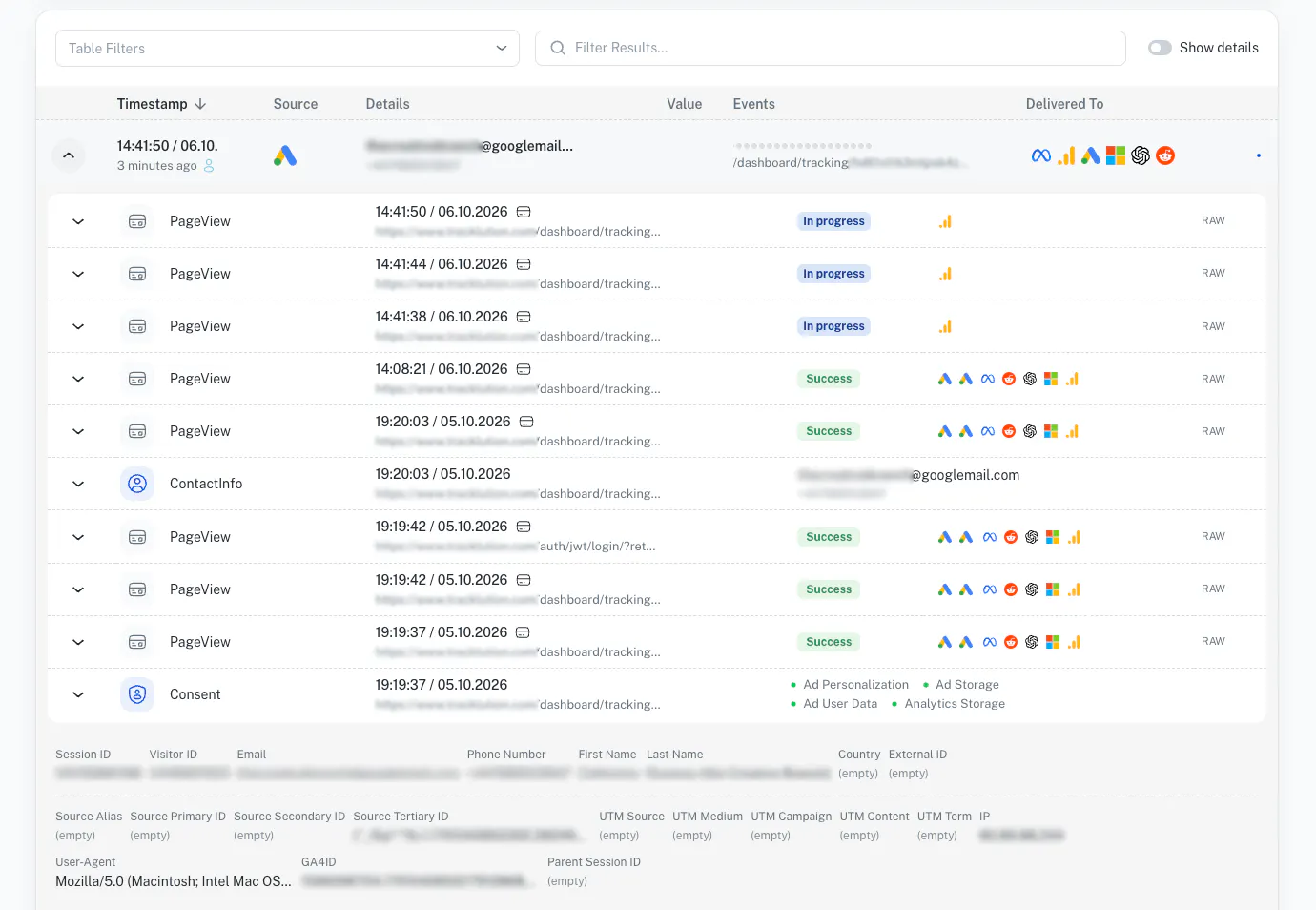
It's one of the two things Lucas, our Product Specialist, automatically points to when he explains what makes Tracklution outstanding (the second one being the fully managed aspect).
“If something goes wrong, you can see exactly what went wrong. And you can prove exactly what you've done with the data if you end up in a review.”
Lucas Nilsson,
Product Specialist at Tracklution
That compliance angle is a real use case most Tracklution customers couldn’t live without.

“We can confidently provide security proof of what data flows via the tracking setup. Tracklution is our shield to show how we deal with this data, in real time.”
Read the storyVíctor Caride Sáez,
Martech manager, Santander Consumer Bank
Make tracking your competitive edge
Here we are.
Server-side tracking is the space we (Tracklution and other players) evolve in, and every other option in this space will get your event from your server to an ad platform, eventually.
Now, Tracklution does it without you managing any infrastructure, gets you there in 16 minutes (or less), keeps it running without a developer, and shows you exactly what happened to every event.
And that's what we believe makes tracking your competitive edge.
Related posts

Ask Tracklution
Is server-side tracking just better reporting?
Server-side tracking recovers conversions your pixel misses. Is that just better reporting, or does it actually change how your ads perform?
Ask Tracklution
Is server-side tracking just better reporting?
Server-side tracking recovers conversions your pixel misses. Is that just better reporting, or does it actually change how your ads perform?
Ask Tracklution
Do you need your own server to do server-side tracking?
No, you don't need your own server for server-side tracking. Here's what it actually takes and your three real options.
Ask Tracklution
Do you need your own server to do server-side tracking?
No, you don't need your own server for server-side tracking. Here's what it actually takes and your three real options.
Ask Tracklution
If Tracklution is server-side, why use a browser script?
Tracklution server-side tracking still uses a browser script, but not to process data. We tell you why it matters, and what happens on the server.
Ask Tracklution
If Tracklution is server-side, why use a browser script?
Tracklution server-side tracking still uses a browser script, but not to process data. We tell you why it matters, and what happens on the server.
Questions and answers
What does Tracklution actually do?
Tracklution sends conversion data directly to ad platforms (Meta, Google Ads, TikTok, etc.) through server-side APIs. Instead of relying on browser pixels that get blocked by ad blockers, iOS privacy changes, and cookie restrictions, your data goes server-to-server. The result: ad platforms see more of your real conversions, their algorithms optimize better, and you get better ROAS.
What is server-side tracking?
Server-side tracking gathers first-party data directly on your website and sends tracking events to ad platforms via Conversion APIs. This approach bypasses restrictions from iOS devices, ad blockers, and privacy-focused browsers, providing more accurate data and making your paid advertising more efficient.
Is it just one setup that feeds data into all my ad platforms?
Yes. You install Tracklution once, connect your ad accounts, and it sends conversion data to all platforms simultaneously through their respective APIs (Meta CAPI, Google Ads API, TikTok Events API, etc.). No need to manage separate server-side setups for each platform.
How much more conversion data will my ad platforms actually see?
On average, clients report 34.2% more conversions compared to traditional browser-based pixels. This means the ad algorithms have significantly more signal to work with, which translates to 15-35% lower customer acquisition costs for most clients.
Do I need developers to set this up?
No. Setup takes 5-15 minutes depending on your platform. For Shopify, WooCommerce, and other supported platforms, it is plug-and-play. You do not need custom coding or engineering resources. For GTM users, you can keep your existing setup and add Tracklution alongside it.
Do I need to remove my existing tracking tags?
Not necessarily. Tracklution works alongside your current setup. You can run both in parallel initially to compare data, then decide whether to simplify.
What about the DNS / CNAME setup?
Tracklution uses a first-party CNAME record on your domain for data collection. This takes a couple of minutes to configure and up to 48 hours to propagate. It is what makes the tracking resistant to ad blockers and browser restrictions.
Can I verify that the data is actually more accurate?
Yes. Run Tracklution alongside your existing tracking and compare. The dashboard also shows "recovered events" so you can see exactly how many conversions would have been missed without server-side tracking.
Can I distinguish between organic and paid traffic?
Yes. Tracklution preserves traffic source attribution. The conversion data sent to each ad platform includes the proper attribution parameters.
What about offline conversions (phone calls, in-store, CRM events)?
Tracklution supports offline conversion tracking through webhooks and CRM integrations. If someone clicks an ad, then converts offline, you can feed that back to the ad platforms. Clients using this see up to 35% reduction in acquisition costs because the algorithms learn from the full conversion picture.
How does this work with cookie consent and CMP tools?
Tracklution supports both Basic and Advanced Consent Mode. It reads your CMP data layer automatically and respects user consent choices. In Advanced Consent Mode, it can still collect anonymized, cookieless data when users decline cookies, which helps ad platform modeling without violating privacy rules. Fully GDPR-compliant.
How is this different from Stape or building your own sGTM setup?
Stape provides server-side GTM hosting, which means you still need to build and maintain the tags, triggers, and configuration yourself. Tracklution is a complete solution: plug-and-play setup, automatic event detection, built-in consent management, a real-time analytics dashboard, and ongoing maintenance of all API connections. When ad platforms change their APIs (which happens often), we handle the updates.
How does the agency partner model work?
Single dashboard to manage all client accounts. Each client has their own tracking container. The platform handles all technical maintenance, so you are not stuck troubleshooting API changes or broken tracking.

Have further questions?
Already convinced? Get 100% accurate data with server side tracking
Already convinced? Get 100% accurate data with server side tracking




