Do you need your own server to do server-side tracking?
No, you don't need your own server for server-side tracking. Here's what it actually takes and your three real options.

Table of contents
Better data.
Set up server-side tracking in minutes with Tracklution. Send better conversion data to your ad platforms so their algorithms can optimise for better results from your budget.
Start your free trialThe TL;DR version
No, you don't.
Whether you want your own server is a different question, and that one's entirely up to you.
By definition, server-side tracking needs a server to exist, pretty much the way the emails or Slack messages you send need a server to exist. That doesn't mean the server has to be yours.
In truth, almost everyone rents that server. You'll also hear this called hosting: renting and hosting mean the same thing here, and we'll use both words. May it be through Google Cloud, sGTM, or Tracklution, you end up on someone else’s infrastructure.
In fact, that’s what we do: Tracklution runs on a rented cloud.
The only way to truly own a server is to buy the hardware and run it yourself, and almost nobody needs to.
So, don’t ask “own a server or not”. Instead, ask “how much of the hosting (and the work that comes with it) do you want to hand off?”
To put things in perspective, when I get asked if one needs their own server to do server-side tracking, I often think about CRMs.
Can you build your own? Sure. Many have. Should you? Probably not … unless CRM is what you sell? The moment you do, you own the development, the maintenance, the security, and everything else that comes with an in-house build you could have externalized in the first place.
Server-side tracking is the same.
A reminder on what a server does, in server-side tracking
If you’re at the stage of wondering whether or not you need your own server, you likely already know what server-side tracking is. But do you know what the server does?
Let's separate the method from the machine for a minute:
- Your events run through a server before they reach the ad platforms, whether they're collected in the browser or fired straight from your own backend. You usually reach that server through a subdomain of your own website (something like data.yourdomain.com), which points to it.
- For the events you collect in the browser, that first-party endpoint is what makes routing them this way worth it: requests come from your domain, so most ad blockers let them through, you control what gets forwarded before it leaves the server, and you keep the heavy scripts and processing out of the visitor's browser.
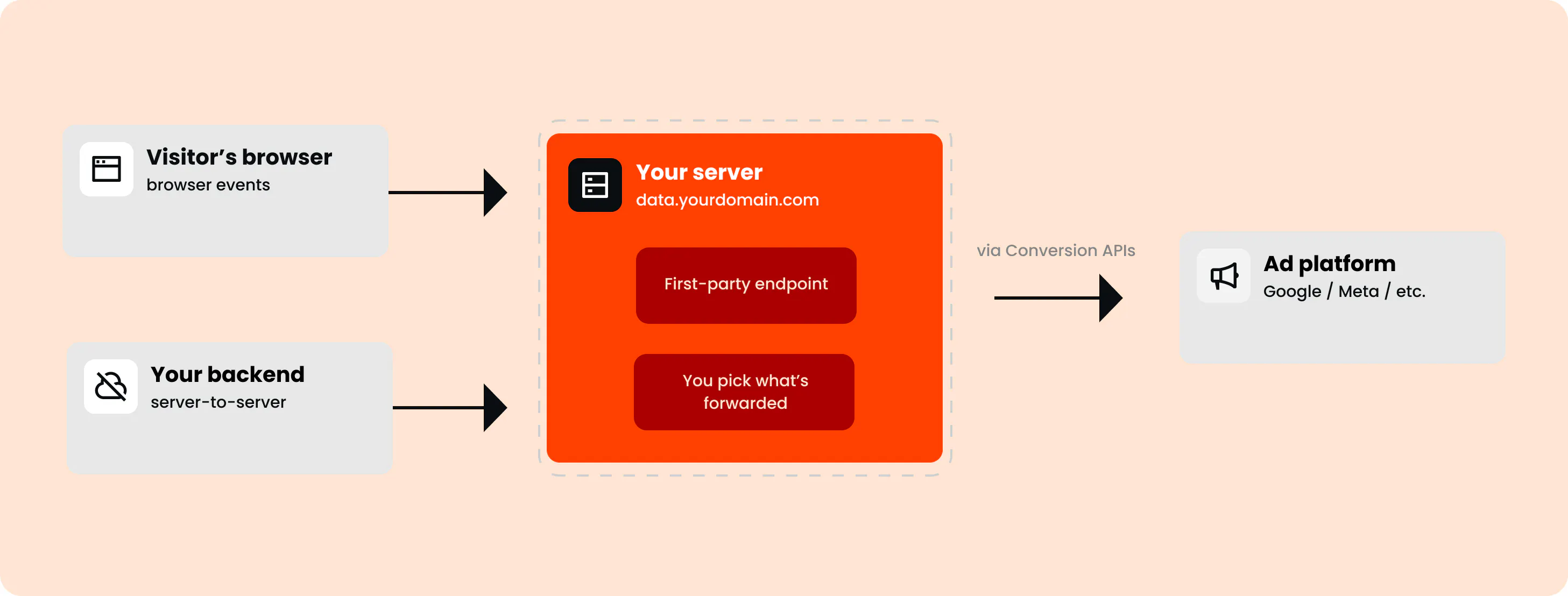
All of that is true whether the server is yours, rented or hosted for you.
The method needs a server (and you don't need to own it)
Those are two different statements, and the gap between them is this whole article.
Think about how many servers you already rely on in a day.
- your emails live on one.
- This blog post is being served from one right now.
You don't own any of them, and until now, maybe you'd never given it a thought.
Server-side tracking is no different.
The server has to be there… and it does not have to be yours.
Here's the part that's easy to miss though: renting or hosting the box doesn't automatically mean someone else maintains what runs on it. Who owns the server and who maintains the tracking setup on top of it are two separate questions.
Having said all that, let’s cover your real options, including DIY.
Your real options for server-side tracking
To put it simply, "your own server" means hardware you bought and need to maintain yourself.
Everything else is renting (or hosting).
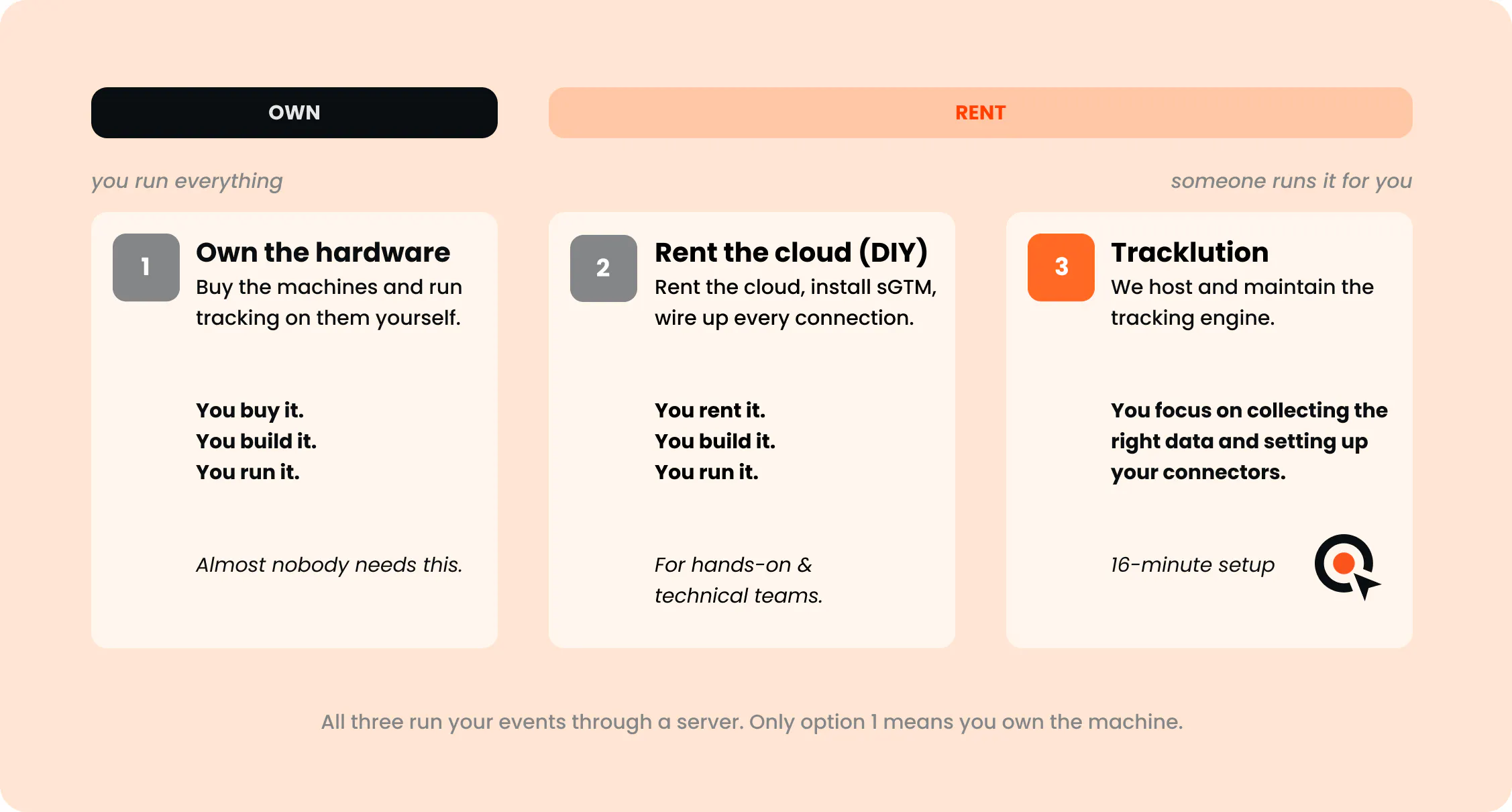
So your options sit on one line, from owning the machine outright to handing almost everything off.
Option 1: Own the hardware (the only "your own server" alternative)
Buy the hardware, put them somewhere you control (your office, or space you rent in a data center), and run server-side tracking on them yourself. This is the one setup where you truly own the infrastructure, not just the data.
What you get is total control: no vendor dependability in the way.
Of course, with great power comes great responsibility. The tradeoff is that uptime, security, updates, scalability, and guarding against data corruption are yours to deal with, indefinitely.
My take? Almost nobody needs this. It's the right call only if running your own infrastructure is core to your business.
Option 2: Rent the cloud and build the rest yourself (DIY)
This right here is what most people mean by "DIY," … and, at the end of the day, it's still renting.
1. You rent space on Google Cloud or AWS, provision the server, and install server-side Google Tag Manager (sGTM, the framework that handles the tagging). From there, you set up failsafes for uptime and build every connection to every ad platform yourself.
sGTM is an infrastructure framework, and it essentially lowers the risk of the whole thing falling over, but it doesn't build the connections for you. That’s your job. Your data usually lives in Google Cloud, often in BigQuery (Google's data warehouse).
- The cloud bill is yours.
- Provisioning, configuring, and keeping the server healthy is yours.
- Building and maintaining every connection is yours.
- Downtime is your problem.
- And so is security.
Outsource the hosting (not the maintenance)
You can also pay managed hosts like Stape or TAGGRS to run the sGTM server for you.
They are hosting providers. It means they keep the server up and running, but you’re the one building and maintaining your tracking system on top of it.
Either way, sGTM is the infrastructure and building the engine is your task.
Some technical teams genuinely want this level of control, and that's fine.
Option 3: Connect a managed platform (Tracklution)
This is the other end of the same rented line: you still rent, but this time, someone else doesn't just host the box. They build and maintain the tracking engine that runs on it too..
So this is the part where I inevitably tell you about Tracklution.
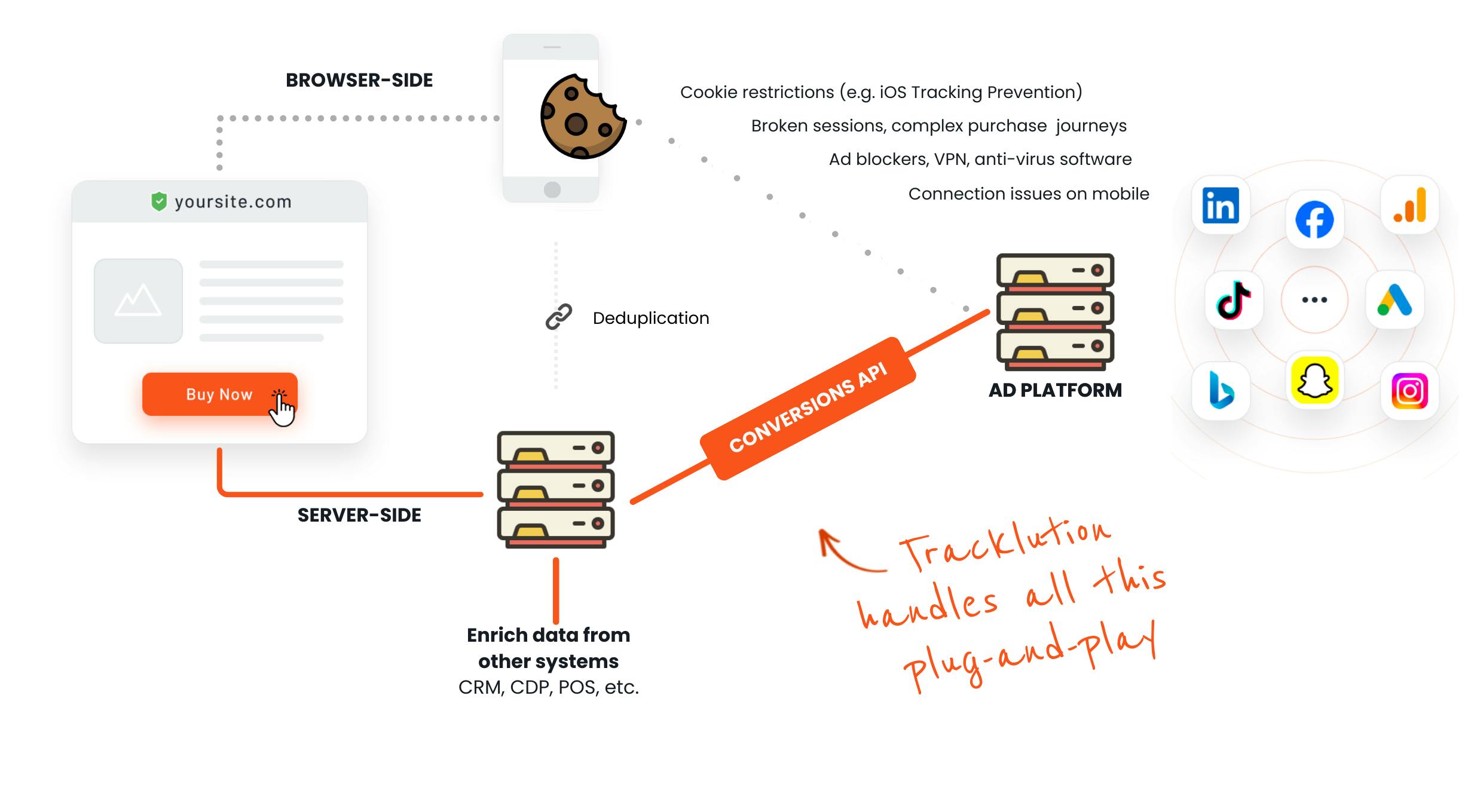
All you have to do is install Tracklution (median implementation time is 16 minutes, across any stack, whether that's Shopify, WordPress, WooCommerce, or something you built from scratch):
- You connect your accounts,
- we host and maintain the tracking engine,
- you focus on collecting the right data and setting up your connectors.
We host the infrastructure ourselves (AWS, in Stockholm), but that's not where our job stops. Unlike hosting providers such as Stape or TAGGRS, who keep the server up and hand the rest back to you, we build and maintain what runs on top of it too:
- data storage,
- data lookups,
- offline enrichments,
- hashing,
- deduplication,
- session stitching,
- and the APIs that talk to every ad platform..
No cloud project, no sGTM build, no connections to wire up by hand, and nothing for you to randomly patch in the middle of the night.
Now, even in this configuration, you hand off the pain of running and maintaining the engine, but you still own your data.
What you gain, however, is data recovery.
The scale and the compliance also sit on our side of the line:
- 642 million events a day,
- SOC 2 Type 2,
- ISO 27001,
- and GDPR compliance.
So, do you need your own server for server-side tracking?
Only if you truly want one.
And remember what "your own" actually means: hardware you buy and maintain. The method needs a server, yes. You don't need to own it, any more than you need to own a power plant to charge your laptop. And renting or hosting one doesn’t erase the maintenance, it just changes how much of it is on you.
Eager to get started? Implement Tracklution in a flash and reap the benefits of server-side tracking today.
Related posts
Ask Tracklution
Is server-side tracking just better reporting?
Server-side tracking recovers conversions your pixel misses. Is that just better reporting, or does it actually change how your ads perform?
Ask Tracklution
Is server-side tracking just better reporting?
Server-side tracking recovers conversions your pixel misses. Is that just better reporting, or does it actually change how your ads perform?

Ask Tracklution
If Tracklution is server-side, why use a browser script?
Tracklution server-side tracking still uses a browser script, but not to process data. We tell you why it matters, and what happens on the server.
Ask Tracklution
If Tracklution is server-side, why use a browser script?
Tracklution server-side tracking still uses a browser script, but not to process data. We tell you why it matters, and what happens on the server.
Ask Tracklution
Server-side tracking, server-side tagging, gateways: what's the difference?
Client-side, server-side, and gateways explained: what each one actually does, how they differ, and which is right for you.
Ask Tracklution
Server-side tracking, server-side tagging, gateways: what's the difference?
Client-side, server-side, and gateways explained: what each one actually does, how they differ, and which is right for you.
Questions and answers
What does Tracklution actually do?
Tracklution sends conversion data directly to ad platforms (Meta, Google Ads, TikTok, etc.) through server-side APIs. Instead of relying on browser pixels that get blocked by ad blockers, iOS privacy changes, and cookie restrictions, your data goes server-to-server. The result: ad platforms see more of your real conversions, their algorithms optimize better, and you get better ROAS.
What is server-side tracking?
Server-side tracking gathers first-party data directly on your website and sends tracking events to ad platforms via Conversion APIs. This approach bypasses restrictions from iOS devices, ad blockers, and privacy-focused browsers, providing more accurate data and making your paid advertising more efficient.
Is it just one setup that feeds data into all my ad platforms?
Yes. You install Tracklution once, connect your ad accounts, and it sends conversion data to all platforms simultaneously through their respective APIs (Meta CAPI, Google Ads API, TikTok Events API, etc.). No need to manage separate server-side setups for each platform.
How much more conversion data will my ad platforms actually see?
On average, clients report 34.2% more conversions compared to traditional browser-based pixels. This means the ad algorithms have significantly more signal to work with, which translates to 15-35% lower customer acquisition costs for most clients.
Do I need developers to set this up?
No. Setup takes 5-15 minutes depending on your platform. For Shopify, WooCommerce, and other supported platforms, it is plug-and-play. You do not need custom coding or engineering resources. For GTM users, you can keep your existing setup and add Tracklution alongside it.
Do I need to remove my existing tracking tags?
Not necessarily. Tracklution works alongside your current setup. You can run both in parallel initially to compare data, then decide whether to simplify.
What about the DNS / CNAME setup?
Tracklution uses a first-party CNAME record on your domain for data collection. This takes a couple of minutes to configure and up to 48 hours to propagate. It is what makes the tracking resistant to ad blockers and browser restrictions.
Can I verify that the data is actually more accurate?
Yes. Run Tracklution alongside your existing tracking and compare. The dashboard also shows "recovered events" so you can see exactly how many conversions would have been missed without server-side tracking.
Can I distinguish between organic and paid traffic?
Yes. Tracklution preserves traffic source attribution. The conversion data sent to each ad platform includes the proper attribution parameters.
What about offline conversions (phone calls, in-store, CRM events)?
Tracklution supports offline conversion tracking through webhooks and CRM integrations. If someone clicks an ad, then converts offline, you can feed that back to the ad platforms. Clients using this see up to 35% reduction in acquisition costs because the algorithms learn from the full conversion picture.
How does this work with cookie consent and CMP tools?
Tracklution supports both Basic and Advanced Consent Mode. It reads your CMP data layer automatically and respects user consent choices. In Advanced Consent Mode, it can still collect anonymized, cookieless data when users decline cookies, which helps ad platform modeling without violating privacy rules. Fully GDPR-compliant.
How is this different from Stape or building your own sGTM setup?
Stape provides server-side GTM hosting, which means you still need to build and maintain the tags, triggers, and configuration yourself. Tracklution is a complete solution: plug-and-play setup, automatic event detection, built-in consent management, a real-time analytics dashboard, and ongoing maintenance of all API connections. When ad platforms change their APIs (which happens often), we handle the updates.
How does the agency partner model work?
Single dashboard to manage all client accounts. Each client has their own tracking container. The platform handles all technical maintenance, so you are not stuck troubleshooting API changes or broken tracking.

Have further questions?
Already convinced? Get 100% accurate data with server side tracking
Already convinced? Get 100% accurate data with server side tracking




