
Can server-side tracking inflate your conversion count?
No, server-side tracking doesn't inflate conversion numbers. See how it works and how it prevents situations where overcounting could happen.

Table of contents
Better data.
Set up server-side tracking in minutes with Tracklution. Send better conversion data to your ad platforms so their algorithms can optimise for better results from your budget.
Start your free trialThe TL;DR version
No.
Server-side tracking does not invent conversions.
For instance, Tracklution recovers conversions from ad platforms you would not be able to see or attribute otherwise.
In other words, no script, cookie, or server can invent an order that doesn't exist in your system of record.
“A server by nature doesn't add more data. It just processes the data that's given to it."
— Lucas Nilsson, Product Specialist at Tracklution
And if your tracking misleads you with more conversions, it’s not an invention, but a duplication (more on that later).
What we observe
Weeks after implementing Tracklution, most users see attributed conversion numbers going up (with an average of +34.2% conversion recovered).
Why browser-only tracking undercounts in the first place
To put it simply, browser-only tracking is unreliable.
It relies on a script running in the visitor's browser, and a lot can get in the way:
- Ad blockers. Roughly 30% of visitors use one, and every blocked pixel is a conversion that will not reach your ad platforms back.
- Browser tracking prevention. Safari's Intelligent Tracking Prevention and Firefox's Enhanced Tracking Protection cap or block third-party cookies (and iOS's privacy changes squeeze what's left).
- Consent timing. If your pixel loads after, or depends on, a consent banner, and the visitor converts before that resolves, the event doesn’t fire.
- Simple abandonment. Slow tag chains and single-page app navigation mean visitors can convert and leave before the script finishes loading.
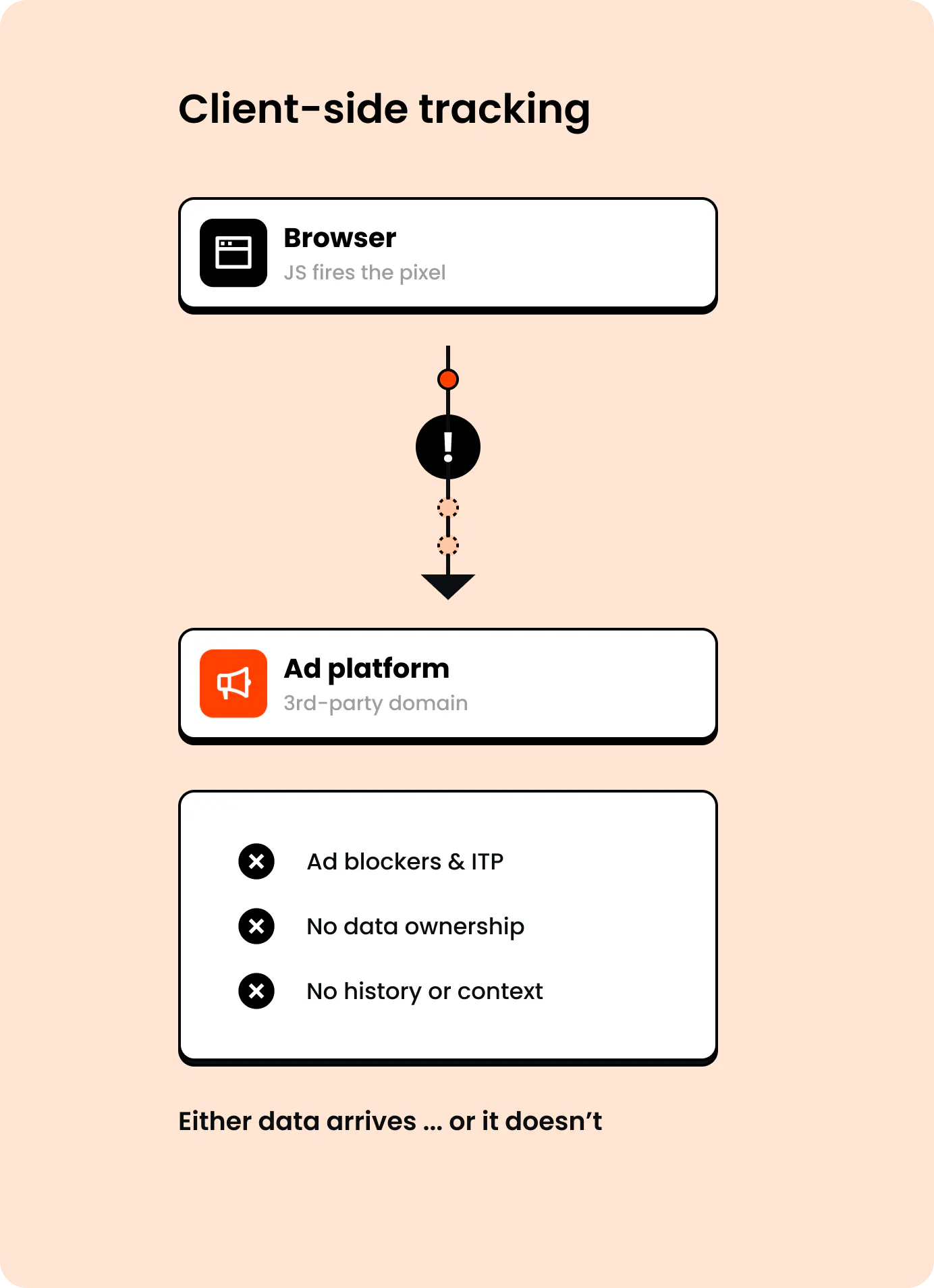
Depending on your audience mix, you could be losing 30 to 70% of those conversions.
What changes with Tracklution and server-side tracking
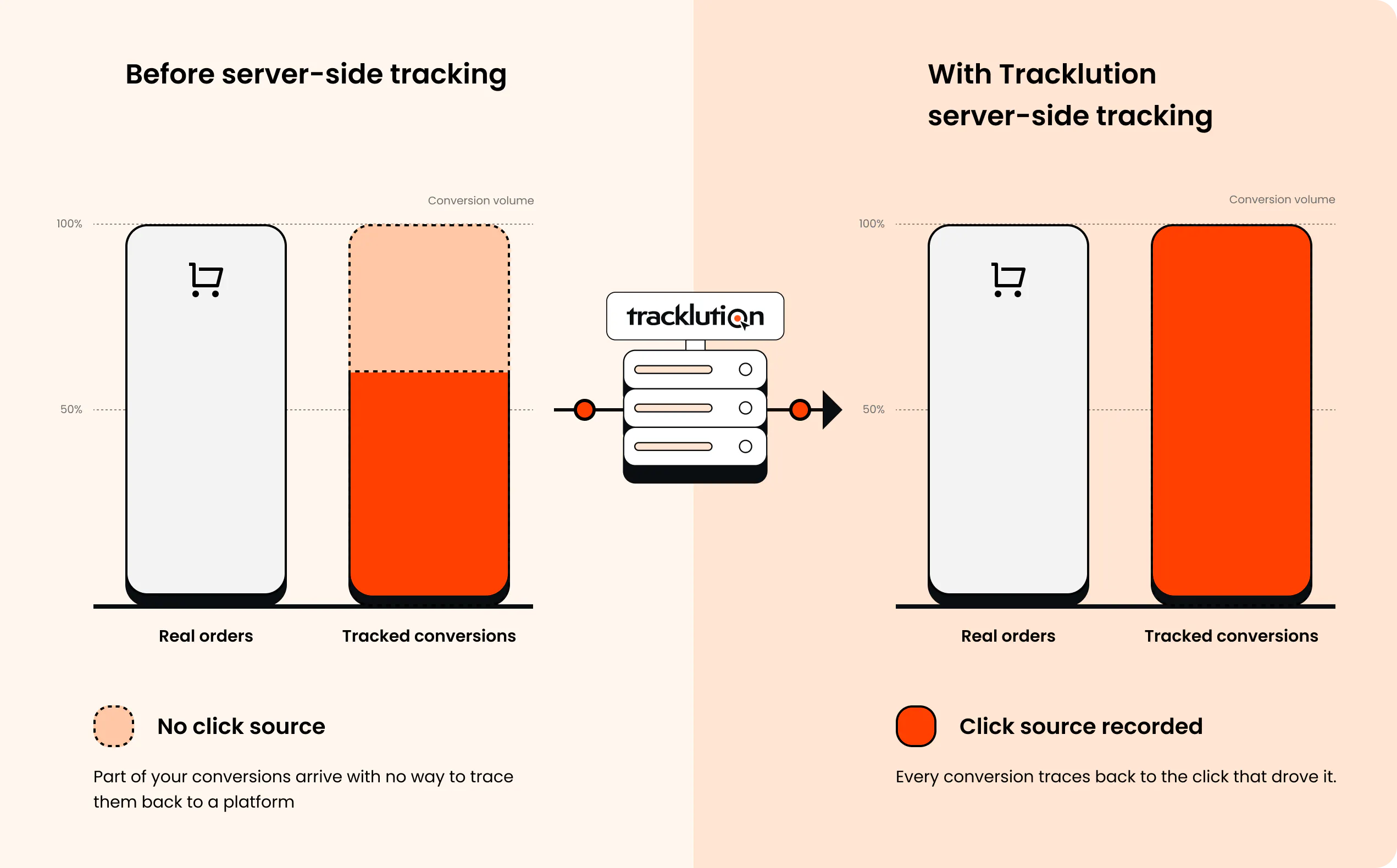
With Tracklution, data collection moves from the browser onto a first-party, server-side endpoint that’s resilient to blockers and script loss.
And so, the extra events you start seeing after the implementation aren’t created by Tracklution, they are events that were already happening prior to installing server-side tracking. Events that you couldn’t track before.
In other words, your real conversion volume doesn't change after you install Tracklution. What changes is how much of that same volume your tracking can attribute back to the original ad platform.
And Tracklution's attribution sticks to what was tracked: the click source recorded in the session. It means no algorithm needs to guess which channel deserves credit.
But can a tracking setup still double-count?
Technically, yes, a tracking setup can overcount, not because of invention, but because of duplication caused by configuration issues or flawed tracking systems.
A tracker never overcounts by inventing events. It overcounts through duplicates.
Now, duplicate mechanisms are both detectable and fixable.
Deduplication cuts both ways, too. Merge two events that were actually separate, and you undercount. Fail to merge two events that were actually the same, and you overcount. Both are deduplication problems, just pointed in opposite directions.
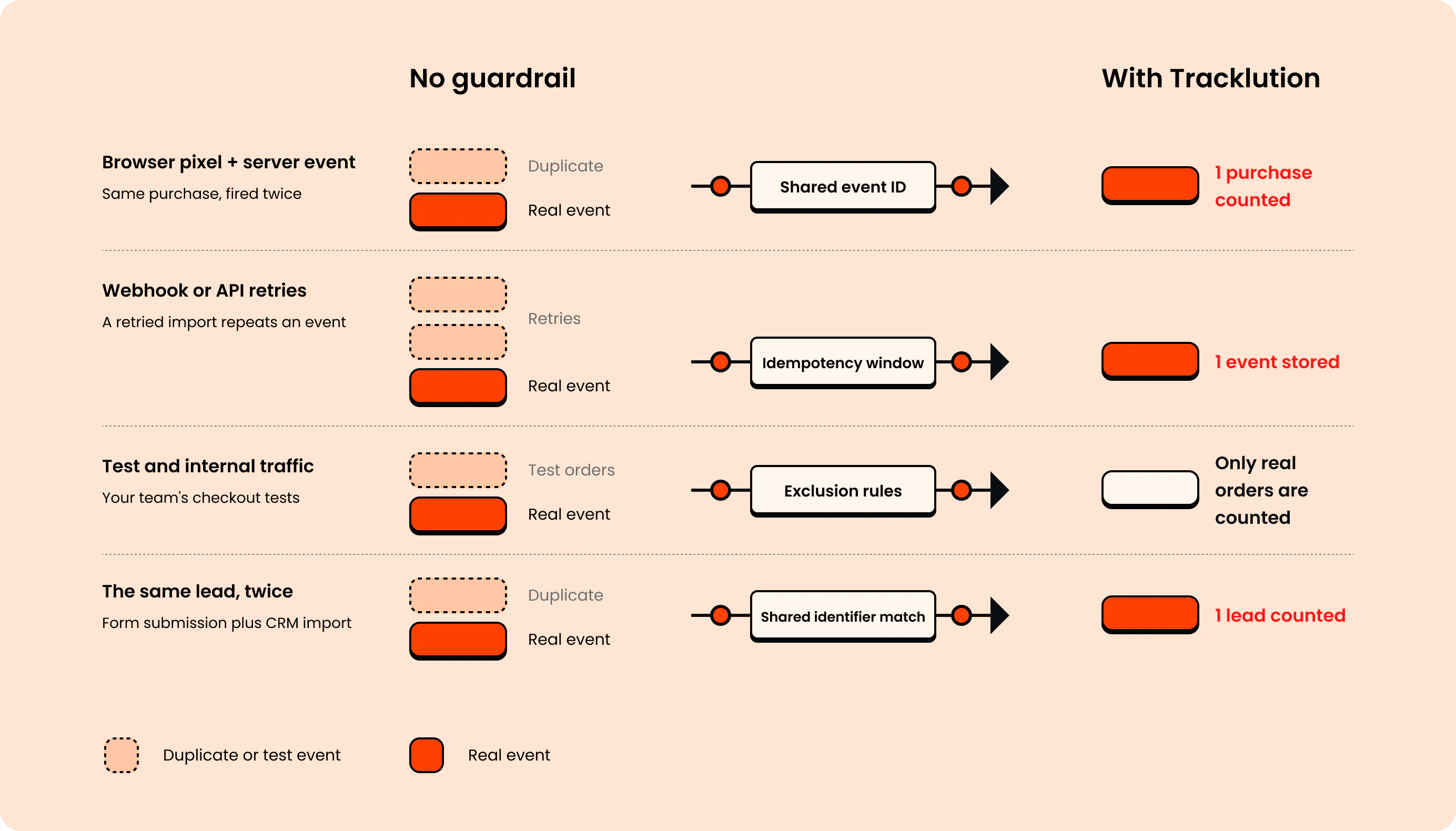
Here are a few common examples:
- A browser pixel and a server event fire for the same purchase. A very common situation. On a typical e-commerce setup, the browser tracks the purchase and a webhook sends a backup copy. Tracklution matches them using a shared event ID and counts the purchase once.
- Webhook or API retries. A retried import can create a repeated event if nothing catches it. Idempotency and dedup windows exist specifically to prevent that.
- Test and internal traffic. Your own team's checkout tests shouldn't count as revenue, and simple exclusion rules handle that.
- The same lead counted twice. A form submission plus a later CRM import of the same person can look like two leads instead of one. Deduplication on a shared identifier (email, phone, or a matched ID) closes that gap.
"The deduplication engine looks at browser data, fingerprinting data, user data, external IDs, event IDs, transaction IDs, order IDs, a lot of things. The more data you include, the better the deduplication engine can work for you."
— Lucas Nilsson, Product Specialist at Tracklution
Send more of those signals, and each event gets matched with more confidence.
The good news for you: Tracklution runs deduplication automatically, as part of the pipeline. You don't have to build or maintain it yourself, and the more data you send, the better it matches.
Check it yourself. Open the processed events table in your dashboard. You'll see the sessions Tracklution builds, every event inside them, the data it received, and what went out to each ad platform. Then compare your tracked purchases against your real orders for the same week. They should land close together.
It’s all about asking the right question
The wrong question: why did my conversions suddenly increase?
The right question: why were my conversions under-reported for so long?
To make a long-story-short, accurate (or real) reporting isn't the same as inflated (or misleading) reporting. And if your tracking setup is matching your conversion books, it’s just showing the truth and allowing you to feed complete data back to algorithms, so that they can generate more clicks that turn into real business (vs. blindly optimizing for … clicks).
And now, you have the answer.
Related posts

Ask Tracklution
What makes Tracklution different from other server-side tracking solutions?
See what actually sets Tracklution apart from other server-side tracking tools: all-in-one, managed, CAPIs built in, and setup agnostic.
Ask Tracklution
What makes Tracklution different from other server-side tracking solutions?
See what actually sets Tracklution apart from other server-side tracking tools: all-in-one, managed, CAPIs built in, and setup agnostic.

Ask Tracklution
Is server-side tracking just better reporting?
Server-side tracking recovers conversions your pixel misses. Is that just better reporting, or does it actually change how your ads perform?
Ask Tracklution
Is server-side tracking just better reporting?
Server-side tracking recovers conversions your pixel misses. Is that just better reporting, or does it actually change how your ads perform?

Ask Tracklution
Do you need your own server to do server-side tracking?
No, you don't need your own server for server-side tracking. Here's what it actually takes and your three real options.
Ask Tracklution
Do you need your own server to do server-side tracking?
No, you don't need your own server for server-side tracking. Here's what it actually takes and your three real options.
Questions and answers
What does Tracklution actually do?
Tracklution sends conversion data directly to ad platforms (Meta, Google Ads, TikTok, etc.) through server-side APIs. Instead of relying on browser pixels that get blocked by ad blockers, iOS privacy changes, and cookie restrictions, your data goes server-to-server. The result: ad platforms see more of your real conversions, their algorithms optimize better, and you get better ROAS.
What is server-side tracking?
Server-side tracking gathers first-party data directly on your website and sends tracking events to ad platforms via Conversion APIs. This approach bypasses restrictions from iOS devices, ad blockers, and privacy-focused browsers, providing more accurate data and making your paid advertising more efficient.
Is it just one setup that feeds data into all my ad platforms?
Yes. You install Tracklution once, connect your ad accounts, and it sends conversion data to all platforms simultaneously through their respective APIs (Meta CAPI, Google Ads API, TikTok Events API, etc.). No need to manage separate server-side setups for each platform.
How much more conversion data will my ad platforms actually see?
On average, clients report 34.2% more conversions compared to traditional browser-based pixels. This means the ad algorithms have significantly more signal to work with, which translates to 15-35% lower customer acquisition costs for most clients.
Do I need developers to set this up?
No. Setup takes 5-15 minutes depending on your platform. For Shopify, WooCommerce, and other supported platforms, it is plug-and-play. You do not need custom coding or engineering resources. For GTM users, you can keep your existing setup and add Tracklution alongside it.
Do I need to remove my existing tracking tags?
Not necessarily. Tracklution works alongside your current setup. You can run both in parallel initially to compare data, then decide whether to simplify.
What about the DNS / CNAME setup?
Tracklution uses a first-party CNAME record on your domain for data collection. This takes a couple of minutes to configure and up to 48 hours to propagate. It is what makes the tracking resistant to ad blockers and browser restrictions.
Can I verify that the data is actually more accurate?
Yes. Run Tracklution alongside your existing tracking and compare. The dashboard also shows "recovered events" so you can see exactly how many conversions would have been missed without server-side tracking.
Can I distinguish between organic and paid traffic?
Yes. Tracklution preserves traffic source attribution. The conversion data sent to each ad platform includes the proper attribution parameters.
What about offline conversions (phone calls, in-store, CRM events)?
Tracklution supports offline conversion tracking through webhooks and CRM integrations. If someone clicks an ad, then converts offline, you can feed that back to the ad platforms. Clients using this see up to 35% reduction in acquisition costs because the algorithms learn from the full conversion picture.
How does this work with cookie consent and CMP tools?
Tracklution supports both Basic and Advanced Consent Mode. It reads your CMP data layer automatically and respects user consent choices. In Advanced Consent Mode, it can still collect anonymized, cookieless data when users decline cookies, which helps ad platform modeling without violating privacy rules. Fully GDPR-compliant.
How is this different from Stape or building your own sGTM setup?
Stape provides server-side GTM hosting, which means you still need to build and maintain the tags, triggers, and configuration yourself. Tracklution is a complete solution: plug-and-play setup, automatic event detection, built-in consent management, a real-time analytics dashboard, and ongoing maintenance of all API connections. When ad platforms change their APIs (which happens often), we handle the updates.
How does the agency partner model work?
Single dashboard to manage all client accounts. Each client has their own tracking container. The platform handles all technical maintenance, so you are not stuck troubleshooting API changes or broken tracking.

Have further questions?
Already convinced? Get 100% accurate data with server side tracking
Already convinced? Get 100% accurate data with server side tracking




