Up to 100% accurate
Server-side tracking
Up and running in as little as 5 minutes. Enter your website to start your 14-day free trial
14-day trial • No credit card required • SOC2 & ISO27001 compliant
Recover +34.2% conversions (avg. uplift) that ad blockers and iOS restrictions hide from your ad platforms
The only MCP that installs end-to-end server-side tracking, no GTM, no server setup, no code to write
Say "Install Tracklution" in Cursor, Claude Code, Windsurf, or any compatible agent and set your tracking up in minutes









Tracklution users recover 34.2% more conversions than browser-based tracking alone
iOS restrictions, ad blockers, and cookie deprecation cut browser-based pixel accuracy to as low as 40%. Tracklution's server-side tracking delivers complete conversion data to every ad platform through their native APIs.
Tracklution server-side tracking (up to 100% data accuracy)
Up to 100% data accuracy
Tracks server-side via direct API calls to Meta, Google, TikTok, and more
Collects first-party data with first-party cookies
Bypasses iOS 14.5+ tracking restrictions, ad blockers, and browser-side limitations
Accurate data only, no artificial conversion modeling
Automatically adapts to users' cookie consent status
Faster website. Tracking handled server-side, not in the browser
Browser-based pixel tracking (as low as 40% data accuracy)
As low as 40% data accuracy
Tracks browser-side via pixel tags and JavaScript snippets
Reliant on third-party cookies
Exposed to iOS 14.5+ restrictions, ad blockers, and browser limitations
Artificial conversion modeling fills gaps in missing data
Browser-side tracking scripts slow page load and hurt UX
Install accurate tracking before your next campaign goes live
Your AI agent handles the technical setup. You get complete, server-side conversion data flowing to every ad platform from day one.
Install accurate tracking before your next campaign goes live
Your AI agent handles the technical setup. You get complete, server-side conversion data flowing to every ad platform from day one.
All of server-side tracking's benefits, set up by your AI agent.
Any AI coding agent. Every ad platform.
Your AI agent installs tracking for you
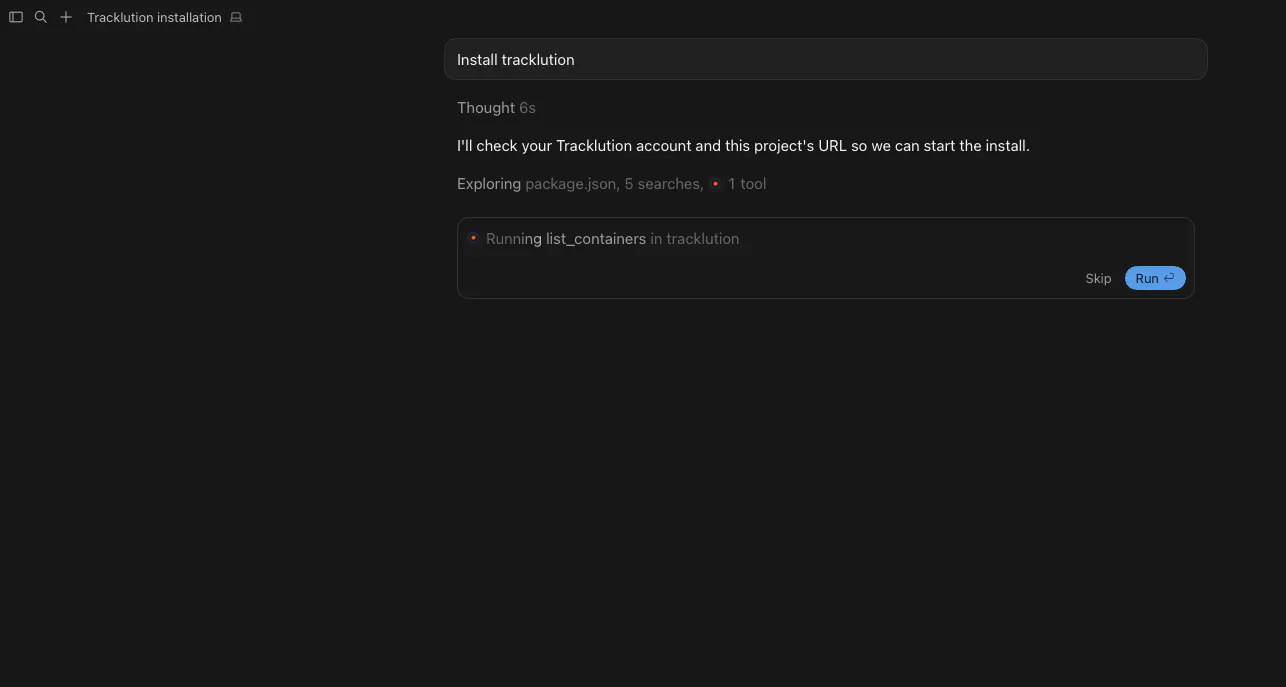
Say "Install Tracklution" and provide your email and site URL. The agent detects your framework, provisions a container, applies the tracking code, and verifies events are firing. Your account is created if you don't have one yet.
Works with all mainstream AI coding tools
Cursor, Claude Code, Codex, Windsurf, Cline, Lovable, Replit, and Bolt. Some agents mount the MCP automatically when you say "Install Tracklution." Others need the server URL added in settings first.
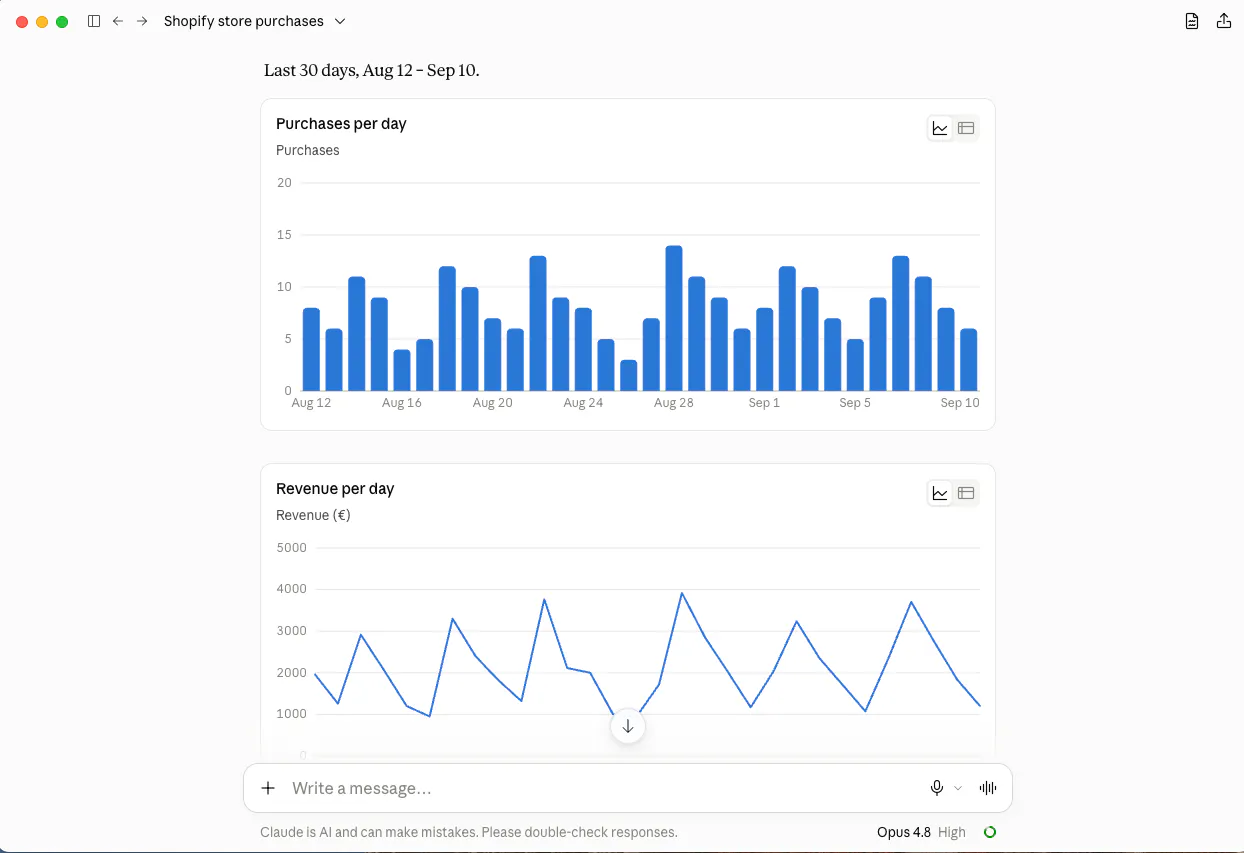
Query your tracking data in plain English
Ask your AI assistant "How did my site perform last week?" or "Which source drove the most purchases?" and get real answers from your live tracking data. Read-only and privacy-safe. No PII is ever exposed.
One setup, every ad platform
Once installed via MCP, connect Meta CAPI, Google Ads Enhanced Conversions, TikTok, LinkedIn, and more from your Tracklution dashboard. All platforms get the same accurate, server-side conversion data.
How to install server-side tracking with an AI agentin as little as 5 minutes
Your AI agent does the technical work. You just tell it what to do.
Step 01
1 min
Tell your AI agent to install Tracklution
In Cursor, Claude Code, Codex, Windsurf, Cline, Lovable, Replit, or Bolt, type "Install Tracklution." The agent reads Tracklution's install protocol and mounts the MCP automatically. If your agent asks for the server URL, paste https://mcp.tracklution.com/mcp. Provide your email and website URL when prompted.
Step 02
3 min
The agent handles the rest
Your agent detects your website’s platform and framework, provisions a new tracking Container or uses the existing Container for your website, applies the correct tracking code to your project, and verifies that events are being received.
Step 03
1 min
Connect your ad platforms
Log into your Tracklution dashboard and click "Add" on any connector card. Meta, Google Ads, TikTok, LinkedIn, and more. Enter the required credentials for each platform and toggle live. Events start flowing through their native APIs immediately.
All done
Your tracking is live, server-side, and accurate. No code to write, no server to manage, no maintenance required.
Tracklution easily connects to your key platforms
Launch fast with built-in integrations designed to outperform in the AI-driven era of digital ads.

Google Ads

Meta Ads


Snapchat Ads

TikTok Ads



Awin

Klaviyo

Bing Ads

LinkedIn Ads

GTM

Adform

DV360

CM360

Google Analytics 4

OpenAI Ads
Custom Connector
Google Ads
Meta Ads
Snapchat Ads
TikTok Ads
Awin
Klaviyo
Bing Ads
LinkedIn Ads
GTM
Adform
DV360
CM360
Google Analytics 4
OpenAI Ads
Custom Connector
Google Ads
Meta Ads
Snapchat Ads
TikTok Ads
Awin
Klaviyo
Bing Ads
LinkedIn Ads
GTM
Adform
DV360
CM360
Google Analytics 4
OpenAI Ads
Custom Connector
Google Ads
Meta Ads
Snapchat Ads
TikTok Ads
Awin
Klaviyo
Bing Ads
LinkedIn Ads
GTM
Adform
DV360
CM360
Google Analytics 4
OpenAI Ads
Custom Connector
Google Ads
Meta Ads
Snapchat Ads
TikTok Ads
Awin
Klaviyo
Bing Ads
LinkedIn Ads
GTM
Adform
DV360
CM360
Google Analytics 4
OpenAI Ads
Custom Connector
Google Ads
Meta Ads
Snapchat Ads
TikTok Ads
Awin
Klaviyo
Bing Ads
LinkedIn Ads
GTM
Adform
DV360
CM360
Google Analytics 4
OpenAI Ads
Custom Connector
Google Ads
Meta Ads
Snapchat Ads
TikTok Ads
Awin
Klaviyo
Bing Ads
LinkedIn Ads
GTM
Adform
DV360
CM360
Google Analytics 4
OpenAI Ads
Custom Connector
Google Ads
Meta Ads
Snapchat Ads
TikTok Ads
Awin
Klaviyo
Bing Ads
LinkedIn Ads
GTM
Adform
DV360
CM360
Google Analytics 4
OpenAI Ads
Custom Connector
Custom Connector
OpenAI Ads
Google Analytics 4
CM360
DV360
Adform
GTM
LinkedIn Ads
Bing Ads
Klaviyo
Awin
TikTok Ads
Snapchat Ads
Meta Ads
Google Ads
Custom Connector
OpenAI Ads
Google Analytics 4
CM360
DV360
Adform
GTM
LinkedIn Ads
Bing Ads
Klaviyo
Awin
TikTok Ads
Snapchat Ads
Meta Ads
Google Ads
Custom Connector
OpenAI Ads
Google Analytics 4
CM360
DV360
Adform
GTM
LinkedIn Ads
Bing Ads
Klaviyo
Awin
TikTok Ads
Snapchat Ads
Meta Ads
Google Ads
Custom Connector
OpenAI Ads
Google Analytics 4
CM360
DV360
Adform
GTM
LinkedIn Ads
Bing Ads
Klaviyo
Awin
TikTok Ads
Snapchat Ads
Meta Ads
Google Ads
Custom Connector
OpenAI Ads
Google Analytics 4
CM360
DV360
Adform
GTM
LinkedIn Ads
Bing Ads
Klaviyo
Awin
TikTok Ads
Snapchat Ads
Meta Ads
Google Ads
Custom Connector
OpenAI Ads
Google Analytics 4
CM360
DV360
Adform
GTM
LinkedIn Ads
Bing Ads
Klaviyo
Awin
TikTok Ads
Snapchat Ads
Meta Ads
Google Ads
Custom Connector
OpenAI Ads
Google Analytics 4
CM360
DV360
Adform
GTM
LinkedIn Ads
Bing Ads
Klaviyo
Awin
TikTok Ads
Snapchat Ads
Meta Ads
Google Ads
Custom Connector
OpenAI Ads
Google Analytics 4
CM360
DV360
Adform
GTM
LinkedIn Ads
Bing Ads
Klaviyo
Awin
TikTok Ads
Snapchat Ads
Meta Ads
Google Ads
Under the hood:
How it works
When you say "Install Tracklution" in your AI coding agent, the MCP triggers a structured installation contract defined at www.tracklution.com/agent-install.md. This contract tells the agent exactly what to do, step by step, without you having to guide it.
First, the agent inspects your project. It detects your framework and identifies where tracking code should go. This framework detection step is what makes AI-powered installation possible. The agent knows which files to touch, which configuration patterns to follow, and which snippets to apply for your specific setup.
Next, the agent provisions your Tracklution account and container. If you're new to Tracklution, it creates an account using the email you provide. Then it spins up a tracking container, which is the server-side environment that receives your events, processes them, and forwards them to your ad platforms via their native APIs. No servers for you to configure or maintain.
The tracking code is applied directly to your codebase. No GTM, no third-party tag managers, no manual copy-paste. The agent writes the snippets into the right place for your stack. For Next.js projects, that means the correct layout file. For HTML sites, the right script placement.
Finally, the agent verifies. It checks that events are reaching your Tracklution dashboard before reporting back that installation is complete. You're not left guessing whether it worked.
For analytics queries, the MCP gives AI assistants read-only access to your tracking data. Ask your assistant questions like "Which source drove the most purchases last month?" and it pulls real data from your Tracklution account and formats it clearly. Raw event data is retained for approximately 14 days. Aggregated reports go longer. PII is never exposed through the MCP.
The result is a complete server-side tracking setup, verified and live, installed by your AI agent in under five minutes.
Tracklution MCP vs. other approaches
See how AI-powered installation compares to managing containers via AI or building server-side GTM from scratch on Google Cloud.
 MCP | Other Server-side Tracking MCPs | Server-side GTM Google Cloud | |
|---|---|---|---|
Installation time | As little as 5 minutes | No MCP install | Hundreds of hours |
End-to-end tracking install | |||
Natural language analytics | |||
Automatic API updates | |||
No server management | |||
Automatic framework detection | |||
Cost | Free plan (5k events/mo). From €39/mo. | Varies | Starts at €120/mo + setup hours |
MCP | Other Server-side Tracking MCPs | Server-side GTM Google Cloud | |
|---|---|---|---|
Installation time | As little as 5 minutes | No MCP install | Hundreds of hours |
End-to-end tracking install | |||
Natural language analytics | |||
Automatic API updates | |||
No server management | |||
Automatic framework detection | |||
Cost | Free plan (5k events/mo). From €39/mo. | Varies | Starts at €120/mo + setup hours |
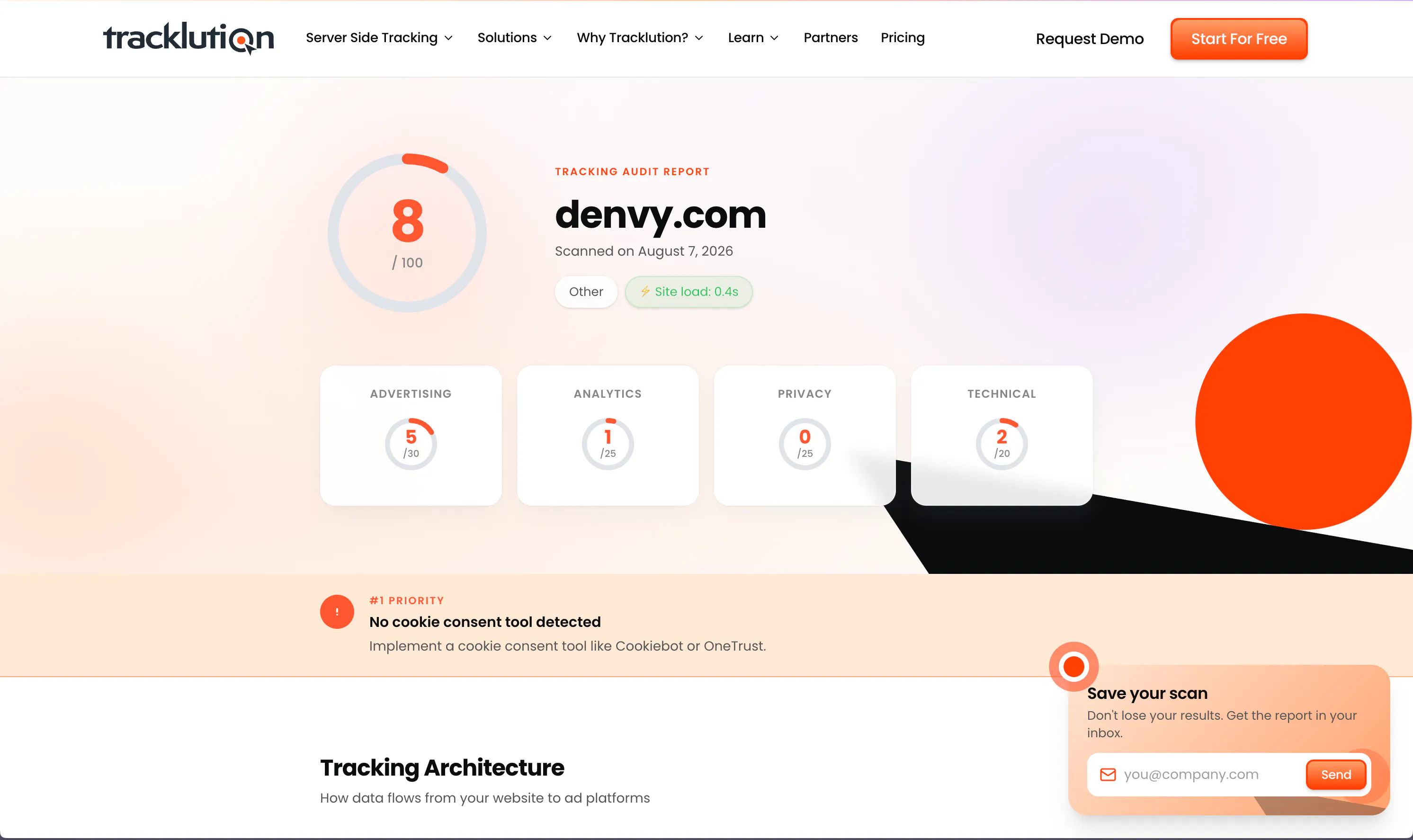
Think your tracking works? Put it to the test.
Tracklution's free tracking audit scans your current setup and shows you exactly where you're losing conversion data, plus what to fix first.
Think your tracking works? Put it to the test.
Tracklution's free tracking audit scans your current setup and shows you exactly where you're losing conversion data, plus what to fix first.
What you can do with Tracklution MCP
Install tracking
Your AI agent installs complete server-side tracking on your site automatically, no code required.
Query performance
Ask your AI assistant what your tracking data shows, in plain English, and get real answers from live data.
Check setup status
Confirm which containers are active, which events are firing, and whether your tracking is working correctly.
Troubleshoot issues
Ask your agent to diagnose tracking gaps, missing events, or connector errors without opening the dashboard.
Build custom reports
Request event breakdowns, conversion summaries, or platform comparisons from your AI assistant anytime.
Connect ad platforms
After MCP installation, connect Meta, Google Ads, TikTok, and more from your Tracklution dashboard in minutes.
Trusted by advertisers worldwide
See how teams like yours recover lost conversions, lower CAC, and get their campaigns optimizing on complete data.

Tracklution has certainly had a positive impact. I would be comfortable with a ballpark percentage of 15 to 20%, certainly in that region, as a saving.
John Cove, Marketing Manager @ ScotlandShop


Almost every client we have onboarded to Tracklution has seen a growth in conversions. For reference, the media spend for these companies starts at just €500 a month.
Mikael Lahtinen, Head of Advertising @ Tagomo


We made Tracklution a standard part of our service agreement and technology stack for clients. It’s like a quality guarantee for conversion data. And setting it up doesn’t take more than a few minutes.
Sampo Soininen, Digital Strategist @ Aava & Bang


The system runs so smoothly that contact with Tracklution is minimal. Support response time is excellent. Overall very positive experience with minimal issues.
Jacob Blæsbjerg, Founder @ The Morning Show


Now we know exactly which campaigns drive real appointments – and we’ve cut acquisition costs by more than 30% while keeping bookings steady.
Jesse Bartels, Chief Smile Officer @ Orthoclear


While others are still debating whether to modernise, we’ve already built the foundation for the next decade of advertising
Shaan Raja, Teamlead SEO & Integration Analyst @ The Platform Group
Why install server-side tracking via MCP?

You already use AI to code. Let it install tracking too.
If you're using Cursor, Claude Code, or Lovable to build, adding tracking is one more prompt. No context switching, no separate setup, no developer needed.

Tracklution users track 34.2% more conversions on average.
iOS restrictions and ad blockers strip pixel data before it reaches your ad platforms. Server-side tracking captures every event and sends it via API, so nothing gets lost.

No tracking means your ad campaigns optimize blind.
Ad algorithms need a complete conversion signal to learn and optimize efficiently. Tracklution gives them accurate, deduplicated data from day one. Install it before your next campaign launches.
Certified privacy and security
Tracklution is fully GDPR-compliant and certified under both ISO27001 and SOC2. Your data remains 100% yours — we never claim any rights to it. You have full control over what is tracked and what is sent to ad platforms. We’re simply your secure, privacy-first system provider.

SOC2, TYPE 2
Secure SSL Transactions

ISO 27001

GDPR Compliant
Questions and answers
What is MCP and how does Tracklution use it?
MCP (Model Context Protocol) is an open standard that lets AI assistants and coding agents connect to external tools and data sources. Tracklution's MCP server (https://mcp.tracklution.com/mcp) gives AI agents two capabilities: installing end-to-end server-side tracking on your site, and querying your tracking analytics in natural language.
How does the AI-powered install work?
Type "Install Tracklution" in any compatible AI coding agent. The agent asks for your email address and website URL, then handles the rest: detecting your framework, creating your account if needed, provisioning a tracking container, applying the code to your project, and verifying events are firing. The full process takes under 5 minutes.
Which AI tools work with Tracklution MCP?
Cursor, Claude Code, Codex, Windsurf, Cline, Lovable, Replit, and Bolt all support Tracklution's MCP. Any tool that supports the Model Context Protocol will work. Connect by adding https://mcp.tracklution.com/mcp as the server URL in your agent's settings.
What can I query through the MCP?
You can ask your AI assistant about site performance, conversion counts, top traffic sources, active connectors, and more. Data queries cover up to 30 days of history. Aggregated reports go longer. Raw event data is retained for approximately 14 days. No personally identifiable information is ever exposed through the MCP.
Is my tracking data safe when accessed via MCP?
Yes. MCP analytics access is strictly read-only. No PII is exposed through the MCP interface. Tracklution is SOC2 and ISO27001 certified. Your data is always 100% yours, and we never claim any rights to it.
How is Tracklution different from browser-side tracking?
Browser-side pixels fire in the visitor's browser and are blocked by iOS privacy settings, ad blockers, and cookie consent. Tracklution processes events server-side and sends them directly to ad platforms through their native APIs. The result is up to 100% data accuracy versus as low as 40% with browser-side tracking alone.
What frameworks does the MCP installer support?
The MCP installer currently supports Next.js and plain HTML sites. Framework detection is automatic. The agent identifies your project type and applies the correct tracking code for your stack.
Do I need a Tracklution account before using the MCP?
No. If you don't have an account, the agent creates one for you during installation using the email you provide. You'll receive a dashboard login link once setup is complete.
How much does Tracklution cost?
Tracklution offers a free plan with 5,000 events per month. Paid plans start at €39/month. All plans include a 14-day free trial with no credit card required.
Can I use Tracklution without the MCP?
Yes. Tracklution also offers a no-code GTM installation (built by Simo Ahava), manual integration options, and webhook support. The MCP is one of several ways to get started. Visit tracklution.com/server-side-tracking for all installation methods.

Have further questions?
Set up accurate tracking in as little as 5 minutes.
Tell your AI agent to install Tracklution and your conversion data starts flowing server-side to every ad platform. No code, no server setup, no guesswork.
Set up accurate tracking in as little as 5 minutes.
Tell your AI agent to install Tracklution and your conversion data starts flowing server-side to every ad platform. No code, no server setup, no guesswork.




