Up to 100% accurate
Adform
Set up and running in 16 minutes. Enter your website to start your 14-day free trial
14-day trial • No credit card required • SOC2 & ISO 27001 compliant
Recover +34.2% conversions (avg. uplift) that ad blockers and browser restrictions hide from your Adform Tracking Points
Send complete, deduplicated conversion data to Adform FLOW via Pixel and Conversion API, giving your programmatic campaigns accurate signals to optimize toward
16-minute no-code setup with the Adform connector. No credit card needed.









Adform advertisers using Tracklution track 34.2% more conversions
Pixel-based tracking can fall to as low as 40% accuracy once ad blockers, browser privacy features and cookie limits kick in. Every conversion Adform never sees is a signal your programmatic bidding can't learn from.
Tracklution server-side tracking (up to 100% data accuracy)
Pixel and Conversion API in one connector, so Adform can deduplicate events
First-party data collection that ad blockers and browser restrictions don't stop
Conversions counted against the Tracking Points you already use in Adform
Revenue and product data sent with every mapped conversion
Faster website, because tracking runs server-side instead of in the browser
Real conversion data instead of modeled estimates
EU-built and operated. SOC2 & ISO 27001 certified. Forwards data based on your users' consent choices.
Adform Pixel tracking (as low as 40% data accuracy)
Browser-side only, with no server-side delivery
Stopped by ad blockers, browser privacy features and cookie restrictions
Server-side accuracy needs a separate, hand-built Conversion API integration
Revenue data is lost whenever the pixel is blocked
Client-side scripts add page load time
Modeled data fills gaps when pixel events are missing
GDPR compliance depends on implementation
Get more from your Adform FLOW campaigns
Track real conversions from your programmatic campaigns with first-party data. No more gaps in your tracking.
Get more from your Adform FLOW campaigns
Track real conversions from your programmatic campaigns with first-party data. No more gaps in your tracking.
Adform Integrations
Connect your website to multiple marketing channels and their Conversion APIs with one simple app (that's Tracklution). No need for configurations, coding work or technical skills.
Connect the rest of your stack
Tracklution connects with a wide range of ad platforms, CRMs and ecommerce tools, including custom connectors. Browse every integration in one place.
Send events from CRMs, booking systems, and other tools to Tracklution using webhooks.
Still unsure if this works for you?
Capture and send accurate Adform conversion data in minutes
Works across any website. No code or maintenance needed.
Works with the website you already have
Tracklution works with all CMS and eCommerce platforms. Track purchases, leads and custom events once, then choose exactly which ones Adform receives.
Connect Adform in a few clicks
Sign in to Adform from your Tracklution dashboard, sync your campaigns and pick the one that should receive your events. There are no tags to edit and no dev work involved.
Revenue and product data included
Order value, currency, order ID and product details from your events are renamed to the variables Adform expects, like sales, orderid and productid. Your Adform reports show revenue as well as conversion counts.
Fully managed, fully visible
Watch events land in real time and see exactly what was sent where. When Adform updates their API, we update the integration, so nothing changes on your side.
Implement accurate conversion tracking for Adform in 16 minutes
Set it up once, and your Adform Tracking Points get accurate data from here on.
Step 01
4 min
Enable first-party data
Add a DNS record so Tracklution loads under your own domain. This switches tracking to first-party, bypassing ad blockers, browser restrictions, and cookie limitations. Most users see accuracy jump from 40-70% to near 100%.
Step 02
5 min
Install your Tracklution pixel
Deploy the pixel to your website using the Shopify app, WooCommerce plugin, Google Tag Manager template, or any other supported installation method. Standard events are tracked automatically with Shopify and WooCommerce. With GTM, you configure each event as a tag.
Step 03
3 min
Connect your Adform account
Click "Add connector" in your Tracklution dashboard and add Adform. Click "Start Authentication" and sign in to your Adform account, then click "Sync Campaigns" and choose the campaign that should receive your events. For each event, select the Adform Tracking Point it should count as and click "Map". The event goes live straight away. Important: if the Adform pixel is already on your website (in your HTML or via GTM), remove or deactivate it first so events aren't counted twice.
All done!
Your Adform campaign now receives complete conversion data for every event you mapped, without guesswork or gaps.
Under the hood:
When a visitor converts on your website, Tracklution records the event on your own domain and sends it to Adform twice: once through the Adform Pixel and once through the Conversion API. Adform matches the two and counts the conversion once, so the Conversion API fills the gap whenever the browser pixel is blocked.
Each event arrives at the Tracking Point you mapped it to, together with the supported parameters from that event. Custom events work the same way: once Tracklution has received one, it appears in your Adform event mapping list.
There is no custom JavaScript to write and no server to run. Tracklution keeps the connection up to date, and you can check every event it sends from your dashboard.
Using Tracklution vs. doing it yourself
See how Tracklution compares to using the Adform Pixel alone or building a custom Conversion API integration.
 Basic Setup | Adform Pixel Browser-side | Your own Conversion API integration Server-side | |
|---|---|---|---|
Accuracy | Up to 100% | 40-70% | Up to 100% |
Installation time | 16 minutes | 5-30 minutes | Hours to days |
Pixel + Conversion API | |||
Pixel/API deduplication | |||
Bypassing Tracking Limitations | |||
Automatic API updates | |||
Server-side tracking without managing your own server | |||
Cost | 14-day free trial, then from €39/mo | Free | Dev time + hosting |
Basic Setup | Adform Pixel Browser-side | Your own Conversion API integration Server-side | |
|---|---|---|---|
Accuracy | Up to 100% | 40-70% | Up to 100% |
Installation time | 16 minutes | 5-30 minutes | Hours to days |
Pixel + Conversion API | |||
Pixel/API deduplication | |||
Bypassing Tracking Limitations | |||
Automatic API updates | |||
Server-side tracking without managing your own server | |||
Cost | 14-day free trial, then from €39/mo | Free | Dev time + hosting |
Put your tracking setup to the test
Tracklution's free tracking audit scans your current setup and shows you exactly where you're losing conversion data, plus what to fix first.
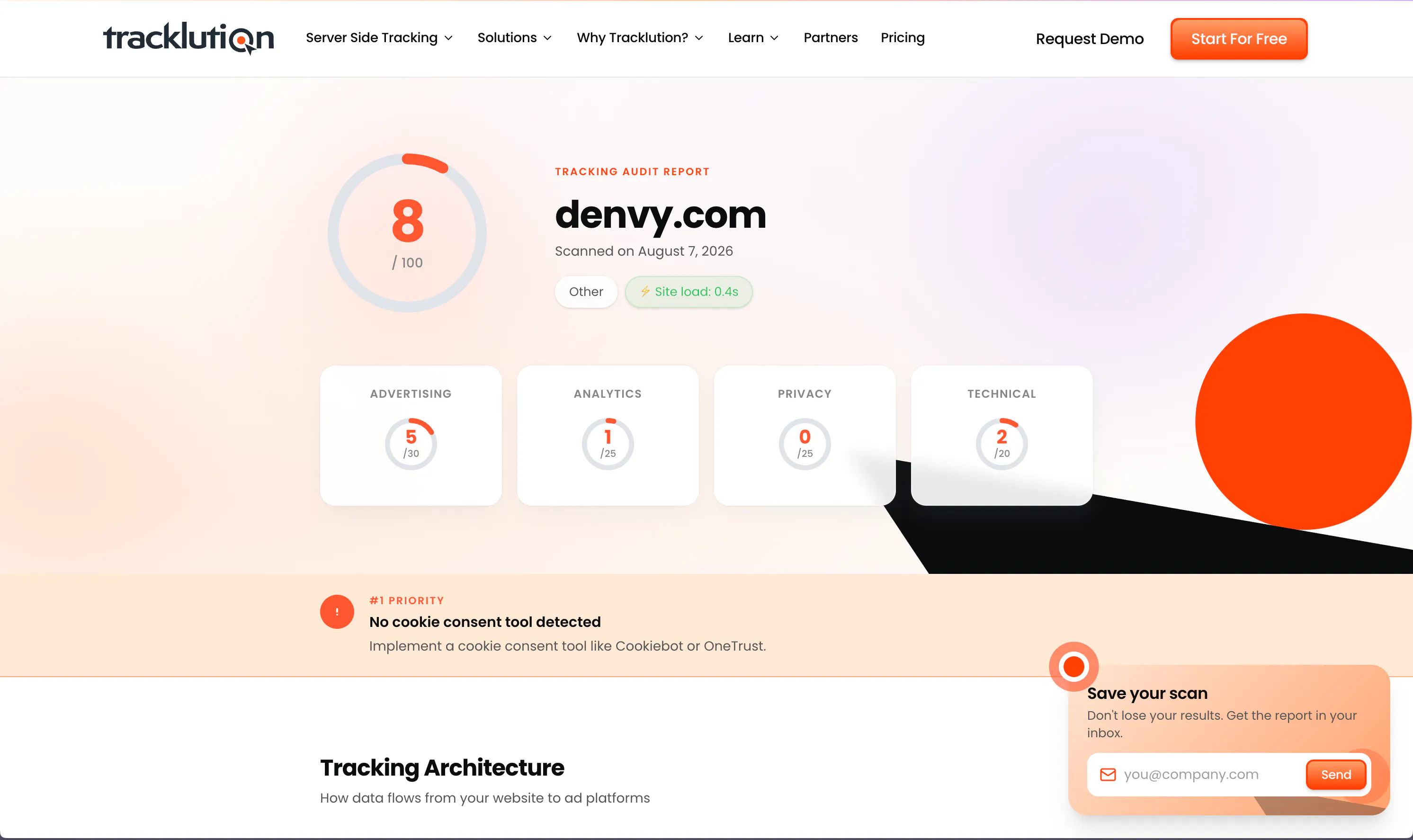
Put your tracking setup to the test
Tracklution's free tracking audit scans your current setup and shows you exactly where you're losing conversion data, plus what to fix first.
What you can track with Tracklution for Adform
Tracklution maps your conversion events to Adform Tracking Points and sends them via both Pixel and Conversion API. You choose which events go to which Tracking Point inside the connector setup.
Purchase
Completed transactions with value, currency, and product data. Sent to the Adform Tracking Point you map it to.
Lead
Form submissions, demo requests, and contact completions. Captured server-side for reliable attribution.
Add to Cart
Cart additions tracked as upper-funnel signals for optimization.
Checkout
Checkout initiations captured to measure purchase intent across your programmatic funnel.
View Content
Product and page views tracked as upper-funnel signals for your Adform campaigns.
Registration
Account sign-ups and event registrations tracked server-side through completion.
Custom events
Any conversion action you need, mapped to a Tracking Point once Tracklution has received it.
Trusted by advertisers worldwide
See how teams like yours recover lost conversions, lower CAC, and get their campaigns optimizing on complete data.


Almost every client we have onboarded to Tracklution has seen a growth in conversions. For reference, the media spend for these companies starts at just €500 a month.
Mikael Lahtinen, Head of Advertising @ Tagomo


While others are still debating whether to modernise, we’ve already built the foundation for the next decade of advertising
Shaan Raja, Teamlead SEO & Integration Analyst @ The Platform Group


We made Tracklution a standard part of our service agreement and technology stack for clients. It’s like a quality guarantee for conversion data. And setting it up doesn’t take more than a few minutes.
Sampo Soininen, Digital Strategist @ Aava & Bang


Now we know exactly which campaigns drive real appointments – and we’ve cut acquisition costs by more than 30% while keeping bookings steady.
Jesse Bartels, Chief Smile Officer @ Orthoclear


The system runs so smoothly that contact with Tracklution is minimal. Support response time is excellent. Overall very positive experience with minimal issues.
Jacob Blæsbjerg, Founder @ The Morning Show
Why use server-side tracking for Adform?

Ad blockers hit programmatic campaigns hard
Programmatic display audiences often use ad blockers. When the Adform Pixel can't fire, conversions go unrecorded, your Tracking Points get incomplete data, and campaign optimization suffers. Tracklution also sends conversions server-to-server, so events still reach Adform when the pixel is blocked.

Accurate data makes programmatic smarter
Adform FLOW optimizes on the conversion signals it receives. Incomplete data means weaker bids, slower learning, and higher CAC. Tracklution users see a 34.2% average uplift in tracked conversions vs. pixel-only setups.

You decide what Adform counts
Map each Tracklution event, custom events included, to the Adform Tracking Point it should count as. Events go live the moment you map them, so your Tracking Points only get the conversions you choose.
Privacy and security you can rely on
Tracklution is fully GDPR-compliant and certified under both ISO27001 and SOC2. Your data remains 100% yours — we never claim any rights to it. You have full control over what is tracked and what is sent to ad platforms. We’re simply your secure, privacy-first system provider.

SOC2, TYPE 2
Secure SSL Transactions

ISO 27001

GDPR Compliant
Questions and answers
How does Tracklution work with Adform?
Tracklution collects conversion data server-side and delivers it to Adform FLOW through both the Adform Pixel and Conversion API. You authenticate your Adform account, select the campaign to receive events, and map each Tracklution event to an Adform Tracking Point. From there, Tracklution handles delivery, and because each event arrives through both the Pixel and the Conversion API, Adform can deduplicate it.
Do I need to remove my existing Adform pixel?
Yes. If you already have the Adform pixel installed on your website (via GTM or directly in your HTML), you must remove or deactivate it before enabling the Tracklution connector. The connector includes both the Pixel and Conversion API, so leaving the existing pixel active will cause duplicate events and inconsistent reporting in Adform.
What are Adform Tracking Points?
Tracking Points are the conversion event definitions inside Adform FLOW. Each Tracking Point represents a conversion action you want Adform to count. In Tracklution, you map each event (such as Purchase or Lead) to the corresponding Tracking Point in your Adform account.
Can I send custom events to Adform through Tracklution?
Yes. Once Tracklution has received at least one of your custom events, it shows up in the Adform event mapping list and you can send it to a Tracking Point just like a standard event. Event parameters are passed when they're on the connector's supported list (value, currency, order ID and product details, for example). Other custom parameters are not sent to Adform.
How does Tracklution differ from other conversion tracking methods?
Because Tracklution runs server-side rather than in the browser, it minimises the effect that ad blockers and tracking preventions such as iOS tracking prevention have on your Adform data. We don't just gather precise data from your website; we also send it on to Adform, so your programmatic campaigns learn more quickly and bring in new sales at a lower cost. Setting it up won't take a single line of code, and you won't need to bother your developer team.
What is the uplift in conversion tracking?
Going by the data we've received from our users, server-side tagging with Tracklution has improved tracking by 11-48% over basic pixel-only, cookie-based (client-side) tracking, and by 34.2% on average. For Adform advertisers, that means more of the conversions your display campaigns drive actually reach your Tracking Points.
How much does this cost?
Enjoy your first 14 days of Adform tracking on us. No credit card is required, and you can cancel anytime. Once the trial is over, you can explore our pricing options here.
Are you GDPR compliant?
Yes. Tracklution is designed and built in the EU, which puts GDPR compliance in our very DNA, and all our data and servers sit in the EU area. Whether your own Adform setup is GDPR compliant depends on your legal basis, your cookie consent implementation and which data you configure Tracklution to send to Adform.
Is there a free trial to get started?
Absolutely! You can try out Tracklution with Adform for 14 days, no strings attached. There's no credit card needed to get started, and you're free to cancel whenever you want.

Have further questions?
Get even more from your Adform campaigns
Set up server-side tracking in 16 minutes. 14-day free trial, no credit card required.
Get even more from your Adform campaigns
Set up server-side tracking in 16 minutes. 14-day free trial, no credit card required.




