Tracklution product update: September 2025
September brings three big updates: Shopify checkout tracking that survives the Checkout Extensibility change, fallback parameters for Safari’s click ID stripping, and new event delivery status codes that make debugging easier.

Table of contents
Better data.
Set up server-side tracking in minutes with Tracklution. Send better conversion data to your ad platforms so their algorithms can optimise for better results from your budget.
Start your free trialShopify checkout tracking keeps on giving 🛒
From August 28th onwards, Shopify forces all stores to Checkout Extensibility. Good news for customization, bad news for tracking: GA, Meta, GTM snippets, and purchase events may disappear from the old order status page.
For most merchants, this means that the ad spend keeps running but conversions aren’t tracked – talk about a fast way to tank ROAS.
Tracklution customers didn’t miss a beat.
Tracklution works with the new, sandboxed checkout out-of-the-box:
- No lost conversions
- No broken pipelines
- No theme hacks needed
If you’re running Shopify, Tracklution keeps your ads optimized even after the update.
Safari stripping click IDs? Tracklution has your back 🧭
Safari has started stripping ad click identifiers like GCLID, FBCLID, and MSCLKID. While platforms have fallbacks (GBRAID, WBRAID, conversion modeling, etc.), this change threatens attribution accuracy.
Tracklution adds fallback parameters for every major platform:
- Google Ads → trlgid, trlgbid, trlgwid
- Meta Ads → trlfid
- TikTok Ads → trltid
- Snapchat Ads → trlsid
- LinkedIn Ads → trllid
- Microsoft Ads → trlmid
- Affiliates → trlc
Add the custom parameter once in your ad platform, and Tracklution handles the rest. No lost conversions, even if Safari strips IDs.
Take care of this immediately: see how it's done
Easier debugging with new event delivery statuses ℹ️
We’ve expanded event delivery codes so you can instantly see what’s happening when Tracklution delivers your events:
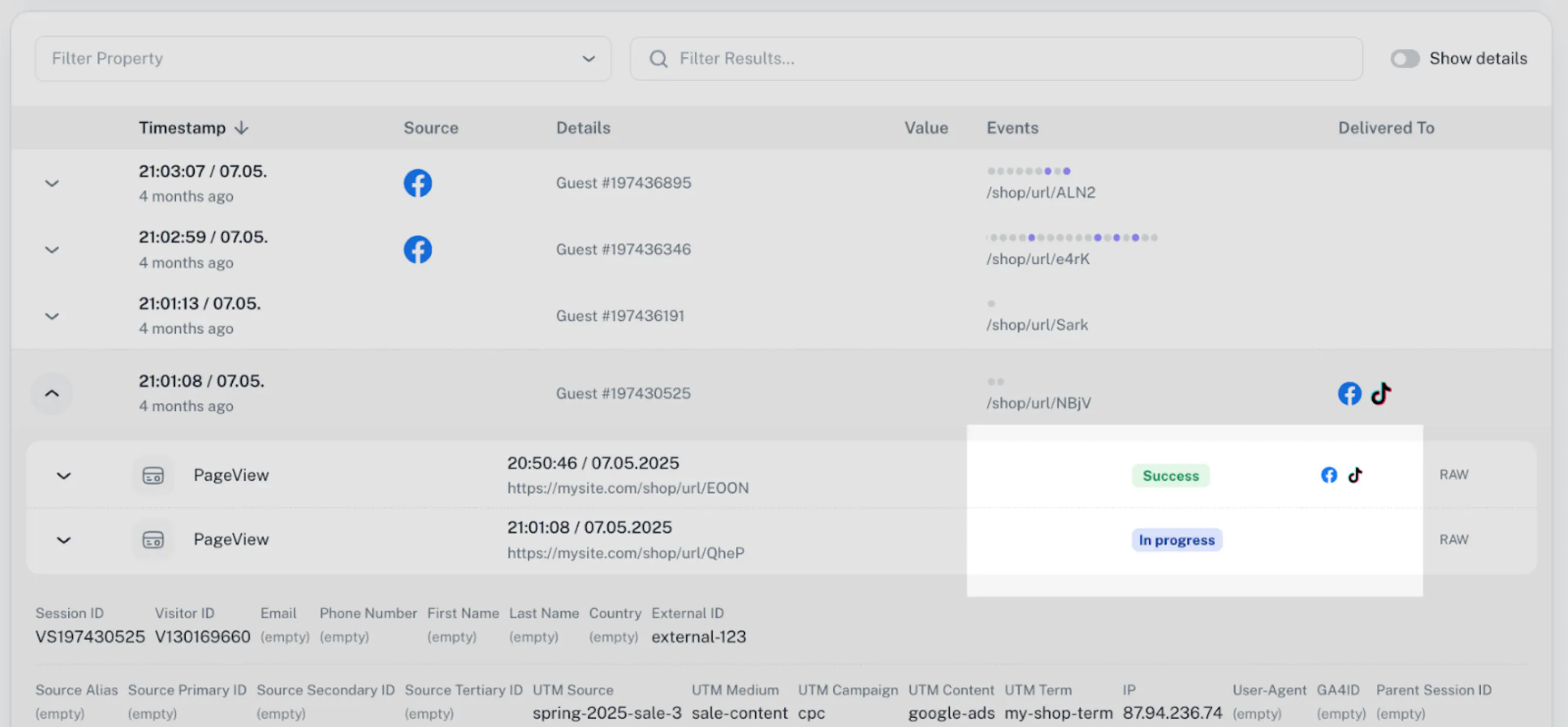
- Pixel Success → Pixels fired, API didn’t (expected for GA4)
- Success → At least one Connector delivery succeeded
- Virtual → Virtual event, not delivered
- Pending → Processing, usually just a couple of minutes
- Invalid Connector settings → Connector found, settings not valid
- No active Connectors → Event had nowhere to go
- Rejected → Blocked by your rejection rules
- Delivery error → Check payload for details
- Generic/System error → Contact support
These codes make it much easier to spot where things go wrong, and fix them fast.
Bonus treats 🍬
GA4 connector improvements 📊
We’ve rolled out behind-the-scenes improvements to our Google Analytics 4 connector that enables even more stable data delivery. No steps are required from you - all existing accounts have already been upgraded to the improved GA4 connector automatically.
In beta: Affiliate tracking support ⚙️
We're excited to announce that Tracklution now supports affiliate tracking! You can configure custom postbacks from your conversions to any affiliate network, making it easier than ever to also send reliable conversion data to your affiliate networks. This feature is currently in beta, and we'd love your feedback! If you're interested in joining the beta program, please get in touch with us.
As always, happy tracking
The Tracklution Team
Related posts

Product updates
Analytics engine, Insights and Monitoring: October 2026 update
A dedicated analytics engine, new tabs, multiple Meta datasets, Nextdoor and Adtraction connectors.
Product updates
Analytics engine, Insights and Monitoring: October 2026 update
A dedicated analytics engine, new tabs, multiple Meta datasets, Nextdoor and Adtraction connectors.

Product updates
PII redaction, more connectors, improved UI: September 2026 update
PII redaction, 7 new ad connectors, and Microsoft Ads Conversions API for everyone.
Product updates
PII redaction, more connectors, improved UI: September 2026 update
PII redaction, 7 new ad connectors, and Microsoft Ads Conversions API for everyone.
Product updates
Your tracking data, more accurate than ever: August product update
Sharper consent visibility, more accurate GA4 data, a smarter WooCommerce plugin, and lockable webhooks. Everything new this August.
Product updates
Your tracking data, more accurate than ever: August product update
Sharper consent visibility, more accurate GA4 data, a smarter WooCommerce plugin, and lockable webhooks. Everything new this August.
Questions and answers
What does Tracklution actually do?
Tracklution sends conversion data directly to ad platforms (Meta, Google Ads, TikTok, etc.) through server-side APIs. Instead of relying on browser pixels that get blocked by ad blockers, iOS privacy changes, and cookie restrictions, your data goes server-to-server. The result: ad platforms see more of your real conversions, their algorithms optimize better, and you get better ROAS.
What is server-side tracking?
Server-side tracking gathers first-party data directly on your website and sends tracking events to ad platforms via Conversion APIs. This approach bypasses restrictions from iOS devices, ad blockers, and privacy-focused browsers, providing more accurate data and making your paid advertising more efficient.
Is it just one setup that feeds data into all my ad platforms?
Yes. You install Tracklution once, connect your ad accounts, and it sends conversion data to all platforms simultaneously through their respective APIs (Meta CAPI, Google Ads API, TikTok Events API, etc.). No need to manage separate server-side setups for each platform.
How much more conversion data will my ad platforms actually see?
On average, clients report 34.2% more conversions compared to traditional browser-based pixels. This means the ad algorithms have significantly more signal to work with, which translates to 15-35% lower customer acquisition costs for most clients.
Do I need developers to set this up?
No. Setup takes 5-15 minutes depending on your platform. For Shopify, WooCommerce, and other supported platforms, it is plug-and-play. You do not need custom coding or engineering resources. For GTM users, you can keep your existing setup and add Tracklution alongside it.
Do I need to remove my existing tracking tags?
Not necessarily. Tracklution works alongside your current setup. You can run both in parallel initially to compare data, then decide whether to simplify.
What about the DNS / CNAME setup?
Tracklution uses a first-party CNAME record on your domain for data collection. This takes a couple of minutes to configure and up to 48 hours to propagate. It is what makes the tracking resistant to ad blockers and browser restrictions.
Can I verify that the data is actually more accurate?
Yes. Run Tracklution alongside your existing tracking and compare. The dashboard also shows "recovered events" so you can see exactly how many conversions would have been missed without server-side tracking.
Can I distinguish between organic and paid traffic?
Yes. Tracklution preserves traffic source attribution. The conversion data sent to each ad platform includes the proper attribution parameters.
What about offline conversions (phone calls, in-store, CRM events)?
Tracklution supports offline conversion tracking through webhooks and CRM integrations. If someone clicks an ad, then converts offline, you can feed that back to the ad platforms. Clients using this see up to 35% reduction in acquisition costs because the algorithms learn from the full conversion picture.
How does this work with cookie consent and CMP tools?
Tracklution supports both Basic and Advanced Consent Mode. It reads your CMP data layer automatically and respects user consent choices. In Advanced Consent Mode, it can still collect anonymized, cookieless data when users decline cookies, which helps ad platform modeling without violating privacy rules. Fully GDPR-compliant.
How is this different from Stape or building your own sGTM setup?
Stape provides server-side GTM hosting, which means you still need to build and maintain the tags, triggers, and configuration yourself. Tracklution is a complete solution: plug-and-play setup, automatic event detection, built-in consent management, a real-time analytics dashboard, and ongoing maintenance of all API connections. When ad platforms change their APIs (which happens often), we handle the updates.
How does the agency partner model work?
Single dashboard to manage all client accounts. Each client has their own tracking container. The platform handles all technical maintenance, so you are not stuck troubleshooting API changes or broken tracking.

Have further questions?
Already convinced? Get 100% accurate data with server side tracking
Already convinced? Get 100% accurate data with server side tracking




