Tracklution product update: April 2025
April's update brings exciting new tools to simplify your tracking workflow, enhance your dashboard experience, and give you deeper insights into your data. Plus, check out our new learning resources to help you get the most out of Tracklution in record time.

Table of contents
Better data.
Set up server-side tracking in minutes with Tracklution. Send better conversion data to your ad platforms so their algorithms can optimise for better results from your budget.
Start your free trialThis month, we've been all about making Tracklution more powerful, more flexible, and easier to use - whether you're managing one site or a hundred. Here's a quick look at what's new:
Say hello to our new connector: Adform
We've added Adform to our ever-growing list of supported platforms! Adform is a leading independent platform for programmatic advertising, widely used across Europe, and now you can send your conversion data directly to it via Tracklution.
As always, setup is simple, reliable, and server-side.
Dashboard just got an usability upgrade
We've made it faster and shipped several improvements to the dashboard to make your daily work smoother and faster:
- Search your containers: You can now search in the container listing by name or other info. Especially helpful for agencies managing many clients.
- Custom currencies for charts: The dashboard no longer speaks only Euro! You can now switch the reporting currency to anything that fits your business.
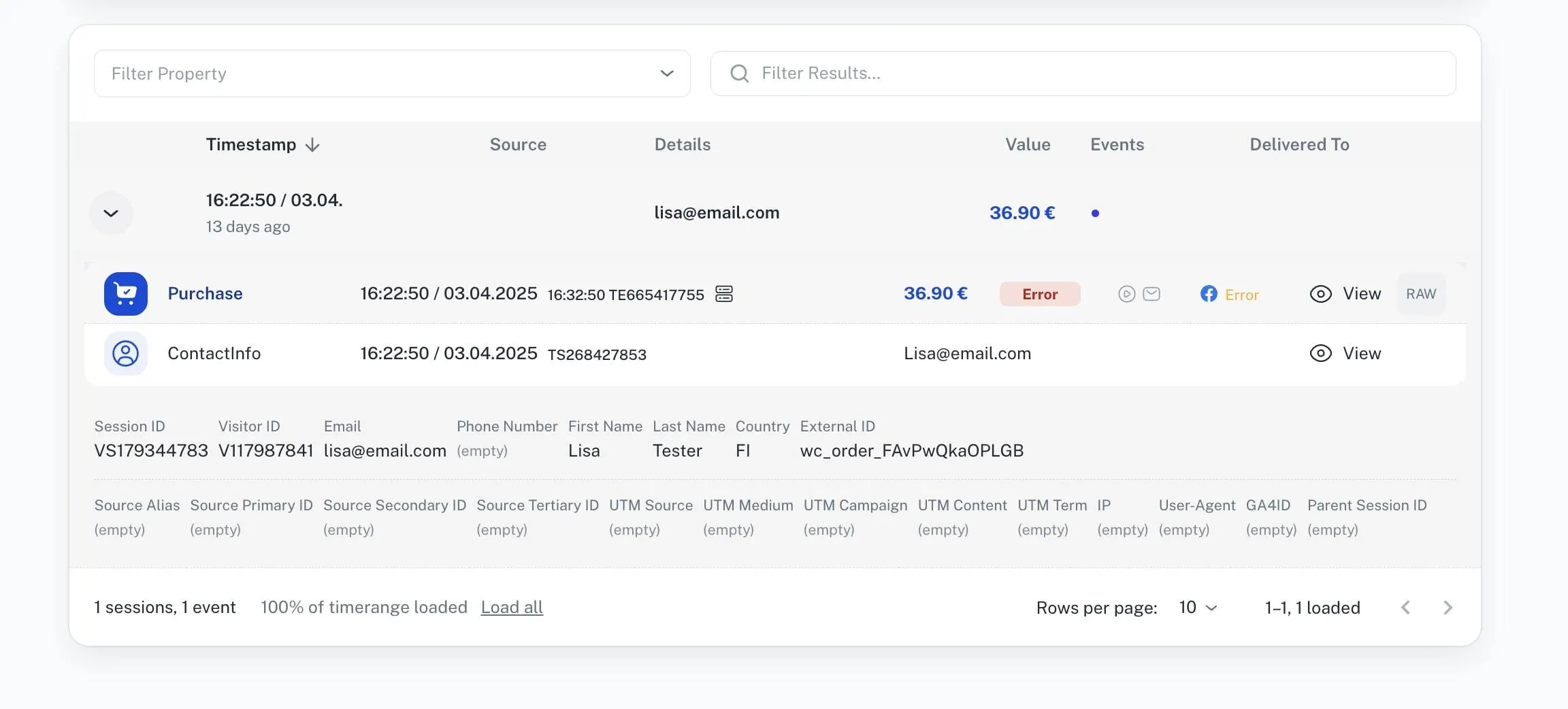
- RAW session data viewer: Dig deeper into what's happening. Open full raw data from any session to help with advanced debugging and validation.
Introducing Tracklution Academy on YouTube
We've launched Tracklution Academy: a YouTube playlist with quick videos covering server-side tracking basics, how to use Tracklution effectively, and how to troubleshoot like a pro. Spend just 40 minutes with Tracklution Academy and you'll be a Tracklution conversion tracking expert.
👉 Watch the Tracklution Academy playlist
That's it for April! As always, we're building based on your feedback, and we're just an email away if you need anything.
🚀 Happy tracking, The Tracklution Team
P.S. Got questions or want to dive deeper into Tracklution? Join our live Office Hours on 6th of May at 15 EEST - a casual session where you can ask anything and chat directly with our team. Sign up here!
Related posts
Product updates
Analytics engine, Insights and Monitoring: October 2026 update
A dedicated analytics engine, new tabs, multiple Meta datasets, Nextdoor and Adtraction connectors.
Product updates
Analytics engine, Insights and Monitoring: October 2026 update
A dedicated analytics engine, new tabs, multiple Meta datasets, Nextdoor and Adtraction connectors.

Product updates
PII redaction, more connectors, improved UI: September 2026 update
PII redaction, 7 new ad connectors, and Microsoft Ads Conversions API for everyone.
Product updates
PII redaction, more connectors, improved UI: September 2026 update
PII redaction, 7 new ad connectors, and Microsoft Ads Conversions API for everyone.
Product updates
Your tracking data, more accurate than ever: August product update
Sharper consent visibility, more accurate GA4 data, a smarter WooCommerce plugin, and lockable webhooks. Everything new this August.
Product updates
Your tracking data, more accurate than ever: August product update
Sharper consent visibility, more accurate GA4 data, a smarter WooCommerce plugin, and lockable webhooks. Everything new this August.
Questions and answers
What does Tracklution actually do?
Tracklution sends conversion data directly to ad platforms (Meta, Google Ads, TikTok, etc.) through server-side APIs. Instead of relying on browser pixels that get blocked by ad blockers, iOS privacy changes, and cookie restrictions, your data goes server-to-server. The result: ad platforms see more of your real conversions, their algorithms optimize better, and you get better ROAS.
What is server-side tracking?
Server-side tracking gathers first-party data directly on your website and sends tracking events to ad platforms via Conversion APIs. This approach bypasses restrictions from iOS devices, ad blockers, and privacy-focused browsers, providing more accurate data and making your paid advertising more efficient.
Is it just one setup that feeds data into all my ad platforms?
Yes. You install Tracklution once, connect your ad accounts, and it sends conversion data to all platforms simultaneously through their respective APIs (Meta CAPI, Google Ads API, TikTok Events API, etc.). No need to manage separate server-side setups for each platform.
How much more conversion data will my ad platforms actually see?
On average, clients report 34.2% more conversions compared to traditional browser-based pixels. This means the ad algorithms have significantly more signal to work with, which translates to 15-35% lower customer acquisition costs for most clients.
Do I need developers to set this up?
No. Setup takes 5-15 minutes depending on your platform. For Shopify, WooCommerce, and other supported platforms, it is plug-and-play. You do not need custom coding or engineering resources. For GTM users, you can keep your existing setup and add Tracklution alongside it.
Do I need to remove my existing tracking tags?
Not necessarily. Tracklution works alongside your current setup. You can run both in parallel initially to compare data, then decide whether to simplify.
What about the DNS / CNAME setup?
Tracklution uses a first-party CNAME record on your domain for data collection. This takes a couple of minutes to configure and up to 48 hours to propagate. It is what makes the tracking resistant to ad blockers and browser restrictions.
Can I verify that the data is actually more accurate?
Yes. Run Tracklution alongside your existing tracking and compare. The dashboard also shows "recovered events" so you can see exactly how many conversions would have been missed without server-side tracking.
Can I distinguish between organic and paid traffic?
Yes. Tracklution preserves traffic source attribution. The conversion data sent to each ad platform includes the proper attribution parameters.
What about offline conversions (phone calls, in-store, CRM events)?
Tracklution supports offline conversion tracking through webhooks and CRM integrations. If someone clicks an ad, then converts offline, you can feed that back to the ad platforms. Clients using this see up to 35% reduction in acquisition costs because the algorithms learn from the full conversion picture.
How does this work with cookie consent and CMP tools?
Tracklution supports both Basic and Advanced Consent Mode. It reads your CMP data layer automatically and respects user consent choices. In Advanced Consent Mode, it can still collect anonymized, cookieless data when users decline cookies, which helps ad platform modeling without violating privacy rules. Fully GDPR-compliant.
How is this different from Stape or building your own sGTM setup?
Stape provides server-side GTM hosting, which means you still need to build and maintain the tags, triggers, and configuration yourself. Tracklution is a complete solution: plug-and-play setup, automatic event detection, built-in consent management, a real-time analytics dashboard, and ongoing maintenance of all API connections. When ad platforms change their APIs (which happens often), we handle the updates.
How does the agency partner model work?
Single dashboard to manage all client accounts. Each client has their own tracking container. The platform handles all technical maintenance, so you are not stuck troubleshooting API changes or broken tracking.

Have further questions?
Already convinced? Get 100% accurate data with server side tracking
Already convinced? Get 100% accurate data with server side tracking




