
TikTok Events API: How to set it up & stop losing conversions
Ad blockers and cookie limits are hiding your real TikTok conversions. Learn what the TikTok Events API is, how it works, and how to set it up.

Table of contents
Better data.
Set up server-side tracking in minutes with Tracklution. Send better conversion data to your ad platforms so their algorithms can optimise for better results from your budget.
Start your free trialWhen someone buys a product through one of your TikTok campaigns, you expect to see that same purchase show up in your TikTok Ads Manager. According to your backend, the order is safe and sound, but the ad account shows zero conversions for that particular ad set.
The usual suspects for poor campaign performance might be ad creative or budget allocation. But what if the ad worked, and your tracking didn’t? This is a likely scenario if you’re still relying on client-side tracking, which is regularly stifled by content blockers, cookie limits, and script drop-offs on mobile.
For example, according to GWI data, cited by Backlinko, 29.5% of internet users worldwide use ad blockers, as of Q2 2025. That alone is 1.77 billion people who are mostly invisible to your browser pixel.
Without the full information, TikTok's algorithm also has to guess who it should target next, instead of using your full conversion data to make informed decisions. TikTok Events API solves this with a straightforward server-to-server connection between your website and your TikTok account.
You’re probably here for something specific, so you can jump straight in:
What is the TikTok Events API?
TikTok Events API (also known as TikTok CAPI or TikTok conversions API) is a server-to-server interface that allows your server to share marketing data directly with TikTok's endpoint, rather than depending on the script running in your visitor's browser.
With browser-side tracking, the TikTok Pixel runs in the visitor's browser and sends events to TikTok. With Events API, your server packages the event data and sends it directly to TikTok's server over HTTPS.
This means events can still be sent when browser-based tracking is disrupted by things like ad blockers, browser restrictions, or cookie limitations.
TikTok's Business Help Center states that their Events API gives advertisers a reliable connection to their marketing data, on web, in-app, and offline, along with the control over what’s being shared.
It supports three main types of data:
- Web events: The usual online shop actions, e.g. viewing content, adding items to cart, Shopify checkout, completing a payment.
- App events: In-app actions, e.g. registration steps, starting a trial, mobile in-app purchase.
- Offline events: Any conversion that happens offline, outside the browser session. This can include but isn’t limited to: phone orders, CRM events, or brick and mortar store purchases.
In practice, Events API is one way of implementing server-side tracking for TikTok: your own server receives or processes an event, then sends it to TikTok via the Events API.
Behind the scenes of TikTok Events API
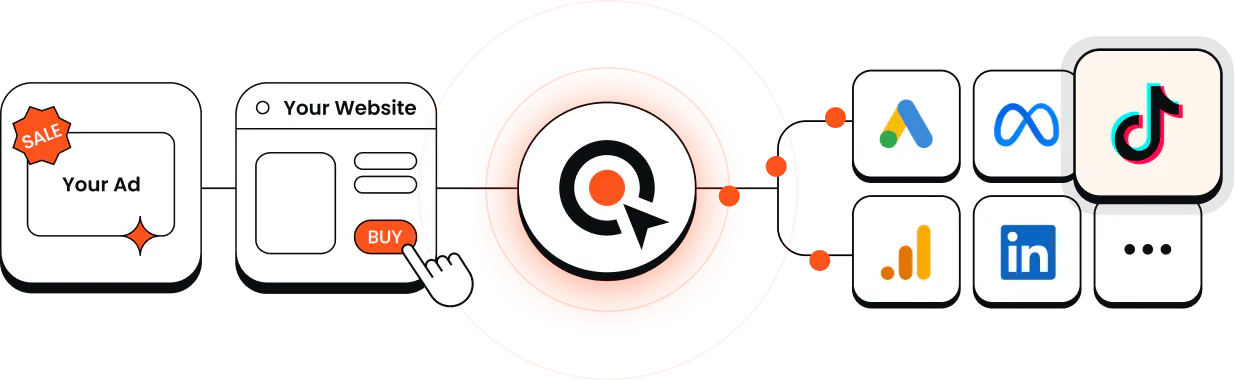
Using TikTok's Events API means running a server between your website and TikTok. After a visitor takes an action on your site, the server captures it, attaches the match keys it has (e.g. a hashed email or the ttclid click parameter), and posts the event to TikTok's API endpoint over HTTPS.
This machinery can be your own custom code, a container you maintain, or a dedicated platform that takes care of it for you.
Managed platforms like Tracklution handle this routing for you. A Tracklution pixel captures data client-side and sends it to a managed server, which processes and routes it to ad platforms; TikTok in this case.
To quote our colleague:
"Server-side is not some magic replacement. You still collect most events from a browser, and you still use pixels. Server-side is a powerful tool that enriches and supports your conversion tracking." - Lucas Nilsson, Product Specialist at Tracklution
What changes inside TikTok Events Manager
Shortly after your server connection is live, you'll be able to start seeing some practical differences in TikTok Events Manager, as well as your daily campaign metrics:
- You'll see higher Event Match Quality: Thanks to passing advanced matching parameters (e.g. hashed emails, phone numbers, and the ttclid click parameter), TikTok is ready to start matching conversion events back to user accounts with more precision.
- Recovered conversion volume: You’ll see a more accurate picture in your reporting columns. This can include sales and lead conversions previously lost to ad blockers or cookie limits. For example: an ad set that used to look unprofitable can finally start showing its real ROAS once server events fill in the purchases from ad-blocker and Safari users.
- Healthier audiences: Fewer people drop out from your data, which means your custom audiences and lookalike segments can grow and get more accurate. Right now your retargeting list probably only has the customers whose browsers reported back. Server-side adds the ones the browsers missed going forward.
Thanks to this more complete data, TikTok's automated bidding improves significantly. Campaigns are much quicker to learn, and they exit the learning phase sooner, which stabilizes acquisition costs.
If you'd like to understand the wider picture of how data quality impacts budget decisions, we recommend a glance at our guide to marketing spend optimization.
Most optimization doesn't happen where people think it does. It's usually not in campaign or creative tweaks, but in the quality and consistency of the conversion data you feed into platforms. Small data issues silently multiply into huge budget decisions. - Anni Salo, CEO, Tracklution
TikTok Pixel vs. Events API
The TikTok pixel is a small piece of code you add to your website to track when visitors view a page, add to cart, and make a purchase. It fires directly in their browser and sends these events to TikTok.
The Events API does the same job, but with an important distinction. As it’s a server-to-server connection, the data flows first to a server you control for processing before being sent to TikTok, without relying solely on the user’s web browser.
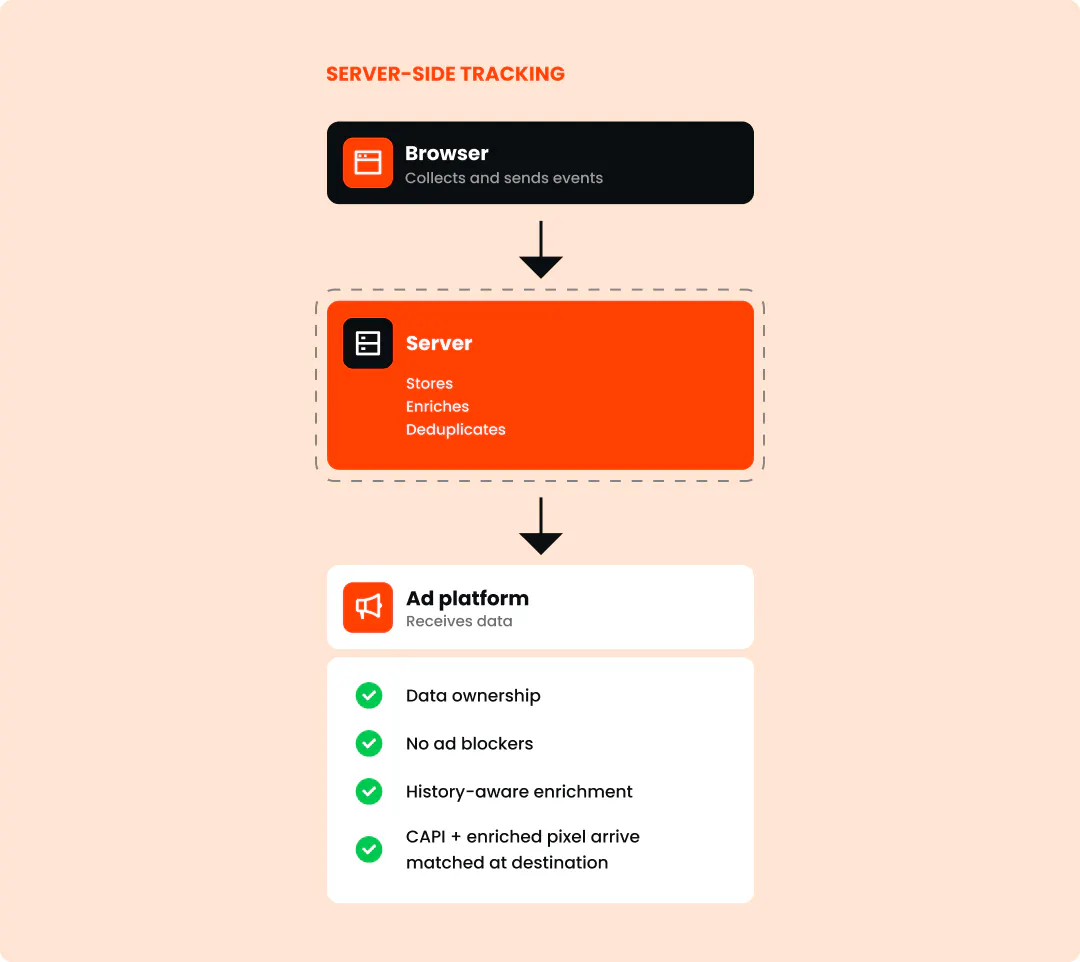
This difference is important because browsers are becoming increasingly unfriendly to the first method, and relying on the TikTok pixel alone gives you incomplete data to work with.
The losses can rarely be blamed on one dramatic cause. According to Anni Salo, CEO here at Tracklution, people often think one specific issue is behind their data loss, but it's usually a bunch of small things that add up: consent declines, ad blockers, misconfigured tags, or tags that don't load on a slow page.
"You lose a small percentage here and there, and all of a sudden you're losing half your data."
Feature | TikTok pixel | TikTok Events API | Dual setup (recommended) |
Data routing | Browser to TikTok | Server to TikTok | Both browser and server in parallel |
Ad blocker resistance | Blocked easily | Unaffected by ad blockers | Complete coverage |
Cookie durability | Depends on browser cookie rules, which vary and keep tightening | Relies on durable first-party identifiers | Resilient first-party matching |
Offline events & CRM | Not supported | Full CRM and offline transaction sync | Full CRM and offline transaction sync |
Data governance | Limited control over vendor script capture | Precise payload filtering and data control | Filtered server routing |
TikTok itself explicitly recommends running both the pixel and Events API together in a dual setup with event deduplication.
How to avoid double counting conversions
When the browser pixel and Events API run together, both of them will capture the same purchase event. Because of this, the event data needs to be deduplicated before it's used. If deduplication doesn’t occur, TikTok will record two conversions for every single order. This can inflate sales and ROAS figures, and negatively affect the bidding algorithm that’s reliant on inaccurate conversion tracking.
To prevent this, you’ll want to pass two identical identifiers in both payloads:
- event_name (e.g. CompletePayment, AddToCart)
- event_id (a unique order number or transaction ID)
If TikTok registers two events with the identical event_name and event_id within 48 hours, it understands that they’re part of the same transaction. It keeps the first event, fills in any parameters missing from the second, and bins the duplicate.
How to set up TikTok Events API
There are four practical ways to implement the TikTok Events API. To decide which one is right for you, you’ll have to consider technical skills and capacity for maintenance.
As you’ll notice, one of the four options below is our tool, Tracklution. We’ve judged all four using the same criteria, so you get an impartial look at what is the best fit for your team.
If you’re interested in trying Tracklution, our TikTok server-side tracking page can give you a deeper platform-specific walkthrough.
Method | Implementation time | Maintenance expectation | Multi-platform support |
Events API Gateway | 1 to 2 days | Low (single container) | No (TikTok only) |
Server-side GTM | 2-4 weeks | Moderate (tag and server maintenance) | Yes, with platform-specific tags/templates |
Direct API (Full DIY) | Can take weeks to months | Heavy engineering upkeep | Requires separate integrations |
Managed SST (Tracklution) | 16 minutes | Minimal (fully managed) | Yes, one setup allows for easy connections to multiple platforms (e.g. TikTok, Meta, Google Ads and more) |
Tracklution keeps you fully in your control over what exactly is collected and forwarded, and never gains access to or control over your data. You get a convenient pairing of a managed environment in which you set your own rules.
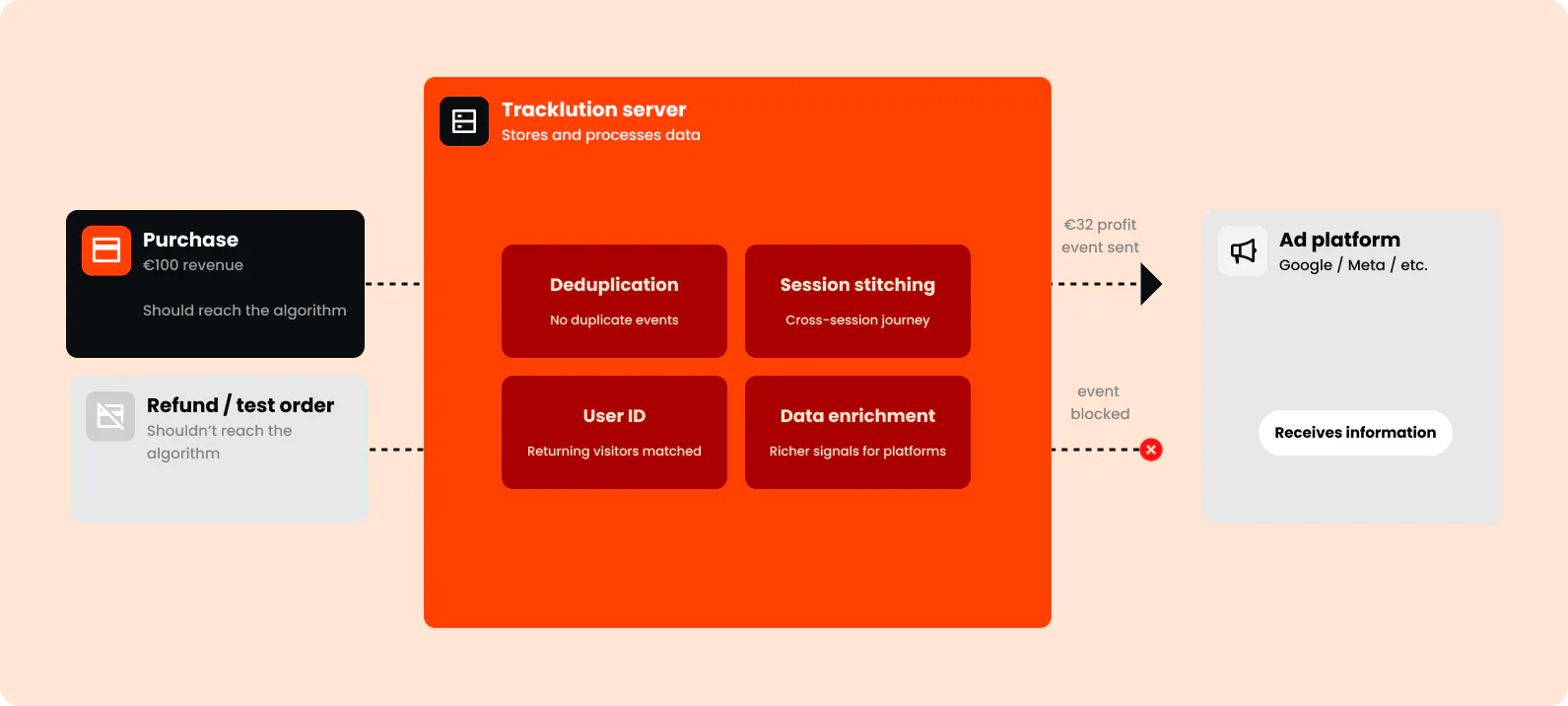
Whichever implementation road you take, connecting your site to TikTok Events API broadly follows the same four steps.
Steps 1, 2 and 4 are minor and will look similar in each setup. Step 3, however, can vary significantly, depending on the approach you choose, and is the reason for the vastly differing setup times.
- Find your Pixel ID inside TikTok Ads Manager, under Events → Web Events.
- In Settings, find the Events API section, and click Generate Access Token.
- This step involves everything from server-provisioning to data layer architecture. This is where you’ll map your event parameters and customer match keys (email, phone, ttclid, external ID, and event_id) in the server payload.
How much of this process falls on you will depend entirely on which method you choose.
On a managed platform, the mapping is prebuilt for you and you pick which events to send.
If you go down the server-side GTM route, you’ll have to provision and maintain a server and container, build the data layer, do the tag template configuration, and SHA-256 email and phone hashing yourself.
If you go full-on DIY, you’ll do all of that and also write and maintain the API calls.
TikTok’s developer documentation details the payload spec if you decide to build it yourself. - Always run a test order to make sure the incoming server payloads appear inside the Test Events tab before publishing your changes. This is also the right time to confirm your event_id is matching across both browser and server events, which is what stops TikTok counting the same purchase twice.

"Within about 10 minutes our developer came back to me and said, this is great, this is simple, this is straightforward. My biggest learning is don't overcomplicate it."
Read the full ScotlandShop success storyJohn Cove,
Marketing Manager at ScotlandShop
Solve your TikTok attribution in 16 minutes
Send clean, server-side conversion data directly to TikTok. No cloud servers, no API code, no debugging tag containers.
Best practices for TikTok Events API
A few details can help you achieve the highest Event Match Quality scores and pass the clearest signals to TikTok's algorithm:
- Pass comprehensive customer match keys: Remember to always hash any personal identifiers, such as emails and phone numbers using SHA-256 before sending them. Passing both ttclid and hashed user data gives TikTok the best opportunity to match events to users.
- Stick to standard event names: Custom event names don’t get mapped automatically, so make sure to always use official event names, e.g. CompletePayment, AddToCart, InitiateCheckout.
- Keep event_id values consistent: Generate the event_id at the moment when the transaction happens and pass the exact same string through the browser pixel and the server payload.
Offline conversions deserve the same speed and attention. If someone buys over the phone or in-store after clicking an ad, it’s best to push that update to TikTok promptly. TikTok also only accepts offline events that have occurred within the past 28 days, so a month-old CRM export is already stale.
Consent handling works quite similarly. Whenever someone opts out, their personal data gets filtered out before it ever reaches TikTok. This way, you enable compliance and your pipeline keeps running just fine. For more precise legal and technical details, check out our guide on server-side tracking and GDPR.
That’s a lot to stay on top of. Tracklution can do most of it for you: offline conversions come in through a webhook from your CRM or POS, deduplication runs automatically, and it respects your current consent management.
Case Study
How Tonefest Guitar Gallery doubled ROAS and grew sales 36%
2X
ROAS in two months
36%
growth in online sales
45%
more conversions recovered
Tonefest is a vintage guitar shop from Finland, and being small was the problem. They were losing so much conversion data to the browser restrictions, that they sat below the volume Smart Bidding needed to learn from. Server-side tracking recovered those events and pushed them past the threshold.
"it's the only way to act bigger than you are."

Petri Matero
Founder @ Tonefest
What complete data brings you
If you’re relying purely on browser-only tracking, you’re basing your ad budget decisions and future campaign performance on fragmented data. Ad blockers, issues with mobile networks that cause dropoffs, and cookie limitations keep real, attributable conversions from ever seeing Ads Manager.
This can make your campaigns look like they’re underperforming, and your custom and lookalike audiences come out thinner than they should be. It can also mean having to present, defend, and fight for budget with numbers you know aren’t a full picture.
Events API helps your server establish a direct line with TikTok. Pair it up with the pixel, get deduplication right, and your reports will finally reflect reality.
Your audiences fill back up with people your pixel was blind to, and the algorithm will get steady enough data to bring your cost per acquisition down. The only decision left is how much of it you want to build yourself.

Questions and answers
1. What is ttclid?
The ttclid (TikTok Click ID) is a unique string attached to the destination URL when someone clicks your TikTok ad. Your site captures, stores, and sends it back in the server payload, which is TikTok’s way of pairing up the conversion with a specific click. Without ttclid, matching will rely on hashed identifiers.
2. Is TikTok's API free?
Yes. TikTok doesn’t charge for using or sending data to the Events API. Any related costs come from server hosting, cloud containers, or the managed tracking platform you use to route the payloads, all depending on your particular setup.
3. How to create a TikTok event?
For server events, build your JSON payload with the event parameters (event_name, event_time, match keys, plus an event_id in case you're deduplicating) and post it to TikTok's API endpoint using your Access Token.
4. Can I send in-store/offline purchases to TikTok?
This is possible through offline events. TikTok matches them using hashed customer identifiers like email or phone rather. There is no click ID involved, since there's no URL when someone walks into a shop. The purchase has to have happened in the last 28 days, and the customer's details need to match what TikTok has on file for their account.
What is an event API?
An event API is a direct server-to-server connection that sends user actions (like page views, lead submissions, and checkouts) directly from a website's backend to an ad platform, without relying on client-side browser scripts.

Have further questions?
Already convinced? Get 100% accurate data with server side tracking
Already convinced? Get 100% accurate data with server side tracking




