Conversions API Gateway: How it works and when it's worth it
Not sure what the Conversions API Gateway is all about? Learn what it is, how it works, and how it’s different from the full server-side tracking pipeline.

Table of contents
Better data.
Set up server-side tracking in minutes with Tracklution. Send better conversion data to your ad platforms so their algorithms can optimise for better results from your budget.
Start your free trialThe Conversions API Gateway is an easy way to start sending server-side events to Meta. But is it enough? Learn what it does, where it falls short, and what that means for your tracking.
If your Meta Ads numbers haven't matched your sales for a while, your tracking is probably the culprit. For years, the Meta Pixel did the job: it fired in your visitors' browsers and conversions flowed back to Ads Manager. Easy peasy.
But the Pixel is a client-side tracking tool, meaning it's at the mercy of ad blockers, Safari's Intelligent Tracking Prevention (ITP), privacy settings, and network issues. Meta's answer is the Conversions API. It sends events server-to-server instead of relying on the browser alone. According to Meta, advertisers using it for web events see an average 17.8% lower cost per result.
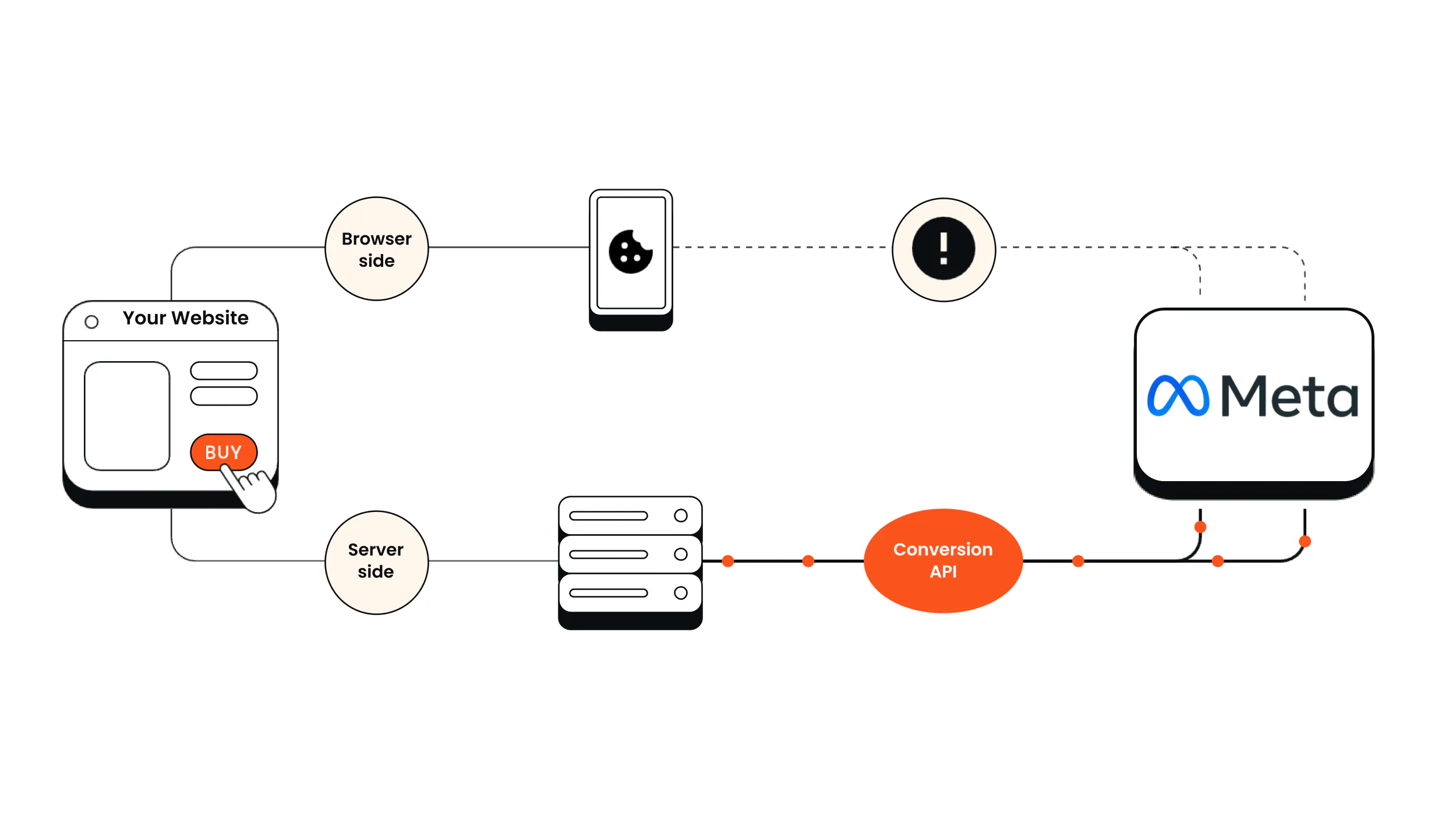
While the Conversions API Gateway changes the data’s delivery path, it doesn’t change the source of data. In other words, it’s not the full server-side tracking pipeline. If you’re confused by these terms, don’t worry: we break down what the Conversions API Gateway is, how it works, and when it’s enough.
What is the Conversions API Gateway?
The Conversions API Gateway (CAPI Gateway or CAPIG if you need another acronym) is Meta’s self-serve configuration option that lets you run the Conversions API without writing any code. It receives the events your Meta Pixel fires in the browser and sends a second copy to Meta from a server endpoint on your domain.
The Gateway is a way to get server-side events to Meta, which helps bypass some browser limitations. But the browser still captures and delivers events. If an ad blocker lets the Pixel load but stops it from reaching Meta, the Gateway can deliver the event through your domain instead. If the ad blocker stops the Pixel from loading at all, or if a visitor declines tracking, then there's no event to work with, and the Gateway can’t help you there.
Platform gateways keep tracking on the client side, but route pixels through your domain, making them appear first-party. But the tracking still relies on the browser. - Anni Salo, CEO at Tracklution
How the CAPI Gateway works
So what actually happens in the back-end when you set up the CAPI Gateway? Here’s how it works, step by step:
- A visitor takes an action on your site, like filling out a form or completing a purchase.
- The Meta Pixel fires in their browser.
- The Pixel sends that event to two places: straight to Meta, and to your CAPI Gateway.
- The Gateway converts the Pixel’s copy of the event into a CAPI event and forwards it to Meta from your server.
- Meta receives both copies and deduplicates them automatically using an event_id.
As Anni Salo, CEO of Tracklution, explains, “People who say they're fine with client-side tracking usually don't realize that ads are driven by algorithms, and algorithms are directly affected by the data they receive. They think tracking is just there for generating reports, but it's directly connected to how those algorithms perform for you.”
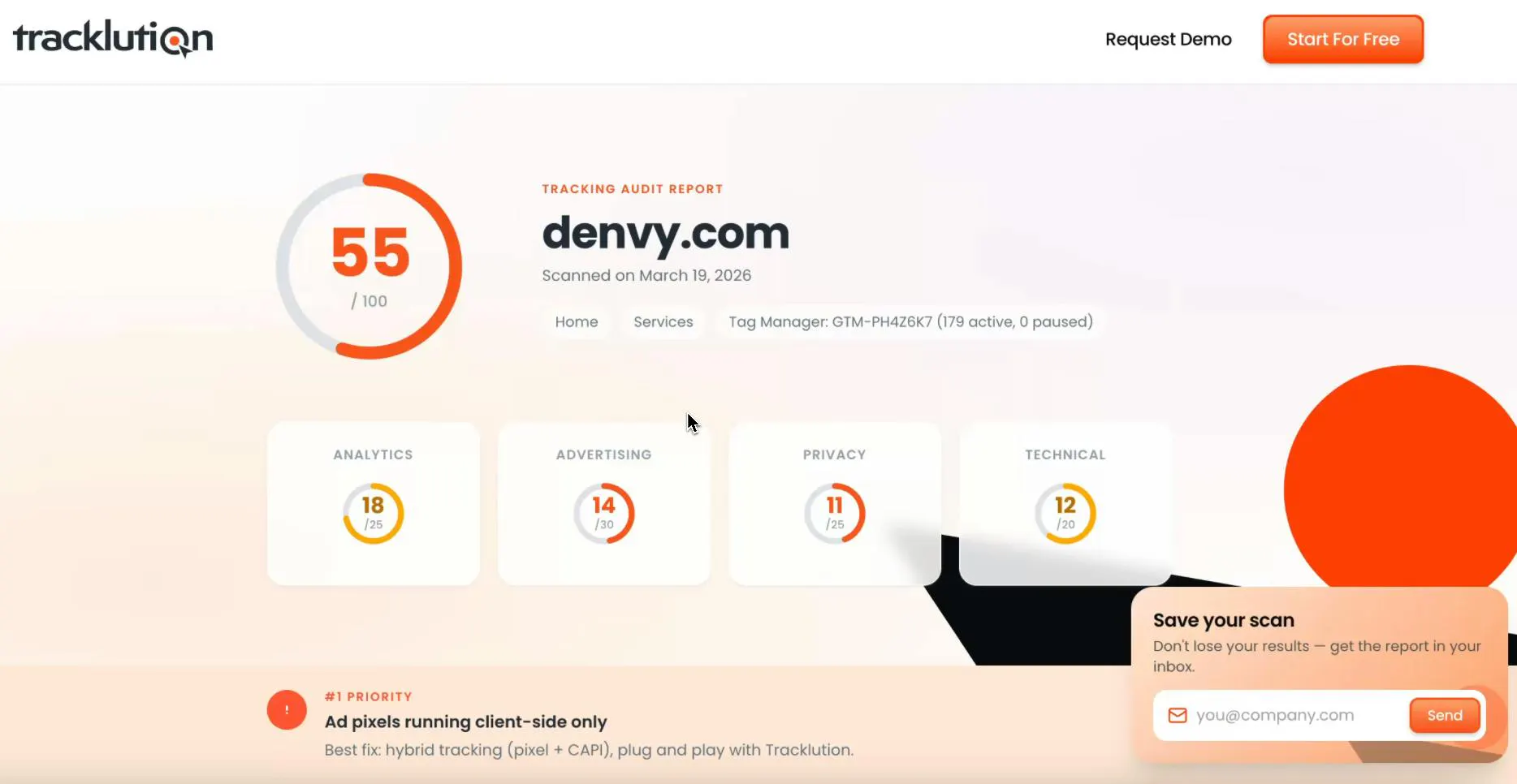
See what conversions your pixel is missing
Tracklution's free AI tracking audit scans your setup in a couple of minutes and shows you where you're losing conversion data, and what to fix first. No signup required.
How to set up the Conversions API Gateway
Setting up the CAPI Gateway is pretty straightforward. First, you configure it in Meta’s Events Manager, so you’ll need a Meta Business account. From there, you pick one of two routes:
1) Self-host in your own cloud: Meta’s templates auto-deploy the Gateway inside your own AWS or Google Cloud account, so no developer help is needed. Meta estimates hosting at around $40-55 a month, depending on your cloud provider and region. You'll then add a custom subdomain to help data routing.
2) Use a managed hosting partner: Several of Meta’s hosting partners, like Stape and TAGGRS, will set up and run the Gateway for you for a monthly fee (pricing starts from around $10/month for each Pixel, depending on the provider). The tradeoff is that your event data runs through the partner’s servers instead of a cloud account you control.
Once the Gateway is live, it’s time to check that it's actually working. The Test Events tool in Events Manager shows server events as they arrive, and the Gateway's admin portal shows what share of browser events are making it through to Meta.

“We own our data and our stack, and we didn't want that to be outsourced, or to depend on other teams.”
Read the full case studyPierre-Antoine Colonna,
Marketing Data Lead at Framery
What the Conversions API Gateway solves
The CAPI Gateway is a low-effort way to start sending server-side events to Meta, but it has its limits.
First, let’s cover what problems it actually solves:
- Reduced domain-based blocking: Some ad blockers let the Pixel load but stop its data from reaching Meta's domains. With the Gateway, the Pixel also sends each event to your own domain, bypassing those restrictions.
- Extended cookie lifespan (in some setups): Routing through your own domain can help first-party cookies last longer under Apple's ITP, depending on how the Gateway is configured.
- No developers needed: The Gateway lets non-technical teams quickly set up the routing layer of server-side tracking.
- Built-in deduplication and auto-updates: The Gateway takes care of two tricky parts of a DIY Conversions API setup: making sure Meta doesn't count the same event twice, and keeping up with platform changes.
Limitations of the Conversions API Gateway
That said, here are its limitations:
- It’s browser-dependent: While the Gateway can bypass domain-based blocking, it can’t recover events blocked by strict content-based blockers or events that never fire in the first place.
- It's Meta-only: If you’re also running ads on Google, TikTok, or LinkedIn, you'll need separate CAPIs for each platform. We recommend checking out our guide to TikTok Events API if you’re advertising there.
- No data storage or enrichment: You can't clean up event data, deduplicate across other sources, or add profit margins or CRM details before they reach Meta.
- No offline events: The Gateway doesn’t forward any phone sales, in-store purchases, or deals that close in your CRM to Meta.
- Limited visibility: You can monitor event volume and delivery rates in the Gateway's admin portal, but you can’t see exactly what data passes through, what gets stored, or what happens to it.

“With Tracklution, we are able to seamlessly connect our offline conversion data with online advertising.”
Read the full case studyJoose Pinomaa,
CCO at 24 Center
Is the Conversions API Gateway enough?
In short, it depends (sorry!). Here's a quick way to tell if the CAPI Gateway is the right fit for your team:
The Conversions API Gateway makes sense if:
- Meta is your main (or only) ad channel.
- You don't have developer resources and want to quickly improve how reliably your events reach Meta.
- Nearly all your conversions happen on your website.
It may not be the right fit if:
- You advertise across multiple platforms beyond Meta.
- You need offline conversion tracking (you have plenty of customers who buy via phone calls, in-store, Stripe, etc.)
- You need full control over your data, including what's collected, what's shared with each platform, and how consent is enforced.
- You need more than reliable event delivery: you also want to send ad platforms confirmed sales, profit margins, and lead quality data.
This is where the full server-side tracking setup comes in. You still get the benefits of the CAPI Gateway, but instead of just passing events along, a server can remember visitors across sessions, add offline and CRM data, and send one clean version to every ad platform you use. As Anni Salo puts it, server-side tracking lets you manage your data more robustly overall.
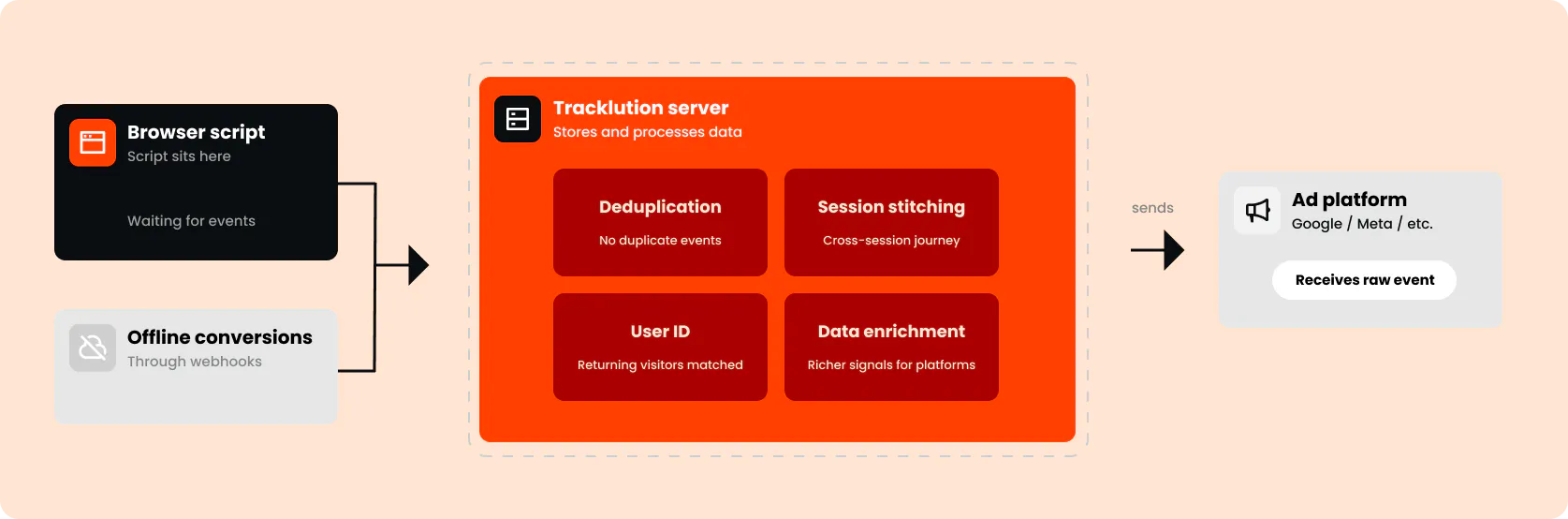
The beauty with Tracklution is that's basically all you need to do. As you add connectors, Tracklution handles the formatting for both the pixel and the CAPI side, what the parameters should be, what the data should look like when sent to your ad platforms. - Lucas Nilsson, Product Specialist at Tracklution
By the way, we recommend glancing through our guide to server-side tagging vs tracking vs gateways, which breaks down the differences in plain English.
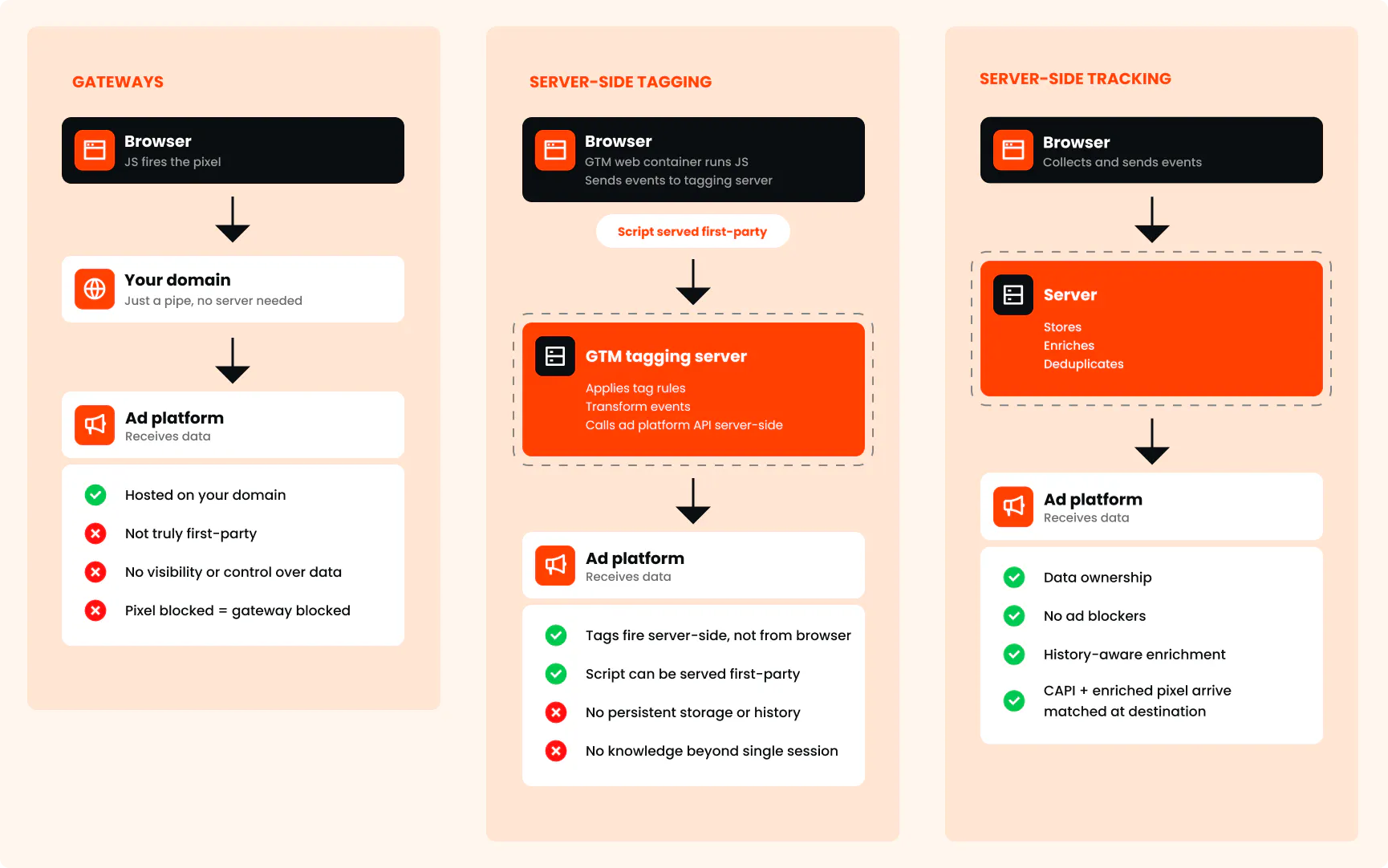
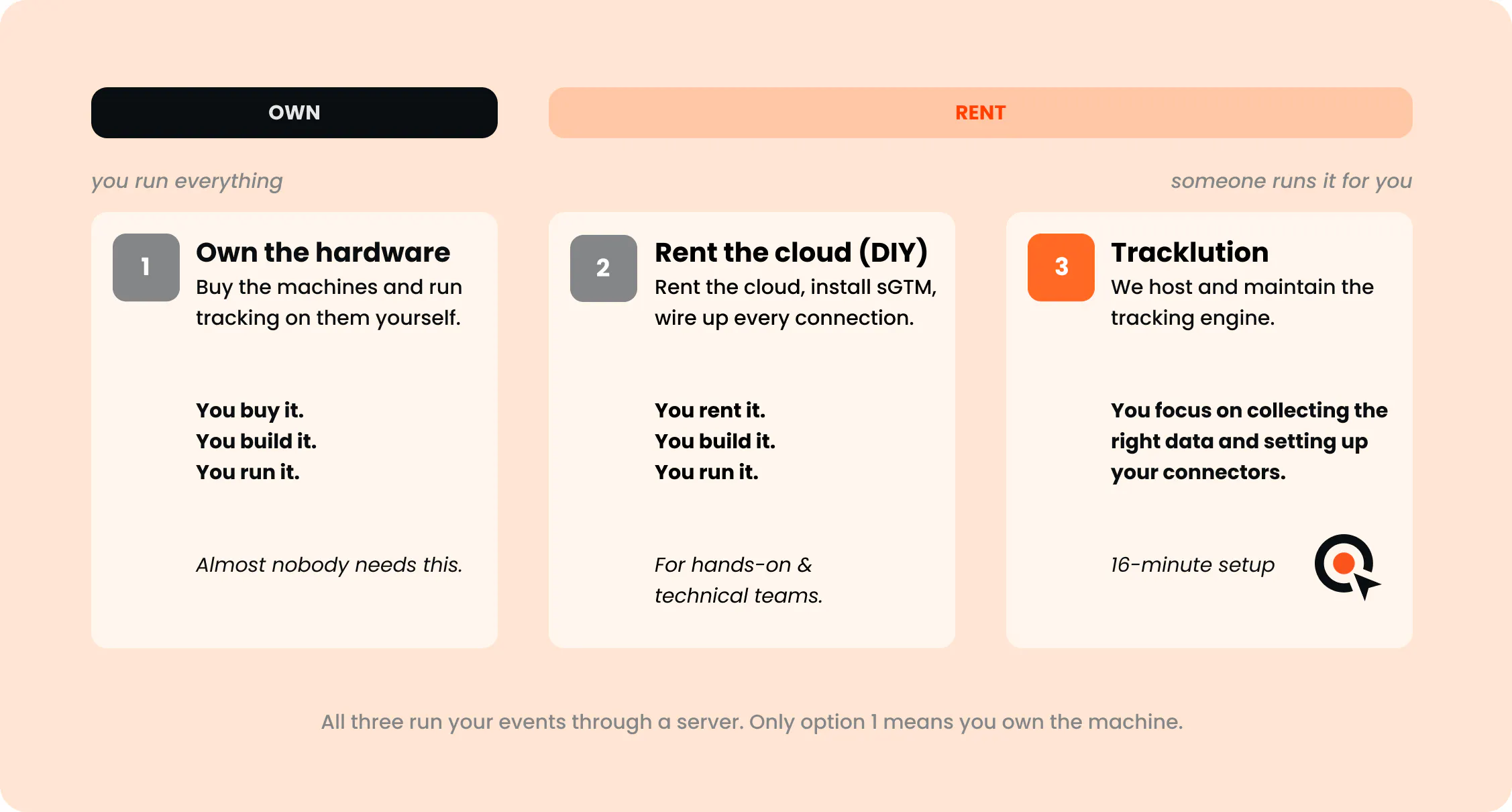
We’ve seen that many marketers have had server-side tracking on their radar for a while but steered clear because it sounds like a big, expensive project. It’s true that bespoke setups using server-side Google Tag Manager (sGTM) can require weeks of developer time, plus ongoing maintenance every time a platform changes something.
But Tracklution takes a different approach. It's a fully managed platform, with a median setup time of 16 minutes and no developers needed.
Case Study
How Santander Consumer Bank took full control of its tracking data
+33.6%
purchase events recovered from Google Ads
31 days
Time to outstanding results, after the algorithm learning period
Lower CAC
in side-by-side tests against legacy tracking
Strict compliance rules meant Santander Consumer Bank could only see ad views and clicks, but never the leads and sales that followed. They needed full visibility over what data left their websites, and a guarantee that every event respected customer consent. With Tracklution, they now feed ad platforms complete, consent-aware conversion data, and can prove exactly what flows where.
“The better the data, the better the results.”

Víctor Caride Sáez
Digital Marketing Leader at Santander Consumer Bank
Conclusion
The Conversions API Gateway is a quick, no-code way to get more of your Pixel's events to Meta. It might be worth it if Meta is your main channel and most of your conversions happen on your website.
But at the end of the day, the CAPI Gateway is only a routing layer. It can't recover events lost in transit. It can’t store, enrich, or add offline events. And it can’t filter and anonymize data. If those gaps matter to you, then you’re better off exploring the full server-side tracking pipeline.

Questions and answers
1. Is the Meta Conversions API Gateway free?
Meta doesn't charge for the Gateway. You only pay your cloud provider if you host it yourself, or a hosting partner if they run it for you.
2. What’s the difference between the Conversions API Gateway and a custom Conversions API build?
The Gateway forwards the events your Pixel already fires, with no coding required. With a custom build, a developer writes the server-to-server integration. This can take weeks of work and requires ongoing maintenance, but does allow for more customization, including sending events from your backend or CRM.
3. Does the Conversions API Gateway replace the Meta Pixel?
No, it actually relies on it. The Gateway takes the events your Pixel already fires and then sends an extra copy to Meta from a server, bypassing domain-based blocking. If you want to recover events blocked by strict content-based blockers, you'll need a full server-side setup.
4. Should I self-host the Gateway or use a partner?
If you want the data to stay in your own cloud account and don't mind managing it, then self-hosting makes sense. If you’d rather skip the cloud setup entirely, then you can use a hosting partner that will run your event data through their servers.
5. What are the disadvantages of using the Conversions API Gateway?
It only works with Meta, it can't recover events the Pixel never fires, and it can't add offline sales, CRM data, or profit margins. Simply put: the Gateway changes the delivery path, but not the source of data.

Have further questions?




