3 reasons why 'just' racking conversions isn’t enough
Only sending Purchase events? You're missing remarketing audiences, faster learning and a clear view of funnel drop-offs. Here's why.

Table of contents
Better data.
Set up server-side tracking in minutes with Tracklution. Send better conversion data to your ad platforms so their algorithms can optimise for better results from your budget.
Start your free trialConversions tell your ad platforms what happened.
Every other event tells them who to find, who to bring back, and who's more likely to generate revenue for your business.
The TL;DR version
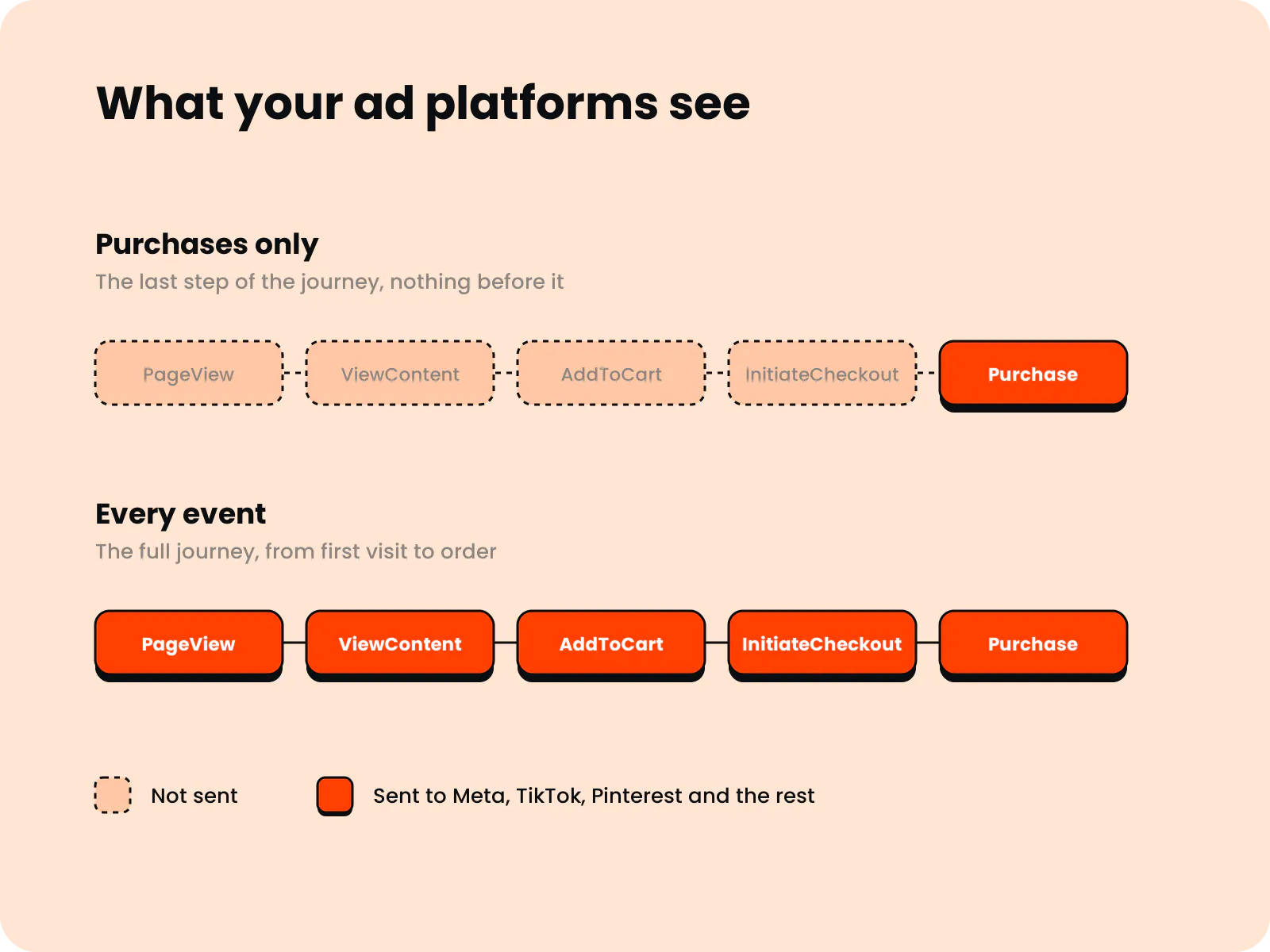
If you only send Purchase events back, Meta and Google see the last step of the journey and nothing before it.
Additionally,
- you’d lose your remarketing audiences,
- your campaigns would have fewer events to optimize for (low purchase volume keeps ad sets stuck in learning).
- and you can't see where people drop off.
Tracking the full set of events, like PageView, ViewContent, AddToCart, InitiateCheckout, Lead, or Purchase (to name but a few) fixes all three.
What each event does
Each standard event marks one step of the buying journey and gives your ad platform different levels of information to interpret and work with.
Event | Fires when | What it powers |
PageView | Someone loads any page on your website | Your broadest remarketing pool (all website visitors), the baseline for every funnel report, and is often the very first event capturing richer source information (where visitors came from) |
ViewContent | Someone opens a product or key content page | Product-level remarketing, dynamic product ads (when the event carries product IDs that match your catalog), and lookalike audiences built from interested visitors |
AddToCart | Someone adds a product to the cart | Cart-abandoner audiences, the warmest people who haven't bought yet |
InitiateCheckout | Someone starts checkout | Checkout-abandoner audiences and a strong mid-funnel signal for campaign learning |
Lead | Someone submits a form or signs up | Lead-gen optimization and B2B retargeting |
Purchase | Someone completes an order | Conversion optimization, ROAS (return on ad spend) reporting, and value-based bidding. |
FYI, here are the standard events Tracklution supports (tracked automatically on Shopify and WooCommerce, added per event with GTM or a manual install).
Reason 1: you need it to build remarketing audiences
Remarketing = showing ads to people who already visited your website.
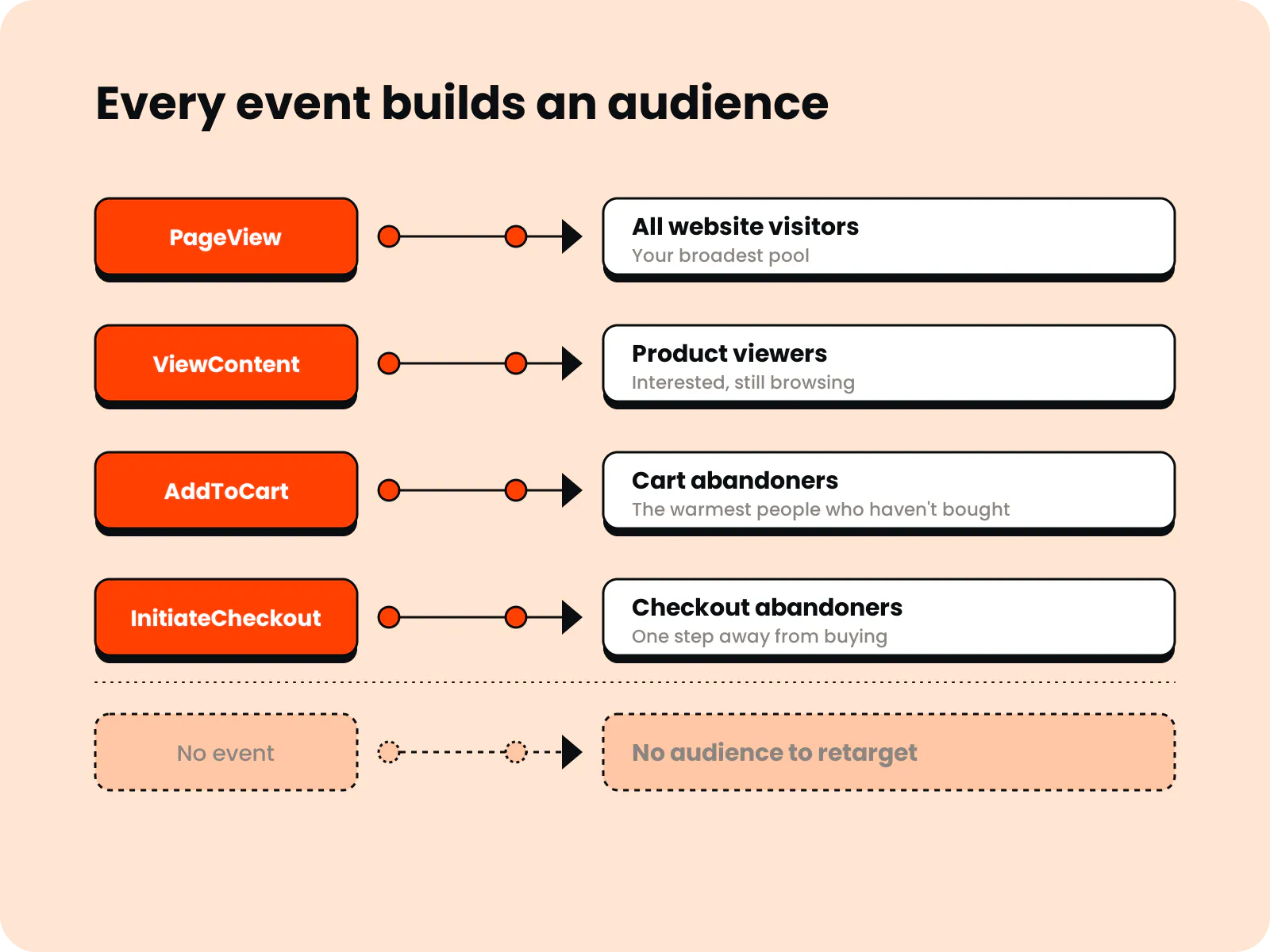
Those audiences are built from events, not from purchases.
For instance, someone who viewed a pair of running shoes three times in the past week is a far better target than a cold audience. But if you don't send ViewContent, the ad platform doesn't know that person even exists.
Same for AddToCart: no event, no cart-abandoner audience.
What’s more, audiences need size to work. Meta, for instance, needs at least 100 people from one country to build a lookalike audience, and small audiences get expensive fast.
This is why sending every PageView and ViewContent keeps your pools big enough to actually spend on.
Reason 2: the algorithm needs more signals than your purchases give it
We know that Meta's delivery system needs around 50 optimization events per ad set per week to get out of the learning phase.
Now, in reality, most businesses out there can’t hit 50 purchases per ad set every week.
Upper-funnel events give you an optimization goal you can actually hit.
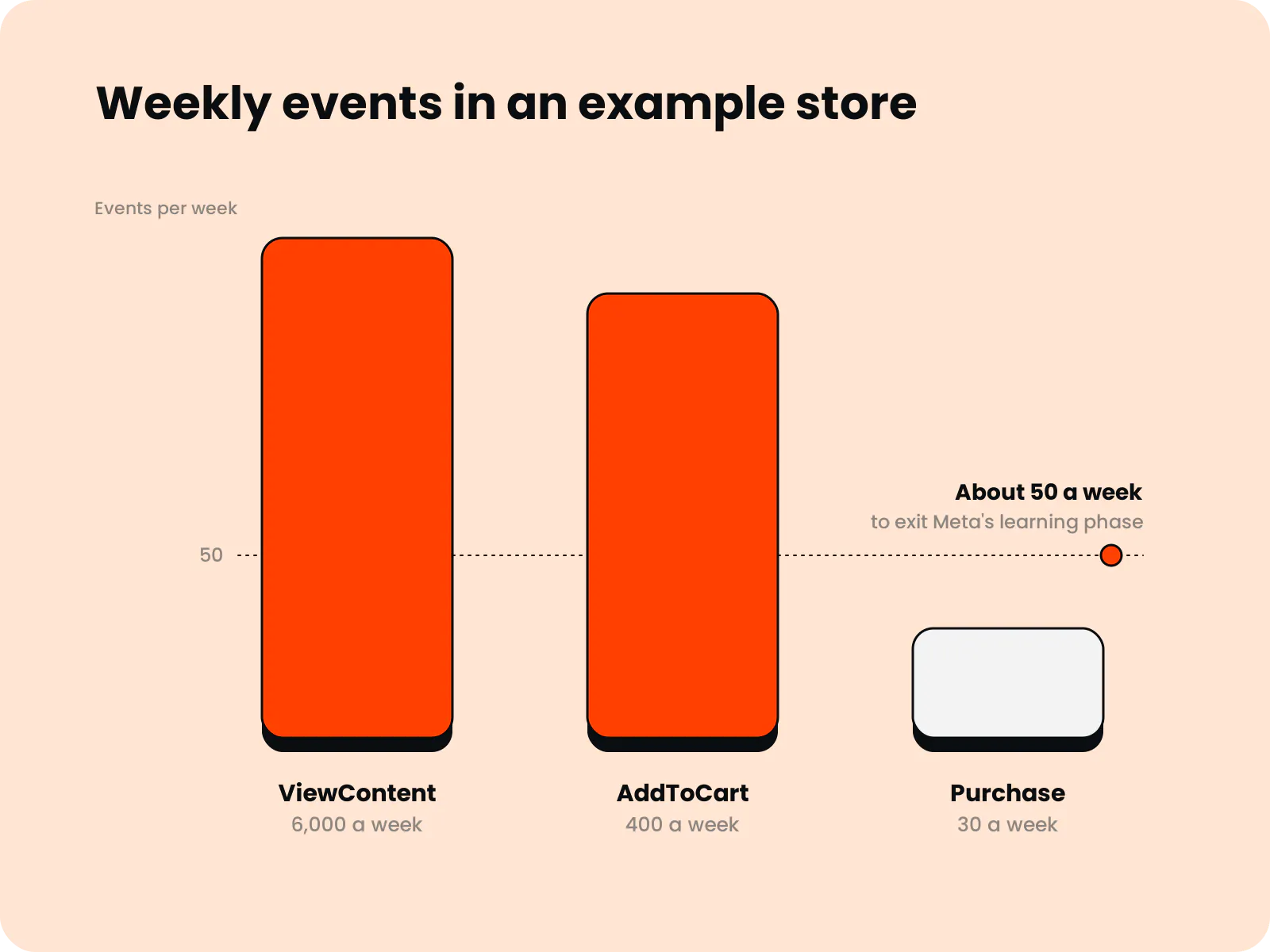
A store with 30 purchases a week might have 400 AddToCarts and 6,000 ViewContents. That's enough volume to optimize on and get out of the learning phase.
It also gives you options.
If your purchase volume is too low, you can optimize a campaign for AddToCart or InitiateCheckout while you scale, and then switch to Purchase once the numbers are there (switching the optimization event restarts the learning phase, so do it once).
Reason 3: you’ll find the weak points in your funnel
And you’ll see them faster.
With only Purchase data, a bad week may simply look like "sales dropped."
With the full set of events, you can see exactly which step broke.
- Lots of ViewContent, few AddToCarts: your product pages, pricing, or stock are the problem.
- Lots of AddToCarts, few InitiateCheckouts: something in the cart is putting people off (shipping costs are the usual suspect).
- Lots of InitiateCheckouts, few Purchases: your checkout or payment step needs attention.
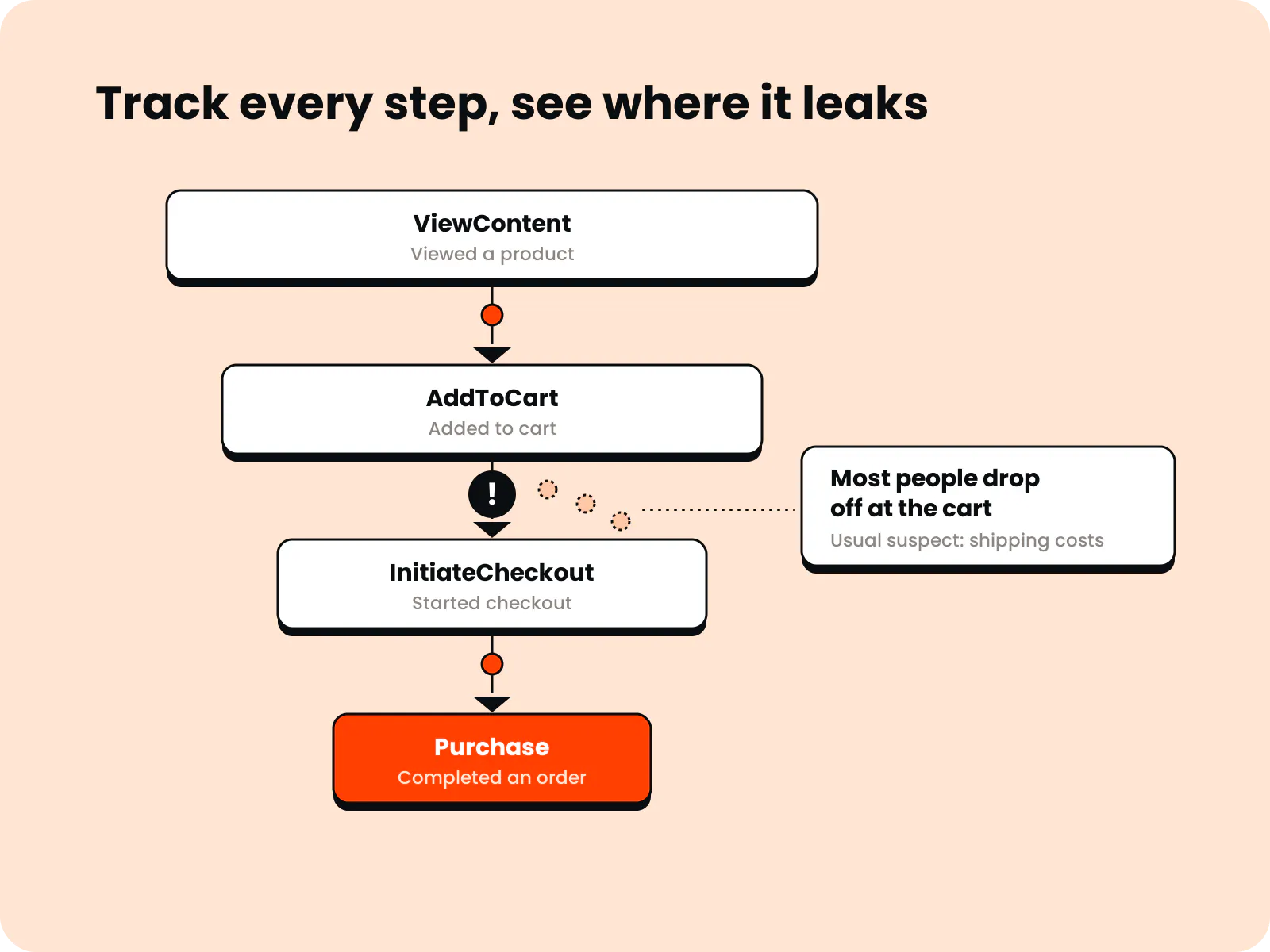
And the same logic works per campaign.
A campaign that drives tons of PageViews but no AddToCarts is buying the wrong traffic, and you'll spot that in days instead of weeks.
So, which events should you send?
Start with the standard events that match your business model.
Ad platforms know what these mean out of the box, so they learn from them right away.
For example:
- Ecommerce: PageView, ViewContent, AddToCart, InitiateCheckout, Purchase.
- Lead gen and B2B: PageView, ViewContent on key pages (pricing, demo), Lead, and your final qualified conversion.
- Subscriptions and SaaS: PageView, ViewContent, Lead or CompleteRegistration, StartTrial, Subscribe.
Skip events nobody will use.
Every scroll, hover, or button click turns your Events Manager into noise. A good practice is that if you can't name the audience, report, or optimization goal an event feeds, you don't need it.
One rule applies to every event: send it the same way you send your Purchases.
If your conversions go server-side but your ViewContents still rely on the browser pixel, ad blockers and browser restrictions will shrink the very audiences you're trying to build.
How Tracklution handles it
Tracklution can send every standard event server-side, not just your conversions.
Server-side means the data goes from a server straight to Meta's Conversions API, TikTok, Pinterest and the other platforms, instead of just relying on a browser pixel that a simple ad blocker can stop. Google Ads receives the events you set up as conversion actions.
PageView, ViewContent, AddToCart, InitiateCheckout, Lead and Purchase all flow through the same connection, and Tracklution gives the browser and server copy of each event the same event ID, so the platform counts each action once.
Related posts
Ask Tracklution
Does Tracklution have its own attribution model?
Yes. Here's how Tracklution's first-party attribution works, which models it offers, and why its numbers differ from Google Ads or Meta.
Ask Tracklution
Does Tracklution have its own attribution model?
Yes. Here's how Tracklution's first-party attribution works, which models it offers, and why its numbers differ from Google Ads or Meta.
Ask Tracklution
Can server-side tracking inflate your conversion count?
No, server-side tracking doesn't inflate conversion numbers. See how it works and how it prevents situations where overcounting could happen.
Ask Tracklution
Can server-side tracking inflate your conversion count?
No, server-side tracking doesn't inflate conversion numbers. See how it works and how it prevents situations where overcounting could happen.
Ask Tracklution
What makes Tracklution different from other server-side tracking solutions?
See what actually sets Tracklution apart from other server-side tracking tools: all-in-one, managed, CAPIs built in, and setup agnostic.
Ask Tracklution
What makes Tracklution different from other server-side tracking solutions?
See what actually sets Tracklution apart from other server-side tracking tools: all-in-one, managed, CAPIs built in, and setup agnostic.
Questions and answers
What does Tracklution actually do?
Tracklution sends conversion data directly to ad platforms (Meta, Google Ads, TikTok, etc.) through server-side APIs. Instead of relying on browser pixels that get blocked by ad blockers, iOS privacy changes, and cookie restrictions, your data goes server-to-server. The result: ad platforms see more of your real conversions, their algorithms optimize better, and you get better ROAS.
What is server-side tracking?
Server-side tracking gathers first-party data directly on your website and sends tracking events to ad platforms via Conversion APIs. This approach bypasses restrictions from iOS devices, ad blockers, and privacy-focused browsers, providing more accurate data and making your paid advertising more efficient.
Is it just one setup that feeds data into all my ad platforms?
Yes. You install Tracklution once, connect your ad accounts, and it sends conversion data to all platforms simultaneously through their respective APIs (Meta CAPI, Google Ads API, TikTok Events API, etc.). No need to manage separate server-side setups for each platform.
How much more conversion data will my ad platforms actually see?
On average, clients report 34.2% more conversions compared to traditional browser-based pixels. This means the ad algorithms have significantly more signal to work with, which translates to 15-35% lower customer acquisition costs for most clients.
Do I need developers to set this up?
No. Setup takes 5-15 minutes depending on your platform. For Shopify, WooCommerce, and other supported platforms, it is plug-and-play. You do not need custom coding or engineering resources. For GTM users, you can keep your existing setup and add Tracklution alongside it.
Do I need to remove my existing tracking tags?
Not necessarily. Tracklution works alongside your current setup. You can run both in parallel initially to compare data, then decide whether to simplify.
What about the DNS / CNAME setup?
Tracklution uses a first-party CNAME record on your domain for data collection. This takes a couple of minutes to configure and up to 48 hours to propagate. It is what makes the tracking resistant to ad blockers and browser restrictions.
Can I verify that the data is actually more accurate?
Yes. Run Tracklution alongside your existing tracking and compare. The dashboard also shows "recovered events" so you can see exactly how many conversions would have been missed without server-side tracking.
Can I distinguish between organic and paid traffic?
Yes. Tracklution preserves traffic source attribution. The conversion data sent to each ad platform includes the proper attribution parameters.
What about offline conversions (phone calls, in-store, CRM events)?
Tracklution supports offline conversion tracking through webhooks and CRM integrations. If someone clicks an ad, then converts offline, you can feed that back to the ad platforms. Clients using this see up to 35% reduction in acquisition costs because the algorithms learn from the full conversion picture.
How does this work with cookie consent and CMP tools?
Tracklution supports both Basic and Advanced Consent Mode. It reads your CMP data layer automatically and respects user consent choices. In Advanced Consent Mode, it can still collect anonymized, cookieless data when users decline cookies, which helps ad platform modeling without violating privacy rules. Fully GDPR-compliant.
How is this different from Stape or building your own sGTM setup?
Stape provides server-side GTM hosting, which means you still need to build and maintain the tags, triggers, and configuration yourself. Tracklution is a complete solution: plug-and-play setup, automatic event detection, built-in consent management, a real-time analytics dashboard, and ongoing maintenance of all API connections. When ad platforms change their APIs (which happens often), we handle the updates.
How does the agency partner model work?
Single dashboard to manage all client accounts. Each client has their own tracking container. The platform handles all technical maintenance, so you are not stuck troubleshooting API changes or broken tracking.

Have further questions?
Already convinced? Get 100% accurate data with server side tracking
Already convinced? Get 100% accurate data with server side tracking