Does Tracklution have its own attribution model?
Yes. Here's how Tracklution's first-party attribution works, which models it offers, and why its numbers differ from Google Ads or Meta.

Table of contents
Better data.
Set up server-side tracking in minutes with Tracklution. Send better conversion data to your ad platforms so their algorithms can optimise for better results from your budget.
Start your free trialThe TL;DR version
Yes, Tracklution has its own attribution model.
Tracklution collects, processes and sends every conversion your ad platforms need, server-side and first-party, and lets you credit conversions by last click or first click.
“My ad platform reports ≠ Tracklution reports. WHY?!”
This is one of the most frequently asked questions during trials, and the answer is simple: they aren’t supposed to match.
Tracklution's attribution and Google's or Meta's (or any other ad platform’s) attribution models answer different questions.
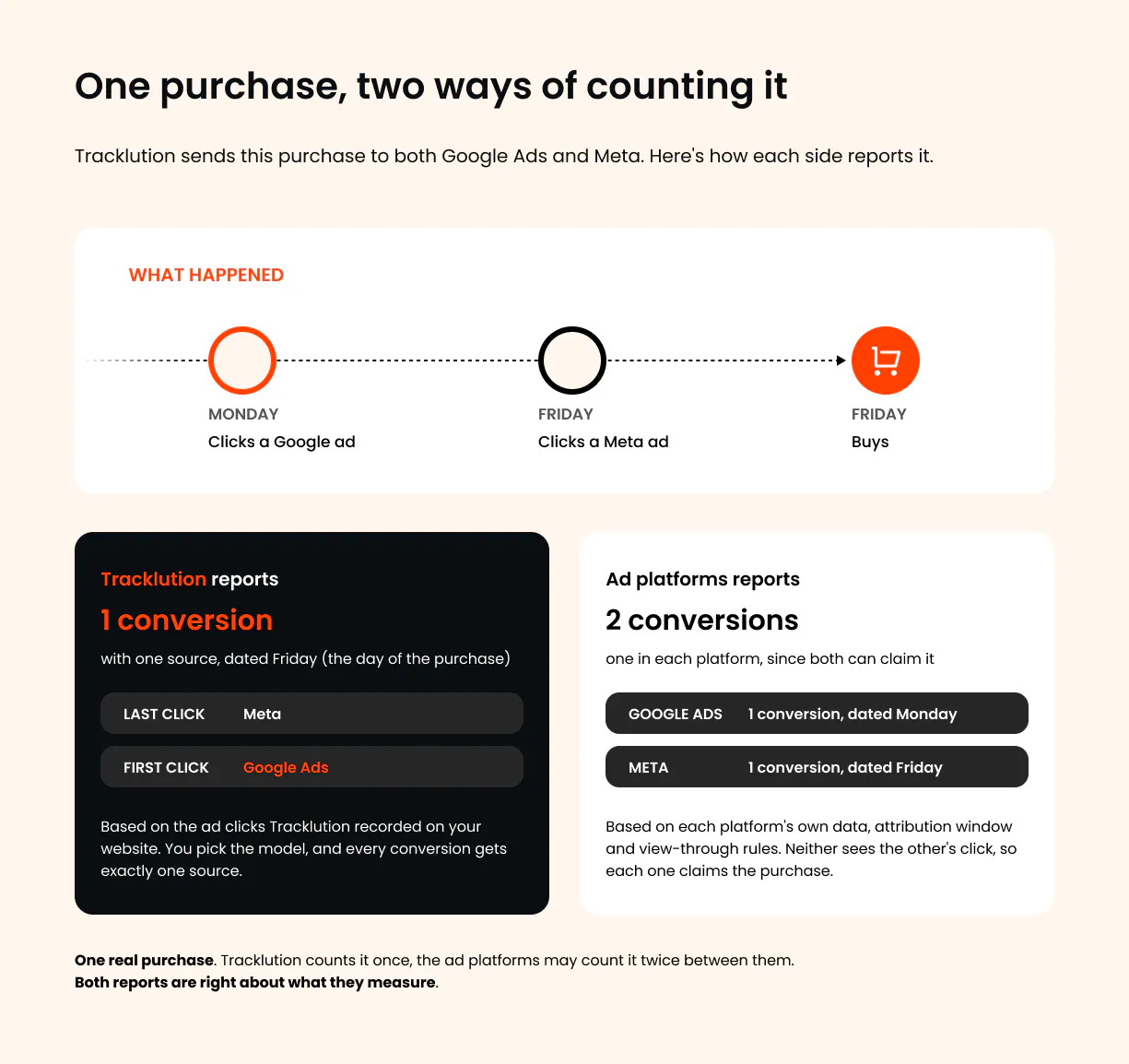
- Tracklution looks at the ad clicks it recorded on your website and gives each conversion one source, based on the first or last click you choose to look at.
- Google, Meta and the other ad platforms receive those same conversions from Tracklution and then run them through their own attribution models, using their own data, attribution windows and view-through rules. Since every platform claims what it can match on its own side, the same purchase can show up in several of them at once, and Google Ads even files it on the day of the ad click, while Tracklution files it on the day of the purchase.
Here’s a visual comparison:
Now, let me elaborate on the (simple) reasons behind it.
How Tracklution ‘decides’ where a visit came from
When someone lands on your website, Tracklution assigns that session a traffic source and checks for 3 signals:
- The click ID: These are the tracking codes ad platforms add to a URL when someone clicks an ad (for instance, gclid for Google Ads or ttclid for TikTok).
- UTM parameters: Parameters like “utm_source” or “utm_medium” you add to links yourself, which helps identify email, SMS, push, or affiliate traffic.
- The referrer. The page the visitor came from, which separates Google organic, Bing organic and referral traffic.
Two additional things worth mentioning:
- A paid click always wins. If someone clicks a Google ad, then comes back during the same visit through a Google search, an email link or an AI tool, Tracklution still counts them as Google Ads traffic. Ad clicks are primary sources, while organic, email and AI visits are secondary ones that don't replace them.
- A conversion takes the source of the visit it happened in. If someone fills in a form or buys during a visit that started from a Meta ad, that conversion is credited to Meta. Tracklution also remembers where the visitor came from the very first time, which is what the first click view uses.
How does Tracklution know it's the same person? A session follows the visitor, not one device or browser. To recognize them, Tracklution combines first-party cookies, click IDs, device fingerprinting or customer data like email addresses, phone numbers or your own external IDs. That's how it keeps track of the visitor's first click, even when they come back on another day or another device.
The difference between last and first click attribution
There are essentially 2 ways to credit a conversion in Tracklution:
- Last click: the conversion goes to the last source of the session it happened in.
- First click: the conversion goes to the visitor's first recorded source.

The last click can tell you what ‘closed the deal’ while the first click can tell you what started a relationship.
They both tell a different story, and so pay attention to both indicators to better understand your overall campaigns or affiliate program performance.
What happens when a new visit starts? A visit doesn't last forever. When a customer comes back after a session has ended, Tracklution starts a new session with its own source. Say someone clicks your Google ad, leaves, and returns days later through an email link to buy. Your dashboard credits that purchase to email, since email is the last source of the session it happened in. Tracklution still remembers the earlier Google click, though, and sends it to Google Ads along with the conversion, so Google Ads can claim the purchase as well, but according to its own model. For such a case, open the session in your dashboard and you'll see it's linked to the earlier session with its source recorded as Google Ads.
What Tracklution's attribution model really is
Tracklution's attribution model is built on your tracking setup.
It looks at what was recorded and tells you what was the last (or first) recognized click source behind a conversion.
And what you get is a neutral view you can hold the platforms' numbers up against.

"It's not telling you this was Google, it's not telling you this was Meta. It's just telling you that the server tracked a Google click in this session, and it also tracked a Meta click. You can then use this data however you want,”
Lucas Nilsson,
Product Specialist at Tracklution
Tracklution's main job is to send all that data to your ad platforms, so their own attribution has as much data to work with as possible.
The dashboard gives you a simplified overview of it, and if you want to build your own attribution logic, the Reporting API and the Tracklution MCP give you the underlying data to do it.
Tracking performance vs. campaign performance
Think of it this way:
Tracklution's dashboard shows tracking performance (what was tracked, when, and what data was received and sent on). Ad platforms show campaign performance (which of your campaigns or what ad its attribution model can claim to have given you the conversion).
So, to make a long story short:
- Yes, Tracklution has its own attribution. Every session gets a traffic source server-side, from click IDs, UTM parameters and the referrer, in that order of priority.
- Two models in the dashboard and Reporting API: last click and first click. One toggle switches every report in Tracklution.
- Affiliate and custom connectors get their own rules: last click, first click or any click, with an attribution window you set.
- It's built on your tracking, not on algorithms. It reads the click sources it recorded.
- It doesn't replace the ad platforms' attribution. Tracklution delivers your conversions with their click IDs and customer data, and Meta, Google and TikTok etc. still attribute them with their own models.
- The numbers will differ, and that's healthy. Tracklution shows tracking performance. The ad platforms show campaign performance.
Related posts

Ask Tracklution
Can server-side tracking inflate your conversion count?
No, server-side tracking doesn't inflate conversion numbers. See how it works and how it prevents situations where overcounting could happen.
Ask Tracklution
Can server-side tracking inflate your conversion count?
No, server-side tracking doesn't inflate conversion numbers. See how it works and how it prevents situations where overcounting could happen.

Ask Tracklution
What makes Tracklution different from other server-side tracking solutions?
See what actually sets Tracklution apart from other server-side tracking tools: all-in-one, managed, CAPIs built in, and setup agnostic.
Ask Tracklution
What makes Tracklution different from other server-side tracking solutions?
See what actually sets Tracklution apart from other server-side tracking tools: all-in-one, managed, CAPIs built in, and setup agnostic.
Ask Tracklution
Is server-side tracking just better reporting?
Server-side tracking recovers conversions your pixel misses. Is that just better reporting, or does it actually change how your ads perform?
Ask Tracklution
Is server-side tracking just better reporting?
Server-side tracking recovers conversions your pixel misses. Is that just better reporting, or does it actually change how your ads perform?
Questions and answers
What does Tracklution actually do?
Tracklution sends conversion data directly to ad platforms (Meta, Google Ads, TikTok, etc.) through server-side APIs. Instead of relying on browser pixels that get blocked by ad blockers, iOS privacy changes, and cookie restrictions, your data goes server-to-server. The result: ad platforms see more of your real conversions, their algorithms optimize better, and you get better ROAS.
What is server-side tracking?
Server-side tracking gathers first-party data directly on your website and sends tracking events to ad platforms via Conversion APIs. This approach bypasses restrictions from iOS devices, ad blockers, and privacy-focused browsers, providing more accurate data and making your paid advertising more efficient.
Is it just one setup that feeds data into all my ad platforms?
Yes. You install Tracklution once, connect your ad accounts, and it sends conversion data to all platforms simultaneously through their respective APIs (Meta CAPI, Google Ads API, TikTok Events API, etc.). No need to manage separate server-side setups for each platform.
How much more conversion data will my ad platforms actually see?
On average, clients report 34.2% more conversions compared to traditional browser-based pixels. This means the ad algorithms have significantly more signal to work with, which translates to 15-35% lower customer acquisition costs for most clients.
Do I need developers to set this up?
No. Setup takes 5-15 minutes depending on your platform. For Shopify, WooCommerce, and other supported platforms, it is plug-and-play. You do not need custom coding or engineering resources. For GTM users, you can keep your existing setup and add Tracklution alongside it.
Do I need to remove my existing tracking tags?
Not necessarily. Tracklution works alongside your current setup. You can run both in parallel initially to compare data, then decide whether to simplify.
What about the DNS / CNAME setup?
Tracklution uses a first-party CNAME record on your domain for data collection. This takes a couple of minutes to configure and up to 48 hours to propagate. It is what makes the tracking resistant to ad blockers and browser restrictions.
Can I verify that the data is actually more accurate?
Yes. Run Tracklution alongside your existing tracking and compare. The dashboard also shows "recovered events" so you can see exactly how many conversions would have been missed without server-side tracking.
Can I distinguish between organic and paid traffic?
Yes. Tracklution preserves traffic source attribution. The conversion data sent to each ad platform includes the proper attribution parameters.
What about offline conversions (phone calls, in-store, CRM events)?
Tracklution supports offline conversion tracking through webhooks and CRM integrations. If someone clicks an ad, then converts offline, you can feed that back to the ad platforms. Clients using this see up to 35% reduction in acquisition costs because the algorithms learn from the full conversion picture.
How does this work with cookie consent and CMP tools?
Tracklution supports both Basic and Advanced Consent Mode. It reads your CMP data layer automatically and respects user consent choices. In Advanced Consent Mode, it can still collect anonymized, cookieless data when users decline cookies, which helps ad platform modeling without violating privacy rules. Fully GDPR-compliant.
How is this different from Stape or building your own sGTM setup?
Stape provides server-side GTM hosting, which means you still need to build and maintain the tags, triggers, and configuration yourself. Tracklution is a complete solution: plug-and-play setup, automatic event detection, built-in consent management, a real-time analytics dashboard, and ongoing maintenance of all API connections. When ad platforms change their APIs (which happens often), we handle the updates.
How does the agency partner model work?
Single dashboard to manage all client accounts. Each client has their own tracking container. The platform handles all technical maintenance, so you are not stuck troubleshooting API changes or broken tracking.

Have further questions?
Already convinced? Get 100% accurate data with server side tracking
Already convinced? Get 100% accurate data with server side tracking