Server-side tracking
Custom installation
Add the Tracklution script straight into your website's code and get server-side accuracy, without GTM or a plugin.
14-day trial • No credit card required • SOC2 & ISO27001 compliant
Get back the conversions that ad blockers, iOS and browser limits hide, with an average uplift of +34.2%
Install one script and track standard events, custom events and contact info on any website or tech stack
16-minute setup: paste the script, add your events and go live, with no server of your own to run







On average, teams using Tracklution track 34.2% more conversions
Browser-side pixel scripts are blocked by ad blockers, degraded by iOS restrictions, and set to expire with third-party cookies. Tracklution's custom installation delivers first-party, server-side conversion data to all your ad platforms, without relying on the browser.
Tracklution custom installation (up to 100% data accuracy)
First-party data collection: scripts load under your own domain, bypassing browser restrictions and ad blockers
Server-side event delivery through each ad platform's Conversions API
Automatic deduplication with event IDs across browser and server signals
Hashes and sends email, phone, and external IDs with every event automatically
Tracking handled server-side: faster website, no client-side script overhead
Real conversion data, no modeled estimates
EU-built and operated. SOC2 & ISO 27001 certified. Forwards data based on your users' consent choices.
Browser pixel only (up to 50% data loss industry-wide)
Relies on browser-side JavaScript and third-party cookies
Blocked by ad blockers, iOS ATT, and browser privacy features
Third-party cookies deprecated in 2026
User matching limited by client-side data availability
Client-side tracking scripts add page load time
Modeled data fills gaps when pixel events are missing
GDPR compliance depends on your legal basis and implementation
Get more from all ad platforms
Send first-party conversion data to all your active connectors, with real numbers instead of modeled estimates.
Get more from all ad platforms
Send first-party conversion data to all your active connectors, with real numbers instead of modeled estimates.
Send accurate data to every platform you run ads on
Install the script once, then send your events to every ad platform you switch on in Tracklution.

Google Ads

Meta Ads


Snapchat Ads

TikTok Ads



Awin

Klaviyo

Bing Ads

LinkedIn Ads

GTM

Adform

DV360

CM360

Google Analytics 4

OpenAI Ads
Custom Connector
Google Ads
Meta Ads
Snapchat Ads
TikTok Ads
Awin
Klaviyo
Bing Ads
LinkedIn Ads
GTM
Adform
DV360
CM360
Google Analytics 4
OpenAI Ads
Custom Connector
Google Ads
Meta Ads
Snapchat Ads
TikTok Ads
Awin
Klaviyo
Bing Ads
LinkedIn Ads
GTM
Adform
DV360
CM360
Google Analytics 4
OpenAI Ads
Custom Connector
Google Ads
Meta Ads
Snapchat Ads
TikTok Ads
Awin
Klaviyo
Bing Ads
LinkedIn Ads
GTM
Adform
DV360
CM360
Google Analytics 4
OpenAI Ads
Custom Connector
Google Ads
Meta Ads
Snapchat Ads
TikTok Ads
Awin
Klaviyo
Bing Ads
LinkedIn Ads
GTM
Adform
DV360
CM360
Google Analytics 4
OpenAI Ads
Custom Connector
Google Ads
Meta Ads
Snapchat Ads
TikTok Ads
Awin
Klaviyo
Bing Ads
LinkedIn Ads
GTM
Adform
DV360
CM360
Google Analytics 4
OpenAI Ads
Custom Connector
Google Ads
Meta Ads
Snapchat Ads
TikTok Ads
Awin
Klaviyo
Bing Ads
LinkedIn Ads
GTM
Adform
DV360
CM360
Google Analytics 4
OpenAI Ads
Custom Connector
Google Ads
Meta Ads
Snapchat Ads
TikTok Ads
Awin
Klaviyo
Bing Ads
LinkedIn Ads
GTM
Adform
DV360
CM360
Google Analytics 4
OpenAI Ads
Custom Connector
Custom Connector
OpenAI Ads
Google Analytics 4
CM360
DV360
Adform
GTM
LinkedIn Ads
Bing Ads
Klaviyo
Awin
TikTok Ads
Snapchat Ads
Meta Ads
Google Ads
Custom Connector
OpenAI Ads
Google Analytics 4
CM360
DV360
Adform
GTM
LinkedIn Ads
Bing Ads
Klaviyo
Awin
TikTok Ads
Snapchat Ads
Meta Ads
Google Ads
Custom Connector
OpenAI Ads
Google Analytics 4
CM360
DV360
Adform
GTM
LinkedIn Ads
Bing Ads
Klaviyo
Awin
TikTok Ads
Snapchat Ads
Meta Ads
Google Ads
Custom Connector
OpenAI Ads
Google Analytics 4
CM360
DV360
Adform
GTM
LinkedIn Ads
Bing Ads
Klaviyo
Awin
TikTok Ads
Snapchat Ads
Meta Ads
Google Ads
Custom Connector
OpenAI Ads
Google Analytics 4
CM360
DV360
Adform
GTM
LinkedIn Ads
Bing Ads
Klaviyo
Awin
TikTok Ads
Snapchat Ads
Meta Ads
Google Ads
Custom Connector
OpenAI Ads
Google Analytics 4
CM360
DV360
Adform
GTM
LinkedIn Ads
Bing Ads
Klaviyo
Awin
TikTok Ads
Snapchat Ads
Meta Ads
Google Ads
Custom Connector
OpenAI Ads
Google Analytics 4
CM360
DV360
Adform
GTM
LinkedIn Ads
Bing Ads
Klaviyo
Awin
TikTok Ads
Snapchat Ads
Meta Ads
Google Ads
Custom Connector
OpenAI Ads
Google Analytics 4
CM360
DV360
Adform
GTM
LinkedIn Ads
Bing Ads
Klaviyo
Awin
TikTok Ads
Snapchat Ads
Meta Ads
Google Ads
Capture and send accurate conversion data from any website
Install it once on any website and Tracklution takes care of the server side.
Integrate your ad platforms in a few clicks
Connect Meta, Google Ads, TikTok, LinkedIn and the other ad platforms you use from the Tracklution dashboard. The events your script captures go to every connector you activate, so there's nothing extra to set up for each platform.
First-party advantage, zero infrastructure
Enable first-party mode with a DNS record and Tracklution loads under your own domain. Bypass ad blockers, iOS restrictions, and cookie limitations without running your own server.
Fully managed, fully visible
Every event shows up in your dashboard in real time, along with where it was sent. When ad platforms update their Conversions APIs, Tracklution updates the integration (and there's nothing for you to do).
How to set up server-side tracking with custom installation in 16 minutes
Add the main script and your events, then switch on the ad platforms you use.
Step 01
Step 01
Enable first-party data
Add a DNS CNAME record (you'll find yours in the Tracklution dashboard under First-Party Mode) and the script loads from your own domain. Tracking then runs first-party, which gets it past ad blockers, browser restrictions and cookie limits.
Step 02
Step 02
Add the Tracklution main script
Paste the main Tracklution script into the head section of every page on your website, so it loads before any event scripts (without it, events won't register). You'll find it in your tracking container's installation instructions, under Standard installation.
Step 03
Step 03
Add your event scripts
Add event scripts to the relevant pages: PageView on every page, Purchase on the order confirmation page, Lead on the thank-you page, and so on. Standard events include Purchase, Lead, AddToCart, ViewContent, InitiateCheckout, CompleteRegistration, PageView and more, and custom events use the same format with any event name you choose.
Step 04
Step 04
Activate your connectors
In the Tracklution dashboard, activate the connectors for each platform you run ads on (Meta, Google Ads, TikTok, LinkedIn, etc.), and events will start flowing to every active connector immediately (no separate setup per platform).
All done
Your ad platforms now receive complete, deduplicated conversion data from every visitor, regardless of ad blockers, iOS restrictions, or cookie limitations.
Under the hood:
With a custom installation, the main Tracklution script sits in the head of every page on your website. It loads first and then waits for your event snippets, the short tlq('track', ...) calls you place on the pages where conversions happen. You fill in values like order total and currency from your own code or dataLayer variables.
PageView runs on every page so Tracklution can pick up the click IDs and UTM parameters people arrive with. When a Purchase or Lead fires later, the conversion is tied back to that ad click, and any ContactInfo you pass (email, phone and so on) is hashed before it goes to an ad platform.
From there the event is processed on Tracklution's servers, deduplicated with a unique event ID and sent to every connector you've switched on (Meta, Google Ads, TikTok and the rest) through their conversion APIs. You don't write any server code, and you don't have to touch your website again when a platform changes its API.
Add the DNS CNAME record for first-party mode and the script loads from your own domain instead of a third-party one. That's what keeps ad blockers and browser cookie limits from cutting into your data.
Using Tracklution vs. doing it yourself
See how Tracklution custom installation compares to browser-pixel-only tracking or running your own server-side setup.
Tracklution Custom Installation Basic Setup | Browser pixel only Browser-side | Self-hosted server setup Server-side | |
|---|---|---|---|
Accuracy | Up to 100% | 40-70% | Up to 100% if built correctly |
Installation time | 16 minutes | 5-15 minutes | Weeks to months |
Bypasses ad blockers | |||
Works on any website | |||
Automatic deduplication | Your developers build it | ||
All ad platforms at once | Built one platform at a time | ||
Automatic API updates | Your team updates each API | ||
No server to manage | |||
Cost | From €39/mo. Free plan for Meta and Google Ads. | Free | Dev time + hosting |
Tracklution Custom Installation Basic Setup | Browser pixel only Browser-side | Self-hosted server setup Server-side | |
|---|---|---|---|
Accuracy | Up to 100% | 40-70% | Up to 100% if built correctly |
Installation time | 16 minutes | 5-15 minutes | Weeks to months |
Bypasses ad blockers | |||
Works on any website | |||
Automatic deduplication | Your developers build it | ||
All ad platforms at once | Built one platform at a time | ||
Automatic API updates | Your team updates each API | ||
No server to manage | |||
Cost | From €39/mo. Free plan for Meta and Google Ads. | Free | Dev time + hosting |
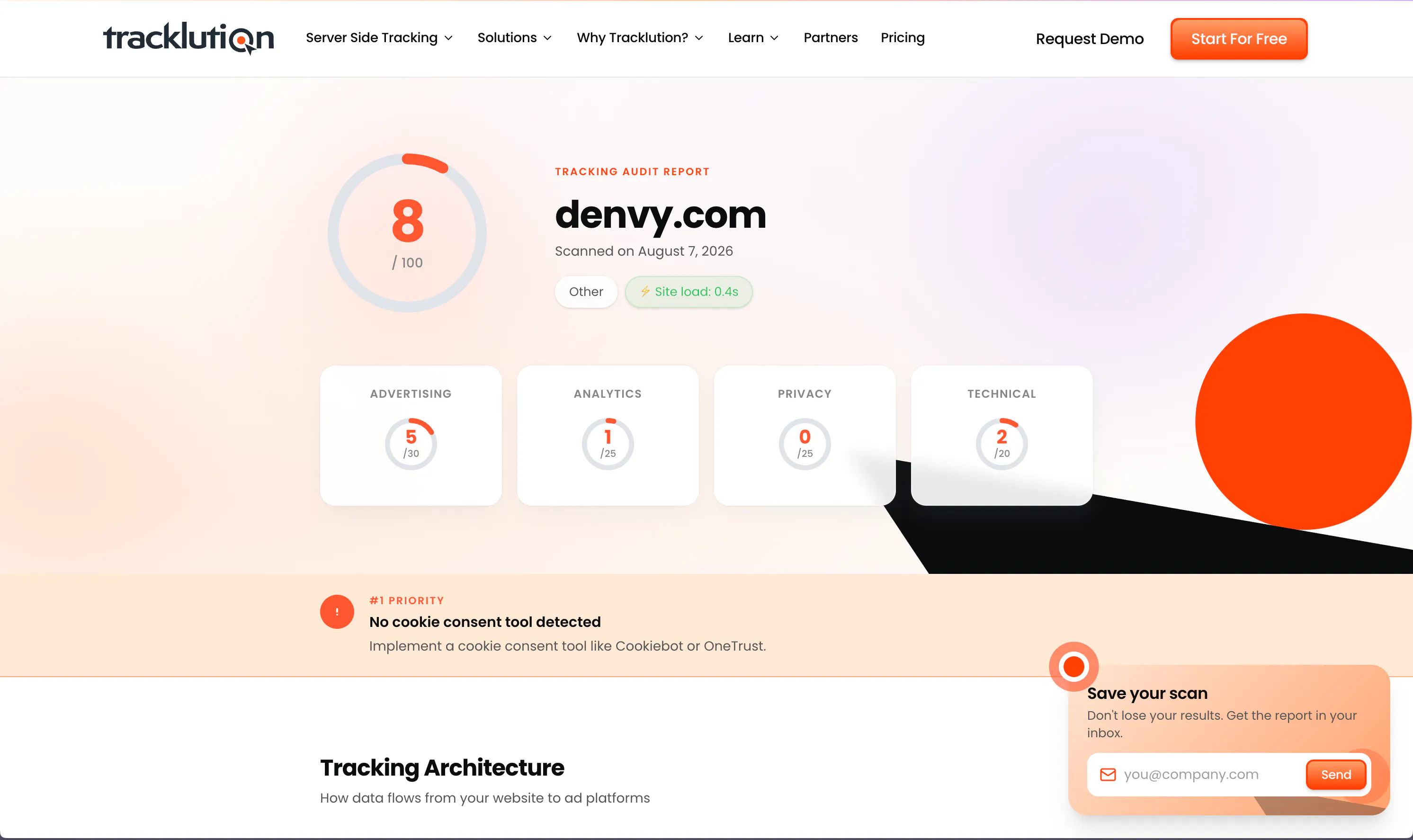
Is your tracking setup (really) working?
Tracklution's free tracking audit scans your current setup and shows you exactly where you're losing conversion data, plus what to fix first.
Is your tracking setup (really) working?
Tracklution's free tracking audit scans your current setup and shows you exactly where you're losing conversion data, plus what to fix first.
What you can track with Tracklution custom installation
Tracklution supports the full standard event catalog plus custom events and partial purchases. Add event scripts to your website for each conversion action you want to track.
Purchase
Every completed order, with its value, currency and product details (value and currency are required).
Lead
Form fills, demo requests and contact requests, sent server-side so they're attributed properly.
Add to Cart
Each item added to the cart, a useful funnel signal for ad platform optimization.
Initiate Checkout
Checkout initiations to measure purchase intent.
View Content
Product and page views you can use to build retargeting audiences.
Complete Registration
Account sign-ups and form completions tracked through confirmation.
Start Trial / Subscribe
Free trial starts and subscription events for SaaS and membership tracking.
ContactInfo
Email, phone, name, and other identifiers hashed automatically (SHA-256) and sent with events to maximize match rates across ad platforms.
Custom events
Track whatever matters to your business, with any event name and any parameters you need.
Partial purchases
Multiple micro-conversions within a session (e.g., partial cart value, newsletter sign-up). Tracklution aggregates them and sends as a single Purchase event to ad platforms.
Trusted by performance teams worldwide
See how teams like yours recover lost conversions, lower CAC, and get their campaigns optimizing on complete data.


Now we know exactly which campaigns drive real appointments – and we’ve cut acquisition costs by more than 30% while keeping bookings steady.
Jesse Bartels, Chief Smile Officer @ Orthoclear


The system runs so smoothly that contact with Tracklution is minimal. Support response time is excellent. Overall very positive experience with minimal issues.
Jacob Blæsbjerg, Founder @ The Morning Show


While others are still debating whether to modernise, we’ve already built the foundation for the next decade of advertising
Shaan Raja, Teamlead SEO & Integration Analyst @ The Platform Group


Almost every client we have onboarded to Tracklution has seen a growth in conversions. For reference, the media spend for these companies starts at just €500 a month.
Mikael Lahtinen, Head of Advertising @ Tagomo


We made Tracklution a standard part of our service agreement and technology stack for clients. It’s like a quality guarantee for conversion data. And setting it up doesn’t take more than a few minutes.
Sampo Soininen, Digital Strategist @ Aava & Bang

Tracklution has certainly had a positive impact. I would be comfortable with a ballpark percentage of 15 to 20%, certainly in that region, as a saving.
John Cove, Marketing Manager @ ScotlandShop
Why server-side tracking matters for your ad performance

Ad blockers and iOS are silently cutting your data
Browser scripts get blocked before they fire. Tracklution runs server-side, so every conversion reaches your ad platforms regardless of what the browser does.

Complete data drives better campaign performance
Ad platform algorithms need accurate conversion signals to optimize bids and targeting. On average, Tracklution users track 34.2% more conversions than with pixels alone, which gives the algorithm more to learn from.

First-party data future-proofs your tracking
Third-party cookies are going away and ad blockers keep getting stricter, but Tracklution's first-party approach keeps your tracking accurate whatever browsers or platforms change next.
Certified privacy and security
Tracklution is fully GDPR-compliant and certified under both ISO27001 and SOC2. Your data remains 100% yours — we never claim any rights to it. You have full control over what is tracked and what is sent to ad platforms. We’re simply your secure, privacy-first system provider.

SOC2, TYPE 2
Secure SSL Transactions

ISO 27001

GDPR Compliant
Questions and answers
Do I need GTM to use Tracklution?
No. Custom installation adds Tracklution's main script straight to your website's code, so you don't need GTM, a plugin or any other tool. If you already use GTM, there's a separate GTM installation method you can use instead.
What's the difference between Custom Installation and Custom Connector?
Custom Installation is how you get data into Tracklution, via a direct script on your website. Custom Connector is how you send data from Tracklution to an external system we don't have a native connector for, so the two work in opposite directions.
How do I track events with custom installation?
Add the main Tracklution script to your website's HTML first: it must load before any event scripts. Then add event-specific scripts to the relevant pages. Each script calls tlq('track', 'EventName', {...}) with any relevant parameters. Purchase events require value and currency fields.
What standard events are supported?
PageView, ViewContent, AddToCart, InitiateCheckout, Lead, Purchase, CompleteRegistration, StartTrial, Subscribe, and ContactInfo. Plus any custom events with any name and parameters you define.
What is the ContactInfo event and why does it matter?
ContactInfo lets you pass customer identifiers (email, phone, name, external ID, and more) to Tracklution. These are hashed automatically using SHA-256 before being sent to ad platforms. Better identifier matching means higher match rates, better attribution, and stronger campaign optimization.
Do I need to set up first-party mode?
It's highly recommended. Adding a DNS CNAME record loads Tracklution under your own domain, dramatically improving data reliability and unlocking features like enhanced conversions. Without it, some browser restrictions and network policies can interfere with data collection.
How does deduplication work?
Every conversion gets its own event ID. When a browser-side and a server-side signal for the same action reach an ad platform, the platform uses the event name and ID to drop the duplicate, so nothing gets counted twice and there's nothing for you to configure.
What does custom installation cost?
Enjoy 14 days on us, with no credit card required. After the trial, a free plan is available (5k events per month). Grow plan from €39 per month.
Are you GDPR compliant?
Yes. Tracklution is designed and built in the EU, so GDPR compliance runs through the whole product, including the script you install. All data and servers stay in the EU area.
Is there a free trial?
Absolutely. You get 14 days, no strings attached. No credit card is needed for the trial, and you can cancel any time.

Have further questions?
Full conversion data, whatever your stack.
Get server-side tracking running in 16 minutes. Free plan available for Meta and Google Ads. From €39/mo for other connectors.
Full conversion data, whatever your stack.
Get server-side tracking running in 16 minutes. Free plan available for Meta and Google Ads. From €39/mo for other connectors.




