Stripe Conversion Tracking With Tracklution: How to Make It Work
Learn how to track Stripe checkouts and payments accurately across browsers, devices, and delayed purchases. Fix attribution gaps with server-side tracking.

Table of contents
Better data.
Set up server-side tracking in minutes with Tracklution. Send better conversion data to your ad platforms so their algorithms can optimise for better results from your budget.
Start your free trialAbout time to make Stripe tracking easy? Track real conversions with Tracklution and send better data to Google Ads, GA4, Meta, TikTok, and more. Here's how.
Tracking Stripe checkouts can be a real hurdle. With the payment flow happening on Stripe, most tracking scripts lose the connection between a visitor, their session, and the final purchase. That usually leaves you with gaps in reporting and ad platforms that can’t learn from real customers.
This guide explains how Stripe conversion tracking works with Tracklution, why it matters, and how you can set it up. We walk through the main challenges, what actually fixes them, and the exact steps you need to take inside both Stripe and Tracklution.
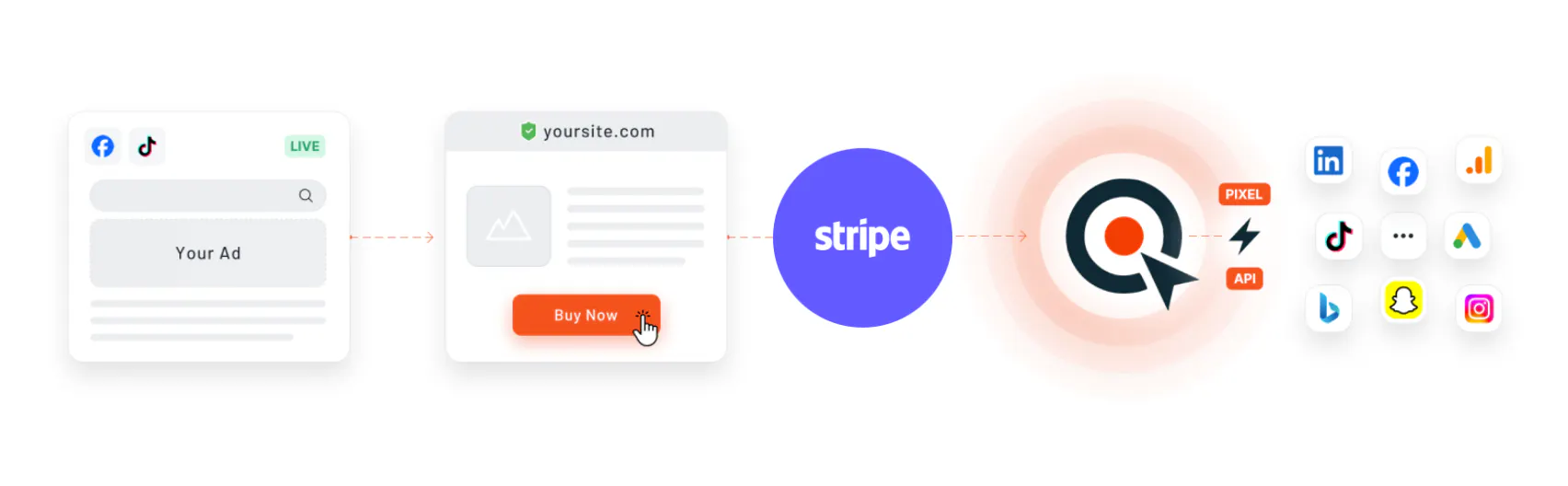
By combining your website data with Stripe purchase events, Tracklution gives you accurate conversion tracking that works across devices, trials, and different browsers. It also lets your marketing platforms see the conversions that really count so they can bring you more of the customers you want.
Originally published July 22, 2024
Table of Contents
- Why you should track Stripe checkouts
- Challenges of tracking Stripe payments
- How to overcome Stripe conversion tracking challenges
- Step-by-step guide: Connecting Stripe to Tracklution
- Putting Stripe conversion tracking to work
- Frequently Asked Questions
Why you should track Stripe checkouts
Digital advertising is increasingly based on algorithms and automations, meaning what you feed to the platform is what you get. This is why you should always feed the platforms with the most accurate data possible.
Proper conversion tracking offers numerous benefits:
- Real conversions: Capture genuine conversion data instead of leads or estimated conversion values.
- Improved attribution: Accurately link conversions to their respective sources and pass real data back to ad platforms.
- Track offline conversions: Monitor conversions that occur later, such as post-trial and recurring purchases.
- Efficient ad campaigns: Feeding your ad algorithms with accurate and high-quality data helps them identify more paying customers for you, while also reducing your customer acquisition costs (CAC).
Challenges of tracking Stripe payments
Stripe creates a few natural obstacles for conversion tracking because checkout happens off your website. Since tracking scripts cannot run inside Stripe Checkout, sessions often break and key attribution signals get lost. This becomes even more challenging when payments happen after a trial period, as traditional pixel tracking often loses the original campaign data entirely.
Tracking conversions from Stripe Payment Links can be a headache due to:
- Tracking code limitations
- External checkout sessions
- Cross-domain tracking issues
- Browser privacy features
How to overcome Stripe conversion tracking challenges
Client-side tracking has a hard time following users through Stripe Checkout because the whole flow sits outside your website.
This is why many businesses move to server-side tracking. With server-side tracking, the important data is captured on the server rather than the browser, which makes it much more reliable when users switch domains or return days later to complete a payment.
However, traditional server-side tracking often comes with significant complexity. Businesses typically need to
- configure their own server infrastructure
- manage cloud hosting
- handle data routing logic
- maintain custom integrations between the website, Stripe, and ad platforms
On top of these, debugging event mismatches, handling retries, and keeping up with platform-specific requirements can require ongoing developer involvement. These setups are powerful, but they are rarely simple or low-maintenance.
The solution: Stripe conversion tracking with a managed server-side tracking tool
Tracklution uses the SST approach to reconnect Stripe purchase data with the original website session and traffic source, but makes it a lot leaner. You get accurate revenue reporting without custom development or complicated setup.
For the usual reasons people choose Tracklution, like first-party tracking, smooth integrations, and a fast setup process, it is a reliable solution for anyone who needs trustworthy Stripe conversion tracking.
- Easy, no-code installation: Track conversions on your website, landing pages & Stripe account with minimal to no technical knowledge.
- Send real conversions to ad platforms: Feed conversion events with real revenue data from Stripe to Google Ads, Meta, LinkedIn, TikTok and more.
- Analyze your entire conversion funnel: Integrate Stripe conversion data also to Google Analytics 4 to analyze your website data & conversion funnels combined with Stripe Checkout data.
Track real Stripe revenue with server-side accuracy
Get started with simple Stripe conversion tracking
Step-by-step: How to enable Stripe conversion tracking
1. Implement tracking to your website:
- Create an account and install Tracklution’s 1st-party tracking with Google Tag Manager, directly to the website, or using a plugin or an app with Shopify and WooCommerce. Tracklution will guide you through this process. Get started here!
- This enables Tracklution to capture traffic source data (such as UTM tags and click IDs) automatically in your website. You can also set up tracking of leads, sign-ups, account creations and other funnel events. For more detailed information on installation methods and possibilities, read the documentation on Stripe Integration.
2. Connect Stripe to Tracklution
How you connect Stripe depends on whether users share information on your website before paying, or complete the full checkout directly in Stripe. Choose the option that matches your setup.
Option A: Track Stripe payments without on-site user data (payment links & direct checkout)
If customers complete their entire checkout in Stripe without entering any personal information on your website, you can still track conversions by reconnecting Stripe checkout sessions to the original visit.
Here is what to do:
- In Stripe, open your Payment Link and set the After Payment setting to redirect customers to your website. Use a URL like: example.com/thank-you/?stripe_session_id={CHECKOUT_SESSION_ID}
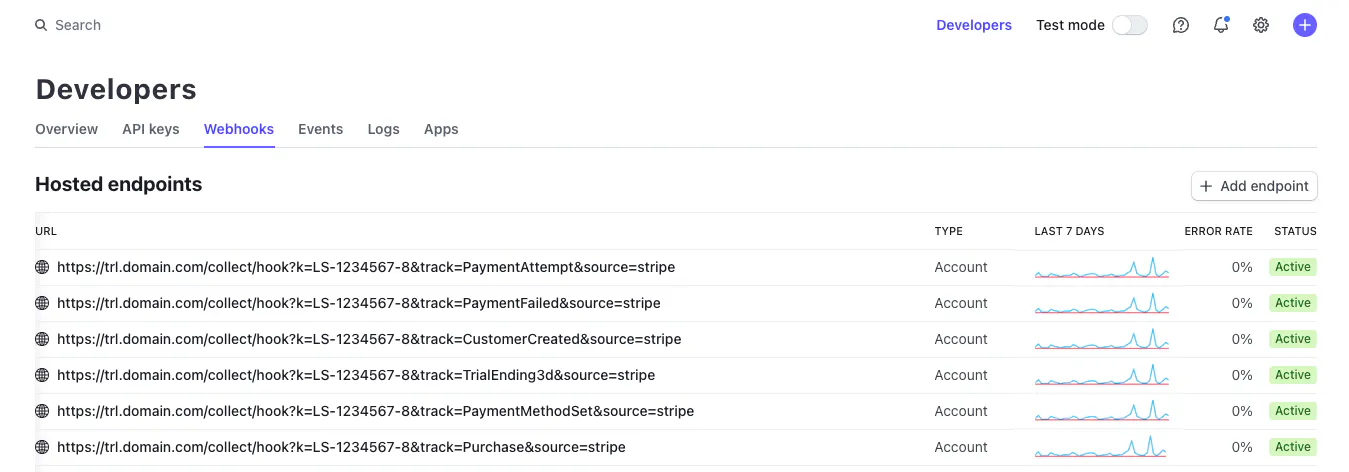
- In Stripe, go to Developers, then Webhooks, and create a new endpoint using the URL from your Tracklution setup instructions.
- Choose the event checkout.session.completed.
Tracklution will match the session ID with the visitor’s original website session and traffic source.
Option B: Track Stripe payments after website registration (SaaS & subscription flows)
If users sign up, create an account, or submit their details on your website before paying in Stripe, Tracklution can link Stripe customers and payments directly to known users.
Here is what to do:
- Make sure your website sends a ContactInfo event to Tracklution. This allows Tracklution to link any Stripe customers or payments back to the correct user session.
- In Stripe, go to Developers, then Webhooks, and add a new endpoint with the parameters track=CustomerCreated and source=stripe.
- Choose the event customer.created.
You can also track other Stripe events if you need them, for example:
- charge.succeeded
- payment_method.attached
- charge.failed
Tracklution automatically processes these events and connects them to the correct user.
3. Activate Ad Platform Connections:
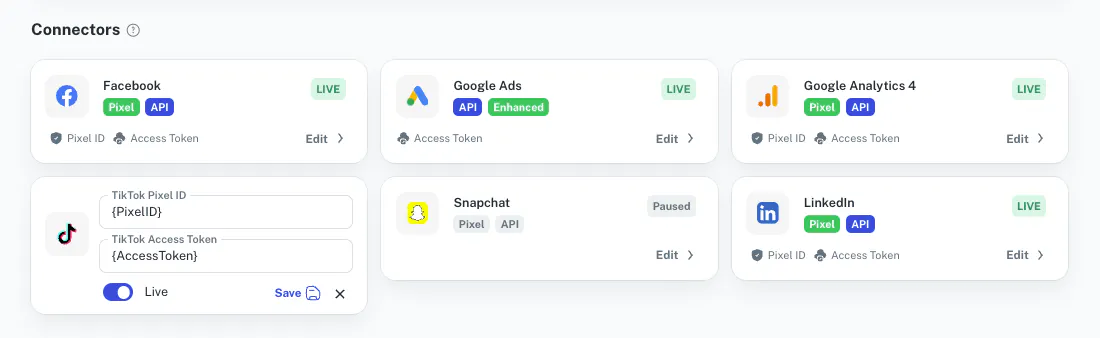
- Once you have completed steps 1 and 2 (A or B option), Tracklution will enrich your website data with Stripe conversion data to pass accurate conversion events, such as purchases originating from Stripe, back to ad platforms and Google Analytics 4.
- Activate the data destinations you want to use, and you’re ready to go!
Putting Stripe conversion tracking to work
Tracking Stripe conversions does not have to be complicated.
With the right setup, you can connect real purchase data with your website traffic and give your marketing platforms the information they need to make better decisions. Tracklution brings all of this together with a simple, reliable server-side approach that works on different browsers, devices, and checkout flows.
By pairing your website data with Stripe’s purchase events, you get accurate reporting and stronger attribution, or, in day-to-day terms, you get clearer insights and more efficient campaigns. Whether you run a SaaS product, subscription business, or ecommerce store, having reliable Stripe conversion data helps you understand what is truly driving revenue.
If you are ready to get better conversion data from Stripe and send high-quality events to your marketing tools, Tracklution makes the process fast and easy.
Install Tracklution tracking in a few minutes
Restore your conversion data and your confidence in no time.
Frequently Asked Questions
Q: Who can benefit from Stripe conversion tracking?
A: Any business that uses Stripe for payments. This includes ecommerce, B2B, SaaS, subscription services, and anyone who wants accurate and reliable conversion tracking.
Q: What challenges does Stripe conversion tracking solve?
A: It fixes the usual problems with tracking Stripe payments, like not being able to run tracking scripts inside Stripe Checkout, broken sessions from domain changes, cross-domain attribution issues, and browser privacy settings that block key signals.
Q: How does Tracklution help with this?
A: Tracklution uses server-side tracking to link Stripe purchase data with website sessions. Your conversions stay accurate, even with longer funnels or delayed payments.
Q: How do I set up Stripe conversion tracking with Tracklution?
A:
- Install Tracklution tracking on your website so we can capture UTMs, click IDs, and visitor data.
- Connect your Stripe account by setting up the webhook events.
- Activate the data destinations you want to use, like Google Ads, GA4, Meta, TikTok, or LinkedIn.
Q: How does this improve campaign performance?
A: When ad platforms receive real revenue data instead of partial or missing events, they optimize far better. This usually leads to stronger targeting, lower CAC, and clearer insight into what actually drives purchases.
Q: Where can I get help or read more?
A: Check Tracklution documentation or reach out to support. You can also explore related articles about server-side tracking, attribution, and platform integrations.
Related posts
Questions and answers
What does Tracklution actually do?
Tracklution sends conversion data directly to ad platforms (Meta, Google Ads, TikTok, etc.) through server-side APIs. Instead of relying on browser pixels that get blocked by ad blockers, iOS privacy changes, and cookie restrictions, your data goes server-to-server. The result: ad platforms see more of your real conversions, their algorithms optimize better, and you get better ROAS.
What is server-side tracking?
Server-side tracking gathers first-party data directly on your website and sends tracking events to ad platforms via Conversion APIs. This approach bypasses restrictions from iOS devices, ad blockers, and privacy-focused browsers, providing more accurate data and making your paid advertising more efficient.
Is it just one setup that feeds data into all my ad platforms?
Yes. You install Tracklution once, connect your ad accounts, and it sends conversion data to all platforms simultaneously through their respective APIs (Meta CAPI, Google Ads API, TikTok Events API, etc.). No need to manage separate server-side setups for each platform.
How much more conversion data will my ad platforms actually see?
On average, clients report 34.2% more conversions compared to traditional browser-based pixels. This means the ad algorithms have significantly more signal to work with, which translates to 15-35% lower customer acquisition costs for most clients.
Do I need developers to set this up?
No. Setup takes 5-15 minutes depending on your platform. For Shopify, WooCommerce, and other supported platforms, it is plug-and-play. You do not need custom coding or engineering resources. For GTM users, you can keep your existing setup and add Tracklution alongside it.
Do I need to remove my existing tracking tags?
Not necessarily. Tracklution works alongside your current setup. You can run both in parallel initially to compare data, then decide whether to simplify.
What about the DNS / CNAME setup?
Tracklution uses a first-party CNAME record on your domain for data collection. This takes a couple of minutes to configure and up to 48 hours to propagate. It is what makes the tracking resistant to ad blockers and browser restrictions.
Can I verify that the data is actually more accurate?
Yes. Run Tracklution alongside your existing tracking and compare. The dashboard also shows "recovered events" so you can see exactly how many conversions would have been missed without server-side tracking.
Can I distinguish between organic and paid traffic?
Yes. Tracklution preserves traffic source attribution. The conversion data sent to each ad platform includes the proper attribution parameters.
What about offline conversions (phone calls, in-store, CRM events)?
Tracklution supports offline conversion tracking through webhooks and CRM integrations. If someone clicks an ad, then converts offline, you can feed that back to the ad platforms. Clients using this see up to 35% reduction in acquisition costs because the algorithms learn from the full conversion picture.
How does this work with cookie consent and CMP tools?
Tracklution supports both Basic and Advanced Consent Mode. It reads your CMP data layer automatically and respects user consent choices. In Advanced Consent Mode, it can still collect anonymized, cookieless data when users decline cookies, which helps ad platform modeling without violating privacy rules. Fully GDPR-compliant.
How is this different from Stape or building your own sGTM setup?
Stape provides server-side GTM hosting, which means you still need to build and maintain the tags, triggers, and configuration yourself. Tracklution is a complete solution: plug-and-play setup, automatic event detection, built-in consent management, a real-time analytics dashboard, and ongoing maintenance of all API connections. When ad platforms change their APIs (which happens often), we handle the updates.
How does the agency partner model work?
Single dashboard to manage all client accounts. Each client has their own tracking container. The platform handles all technical maintenance, so you are not stuck troubleshooting API changes or broken tracking.

Have further questions?




