Up to 100% accurate
Send offline
Connect your CRM, Stripe, booking tools, or any backend system to Tracklution and send offline conversions directly to your ad platforms.
14-day trial • No credit card required • SOC2 & ISO 27001 compliant
Recover +34.2% more conversions (avg. uplift) by closing the gap between your website data and what actually happens in your CRM, Stripe, or booking system
Match offline events to original ad clicks automatically. No CSV uploads, developer, or per-platform setup.
Connect any external system via webhook in minutes and start sending offline conversions to Google, Meta, TikTok, and more. No credit card needed.








Advertisers on Tracklution send 34.2% more conversion data to their ad platforms
Your pixel captures what happens on your website. But the deal that closes in HubSpot, the Stripe payment that completes after a free trial, the Calendly booking that turns into a paying customer. Without offline conversion tracking, those events never reach your ad algorithms. Tracklution bridges that gap.
Tracklution Webhooks (up to 100% data accuracy)
Sends CRM, Stripe, booking, and backend conversion events to ad platforms in real time
Matches offline events to the original ad click using click IDs, email, or external ID
Deduplication across website and webhook events with no manual configuration
Supports Google Ads, Meta CAPI, TikTok, LinkedIn, and GA4 from one webhook endpoint
Handles consent signal propagation from the original web session
No CSV uploads, upload windows, or per-platform integrations
EU-built platform, SOC2 and ISO 27001 certified
Pixel-only tracking (offline events completely invisible)
Pixel fires on your website but cannot see what happens in your CRM or backend systems
Deals closed in Salesforce, Stripe payments, and Calendly bookings go unattributed
Manual CSV upload required per platform, with 62-90 day windows
Click ID matching has to be implemented and maintained manually
Consent signal handling left entirely to you
Each ad platform needs a separate integration or upload file
No server-side infrastructure
Give your ad platforms the conversions your pixel can't see
Every deal that closes in your CRM, every Stripe payment after a free trial, every booking confirmation. Those are the conversions that actually move your business. Connect them to Tracklution for your ad platforms to start optimizing on real revenue.
Give your ad platforms the conversions your pixel can't see
Every deal that closes in your CRM, every Stripe payment after a free trial, every booking confirmation. Those are the conversions that actually move your business. Connect them to Tracklution for your ad platforms to start optimizing on real revenue.
Webhooks Integrations
Tracklution's webhook endpoint accepts data from any platform that can send an HTTP request, including native integrations with Stripe, Zapier, Make, and leading CRMs. If you can trigger an HTTP call, you can send data to Tracklution.

Google Ads

Meta Ads


Snapchat Ads

TikTok Ads



Awin

Taboola

Klaviyo

Bing Ads

LinkedIn Ads

OpenAI Ads

Outbrain
Connect the rest of your stack
Tracklution connects with a wide range of ad platforms, CRMs and ecommerce tools. Browse every integration in one place.
Tracklution's custom connector allows you to connect to platforms that we don't yet have a native connector for.
Still unsure if this works for you?
One webhook endpoint for every ad platform, with no manual uploads
Send offline conversion data once. Tracklution handles the routing.
Connect any system that sends HTTP requests
Tracklution accepts webhook data from any platform that can trigger an HTTP call: CRMs (HubSpot, Zoho, Salesforce), payment processors (Stripe), booking tools (Calendly, Acuity), automation platforms (Zapier, Make), ERPs, and fully custom backends.
Two webhook types, one endpoint
Use Track-type webhooks to register new offline events (CRM qualified lead, Stripe purchase). Use Set-type webhooks to enrich existing sessions with backend data (profit margins, subscription status) without creating a new event.

Click ID matching with identifier fallback
When a webhook arrives, Tracklution matches it to the original ad session using the identifiers you pass: External ID, email, or phone number. You decide which identifier to pass. Tracklution handles the matching, deduplication, and delivery from there.
Send to every active connector at once
Once a webhook event is matched and processed, Tracklution delivers it to every ad platform connector you have activated in your account, including Google Ads, Meta CAPI, TikTok, LinkedIn and GA4, so one webhook reaches every destination you've connected.
How to start sending offline conversions with webhooks
Most of it is copying a URL from your dashboard and pasting it into your CRM or Stripe.
Step 01
Enable first-party data
Add a DNS record so Tracklution loads under your own domain. This switches tracking to first-party mode, bypassing ad blockers and browser restrictions. Most users see reporting accuracy jump from 40-70% to near 100%.
Step 02
Install your Tracklution pixel
Add the tracking pixel to your website using the Shopify app, WooCommerce plugin, Google Tag Manager template, or direct script install. This captures the original click IDs and contact data your offline events will be matched against later.
Step 03
Copy your webhook URL and connect your external system
In your Tracklution container, open the Webhook tab and copy your unique endpoint URL. Paste it into your CRM automation, Stripe webhook settings, Zapier workflow, or any backend system that can send an HTTP request. Add the track parameter to register new events. Omit it to enrich an existing session. For Stripe, include source=stripe to activate Stripe-specific processing.
All done
Your offline conversions are flowing to every connected ad platform in real time. No CSV, upload window, or guesswork.
Under the hood:
When something happens in your CRM, Stripe account, or booking system, that platform sends an HTTP request to your unique Tracklution Webhook Endpoint URL. Tracklution receives the event, determines whether it's a new conversion (Track type) or additional data to enrich an existing session (Set type), and routes it accordingly.
Tracklution then tries to match the incoming webhook event to an existing website session using whatever identifiers are present. The preferred method is an External ID that was collected from the visitor during their website session via the ContactInfo pixel and passed along to your backend system. If External ID isn't available, Tracklution falls back to email address or phone number. If no matching identifier is available, Tracklution can still register and store the event as a standalone conversion and deliver it to ad platforms using the click ID or as an enhanced conversion.
Once matched, Tracklution handles deduplication across your website pixel events and webhook events automatically, then delivers the conversion to every ad platform connector you have active: Google Ads Enhanced Conversions for Leads, Meta Conversions API, TikTok Events API, LinkedIn, and GA4. One webhook, every platform, no per-destination setup.
Consent signals from the original web session carry through to the offline event. If a visitor declined tracking on your website, that signal is honored when the webhook event is processed and forwarded to ad platforms.
Check out our offline conversion tracking guide at tracklution.com/learn/conversion-tracking/offline/ for a full walkthrough of the mechanism and platform-specific notes.
Using Tracklution vs. doing it yourself
See how Tracklution compares to manual CSV uploads or building your own server-side solution.
 Basic Setup | Manual CSV upload Batch upload | Your own server integration Server-side | |
|---|---|---|---|
Accuracy | Up to 100% | Depends on timing | Up to 100% |
Setup time | Minutes | 30-60 min per platform | Weeks to months |
Real-time delivery | |||
Automatic click ID matching | |||
All ad platforms at once | |||
Automatic deduplication | |||
No developer needed | |||
Cost | 14-day free trial, then from €39/mo | Free | Dev time + hosting |
Basic Setup | Manual CSV upload Batch upload | Your own server integration Server-side | |
|---|---|---|---|
Accuracy | Up to 100% | Depends on timing | Up to 100% |
Setup time | Minutes | 30-60 min per platform | Weeks to months |
Real-time delivery | |||
Automatic click ID matching | |||
All ad platforms at once | |||
Automatic deduplication | |||
No developer needed | |||
Cost | 14-day free trial, then from €39/mo | Free | Dev time + hosting |
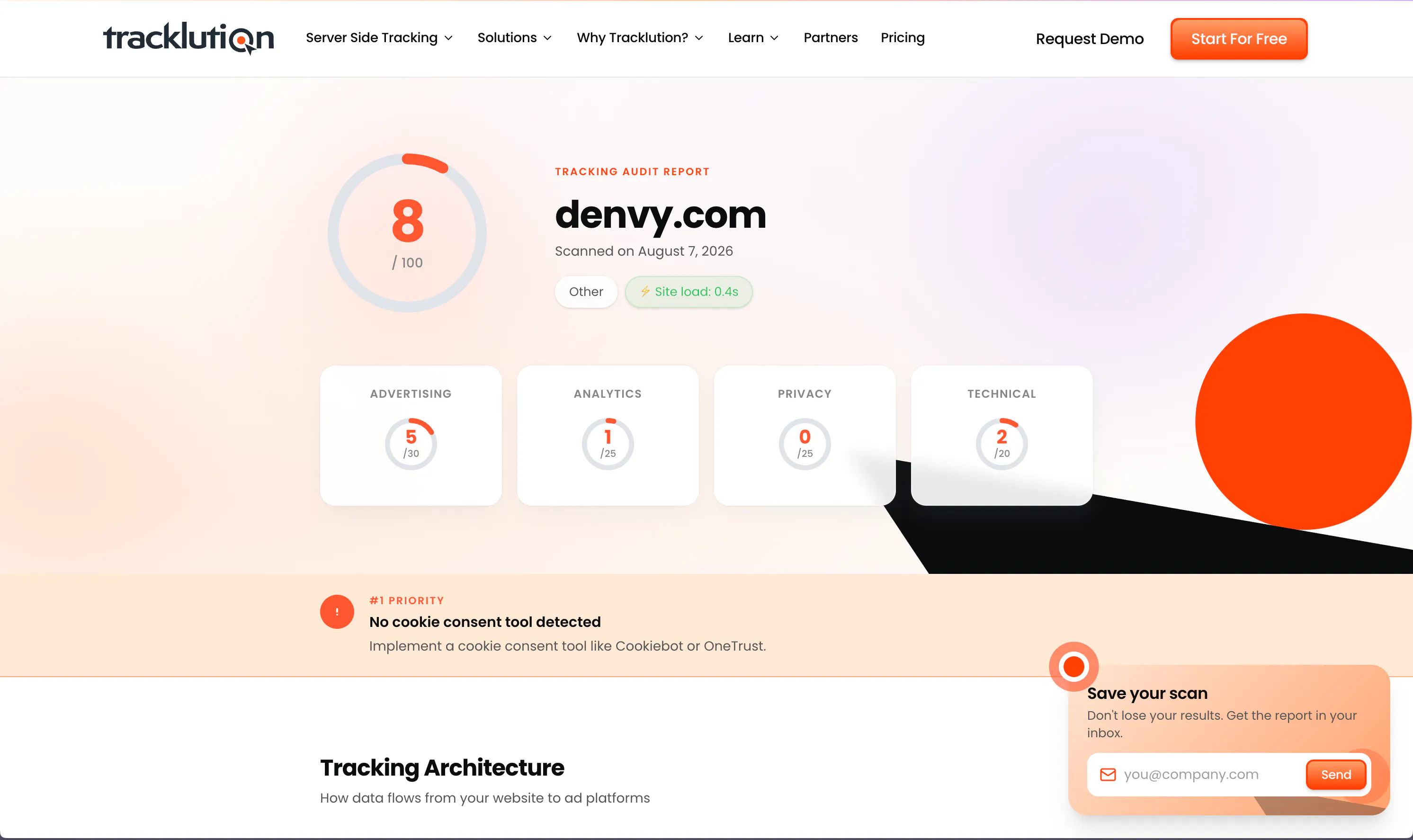
Do you trust your current tracking setup?
Tracklution's free tracking audit scans your current setup and shows you exactly where you're losing conversion data, plus what to fix first.
Do you trust your current tracking setup?
Tracklution's free tracking audit scans your current setup and shows you exactly where you're losing conversion data, plus what to fix first.
What offline events you can send
Any event type your backend can send, Tracklution can receive, match, and deliver to your ad platforms (common use cases below).
CRM qualified lead
A lead that was validated in HubSpot, Salesforce, or Zoho days after the form fill. Connect the closed deal to the original ad click.
Stripe purchase
Completed Stripe checkout, subscription start, or recurring payment. Tracklution includes built-in Stripe-specific processing logic.
Booking confirmation
Appointment booked via Calendly, Acuity, or any booking platform. Capture the actual revenue event, not just the page visit.
Trial to paid conversion
Free trial that converts to a paying subscription in your billing system. Send the revenue event to ad platforms that never saw it.
Purchase with profit data
Enrich a website purchase event with backend cost data to create a ProfitPurchase event. Optimize campaigns on margin, not revenue.
Phone call conversion
Inbound call that results in a sale, tracked via your CRM or call tracking system and sent back to ad platforms.
In-store or POS purchase
Physical transaction linked to a digital ad click via email or external ID matching.
Custom events
Any conversion that matters to your business. Name it, send it, and Tracklution delivers it to every connected ad platform.
Trusted by advertisers worldwide
See how teams like yours recover lost conversions, lower CAC, and get their campaigns optimizing on complete data.


The system runs so smoothly that contact with Tracklution is minimal. Support response time is excellent. Overall very positive experience with minimal issues.
Jacob Blæsbjerg, Founder @ The Morning Show

Tracklution has certainly had a positive impact. I would be comfortable with a ballpark percentage of 15 to 20%, certainly in that region, as a saving.
John Cove, Marketing Manager @ ScotlandShop


Almost every client we have onboarded to Tracklution has seen a growth in conversions. For reference, the media spend for these companies starts at just €500 a month.
Mikael Lahtinen, Head of Advertising @ Tagomo


We made Tracklution a standard part of our service agreement and technology stack for clients. It’s like a quality guarantee for conversion data. And setting it up doesn’t take more than a few minutes.
Sampo Soininen, Digital Strategist @ Aava & Bang


Now we know exactly which campaigns drive real appointments – and we’ve cut acquisition costs by more than 30% while keeping bookings steady.
Jesse Bartels, Chief Smile Officer @ Orthoclear
Why offline conversion tracking improves your ad performance

Your ad platforms are optimizing on incomplete signals
When deals close in your CRM or Stripe, your ad algorithm sees nothing. It keeps spending on campaigns that look low-converting but are actually your best revenue drivers.

CSV uploads won't scale, and they don't work in real time
Manual uploads have upload windows, no deduplication, and require a separate file per platform. By the time your data arrives, the algorithm has already made its next decision. Real-time webhook delivery means your platforms learn faster.

More conversion signals means smarter ad spend
Ad platforms need volume to optimize. When your CRM deals, Stripe payments, and booking confirmations flow in alongside your website conversions, your algorithms have a complete picture of what drives revenue, not just what happens on your landing page.
Privacy and security you can rely on
Tracklution is fully GDPR-compliant and certified under both ISO27001 and SOC2. Your data remains 100% yours — we never claim any rights to it. You have full control over what is tracked and what is sent to ad platforms. We’re simply your secure, privacy-first system provider.

SOC2, TYPE 2
Secure SSL Transactions

ISO 27001

GDPR Compliant
Questions and answers
What's the difference between Tracklution's webhook and the Custom Connector?
The webhook receives data into Tracklution from your external systems. This includes your CRM, Stripe, Zapier, or any backend that can send an HTTP request. Custom Connector sends data from Tracklution outbound to a custom destination or API. If your CRM or payment system is generating the conversion event, the webhook is the right tool.
What systems can send data to Tracklution via webhook?
Any system that can send an HTTP GET or POST request. This includes CRMs (HubSpot, Salesforce, Zoho), payment processors (Stripe), booking tools (Calendly, Acuity), automation platforms (Zapier, Make.com), ERPs, and custom backends. Tracklution has built-in Stripe-specific processing logic. Just include the source=stripe parameter in the webhook URL.
How does Tracklution match a webhook event to the original ad click?
Tracklution tries to match using identifiers present in the webhook payload. The preferred method is an External ID. This is a unique value you generate on the website, pass to Tracklution via the ContactInfo pixel, and include in your backend system so it can be sent back with the webhook. If External ID isn't available, Tracklution falls back to email or phone number. If no matching data exists, the event is processed as a standalone conversion and delivered with the click ID or as an enhanced conversion.
Can I send new events and enrich existing sessions with webhooks?
Yes. Track-type webhooks register new conversion events (for example, a CRM qualified lead or a Stripe purchase). Set-type webhooks enrich an existing session with backend data without creating a new event. This is useful for adding profit margins, subscription status, or other backend values. Tracklution determines the type automatically based on whether the track parameter is included.
Do offline webhook events get sent to all my ad platforms automatically?
Once a webhook event is matched and processed, Tracklution delivers it to every ad platform connector you have activated in your account: Google Ads, Meta CAPI, TikTok, LinkedIn, GA4, and any other connected platform. You need to activate each connector you want data sent to, but there's no per-platform upload or separate webhook required.
How does Tracklution differ from other conversion tracking methods?
Tracklution works on server-side, not browser-side, so ad blockers and tracking preventions such as iOS tracking prevention barely touch your data. And unlike manual CSV uploads or per-platform CRM integrations, it handles click ID matching, deduplication, and multi-platform delivery automatically. We gather your offline conversions and send them back to your marketing channels, which helps their algorithms learn faster and win you new sales at a lower cost.
What is the uplift in conversion tracking?
From the data we've received from our users, Tracklution's server-side tagging has improved tracking by 11-48% versus pixel-only, cookie-based (client-side) tracking, and by 34.2% on average. Results vary depending on how much of your conversion cycle happens off your website and your current tracking setup.
Is Tracklution GDPR compliant?
Tracklution as a platform is designed and operated in the EU, certified under SOC2 and ISO 27001, and built to respect user consent choices. Whether your specific use of offline conversion tracking is GDPR compliant depends on your legal basis for processing and your configuration. Tracklution propagates consent signals from the original web session to offline events automatically, but your compliance setup is ultimately your responsibility.
How much does this cost?
Your first 14 days of webhook tracking are on us. You won't need a credit card, and cancelling is possible at any time. After your trial, explore our pricing options here.
Is there a free trial to get started?
Absolutely! You can test webhooks and the rest of Tracklution free for 14 days, no strings attached. Getting started doesn't require a credit card, and you can cancel any time.

Have further questions?
Connect your offline revenue to your ad campaigns
Send offline conversions from Stripe, your CRM, or any backend system to your ad platforms. No credit card required.
Connect your offline revenue to your ad campaigns
Send offline conversions from Stripe, your CRM, or any backend system to your ad platforms. No credit card required.




