Server-Side Tracking Guide: What It Is & Everything You Need to Know
In this guide, we'll cover nearly everything you need to know to get started with server-side tracking: what it is, how it can benefit your business, and how you can get started today.
Table of contents
12 minute read
Updated Sept 1, 2025
It's a hard truth to swallow, but if you're still using traditional tracking methods, you're likely missing 30-40% of your conversions and burning ad budget on campaigns that look like they're performing well, while neglecting campaigns that are actually your top performers.
Here's what's happening:
- Third-party cookies are being phased out by browsers
- Ad blockers are getting better at blocking tracking pixels
- Privacy laws like GDPR and CCPA make data collection more complicated
- Customer journeys now span websites, apps, physical stores, and CRM systems
If you've noticed gaps between conversions in Google Analytics and what shows up in your Meta or Google ads, that's a clear sign your tracking is breaking down. The solution, folks, is server-side tracking.
Server-side tracking is a more accurate, privacy-friendly way to gather insights, optimize your marketing efforts, and make the most of your ad spend.
It gives you better accuracy, more control over personal data collection, and the ability to overcome tracking challenges like ad blockers and iOS tracking prevention - all while respecting user data privacy without third-party cookies.
Sounds almost too good to be true, right? Well, we promise it’s not. Let’s get into it.
What is server-side tracking?
Server-side tracking is a method of collecting and processing your website visitors' activity data directly on a server running behind your website rather than relying on the user's browser or device. It's a significant improvement in how we gather, track, and use advertising data.
Traditionally, this tracking would happen on the "client side," which means it's done by the user's browser (e.g., Chrome, Safari). When you visit a site, your browser runs a number of scripts (like Google Analytics, Meta, etc.), which collect data and send it back to the site owner.
But there it is – the catch.
Client-side tracking is becoming less reliable. Hurdles like ad blockers, privacy features (like Apple's Intelligent Tracking Prevention), and cookie restrictions have made it harder to collect data this way.
This is where server-side tracking comes in.
Instead of relying on the browser to collect and send data, a server running behind the website handles the tracking. When someone visits your site and does something important like making a purchase or filling out a form, the server captures this information and sends it directly to your tracking tools (like Google Analytics 4, Meta Pixel and Facebook Conversion API).
As paid advertising optimization increasingly relies on algorithmic bidding, high-quality data is essential. Without proper data, you're likely to face poorer results and higher customer acquisition costs.
With server-side tracking you can gain control of your tracking by capturing higher-quality data, and feeding it back to your ad platforms. This means ad platform algorithms can work more efficiently for you and bring new clients at a lower cost.
Why is server-side tracking necessary?
Clean and accurate data is becoming increasingly important, while simultaneously becoming more difficult to come by.
As we mentioned earlier, server-side tracking bypasses many of the common obstacles that come with browser-based tracking and is less susceptible to the disruptions that can occur on the browser side. This leads to more reliable insights and helps businesses understand their audience without as many blind spots – and ultimately, to make more money.
By sending more high-quality data to ad platforms, you’re able to optimize your ad campaigns better and get more out of your marketing budgets, leading to a lower CAC and a better growth for your business.
Finally, while GDPR and CCPA have changed how companies are allowed to collect and store data, server-side tracking gives you the ability to stay compliant whilst still able to track user behavior.
What problems does server-side tracking actually solve?
Many marketers are surprised by just how many persistent issues vanish almost immediately after making the switch from client-side to server-side tracking.
What it fixes:
- Missing conversions: Recovers conversions that ad blockers, iOS restrictions, and browser settings would normally block.
- Attribution gaps: Reduces the difference between clicks in Meta ads or Google ads and your actual conversion numbers.
- Data inconsistencies: Resolves mismatches between Google Analytics 4 and your ad platforms by using a single data source.
- Privacy compliance: Helps you follow privacy regulations while still collecting the data you need.
- Online-offline connection: Links online behavior with offline sales (i.e. conversions that happen in your CRM, or anywhere else) through proper integrations.
What it can't fix:
While server-side tracking solves many critical issues, we can't promise it's a silver bullet. Some problems require more fundamental fixes before server-side tracking can work its magic. Here are the limitations to keep in mind:
- Poor setup: If your pixels are incorrectly installed or your events are inconsistently named, server-side tracking won't automatically fix that.
- Attribution models: It can't determine on its own that someone visited your store because of a Facebook ad unless you have a system to track that connection.
- Bad CRM data: If your customer data is a mess, server-side tracking won't clean it up for you.
How does server-side tracking work?
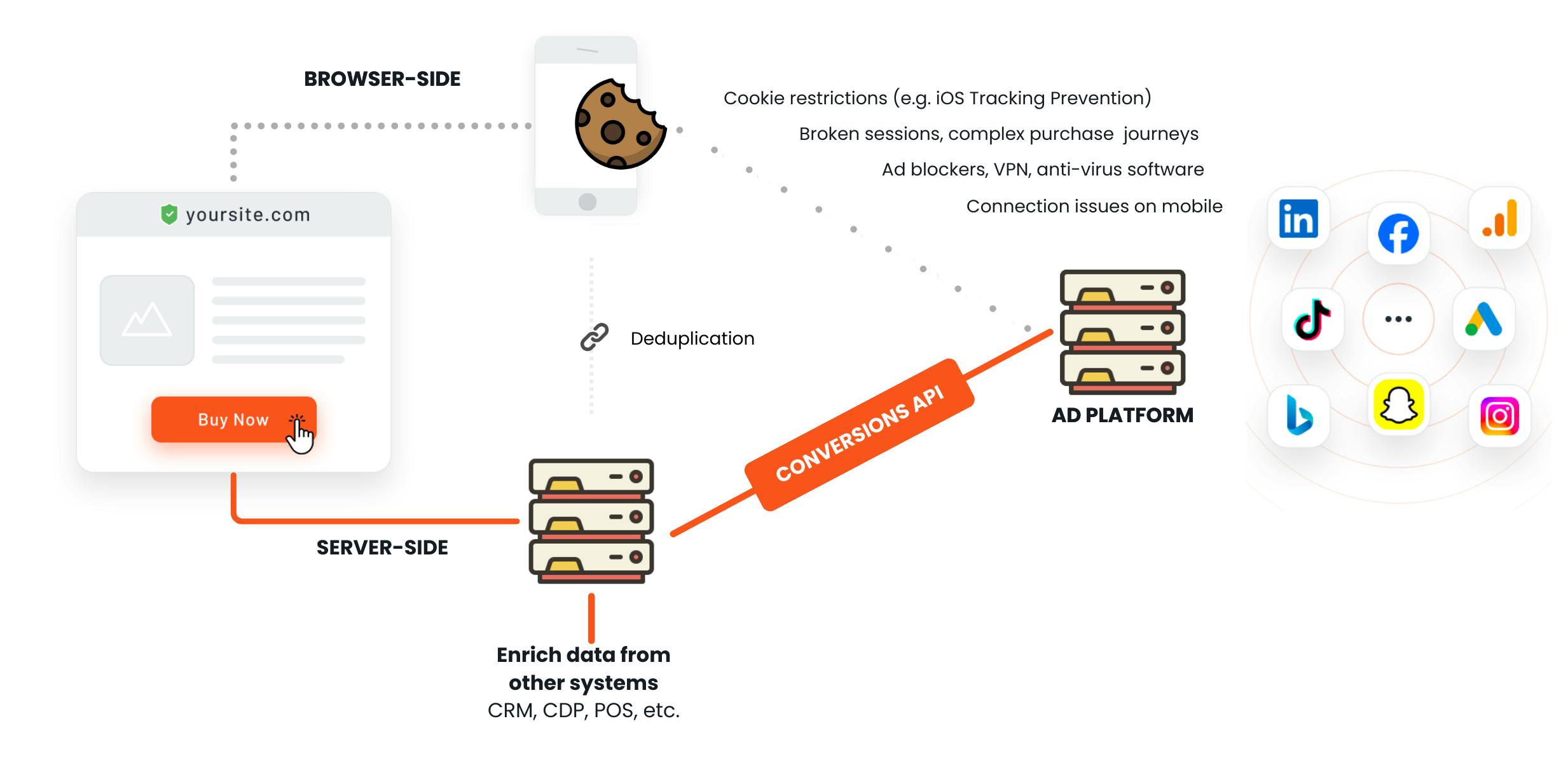
For a detailed deep-dive, you can read our guide to how server-side tracking works. But without getting into the weeds, here are the fundamentals of how server-side tracking works:
- A user interaction happens: A user visits your website and interacts with it (e.g. clicking a button or making a purchase).
- Your server records the data: Instead of the browser sending data directly to third-party services, your server records the user's actions in a first-party context.
- API Requests: This server then sends this data to defined third-party services through secure API requests. APIs allow your server to communicate directly with services like Google Analytics, Meta, Google Ads, or any other advertising and analytics platforms.
Server-side tracking can utilize first-party cookies, which are cookies that your own domain sets and manages, making them less prone to be blocked by browsers or privacy tools.
Before sending your conversion data to digital advertising platforms, your server can also process and transform the data – things like combining multiple data points, filtering out unnecessary information, or anonymizing user data.
And since the tracking is happening server-side, you have full control and transparency over what data is collected, how it’s processed, and when and where it’s sent.
Benefits of server-side tracking
Any business that is spending money on digital advertising is losing money without server-side tracking. It’s as simple as that.
Here is a high-level overview of the benefits for ecommerce businesses and agencies. For a deeper look, you can read our full guide to the benefits of server-side tracking.
Benefits of server-side tracking for ecommerce
1. Track your whole customer journey accurately 💡
Server-side tracking allows ecommerce businesses to capture and analyze the entire customer journey more accurately. You can track complex events with underlying ecommerce product data, like add-to-cart actions, and multi-step checkouts without losing data.
2. Collect more first-party data 🛡️
All that extra data means you can build bigger, more accurate audiences for retargeting. Your conversion tracking becomes more precise, so ad algorithms actually know what they're doing. The result? You find more high-intent customers and spend less to get them.
4. Omnichannel marketing strategy is made easier 🤝
Running campaigns across multiple channels? Server-side tracking connects your online and offline sales data, so you can see the full picture of how customers really buy from you.
5. Better website performance 🏎️
Here's a nice bonus: moving tracking to your server means less JavaScript weighing down your site. Pages load faster, users have a better experience, and you'll see higher conversion rates. Your SEO gets a boost too. Woohoo!
6. Enable profit-based bidding 💰
If you want to optimize for actual profit instead of just revenue, server-side tracking lets ad platforms see your real costs and margins. This allows them to focus on bringing you the customers that actually make you money.
7. Enhanced privacy, consent & cookie use
With server-side tracking, you're in the driver's seat when it comes to privacy. Everything happens on your server, so you get to decide what data gets collected, how it's handled, and where it goes.
Complying with GDPR or CCPA becomes much easier when you control the process. You can clean up the data, remove personal details, or filter out stuff you don't need before sending anything to ad platforms.
8. Extended cookie lifetime & cookieless tracking
Here's the thing about cookies: when they come from your own domain (first-party cookies), browsers and ad blockers are way less likely to mess with them. Server-side tracking lets you use these more reliable cookies.
Plus, you're not stuck tracking just website activity. Got sales happening in your CRM? Phone orders? In-store purchases? Server-side tracking can pull all that together so you actually see how all customers move through your business.
Benefits of server-side tracking for agencies
1. Provide higher quality, higher value services 🧑💻
Implementing server-side tracking as an agency can help increase the value of your service offerings. It provides you with more accurate and comprehensive data analysis, allowing you to deliver deeper, more useful insights to your clients. By using server-side tracking, you can capture a more complete view of customer journeys, reducing data loss or confusion that can be common with traditional tracking methods.
2. More reliable, strategic reporting for your customers 📊
This improved accuracy means you can deliver more reliable reporting to your clients. You’ll be able to show precise performance metrics across various marketing efforts, including detailed campaign-level data. This empowers your clients to make smarter decisions about their marketing strategies and budgets.
3. Advanced tracking services without developer hires 🔥
Some server-side tracking platforms provide user-friendly interfaces and pre-built integrations, making it easy to set up and manage without deep technical knowledge. This means your team can deliver sophisticated tracking solutions, such as cross-platform user tracking and enhanced data privacy controls, while minimizing operational costs. By leveraging these tools, you can scale your services efficiently, providing top-tier tracking solutions without the complexity or expense of building a dedicated development team.
How to get started with server-side tracking
When getting started with server-side tracking, there are a number of routes you can take and systems you could employ, including DIY custom setups and various easier-to-implement solutions, like Tracklution.
1. Compare available methods
We like a spot of DIY as much as the next people, but setting up your own server-side tracking is often a task that most people would gladly hand over to someone else. That being said, it’d be unfair if we didn’t explain both ways of implementing it, so here it goes. Don’t say we didn’t warn you.
1. Implementing server-side tracking: a DIY setup
2. Using a server-side tagging tool like GTM Server Side
3. Server-side tracking with Tracklution
SaaS vs self‑hosted vs DIY: Pros & cons
You have a few main options to choose from.
SaaS solutions ☁️
- Pros: From 5 to 30 minutes setup, managed maintenance, pre-built integrations, practically anyone can use it
- Cons: Monthly subscription fees, limited customization, data processed by third party
Self-hosted solutions 🔐
- Pros: Full customization possible, complete data control, one-time setup costs
- Cons: From weeks to months implementation, ongoing maintenance required, requires web analytics specialist or engineer, build integrations yourself
DIY development ⚙️
- Pros: Complete customization, complete data control, build exactly what you want
- Cons: 3-12+ months implementation, full-time maintenance job, requires team of engineers, build all integrations yourself
Ready to improve your tracking accuracy? Try Tracklution free for 30 days →
2. Choose the right solution
Like choosing any other software, there is a whole market full of options with varying attributes – and not all will be right for your business. When weighing up your options, consider the following factors, or consult our full guide to server-side tracking tools.
Technical expertise 🧑🔧
Assess your team's skills, realistically. Also, assess your team’s workload now and in the future. Are you ready to assign a person on your team (or hire someone) whose focus will be implementation and maintenance, or would you rather outsource all the tech hassle by utilizing a plug-and-play tool?
Scalability 🚀
Choose a server-side tracking tool that handles high traffic and can grow with your business. For example, whether the platform can track offline conversions or support specific ad platforms. Also, check the pricing structure for the tool you choose – most tiered pricing plans will have a limit on how many events you can track before needing to upgrade.
Cost 💵
Balance the upfront setup and maintenance costs (DIY tools, developer time, hosting costs etc.) vs. subscription fees (with managed tools like Tracklution). A good rule of thumb is that server-side tracking should boost your advertising efficiency by around 10%, so the cost of implementing server-side tracking should be no more than 10% of your ad budget.
🔗 Integrations with your favorite ad platforms
Ensure your chosen tool integrates with your preferred your ad platforms (Google, TikTok, Meta, etc.).
Ease of use ✨
Consider not only how easy the tool is to implement and use for non-technical users, but the availability and quality of customer support.
Compliance, data control, and privacy 🛡️
Ensure the tool you choose is GDPR compliant if you operate in the EU, or CCPA in the USA.
Server-side tracking methods: quick comparison table
Full DIY solution Build server-side tracking from a scratch | Server-Side GTM Self-service tool for configuring and managing server-side tagging | Tracklution Plug-and-play server-side tracking tool for any website | |
|---|---|---|---|
Technicality rating | 10/5 🫣 | 4/5 🫡 | 1/5 😎 |
Implementation time | 3-12+ months | From weeks to months | From 5 to 30 minutes |
Maintenance | Full-time job...? | ~Half-time job | Managed by the Tracklution crew ⚡️ |
For who? | Team of engineers | Web analytics specialist or engineer | Practically anyone can plug it in |
Scalability | Depends how you've built it | Ensure having enough server capacity | Scales as you scale |
Integrations | Build yourself what you want and need | Build yourself or utilise templates to help | Utilize ready-made integrations 🪄 |
API updates | Update manually | Update manually | Handled by Tracklution |
Support | If your tech team counts, then yes | Paid services available (e.g. consultants) | Included in the monthly fee |
3. Implement your solution
Next up, you'll need to put your decision into motion and start implementing.
For a full, step-by-step guide to implementation, check out our guide on how to set up server-side tracking, which breaks down the full process for various methods.
Or, you can take the easy route and....
Get Started with Tracklution Today
Sign up for Tracklution and have server-side tracking working for your business in a matter of minutes.
What kind of results can I get with Tracklution's server-side tracking?
You’ve probably figured it out by now, so in the interest of full transparency, we are a bunch of conversion tracking nerds with a pretty slick server-side tracking tool. So for this section, we’ll just share a few results that our own customers have seen after implementing server-side tracking with Tracklution.
🏎️ Simple and fast tracking implementation
When we say fast, we mean it. Like, set up within the time it takes to drink your morning coffee fast.
P.s. you can read what these people actually say riiiight here. Even the morning coffee part.
🌟 Increased conversion tracking accuracy
The average increase in tracked conversions right after switching from traditional tracking pixels to Tracklution’s server-side tracking is as high as +32.1%. In general, our users report much more accurate tracking, with improvements ranging from 11-67%.
📉 Reduction in customer acquisition cost (CAC)
Our customers see, on average, reductions of 5% to 20%, but even as impressive as 50%—which means they spend less to gain new customers.
📊 More flexibility in experimentation
Our users can easily experiment with new marketing strategies and channels without needing to rely on developers. This makes it easier to try new things and adjust their approach quickly.
🏪 Ability to combine online and offline conversions
Tracklution users can easily combine offline sales and other valuable offline-world happenings to their website activities and online conversions to improve data quality.
🤑 Ability to easily optimize for profit (not just revenue!)
While most tracking setups allow you to optimize for revenue, Tracklution’s profit tracking allows you to optimize for… profit!
Frequently Asked Questions
Is server-side tracking necessary?
Any business that is spending money on digital advertising is losing money without server-side tracking. It's as simple as that.
How does server-side tracking improve data accuracy?
Server-side tracking gets around the usual browser problems and isn't as easily messed up by things happening on the user's end. You get more reliable data and can actually see what your audience is doing without the gaps.
What is the difference between client-side and server-side tracking?
Think of it this way: client-side tracking happens in your browser. When you visit a website, your browser runs tracking scripts like Google Analytics or Meta that collect data and send it back to the site owner.
With server-side tracking, the website's server does all that work instead of the browser on your computer.
Does server-side tracking need consent?
GDPR and CCPA changed the rules around collecting and storing data, but server-side tracking helps you stay on the right side of those regulations while still tracking what users do.
When to use server-side tracking?
Server-side tracking is essential when you want to improve your data quality and ad performance, especially if you're relying on algorithmic bidding. It works great if you're running ads across multiple channels. You can link up your online sales with offline purchases and see how all your advertising actually performs together.
Is server-side tracking legal?
Yes, server-side tracking is legal depending on the data collected and how it's used. The key is implementing it correctly with proper consent and compliance measures.
Since everything happens on your server, you're in control of what data gets collected and where it goes. With Tracklution, this complexity is handled for you. We're fully GDPR-compliant and make staying on the right side of regulations straightforward.
Better yet, want to try it out for yourself?
Try Tracklution for free 🔥
Set up server-side tracking for your business in 30 minutes or less, no developer help needed.
14 days trial included | No credit card needed




