
Safari click ID removal: recover your conversions with Tracklution server-side tracking

Table of contents
Better data.
Set up server-side tracking in minutes with Tracklution. Send better conversion data to your ad platforms so their algorithms can optimise for better results from your budget.
Start your free trialSafari’s update and why it matters
There’s been a lot of discussion about Safari removing ad click identifiers such as Google’s GCLID, Facebook’s FBCLID, Microsoft’s MSCLKID, and others. Some of this is based on rumor, so it’s important to still keep level headed while preparing for official updates.
At this stage, GCLID stripping by default has not been confirmed for regular browsing. But the direction is clear, browser changes are limiting reliance on click IDs. Even if GCLID disappears, Google already has GBRAID, WBRAID, Enhanced Conversions, and conversion modeling in place to continue attribution, also other platforms have their solutions, or are picking up on this.
Tracklution’s ready-to-go solution
Tracklution is ahead of these changes. We provide fallback parameters for all our ad platform connectors. When you add the custom parameter in your ad platform, Tracklution takes care of the rest server-side. Currently, most platforms require that the parameter is added directly to each ad, while Google Ads allows custom URL parameters at the account level. As URL stripping may become the trend, other platforms may follow suit. In either case, Tracklution has the parameters and the server-side functionality ready for you to use. That means one simple step from you, and more accurate tracking for your ads.
Do you need to act?
In most cases, no immediate action is required. Tracklution server-side tracking continues to run and send data to your ad platforms, and most platforms already rely on multiple signals beyond click IDs. However, adding Tracklution parameters ensures redundancy for more accurate tracking and preventing attribution blind spots.
How to add fallback parameters
Log in to your ad account to add the custom URL parameter's key and value in accordance with each platform's preferences. This guide gives you Tracklution's pre-configured custom parameters (the key). When you add the parameter, make sure to add the correct dynamic value and follow the correct format for key and value specified by your ad platform. Once added, Tracklution handles everything else. If you've added the parameter correctly, you will be able to see the custom parameter with the click ID value in your Tracklution dashboard from events coming from your ad platform.
Google Ads
Go to Admin → Account settings → Tracking. In the Final URL suffix field, add:
Key: trlgidValue: gclid
Example:
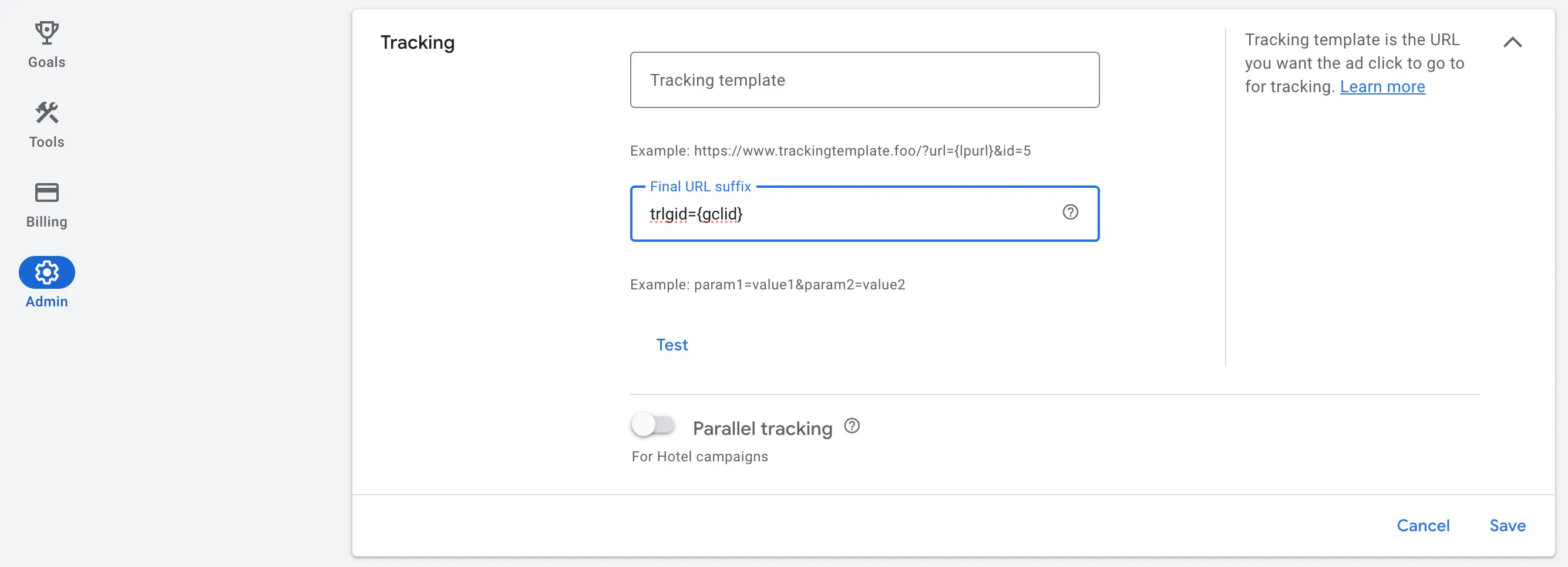
This ensures a backup for the GCLID if Safari strips the original.
➕ Additionally, we provide fallback parameters for:
Key: trlgbidValue: gbraid Key: trlgwid Value: wbraid
Facebook / Meta Ads
In Ads Manager, open your ad and scroll to the Website URL section. Use the URL Parameters field (or click Build a URL Parameter). More details found here. (requires login)
Add:
Key: trlfid Value: fbclid
TikTok Ads
In TikTok Ads Manager, edit your ad and locate the Destination URL. Click Build URL Parameters. More details found here.
Add:
Key: trltid Value: ttclid
Snapchat Ads
In the ad creation screen, locate the Tracking URL Parameters field. More details found here.
Add:
Key: trlsidValue: sc_click_id
LinkedIn Ads
In Campaign Manager, locate Account settings → URL parameters.
Add:
Key: trllidValue: li_fat_id
Microsoft Ads
- Hover over Campaigns and select Ads & extensions > Ads.
- Select Create ad or Create ad extension.
- Under Landing page URL, select Final URL and enter the URL of your website.
- Select Ad URL options or sitelink extension URL options.
- Under Custom parameters first box, enter the name of the parameter.
- Under Custom parameters second box, enter the variable of the parameter.
- Under Tracking template, add the name and variable to the tracking template.
Add:
Key: trlmidValue: msclkid
Affiliate campaigns
Add to your tracking URLs:
Key: trlc Value: your_affiliate_id
New to Tracklution?
Browser changes like this will only become more common. Tracklution’s server-side tracking ensures you stay ahead. Add Tracklution’s server-side solutions to your tracking setup in less than 15 minutes and keep your conversion tracking accurate, even in Safari.
Fix Safari attribution losses now
Safari strips click IDs and drops conversions. Switch to server-side tracking with Thracklution and recover the data your ads depend on.
Related posts

News
Tracklution is Heading to DMEXCO 2024! 😎🇩🇪
Tracklution will be attending DMEXCO 2024, the premier event for digital marketing professionals!
News
Tracklution is Heading to DMEXCO 2024! 😎🇩🇪
Tracklution will be attending DMEXCO 2024, the premier event for digital marketing professionals!
News
Tracklution joins Meta Business Partners
We are excited to announce that Tracklution has joined Meta Business Partners!
News
Tracklution joins Meta Business Partners
We are excited to announce that Tracklution has joined Meta Business Partners!
Questions and answers
What does Tracklution actually do?
Tracklution sends conversion data directly to ad platforms (Meta, Google Ads, TikTok, etc.) through server-side APIs. Instead of relying on browser pixels that get blocked by ad blockers, iOS privacy changes, and cookie restrictions, your data goes server-to-server. The result: ad platforms see more of your real conversions, their algorithms optimize better, and you get better ROAS.
What is server-side tracking?
Server-side tracking gathers first-party data directly on your website and sends tracking events to ad platforms via Conversion APIs. This approach bypasses restrictions from iOS devices, ad blockers, and privacy-focused browsers, providing more accurate data and making your paid advertising more efficient.
Is it just one setup that feeds data into all my ad platforms?
Yes. You install Tracklution once, connect your ad accounts, and it sends conversion data to all platforms simultaneously through their respective APIs (Meta CAPI, Google Ads API, TikTok Events API, etc.). No need to manage separate server-side setups for each platform.
How much more conversion data will my ad platforms actually see?
On average, clients report 34.2% more conversions compared to traditional browser-based pixels. This means the ad algorithms have significantly more signal to work with, which translates to 15-35% lower customer acquisition costs for most clients.
Do I need developers to set this up?
No. Setup takes 5-15 minutes depending on your platform. For Shopify, WooCommerce, and other supported platforms, it is plug-and-play. You do not need custom coding or engineering resources. For GTM users, you can keep your existing setup and add Tracklution alongside it.
Do I need to remove my existing tracking tags?
Not necessarily. Tracklution works alongside your current setup. You can run both in parallel initially to compare data, then decide whether to simplify.
What about the DNS / CNAME setup?
Tracklution uses a first-party CNAME record on your domain for data collection. This takes a couple of minutes to configure and up to 48 hours to propagate. It is what makes the tracking resistant to ad blockers and browser restrictions.
Can I verify that the data is actually more accurate?
Yes. Run Tracklution alongside your existing tracking and compare. The dashboard also shows "recovered events" so you can see exactly how many conversions would have been missed without server-side tracking.
Can I distinguish between organic and paid traffic?
Yes. Tracklution preserves traffic source attribution. The conversion data sent to each ad platform includes the proper attribution parameters.
What about offline conversions (phone calls, in-store, CRM events)?
Tracklution supports offline conversion tracking through webhooks and CRM integrations. If someone clicks an ad, then converts offline, you can feed that back to the ad platforms. Clients using this see up to 35% reduction in acquisition costs because the algorithms learn from the full conversion picture.
How does this work with cookie consent and CMP tools?
Tracklution supports both Basic and Advanced Consent Mode. It reads your CMP data layer automatically and respects user consent choices. In Advanced Consent Mode, it can still collect anonymized, cookieless data when users decline cookies, which helps ad platform modeling without violating privacy rules. Fully GDPR-compliant.
How is this different from Stape or building your own sGTM setup?
Stape provides server-side GTM hosting, which means you still need to build and maintain the tags, triggers, and configuration yourself. Tracklution is a complete solution: plug-and-play setup, automatic event detection, built-in consent management, a real-time analytics dashboard, and ongoing maintenance of all API connections. When ad platforms change their APIs (which happens often), we handle the updates.
How does the agency partner model work?
Single dashboard to manage all client accounts. Each client has their own tracking container. The platform handles all technical maintenance, so you are not stuck troubleshooting API changes or broken tracking.

Have further questions?




